Jump to content
View in the app

A better way to browse. Learn more.

Invision Marketplace

A full-screen app on your home screen with push notifications, badges and more.

To install this app on iOS and iPadOS
  1. Tap the Share icon in Safari
  2. Scroll the menu and tap Add to Home Screen.
  3. Tap Add in the top-right corner.
To install this app on Android
  1. Tap the 3-dot menu (⋮) in the top-right corner of the browser.
  2. Tap Add to Home screen or Install app.
  3. Confirm by tapping Install.

Everything you need for your community

Everything you need for your community

Invision Community 5
  • Category Member Tools
  • Downloads 12
  • Compatibility IC5: 5.0.0+
  • App Version 1.0.0
  • Updated

Description

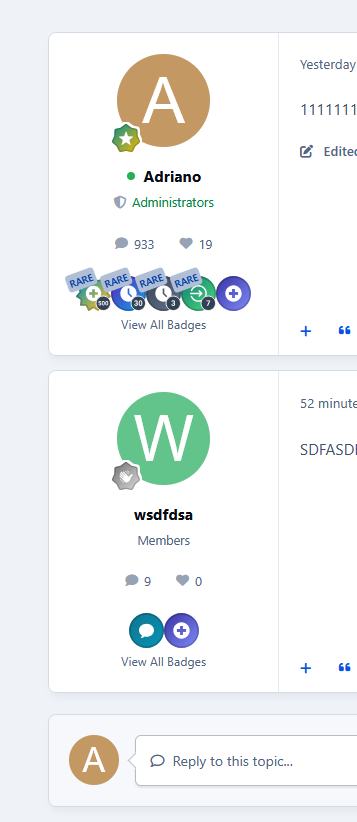
Display a member's most recent badges directly below their profile information in topic view.

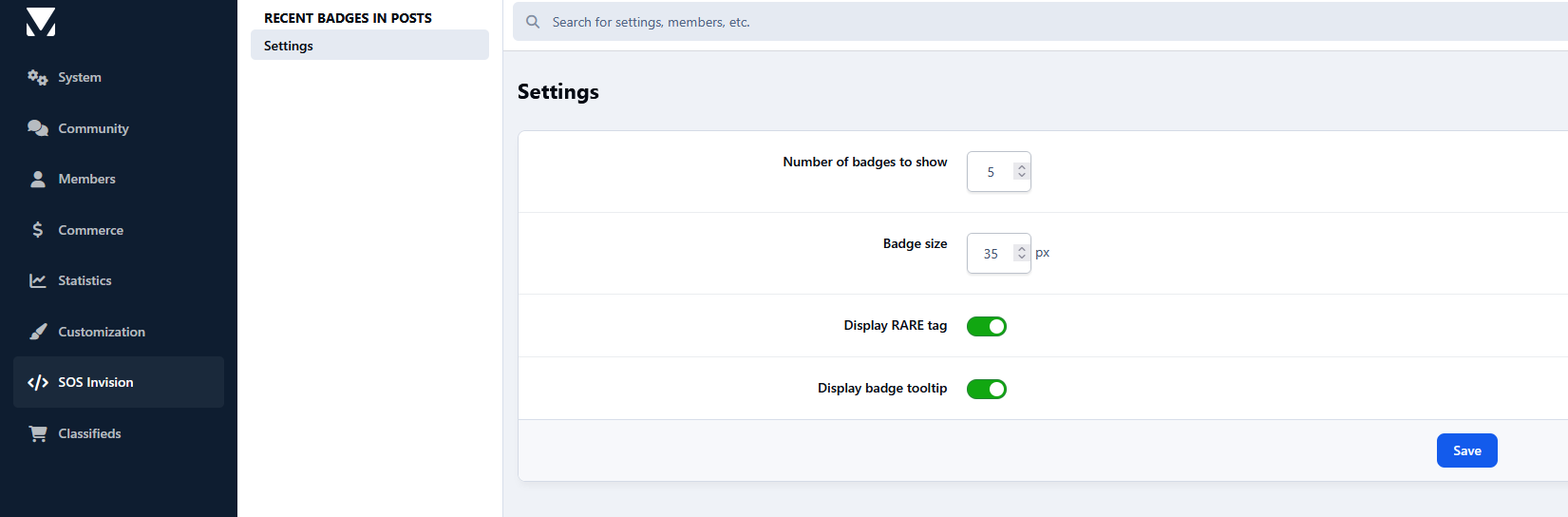
The application includes settings to configure:

  • Number of badges to display

  • Badge size

  • Whether to show the "Rare" ribbon

  • Whether to enable badge tooltips

Members can also click View All Badges to view the complete list of badges on their profile.

Requirement:

  • Forums app.

User Feedback

Create an account or sign in to leave a review

There are no reviews to display.

Configure browser push notifications

Chrome (Android)
  1. Tap the lock icon next to the address bar.
  2. Tap Permissions → Notifications.
  3. Adjust your preference.
Chrome (Desktop)
  1. Click the padlock icon in the address bar.
  2. Select Site settings.
  3. Find Notifications and adjust your preference.