- Category Member Tools
- Downloads 33
- Compatibility IC5: 5.0.0+
- Updated
Description
Topic Summary — 108 minutes of thread, in 8
Every busy community has them: the 200-post thread nobody new will ever read. Topic Summary offers a short version built from the posts that actually mattered, so a newcomer can catch up in minutes instead of bouncing off a wall of replies.
Your topics are never altered. Nothing is deleted, nothing is hidden — it is simply an alternative way to read.
What your members see
On any topic long enough to warrant it, a quiet banner appears above the posts:
"This topic contains 154 posts and takes about 108 minutes to read. A summary of the most significant posts takes about 8 minutes."
One click and they get those posts, in the order they were written, with the opening post and the accepted answer clearly marked, and honest "19 posts skipped" markers between them so the conversation still makes sense. Every post links back to its place in the full topic.
How the significant posts are chosen
Significance blends two kinds of signal, which matters more than it sounds:
Engagement — reactions, quotes, "helpful" marks, featured posts, and the accepted answer
Structure — the opening post, how substantial a post is relative to the rest of that topic, and the topic starter returning with an update
Short "thanks" and "+1" replies are pushed down. The opening post and a marked answer are always included.
Blending both is deliberate. A younger community with few reactions would get nothing useful from an engagement-only score — the structural half means the summary is worth reading from day one.
Honest by design
No banner unless it helps. If the summary would not actually save reading time, nothing is shown.
Nothing is hidden from anyone. The summary only ever shows posts from a topic the member can already read, and always offers the full topic.
Skipped posts are admitted. Gaps are labelled rather than glossed over, so nobody is misled about what they have and have not seen.
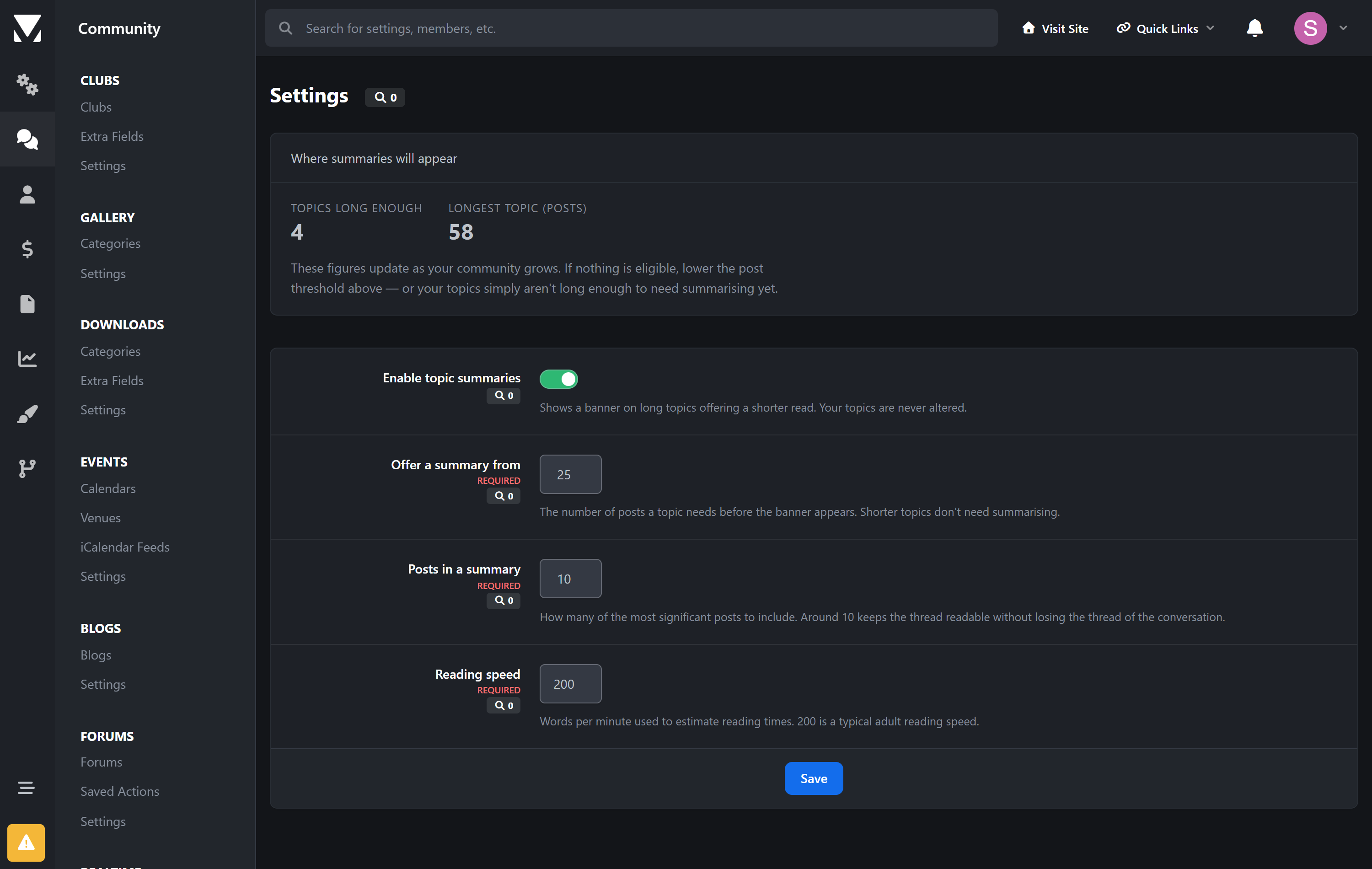
What you control
How many posts a topic needs before a summary is offered
How many posts a summary contains
The reading speed used for the estimates
Turn the whole thing off at any time — your topics are untouched
The settings screen also shows how many of your topics are currently long enough to qualify, so you can pitch the threshold sensibly.
Requirements
Invision Community 5.0 or newer (self-hosted), with the Forums application
Nothing else — no external service, no API key, no background jobs to configure
Summaries are worked out on demand and nothing is stored, so there is no index to build and nothing to keep in sync.
It is upgrade-safe — it reads Invision Community's own data and never edits a single core file.
Create an account or sign in to leave a review
There are no reviews to display.