Jump to content
View in the app

A better way to browse. Learn more.

Invision Marketplace

A full-screen app on your home screen with push notifications, badges and more.

To install this app on iOS and iPadOS
  1. Tap the Share icon in Safari
  2. Scroll the menu and tap Add to Home Screen.
  3. Tap Add in the top-right corner.
To install this app on Android
  1. Tap the 3-dot menu (⋮) in the top-right corner of the browser.
  2. Tap Add to Home screen or Install app.
  3. Confirm by tapping Install.

Everything you need for your community

Everything you need for your community

Invision Community 5
  • Category Admin & Mod Tools
  • Downloads 15
  • Compatibility IC5: 5.0.0+
  • App Version 1.0.0
  • Updated

Description

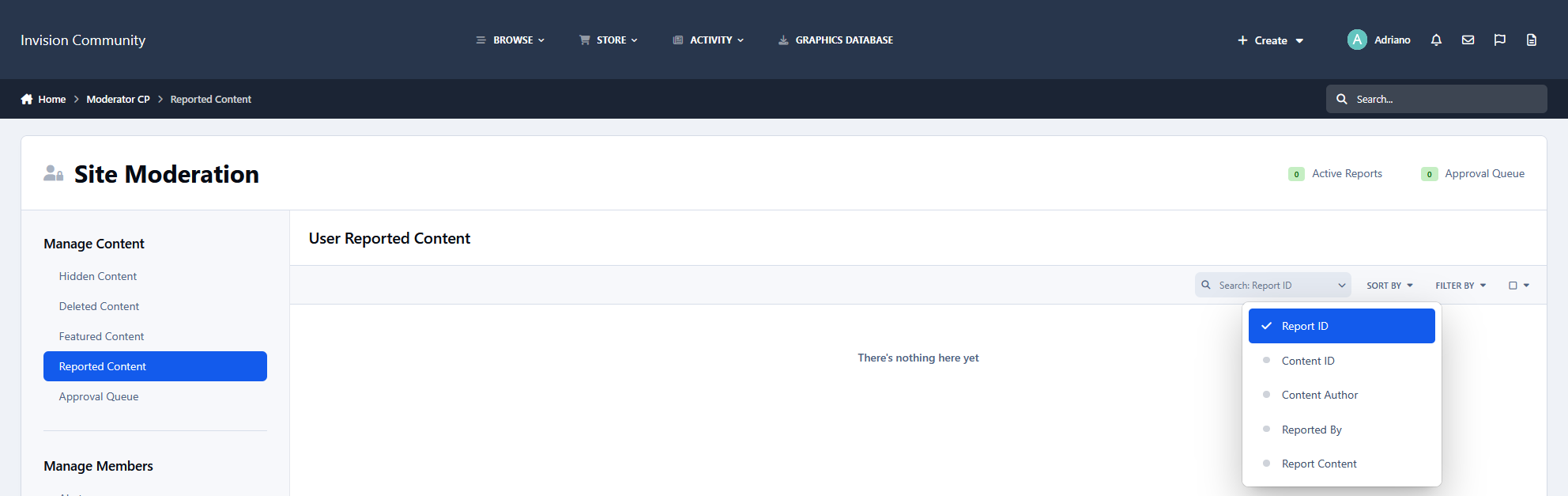
This application adds a search field to the Reported Content section of the Moderator Control Panel.

Moderators can search reports by:

  • Report ID

  • Content ID*

  • Author: Member ID or display name

  • Reported By: Member ID or display name

  • Report Content: Text included in the report

The search field is integrated into the existing toolbar and works alongside the native sorting and filtering options.

Search by Content Title

Reports do not store the title of the reported content. Retrieving it requires loading the original content item, which can belong to different applications and content types. Searching by title would therefore be more complex and potentially affect performance, especially on busy communities.

User Feedback

There are no reviews to display.

Configure browser push notifications

Chrome (Android)
  1. Tap the lock icon next to the address bar.
  2. Tap Permissions → Notifications.
  3. Adjust your preference.
Chrome (Desktop)
  1. Click the padlock icon in the address bar.
  2. Select Site settings.
  3. Find Notifications and adjust your preference.