Passkeys — sign in with a face, a fingerprint or a security key
- Category Integrations
- Downloads 25
- Compatibility IC5: 5.0.0+
- Updated
Description
Passkeys — sign in with a face, a fingerprint or a security key
A passkey replaces the password entirely. Your members tap their phone, look at their laptop, or touch a security key, and they are in. Nothing to remember, nothing to type, nothing to leak.
This is a real login method, not a second factor. Invision Community has no WebAuthn support of any kind — this registers through core's own login-handler system, so the passkey button sits alongside your existing sign-in options and behaves like one of them.
Why passkeys and not another password policy
They cannot be phished. A passkey is bound to your domain by the browser. A convincing copy of your login page on another domain simply will not work — the credential refuses to sign for it.
They cannot be reused. Every site gets a different key, so a breach somewhere else cannot reach your community.
There is nothing on your server worth stealing. You store a public key. It verifies signatures and can create none.
Nothing to reset. No "forgot password" flow, no reset emails, no support tickets about them.
What members see
Adding one | A page in their account settings. One button, their device prompts, they name the key. Several devices, several keys. |
|---|---|
Signing in | A "Sign in with a passkey" button on the normal login form. |
Managing them | Rename or remove any key, with the date added and last used, so an old laptop is easy to spot and revoke. |
Works with what people already have
Face ID and Touch ID, Windows Hello, Android biometrics, iCloud Keychain, Google Password Manager, 1Password, Bitwarden, and hardware keys such as YubiKey. Nothing to install — every current browser has this built in.
Built carefully, because this is authentication
Every check the WebAuthn specification asks for is performed, and the reason each one exists is that skipping it breaks the model. The challenge is single-use, purpose-bound and expiring, so a captured ceremony cannot be replayed. The origin is compared exactly — not "starts with" — so a lookalike domain cannot relay it. Registrations cannot be replayed as logins. A signature is verified over exactly the bytes the authenticator signed.
Cloned-device detection. WebAuthn gives one signal that a credential may have been copied: a signature counter that goes backwards. If that happens the passkey is disabled and the member is told why. Authenticators that don't count at all report zero forever — that is normal, and is never mistaken for an attack.
No third-party code. No composer packages, no bundled cryptography library, nothing fetched at runtime. Verification uses PHP's own OpenSSL functions.
Hidden when it cannot work. Browsers refuse passkeys outside a secure context, so on a site without HTTPS the button does not appear rather than failing when pressed.
No core files are edited. Upgrading Invision Community will not break it.
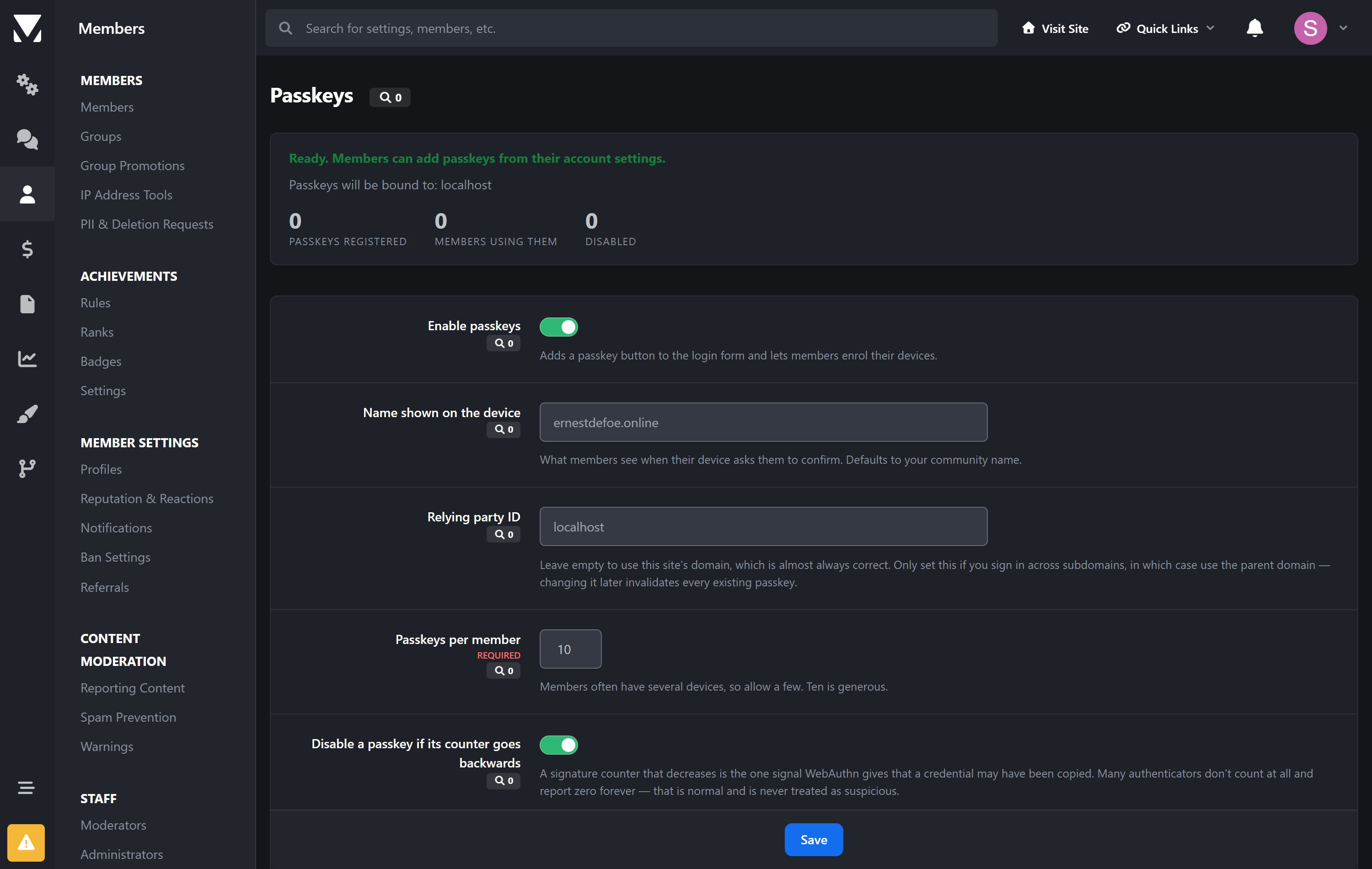
What you control
How many passkeys each member may register
Whether to require user verification — a fingerprint, face or PIN, rather than mere presence
Whether a backwards counter disables the credential
The name members see on their device when it asks them to confirm
Requirements
Invision Community 5.0 or newer (self-hosted)
HTTPS. Browsers will not create or use a passkey without it.
PHP with OpenSSL — standard on every install
Create an account or sign in to leave a review
There are no reviews to display.