Jump to content
View in the app

A better way to browse. Learn more.

Invision Marketplace

A full-screen app on your home screen with push notifications, badges and more.

To install this app on iOS and iPadOS
  1. Tap the Share icon in Safari
  2. Scroll the menu and tap Add to Home Screen.
  3. Tap Add in the top-right corner.
To install this app on Android
  1. Tap the 3-dot menu (⋮) in the top-right corner of the browser.
  2. Tap Add to Home screen or Install app.
  3. Confirm by tapping Install.

Everything you need for your community

Everything you need for your community

Invision Community 5
  • Category Member Tools
  • Downloads 78
  • Compatibility IC5: 5.0.0+
  • Updated
Topic Prefixes brings a classification layer to IPS v5: one clear label per topic, admin-defined, forum-scoped, and optionally required.

Overview

Topic Prefixes brings a classification layer to IPS v5: one clear label per topic, admin-defined, forum-scoped, and optionally required.

Description

Invision Community has tags. They’re great for discovery, but they’re not built for structure.

Topic Prefixes brings a classification layer to IPS v5: one clear label per topic, admin-defined, forum-scoped, and optionally required.

Admin Features (ACP)

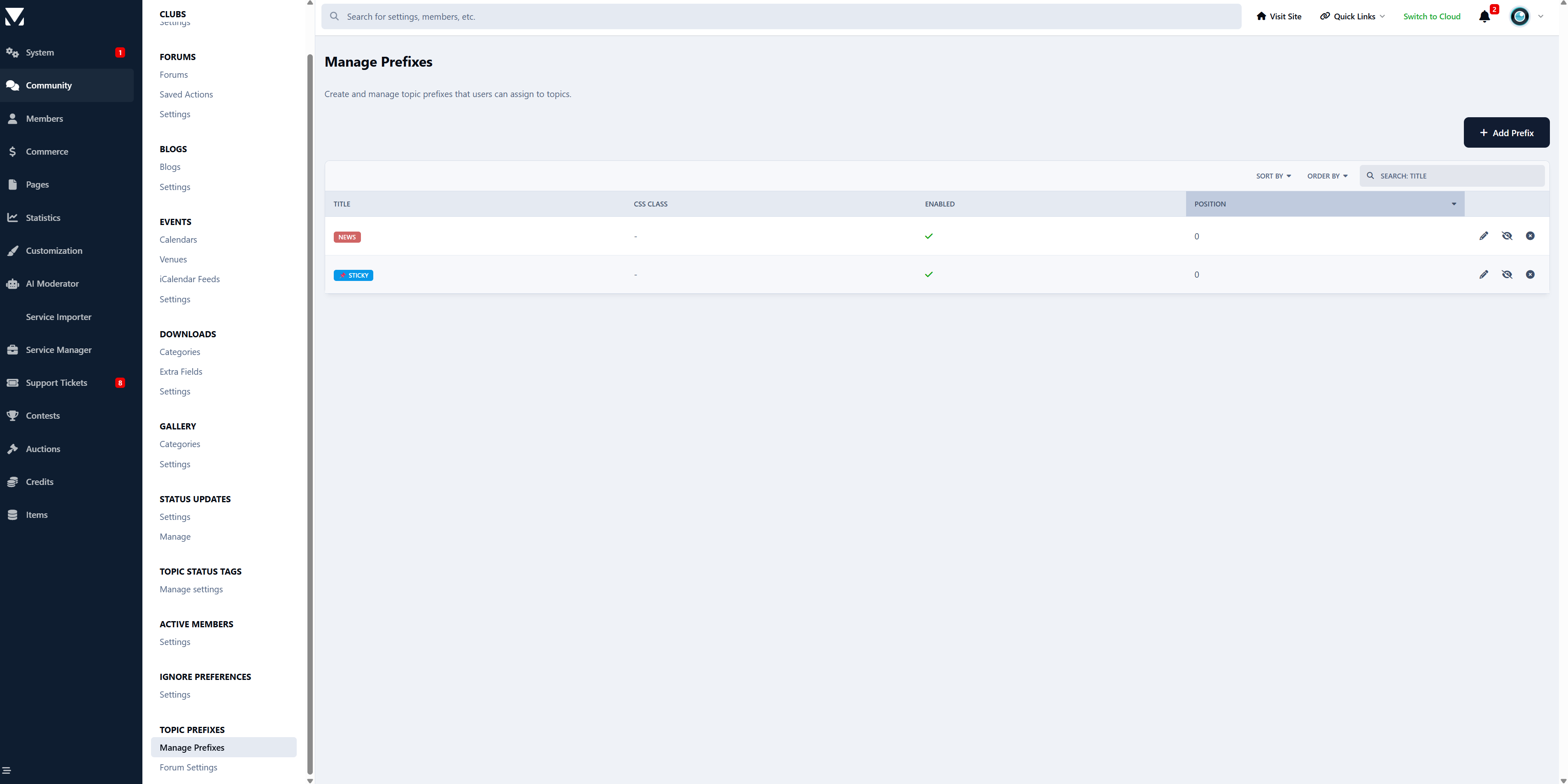
Prefix Management

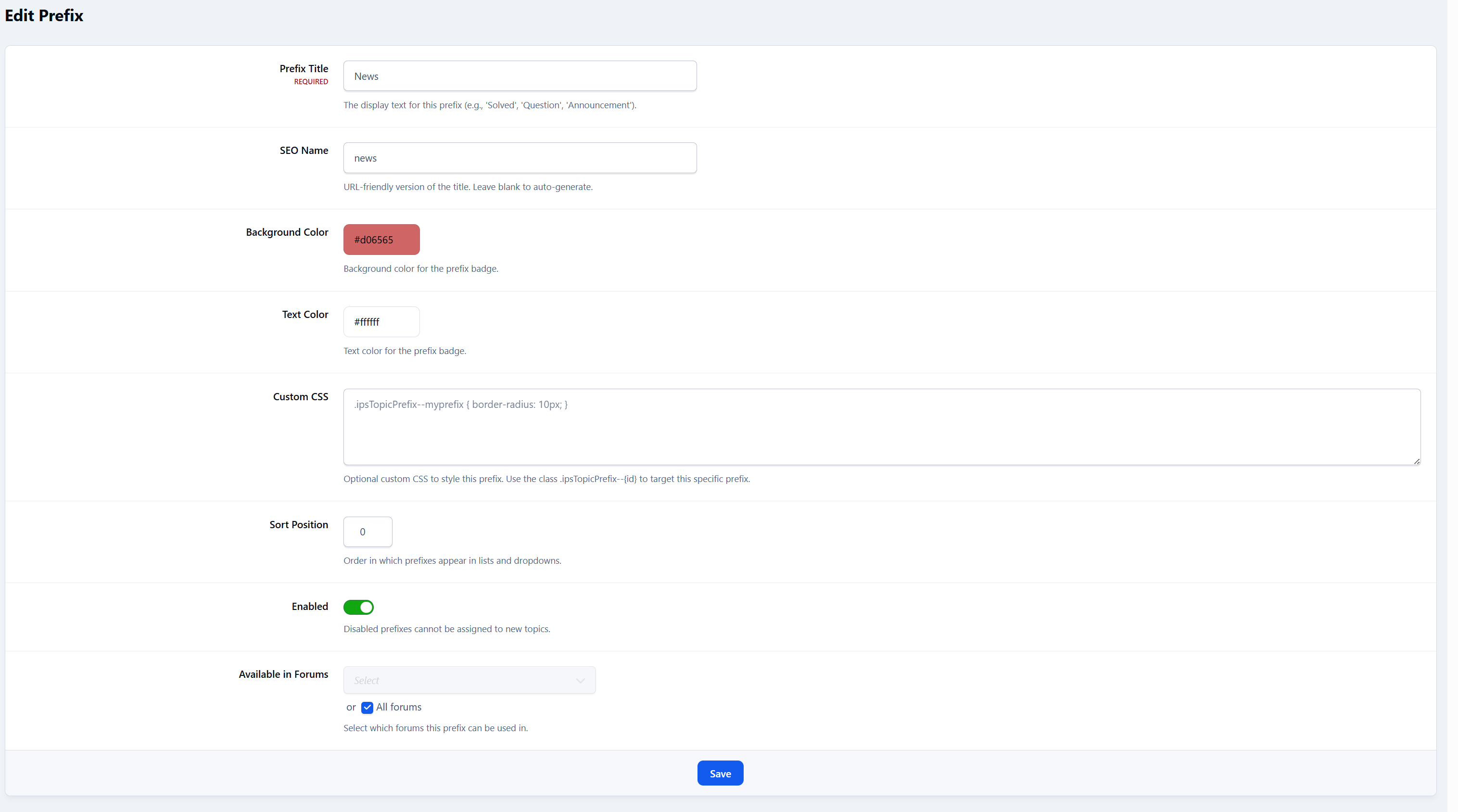
  • Create, edit, and delete prefixes

  • Set title, and display order

  • Define background and text colors

  • Add custom CSS per prefix

  • Enable or disable prefixes at any time

  • Live visual preview of each prefix directly in the ACP list

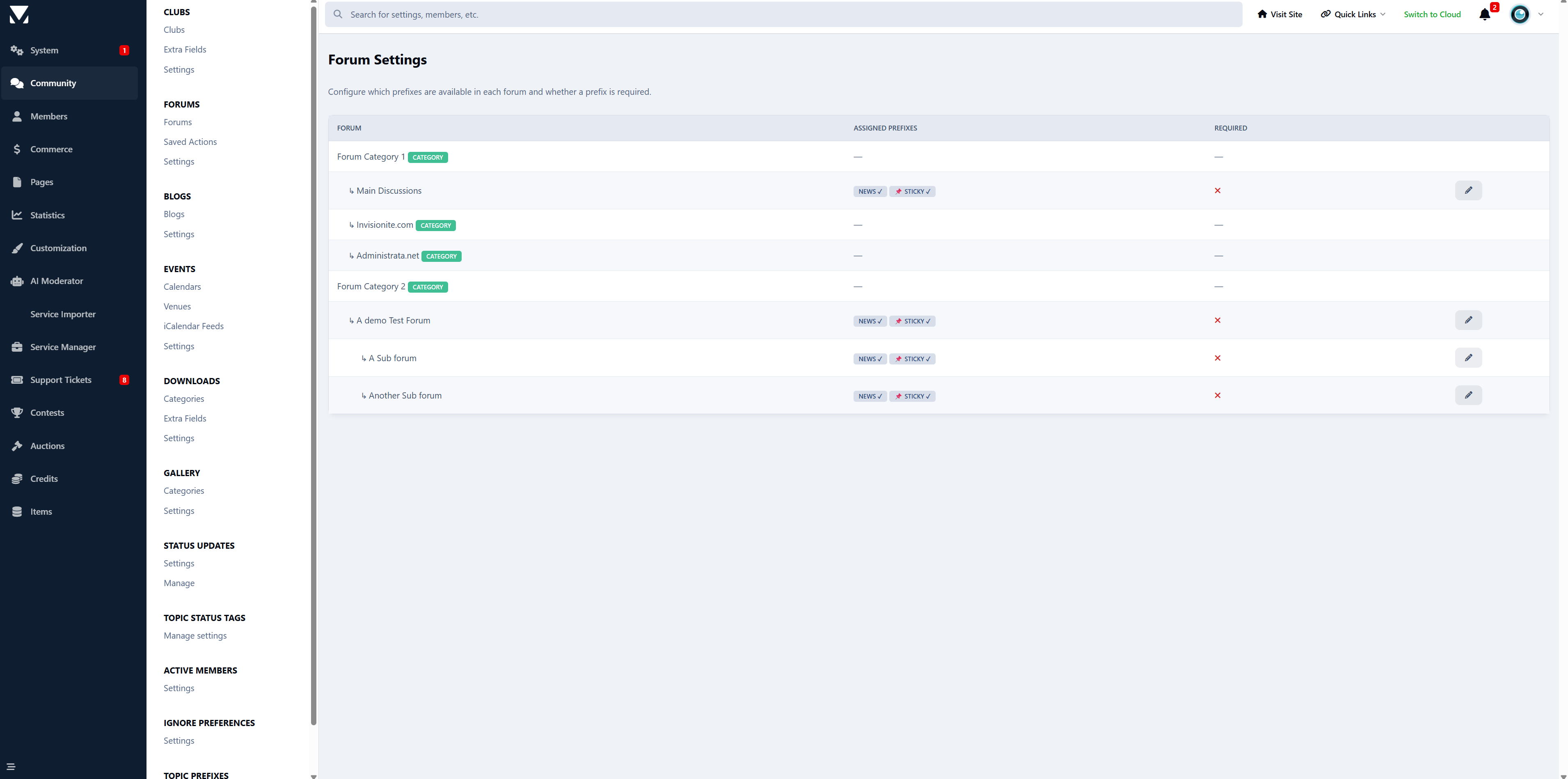
Forum Assignment

  • Assign prefixes to specific forums

  • Optional “All Forums” behavior (no assignment = available everywhere)

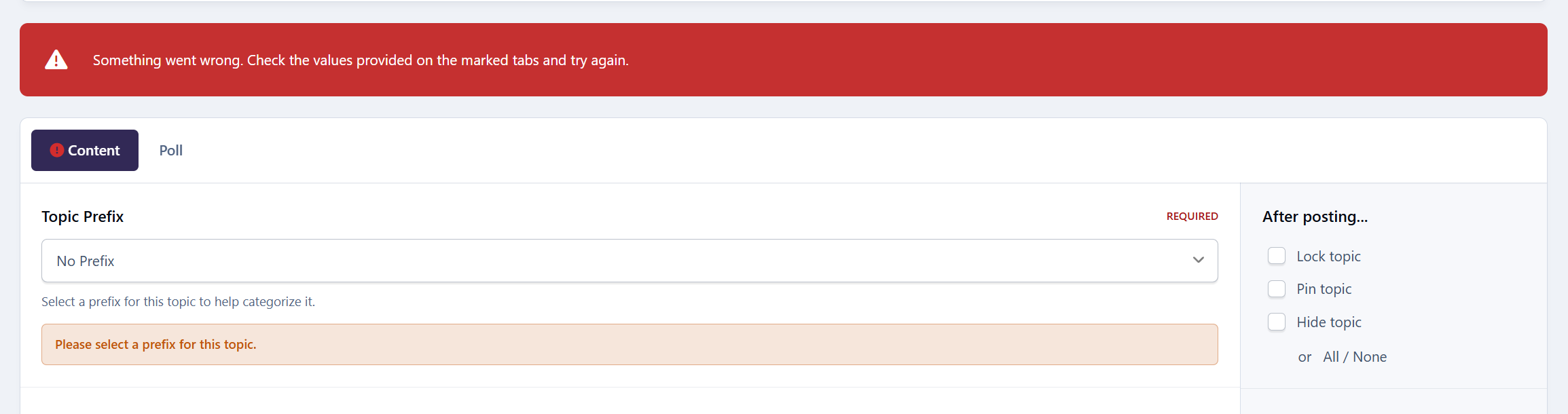
  • Per-forum “prefix required” toggle

  • Visual forum tree showing assigned prefixes at a glance

Display

  • Prefix Selector on Topic Create / Edit

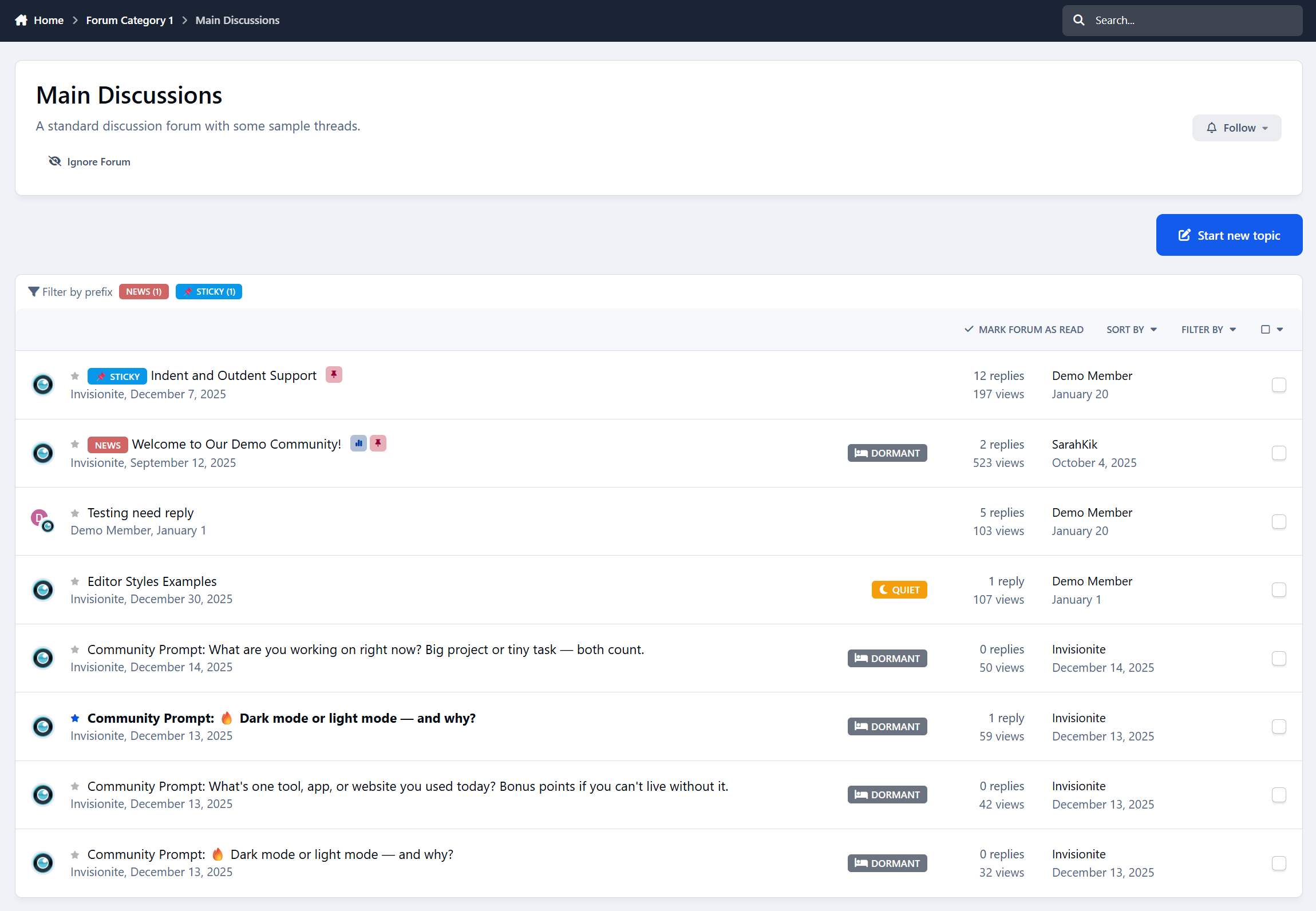
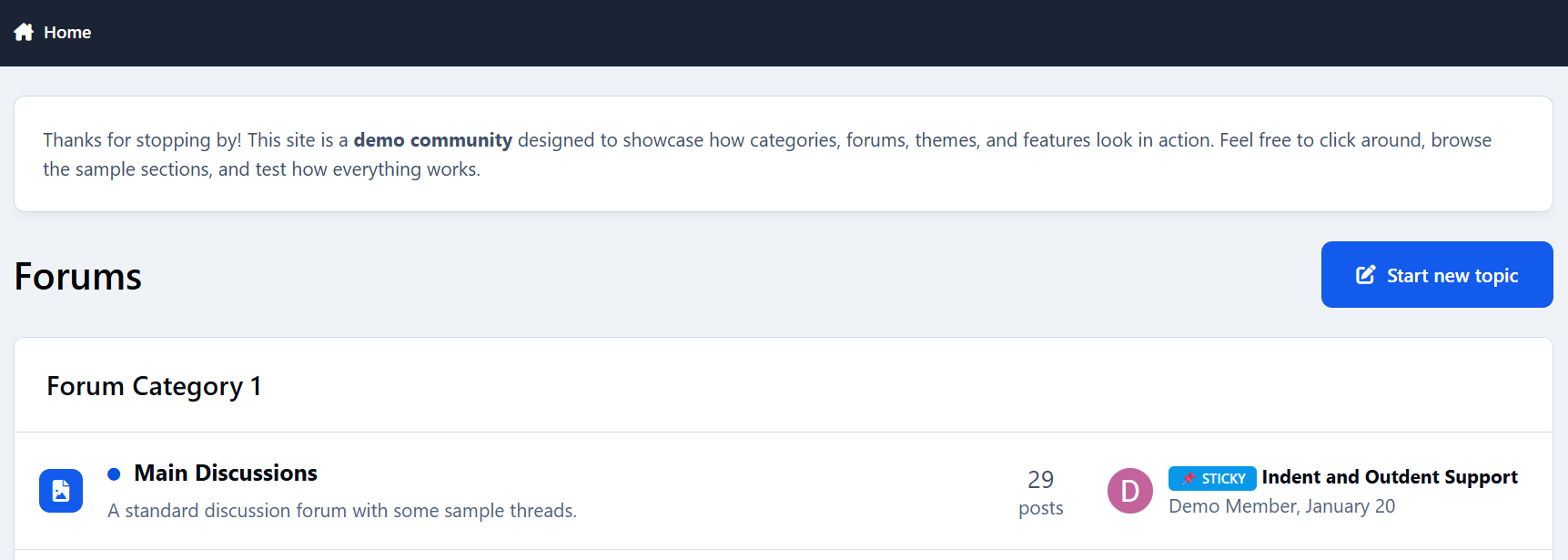
  • Prefix Display in Topic Lists

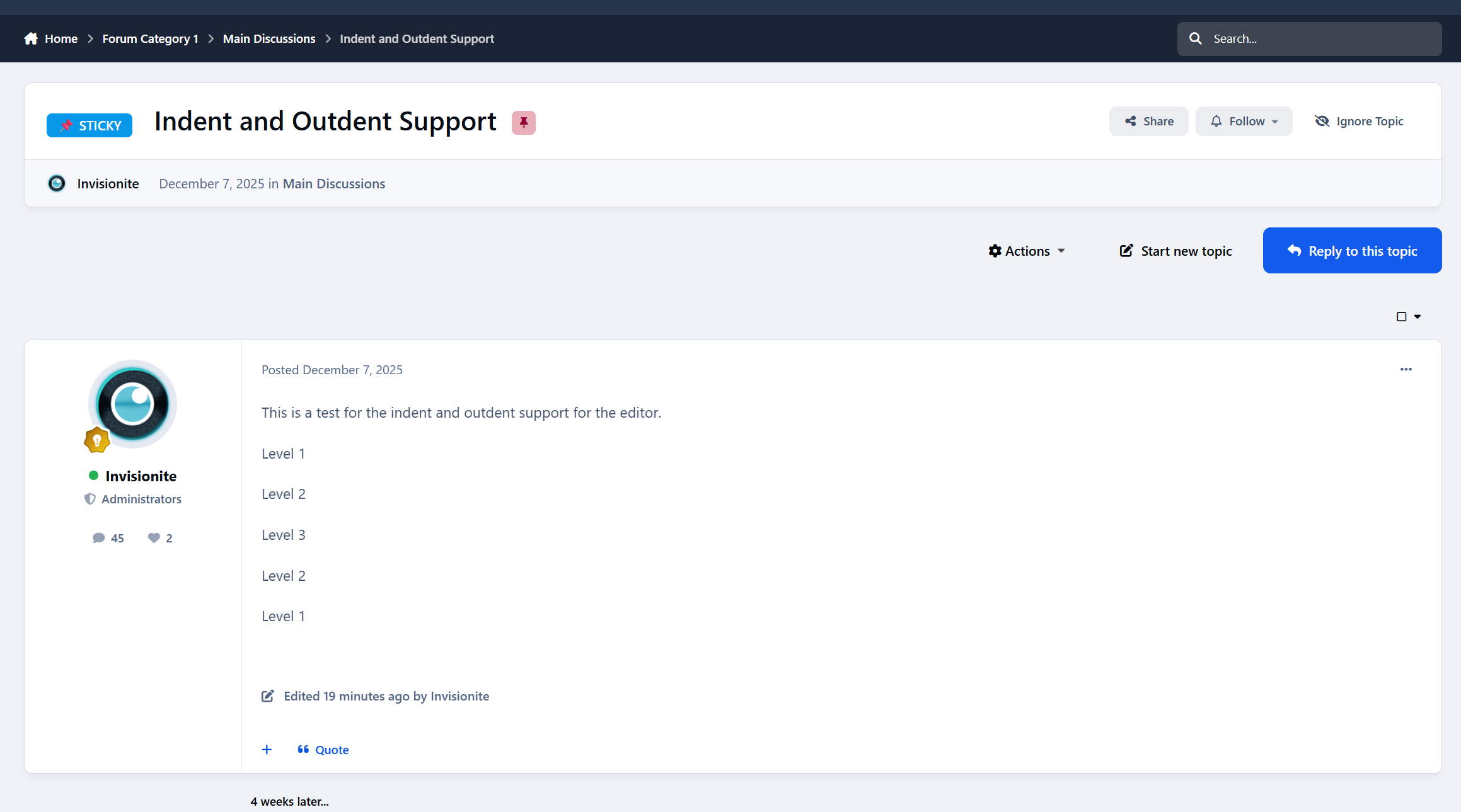
  • Prefix Display in Topic View

  • Prefix Display on Forum Index

Prefix Filter Bar

  • Appears above the topic list within forums

  • Shows only prefixes used in that forum

  • Displays topic counts per prefix

  • One-click filtering

  • “Show All” button to reset the view

Styling System

Two-Tier CSS Architecture

  • Base styling via ipsBadge and ipsTopicPrefix

  • Per-prefix styling via ipsTopicPrefix--{id}

  • Inline colors for simple setups

  • Full custom CSS support for advanced designs

Final Notes

This app is intentionally not a tag replacement.
It’s a classification tool - for signaling intent, state, or type at a glance.

If you’ve ever wanted prefixes like:

  • Question / Guide / Tutorial

  • Solved / Open / WIP

  • Announcement / Feedback / Discussion

…this does exactly that.

Feedback, suggestions, and edge cases welcome 👍

User Feedback

Recommended Comments

panoramia

Members
(edited)

I have a question about this app.

I see topics can be filtered by these prefixes. A couple of questions.

  1. Can new streams be created with these prefixes?

  2. Can the list of topics with the prefixes be listed like in a tag cloud?

  3. When we click a prefix, will we see all topics with that prefix?

One very important question. My community is all about images; the lastComment is always an image, 99% of comments are images. Invision's tags are not working well with my community because when you click on a tag, it will display the first image of the first comment in that topic, so every time I see a tag cloud, the images will be years old and irrelevant to the topic classic_sad

Is it possible to add a checkbox to control this so that, in the prefix tag cloud, the last image in the last comment of each topic is displayed? Categorizing the way you're doing is great, I love it, but if there is no possibility of displaying the last image in the tag cloud, it won't work on my site because the images displayed will be obsolete.

Thanks a lot.

Edited by panoramia

Cedric

Developer
On 2/12/2026 at 7:14 AM, panoramia said:

I have a question about this app.

I see topics can be filtered by these prefixes. A couple of questions.

  1. Can new streams be created with these prefixes?

  2. Can the list of topics with the prefixes be listed like in a tag cloud?

  3. When we click a prefix, will we see all topics with that prefix?

One very important question. My community is all about images; the lastComment is always an image, 99% of comments are images. Invision's tags are not working well with my community because when you click on a tag, it will display the first image of the first comment in that topic, so every time I see a tag cloud, the images will be years old and irrelevant to the topic classic_sad

Is it possible to add a checkbox to control this so that, in the prefix tag cloud, the last image in the last comment of each topic is displayed? Categorizing the way you're doing is great, I love it, but if there is no possibility of displaying the last image in the tag cloud, it won't work on my site because the images displayed will be obsolete.

Thanks a lot.

Thank you for your interest.

1. Can new streams be created with these prefixes?

No. The app currently has no integration with IPS Activity Streams. Prefixes are stored as a prefix_id column on forums_topics - they're not part of IPS's tagging system or content discovery framework. Streams rely on content-type filters, tags, clubs, and follow data, none of which are aware of topic prefixes. This could be built as a feature, but it doesn't exist today.

2. Can the list of topics with the prefixes be listed like in a tag cloud?

Partially. The app has a filter bar that displays all used prefixes in a forum as clickable badges with topic counts (e.g. Active (3), Solved (12)). It appears at the top of a forum's topic listing. However, it's not a standalone tag-cloud page that works across all forums - it's scoped per-forum only.

3. When we click a prefix, will we see all topics with that prefix?

Yes, but only within that forum. Clicking a prefix badge appends ?prefix={id} to the forum URL, and the contentTableWhere() method in the filters the topic list to show only topics with that prefix. There is no cross-forum "show all topics with this prefix across the entire community" page.

As for your images, no, this doesn't exist. The current prefix overview only shows prefix names with topic counts - there is no image display at all. The app has no concept of extracting images from posts. And nor does Invision, hence why you run into this issue. It's technically feasible as a new feature, but to be honest it's a significant one. If it's really important for you then my inbox is always open to make it happen. 🙂

Feel free to send me a PM on Administrata

panoramia

Members
On 2/13/2026 at 3:50 PM, Cedric said:

2. Can the list of topics with the prefixes be listed like in a tag cloud?

Partially. The app has a filter bar that displays all used prefixes in a forum as clickable badges with topic counts (e.g. Active (3), Solved (12)). It appears at the top of a forum's topic listing. However, it's not a standalone tag-cloud page that works across all forums - it's scoped per-forum only.

Maybe I understood this incorrectly. Does this mean I would have to create the same prefixes for each forum and its subforums? I've got quite a few forums where I would like to deploy the prefixes.

Thanks

Cedric

Developer
24 minutes ago, panoramia said:

Maybe I understood this incorrectly. Does this mean I would have to create the same prefixes for each forum and its subforums? I've got quite a few forums where I would like to deploy the prefixes.

Thanks

No, you can select multiple prefixes and point them to multiple forums.

Create an account or sign in to comment

Configure browser push notifications

Chrome (Android)
  1. Tap the lock icon next to the address bar.
  2. Tap Permissions → Notifications.
  3. Adjust your preference.
Chrome (Desktop)
  1. Click the padlock icon in the address bar.
  2. Select Site settings.
  3. Find Notifications and adjust your preference.