Jump to content
View in the app

A better way to browse. Learn more.

Invision Marketplace

A full-screen app on your home screen with push notifications, badges and more.

To install this app on iOS and iPadOS
  1. Tap the Share icon in Safari
  2. Scroll the menu and tap Add to Home Screen.
  3. Tap Add in the top-right corner.
To install this app on Android
  1. Tap the 3-dot menu (⋮) in the top-right corner of the browser.
  2. Tap Add to Home screen or Install app.
  3. Confirm by tapping Install.

Everything you need for your community

We will be moving to a new server soon, some downtime is expected.

Everything you need for your community

 Loading...
 Loading...
 Loading...
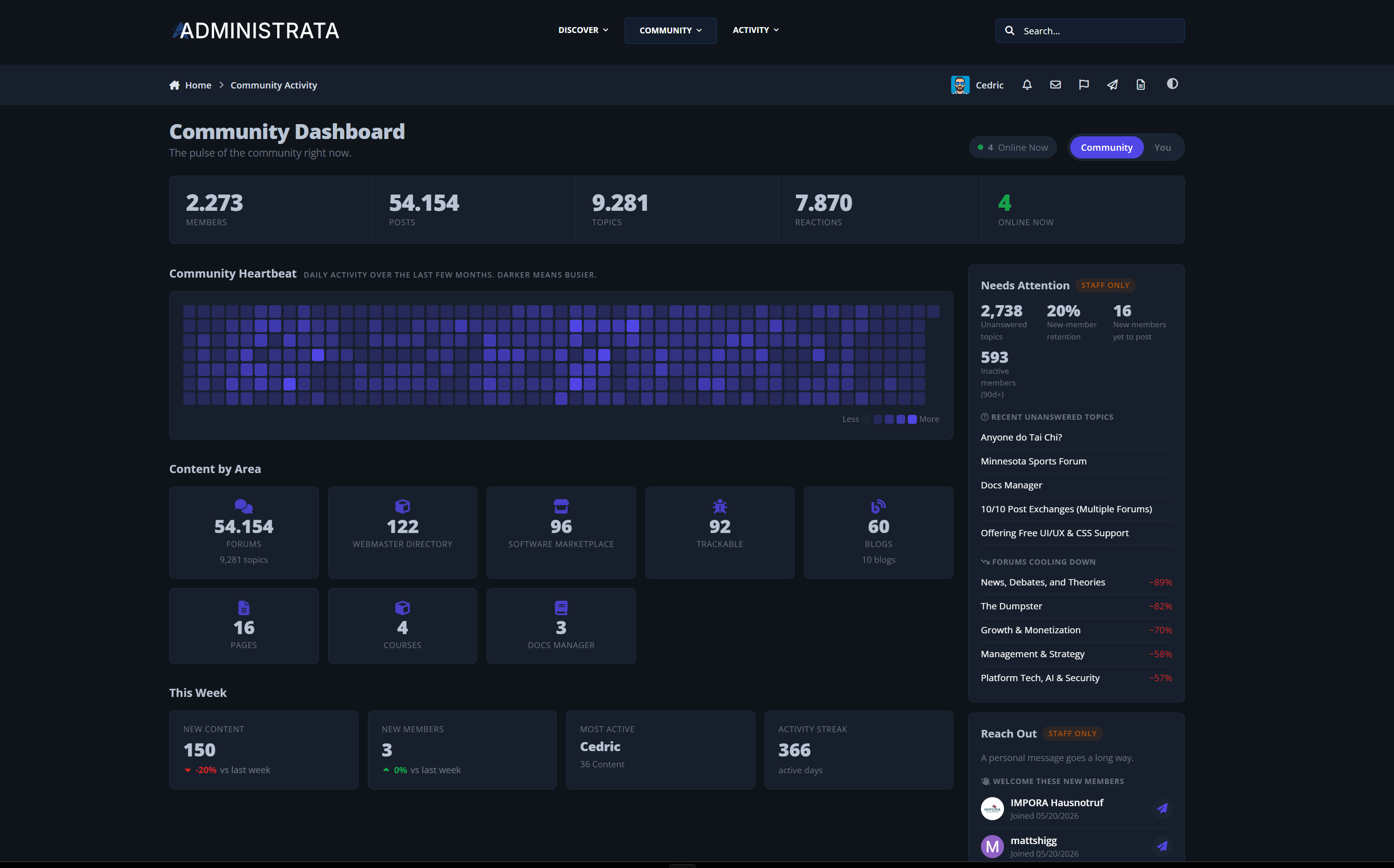
Community Activity is a front-end statistics and engagement dashboard for Invision Community Suite v5. It turns the data your community already produces into a polished, public-facing experience: growth trends, a year-long contribution heatmap, top members and content, cross-application breakdowns, personal scorecards, staff-only outreach tools, and automatic engagement notifications. It complements the built-in board statistics instead of replacing them, and it looks like a native part of your community from the first page load.
Live demo: Community Activity

A Real Dashboard, Not a Buried Stats Page
A polished single-page dashboard at a clean URL: /community-activity/
Live headline totals: members, content, reactions, and who is online right now
A full-year contribution Heartbeat, similar to a contribution graph, so momentum is visible at a glance
Sections animate in as you scroll, without slowing the page down
Light and dark mode aware, fully responsive, and motion-reduced for accessibility
Your statistics stop being an admin afterthought and become a destination.

Community Insights at Every Angle
Growth Trends: a multi-line chart of content, members, active members, and reactions, with instant 7, 30, 90, and 365 day range switching
Activity Patterns: when your community is most active by hour of day
Community Mood: how members react, with a positive, neutral, and negative sentiment split
Content Mix: what is being created across your community month by month
Content by Area: a breakdown across Forums, Gallery, Downloads, Blogs, and more
Top Members, Top Topics, and Busiest Forums: quick views of what and who is driving activity
Records and Milestones: all-time high-water marks plus a celebratory Year in Review
Everything is permission-aware, so members only see content they are allowed to see.

A Personal Scorecard for Every Member
The You tab turns participation into something members care about:
"You are more active than X percent of members"
Personal milestone badges: first topic, ten replies, one hundred posts, best answer, and one-year anniversary
A friendly engagement level, from Quiet Reader up to Community Driver
Your rank this week, posts this month, most-viewed topic, most-reacted content, and your contribution breakdown
Every member gets a reason to come back and watch their numbers climb.

Smart Staff Tools That Drive Retention
When a moderator or admin opens the dashboard, a staff-only sidebar appears with practical, one-click actions:
Needs Attention: unanswered topics, retention signals, first posts with no reply, and cooling-down forums
Reach Out: welcome new members, win back quiet ones, catch power members who are slipping away, and congratulate anniversaries, each with a quick message action
Spotlight: rising stars and members who are one or two posts away from a milestone
Spot the people who need a nudge before you lose them, and recognize the ones carrying your community.

Automatic Engagement Notifications
Six built-in notification types keep members coming back:
Post of the week, personal milestones, activity streaks, weekly recap, ranking updates, and community milestones
Never about the past. Installing the app records the current state silently and only notifies on new activity, so nobody gets flooded with alerts about old events
You choose which types are sent community-wide
Members stay in control and can opt out of any type
They carry your site favicon, so they clearly feel like part of your community
Automated encouragement that never feels spammy.

Built to Be Fast and Self-Sufficient
Aggregate-first design with a daily background task, so the dashboard stays instant even on busy communities
A bundled charting library served locally, with no external dependencies
Builds up to a year of history automatically, so the Heartbeat and Growth charts have data immediately
A front-end widget with two layouts, sidebar and horizontal, for any block area
Native AdminCP settings, group-based access control, and an in-panel support page
No external services, no tracking, and no new personal data collected. It reads what Invision already stores.

Perfect For
Communities that want members to feel their own progress
Forums looking to boost retention and repeat visits
Staff teams who want actionable health signals at a glance
Any community that wants its statistics to feel like part of the site

Community Activity gives your community a living dashboard that members enjoy, staff rely on, and that runs itself. Take a look at the demo and see it in action.
IPS5.0.0+
Community Activity is a front-end statistics and engagement dashboard for Invision Community Suite v5. It turns the data your community already produces into a polished, public-facing experience: growth trends, a year-long contribution heatmap, top members and content, cross-application breakdowns, personal scorecards, staff-only outreach tools, and automatic engagement notifications. It complements the built-in board statistics instead of replacing them, and it looks like a native part of your community from the first page load.
Live demo: Community Activity

A Real Dashboard, Not a Buried Stats Page
A polished single-page dashboard at a clean URL: /community-activity/
Live headline totals: members, content, reactions, and who is online right now
A full-year contribution Heartbeat, similar to a contribution graph, so momentum is visible at a glance
Sections animate in as you scroll, without slowing the page down
Light and dark mode aware, fully responsive, and motion-reduced for accessibility
Your statistics stop being an admin afterthought and become a destination.

Community Insights at Every Angle
Growth Trends: a multi-line chart of content, members, active members, and reactions, with instant 7, 30, 90, and 365 day range switching
Activity Patterns: when your community is most active by hour of day
Community Mood: how members react, with a positive, neutral, and negative sentiment split
Content Mix: what is being created across your community month by month
Content by Area: a breakdown across Forums, Gallery, Downloads, Blogs, and more
Top Members, Top Topics, and Busiest Forums: quick views of what and who is driving activity
Records and Milestones: all-time high-water marks plus a celebratory Year in Review
Everything is permission-aware, so members only see content they are allowed to see.

A Personal Scorecard for Every Member
The You tab turns participation into something members care about:
"You are more active than X percent of members"
Personal milestone badges: first topic, ten replies, one hundred posts, best answer, and one-year anniversary
A friendly engagement level, from Quiet Reader up to Community Driver
Your rank this week, posts this month, most-viewed topic, most-reacted content, and your contribution breakdown
Every member gets a reason to come back and watch their numbers climb.

Smart Staff Tools That Drive Retention
When a moderator or admin opens the dashboard, a staff-only sidebar appears with practical, one-click actions:
Needs Attention: unanswered topics, retention signals, first posts with no reply, and cooling-down forums
Reach Out: welcome new members, win back quiet ones, catch power members who are slipping away, and congratulate anniversaries, each with a quick message action
Spotlight: rising stars and members who are one or two posts away from a milestone
Spot the people who need a nudge before you lose them, and recognize the ones carrying your community.

Automatic Engagement Notifications
Six built-in notification types keep members coming back:
Post of the week, personal milestones, activity streaks, weekly recap, ranking updates, and community milestones
Never about the past. Installing the app records the current state silently and only notifies on new activity, so nobody gets flooded with alerts about old events
You choose which types are sent community-wide
Members stay in control and can opt out of any type
They carry your site favicon, so they clearly feel like part of your community
Automated encouragement that never feels spammy.

Built to Be Fast and Self-Sufficient
Aggregate-first design with a daily background task, so the dashboard stays instant even on busy communities
A bundled charting library served locally, with no external dependencies
Builds up to a year of history automatically, so the Heartbeat and Growth charts have data immediately
A front-end widget with two layouts, sidebar and horizontal, for any block area
Native AdminCP settings, group-based access control, and an in-panel support page
No external services, no tracking, and no new personal data collected. It reads what Invision already stores.

Perfect For
Communities that want members to feel their own progress
Forums looking to boost retention and repeat visits
Staff teams who want actionable health signals at a glance
Any community that wants its statistics to feel like part of the site

Community Activity gives your community a living dashboard that members enjoy, staff rely on, and that runs itself. Take a look at the demo and see it in action.
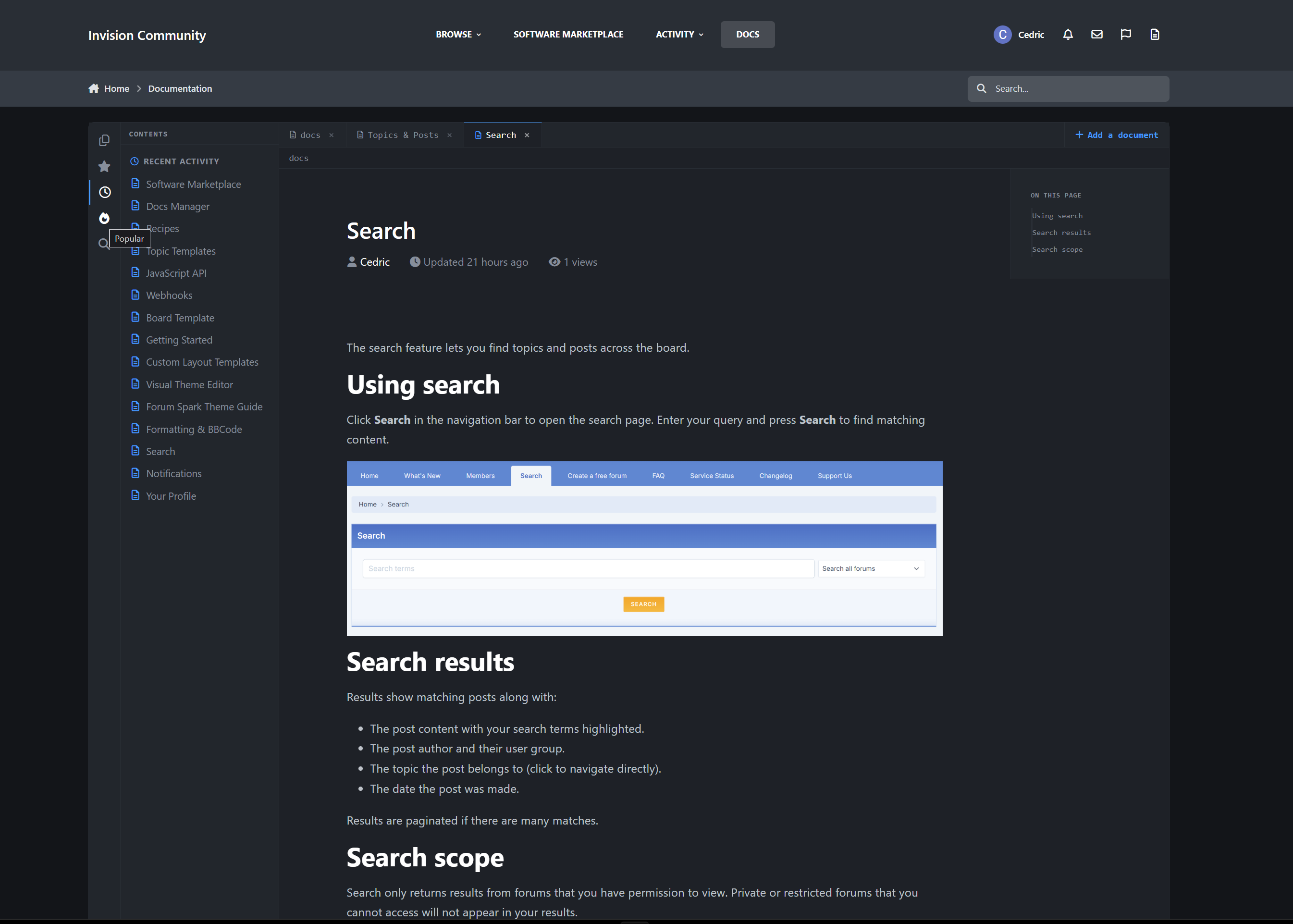
Docs Manager is a full knowledge-base and documentation application for Invision Community Suite v5. It lets you write, organize, publish, and maintain documentation directly inside your community, complete with 13 selectable front-end designs, automatic tables of contents (sticky by design), revision history, reader feedback, member contributions, and deep IPS framework integration including native search, profiles, notifications, reactions, and sitemap support.
A demo can be found here:
https://administrata.net/docs/
Choose Your Look: 13 Front-End Layouts
The biggest thing that sets Docs Manager apart is choice. Pick the entire reading experience from the AdminCP with one setting:
documentation (default · sidebar + sticky TOC) · explorer (VS Code / IDE) · finder · notion · split · terminal · blueprint · notebook · accordion · apiref · readme · tui · mindmap
Every layout applies across the whole app - index, collections, categories, and document pages. Each one is fully responsive, and is built entirely around your theme’s variables.
Your docs don’t look like a forum add-on.
They look like a product.
Structure & Organization
Collections → nested categories → documents
Drag-and-drop ordering for documents and categories in the ACP
SEO-friendly nested URLs
Per-collection navigation trees with subcategory nesting
index page with Featured, Popular, and Recently Updated sections
Organize a 5-page guide or a 500-article knowledge base with the same clean structure.
The Document Page
Each document includes:
Automatic table of contents generated from headings, with a configurable minimum
Previous / Next navigation within a category
Related Documents, either hand-picked or using smart category fallback
“Was this helpful?” feedback with accurate up/down counters
Optional guest voting
Reactions and Follow
Full revision history with configurable retention
Permission-gated Actions menu: edit, feature, hide, move, change author, delete
Deep IPS Framework Integration
Docs Manager is built on \IPS\Content\Item, so it behaves like first-class IPS content:
Indexed in native IPS Search and the Activity / Discover stream
A “Documentation” tab on member profiles, plus entries in /profile/X/content/
Automatic XML sitemap inclusion
Notifications for new documents, updates to followed docs, and reader feedback
Reactions, Follow, and moderation states handled the IPS-native way
Member Contributions
Let your community help write the docs safely:
Front-end submit and edit forms
Draft → Published workflow, with optional auto-publish per group
Granular group permissions: create, edit own / any, delete own / any
Per-group daily submission rate limits
Every edit automatically snapshots a revision
Reader Engagement
Helpful / Not helpful feedback, unique per member and guest IP
Reactions on documents
Follow documents and categories for update notifications
Comments are deliberately not part of Docs Manager. Documentation thrives on structured feedback and revisions, not threaded replies.
Software Marketplace Bridge
If you also run Software Marketplace, link the two together:
Attach a documentation article to any software item, where it appears as a button in the item sidebar
Show a “Related Software” card on the document, above related docs
One-to-one linking, kept in sync both ways
The setting only appears when both apps are installed
Built-in Widgets
Docs Manager includes 5 layout-aware widgets:
Featured Documents
Popular Documents
Recently Updated
Category Navigation
Documentation Search
Each widget is styled to match the active design.
Powerful Admin Control Panel
A full IPS-native ACP experience:
Node-based Collections and Categories with permissions
Document management: approve, feature, hide, move, change author, delete
Drag-and-drop reordering
Configurable layout, TOC, feedback, index, and revision settings
Document-count recount task to keep totals exact
Perfect For
Product and app documentation
Help centers and knowledge bases
Developer docs and API references
Internal team wikis
Guides, tutorials, and onboarding
Release notes and changelogs
IPS5.0.0+
Docs Manager is a full knowledge-base and documentation application for Invision Community Suite v5. It lets you write, organize, publish, and maintain documentation directly inside your community, complete with 13 selectable front-end designs, automatic tables of contents (sticky by design), revision history, reader feedback, member contributions, and deep IPS framework integration including native search, profiles, notifications, reactions, and sitemap support.
A demo can be found here:
https://administrata.net/docs/
Choose Your Look: 13 Front-End Layouts
The biggest thing that sets Docs Manager apart is choice. Pick the entire reading experience from the AdminCP with one setting:
documentation (default · sidebar + sticky TOC) · explorer (VS Code / IDE) · finder · notion · split · terminal · blueprint · notebook · accordion · apiref · readme · tui · mindmap
Every layout applies across the whole app - index, collections, categories, and document pages. Each one is fully responsive, and is built entirely around your theme’s variables.
Your docs don’t look like a forum add-on.
They look like a product.
Structure & Organization
Collections → nested categories → documents
Drag-and-drop ordering for documents and categories in the ACP
SEO-friendly nested URLs
Per-collection navigation trees with subcategory nesting
index page with Featured, Popular, and Recently Updated sections
Organize a 5-page guide or a 500-article knowledge base with the same clean structure.
The Document Page
Each document includes:
Automatic table of contents generated from headings, with a configurable minimum
Previous / Next navigation within a category
Related Documents, either hand-picked or using smart category fallback
“Was this helpful?” feedback with accurate up/down counters
Optional guest voting
Reactions and Follow
Full revision history with configurable retention
Permission-gated Actions menu: edit, feature, hide, move, change author, delete
Deep IPS Framework Integration
Docs Manager is built on \IPS\Content\Item, so it behaves like first-class IPS content:
Indexed in native IPS Search and the Activity / Discover stream
A “Documentation” tab on member profiles, plus entries in /profile/X/content/
Automatic XML sitemap inclusion
Notifications for new documents, updates to followed docs, and reader feedback
Reactions, Follow, and moderation states handled the IPS-native way
Member Contributions
Let your community help write the docs safely:
Front-end submit and edit forms
Draft → Published workflow, with optional auto-publish per group
Granular group permissions: create, edit own / any, delete own / any
Per-group daily submission rate limits
Every edit automatically snapshots a revision
Reader Engagement
Helpful / Not helpful feedback, unique per member and guest IP
Reactions on documents
Follow documents and categories for update notifications
Comments are deliberately not part of Docs Manager. Documentation thrives on structured feedback and revisions, not threaded replies.
Software Marketplace Bridge
If you also run Software Marketplace, link the two together:
Attach a documentation article to any software item, where it appears as a button in the item sidebar
Show a “Related Software” card on the document, above related docs
One-to-one linking, kept in sync both ways
The setting only appears when both apps are installed
Built-in Widgets
Docs Manager includes 5 layout-aware widgets:
Featured Documents
Popular Documents
Recently Updated
Category Navigation
Documentation Search
Each widget is styled to match the active design.
Powerful Admin Control Panel
A full IPS-native ACP experience:
Node-based Collections and Categories with permissions
Document management: approve, feature, hide, move, change author, delete
Drag-and-drop reordering
Configurable layout, TOC, feedback, index, and revision settings
Document-count recount task to keep totals exact
Perfect For
Product and app documentation
Help centers and knowledge bases
Developer docs and API references
Internal team wikis
Guides, tutorials, and onboarding
Release notes and changelogs
Stop scrolling endlessly through 60-page topics. Filter, sort, and zero in on what matters - in one click, with zero page reloads.
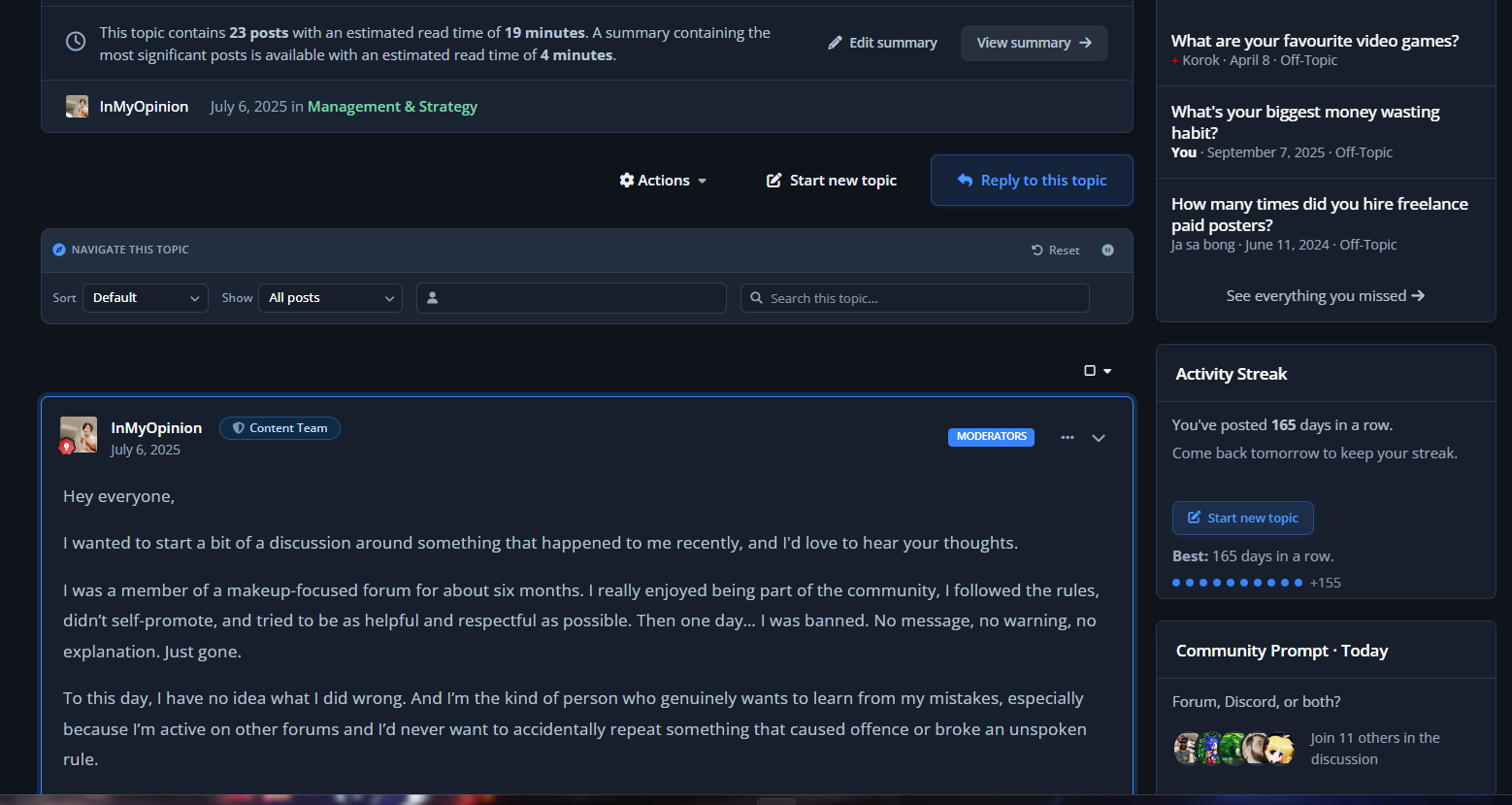
Topic Navigator is a per-topic toolbar for Invision Community Suite v5 that drops a fast, AJAX-powered sort/filter/search bar onto every topic page. Find the OP's posts, jump to your own contributions, pull only posts with images, hunt a username, or grep a keyword across the whole thread without ever leaving the page. Built on native IPS framework patterns - it looks like it shipped with the suite.
Live demo on Administrata

Topic Navigation, Reinvented
A compact toolbar sits beneath every topic header with four controls that work together and persist per-topic:
Sort - Newest first, oldest first, or default
Filter - Starter only, my posts, with links, with images, with quotes (admin-selectable defaults)
Member lookup - Native IPS autocomplete pill; type a username, see only their posts in this thread
Search this topic - Live-debounced keyword search with highlighted hits in the rendered post bodies
Every interaction swaps the post feed in place via AJAX - no full page reload, no scroll loss, no flicker.
Your members get a search engine for the topic they're already reading.

Smart Image Filter
The "with images" filter catches uploaded attachments, embedded media, and inline thumbnails using the same patterns IPS uses internally. Embed cards and link previews are correctly excluded so the filter actually returns what users expect.

Per-Topic Pause (Moderator Control)
Some topics don't want a navigator on top of them - announcements, polls, pinned welcome threads. Moderators get a one-click toggle to disable the toolbar on a per-topic basis.
You decide which topics get the power tools.

Search Term Highlighting
When the search filter is active, matching terms in the rendered post bodies are wrapped in themed <mark> tags using the primary colour at 35% opacity. Users see exactly why each post matched.

Admin Control Panel
Full IPS-native ACP experience:
Master enable/disable toggle
Enabled sort modes - check which sort options appear in the dropdown
Enabled filters - choose which filter chips members see (starter, me, with_links, with_images, with_quotes)
Per-feature toggles - independently enable/disable sort, filter, member lookup, and search
Default selections - set the filters that are pre-selected on first load for new visitors

Built for Active Communities
Threads with 50+ pages where finding the OP's latest update is a chore
Support topics where you need to filter to "with images" to find the screenshot
Long-running discussions where members want to re-read only one user's contributions
Megathreads where keyword search is faster than Ctrl+F (which only sees the current page)
Sticky FAQ topics where members need to jump straight to posts with links
Photo-share topics where you want to skip past the chatter and just see the uploads

Perfect For
High-volume support forums
Long-running discussion threads
Megathreads, AMAs, and Q&A topics
Build logs, project diaries, and ongoing show-and-tell threads
Tech support communities with image-heavy troubleshooting
Any community whose topics regularly cross 10+ pages

Stop making your members scroll. Give them the toolbar topics have always needed.
IPS5.0.0+
Stop scrolling endlessly through 60-page topics. Filter, sort, and zero in on what matters - in one click, with zero page reloads.
Topic Navigator is a per-topic toolbar for Invision Community Suite v5 that drops a fast, AJAX-powered sort/filter/search bar onto every topic page. Find the OP's posts, jump to your own contributions, pull only posts with images, hunt a username, or grep a keyword across the whole thread without ever leaving the page. Built on native IPS framework patterns - it looks like it shipped with the suite.
Live demo on Administrata

Topic Navigation, Reinvented
A compact toolbar sits beneath every topic header with four controls that work together and persist per-topic:
Sort - Newest first, oldest first, or default
Filter - Starter only, my posts, with links, with images, with quotes (admin-selectable defaults)
Member lookup - Native IPS autocomplete pill; type a username, see only their posts in this thread
Search this topic - Live-debounced keyword search with highlighted hits in the rendered post bodies
Every interaction swaps the post feed in place via AJAX - no full page reload, no scroll loss, no flicker.
Your members get a search engine for the topic they're already reading.

Smart Image Filter
The "with images" filter catches uploaded attachments, embedded media, and inline thumbnails using the same patterns IPS uses internally. Embed cards and link previews are correctly excluded so the filter actually returns what users expect.

Per-Topic Pause (Moderator Control)
Some topics don't want a navigator on top of them - announcements, polls, pinned welcome threads. Moderators get a one-click toggle to disable the toolbar on a per-topic basis.
You decide which topics get the power tools.

Search Term Highlighting
When the search filter is active, matching terms in the rendered post bodies are wrapped in themed <mark> tags using the primary colour at 35% opacity. Users see exactly why each post matched.

Admin Control Panel
Full IPS-native ACP experience:
Master enable/disable toggle
Enabled sort modes - check which sort options appear in the dropdown
Enabled filters - choose which filter chips members see (starter, me, with_links, with_images, with_quotes)
Per-feature toggles - independently enable/disable sort, filter, member lookup, and search
Default selections - set the filters that are pre-selected on first load for new visitors

Built for Active Communities
Threads with 50+ pages where finding the OP's latest update is a chore
Support topics where you need to filter to "with images" to find the screenshot
Long-running discussions where members want to re-read only one user's contributions
Megathreads where keyword search is faster than Ctrl+F (which only sees the current page)
Sticky FAQ topics where members need to jump straight to posts with links
Photo-share topics where you want to skip past the chatter and just see the uploads

Perfect For
High-volume support forums
Long-running discussion threads
Megathreads, AMAs, and Q&A topics
Build logs, project diaries, and ongoing show-and-tell threads
Tech support communities with image-heavy troubleshooting
Any community whose topics regularly cross 10+ pages

Stop making your members scroll. Give them the toolbar topics have always needed.
Your members have been posting for years.
Most of that content is invisible to them now.
On This Day brings it back.
Every day, members see a personalized timeline of what they posted on this date in previous years - forum topics, blog entries, gallery images, calendar events, and more.
Old content becomes visible again.
Members reconnect with things they forgot they wrote.
And your community gets a reason to look back, react, and share.

How it works
The app scans each member’s content history and matches it against today’s date across previous years. No tagging, no curation, no setup. If a member posted something on April 19th three years ago, they’ll see it today.
Results are grouped by year, sorted most recent first, and capped per year to keep things clean and relevant.
Queries the full search index - forums, blogs, gallery, downloads, calendar, pages, and more
Built-in leap year handling
Configurable minimum content age (default: 1 year)
Configurable items per year
Optional content type filtering


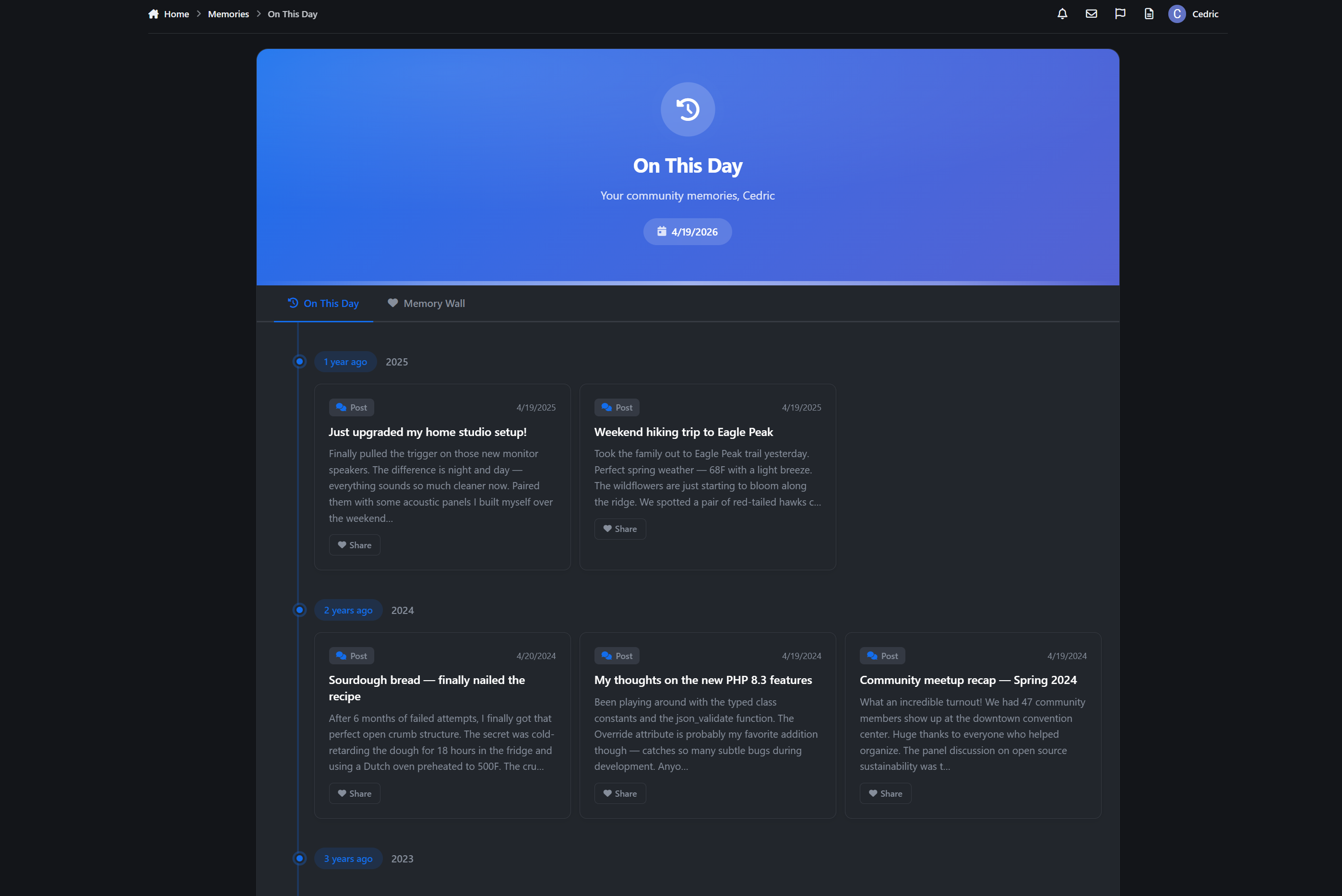
The On This Day page
A personal timeline at /memories/, designed to feel worth visiting.
Full-width hero banner with a personalized greeting and today’s date
Vertical timeline layout with clear year markers
Animated card entrances as you scroll
Each memory card shows content type, title, a 200-character excerpt, and the original date
“Revisit” links take members straight back to the original content
Content type icons for forums, blogs, gallery, downloads, calendar, and CMS
Friendly empty state for members with no memories yet


Memory Wall
Members can share their memories to a public Memory Wall.
Clicking Share opens an inline panel where they can add a personal note - a short message explaining why the memory matters. The original content is preserved alongside their note, so others see both the memory and the reflection.
Optional personal message (up to 500 characters)
Public wall feed with a paginated grid layout
Author avatars, timestamps, content type badges, and “years ago” indicators
Full IPS reaction support on every shared memory
Duplicate sharing prevention
Delete options for authors and admins
Responsive grid that adapts from multi-column to single-column
Including reactions
It turns private nostalgia into shared community moments.

Widget
A Today’s Memories sidebar widget gives members a quick daily snapshot.
Shows how many memories they have today
Preview list grouped by year
Direct link to the full timeline
Sidebar and CMS compatible
Clean empty state with a subtle icon when no memories exist
Place it on your homepage or activity page to create a daily habit.
IPS5.0.0+
Your members have been posting for years.
Most of that content is invisible to them now.
On This Day brings it back.
Every day, members see a personalized timeline of what they posted on this date in previous years - forum topics, blog entries, gallery images, calendar events, and more.
Old content becomes visible again.
Members reconnect with things they forgot they wrote.
And your community gets a reason to look back, react, and share.

How it works
The app scans each member’s content history and matches it against today’s date across previous years. No tagging, no curation, no setup. If a member posted something on April 19th three years ago, they’ll see it today.
Results are grouped by year, sorted most recent first, and capped per year to keep things clean and relevant.
Queries the full search index - forums, blogs, gallery, downloads, calendar, pages, and more
Built-in leap year handling
Configurable minimum content age (default: 1 year)
Configurable items per year
Optional content type filtering


The On This Day page
A personal timeline at /memories/, designed to feel worth visiting.
Full-width hero banner with a personalized greeting and today’s date
Vertical timeline layout with clear year markers
Animated card entrances as you scroll
Each memory card shows content type, title, a 200-character excerpt, and the original date
“Revisit” links take members straight back to the original content
Content type icons for forums, blogs, gallery, downloads, calendar, and CMS
Friendly empty state for members with no memories yet


Memory Wall
Members can share their memories to a public Memory Wall.
Clicking Share opens an inline panel where they can add a personal note - a short message explaining why the memory matters. The original content is preserved alongside their note, so others see both the memory and the reflection.
Optional personal message (up to 500 characters)
Public wall feed with a paginated grid layout
Author avatars, timestamps, content type badges, and “years ago” indicators
Full IPS reaction support on every shared memory
Duplicate sharing prevention
Delete options for authors and admins
Responsive grid that adapts from multi-column to single-column
Including reactions
It turns private nostalgia into shared community moments.

Widget
A Today’s Memories sidebar widget gives members a quick daily snapshot.
Shows how many memories they have today
Preview list grouped by year
Direct link to the full timeline
Sidebar and CMS compatible
Clean empty state with a subtle icon when no memories exist
Place it on your homepage or activity page to create a daily habit.
Build trust between your members, one trade at a time.
Feedback Trader is a member-to-member feedback and reputation system for Invision Community Suite v5. It lets your members rate each other after trades, sales, and deals, building transparent trust scores that are visible across your community. Perfect for buy/sell/trade forums, classifieds communities, and anywhere member reliability matters.
How It Works
Members leave feedback (positive, neutral, or negative) for each other after a transaction. Each entry includes a written comment and an optional link to the related listing or deal. Over time, members build a visible reputation score that acts as a trust signal for the entire community.
Your community polices itself. Trust is earned, not assumed.

Browse Page
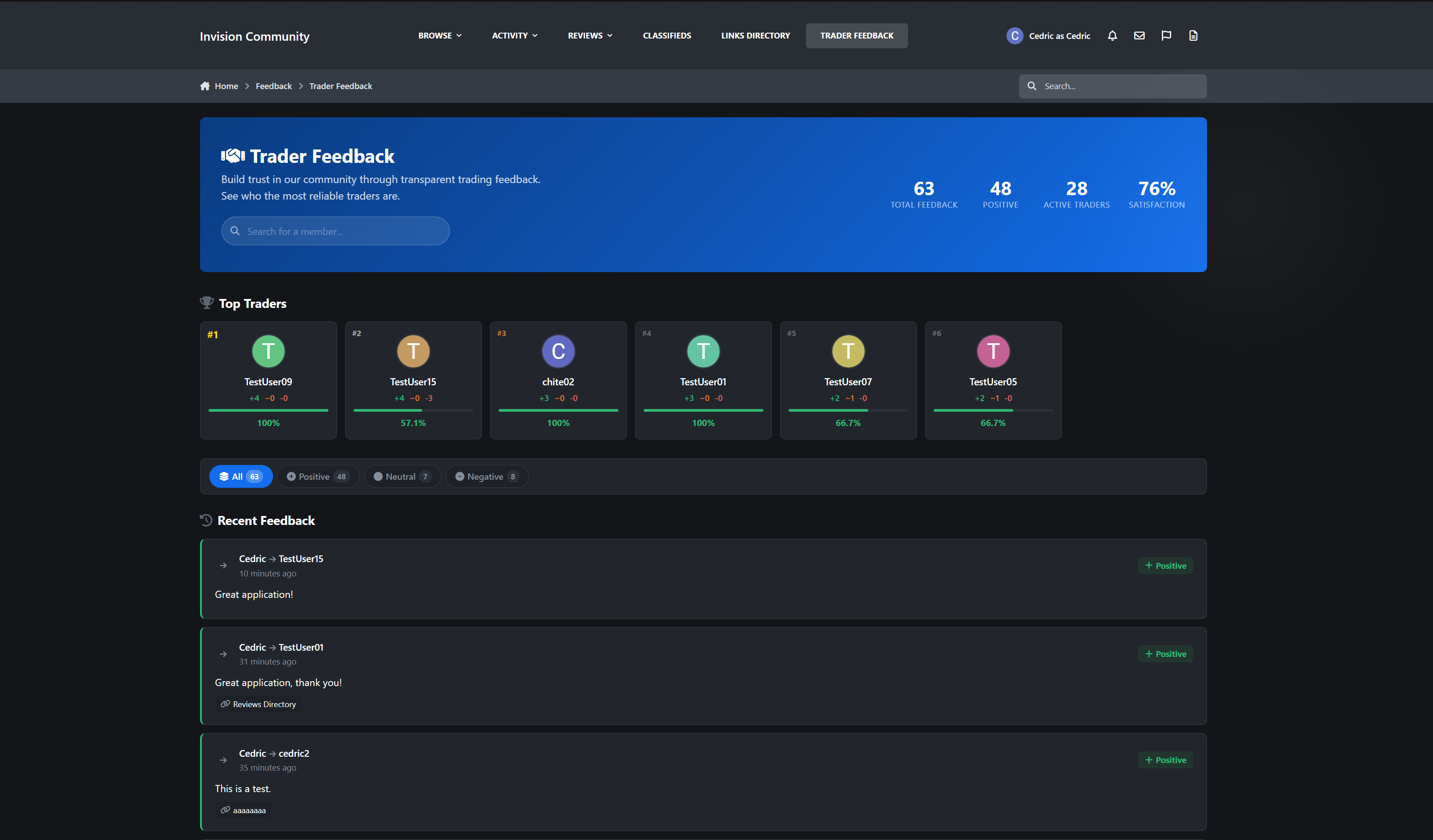
Dedicated feedback hub at /feedback/ with a full-width hero banner and global stats
Statistics dashboard showing total feedback, positive feedback, active traders, and satisfaction percentage
AJAX-powered member search with autocomplete
Top Traders leaderboard with gold, silver, and bronze badges, progress bars, and satisfaction scores
Filterable feed: All, Positive, Neutral, Negative with pill-style filters and live counts
Color-coded feedback cards with avatars, rating badges, comments, timestamps, and linked transactions
Load More infinite scroll with no page refresh
Friendly empty states with a call-to-action when no feedback exists

Feedback & Ratings
3-tier rating system: Positive, Neutral, Negative with color-coded icons
Written comments up to 2,000 characters (configurable)
Transaction linking with listing title and URL
Configurable edit window (default 7 days or unlimited)
Anti-spam cooldown between feedback for the same member pair
Self-feedback prevention


Reputation Engine
Automatic per-member reputation cache with positive, neutral, negative, and total counts
Satisfaction percentage calculated as positive / total
Net score showing positive minus negative

Profile Integration
Dedicated Feedback tab on every profile with count badge
Summary stats grid: +positive / ~neutral / -negative / %satisfaction
Filter buttons for All, Positive, Neutral, and Negative
Hovercard integration with +X / ~Y / -Z summary
“Leave Feedback” button shown
Edit and delete actions for authorized users
Profile sidebar widget with reputation display, certificate badge (80%+ positive), and CTA
Your reputation follows you everywhere on the site.

Widgets
Feedback Stats: Grid with totals and active traders
Latest Feedback: configurable feed (1-25 items) with comments and links
Top Traders: ranked list (1-25) with badges, avatars, and stats
All widgets are sidebar and CMS compatible with configurable limits.

Notifications
Inline, push, and email notifications when feedback is received
Fully configurable per member
Direct link to the recipient’s feedback tab

Perfect For
Buy/sell/trade communities
Classifieds and marketplace forums
Gaming trading communities
Freelance and service exchanges
Any community with member-to-member transactions
Car enthusiast and parts trading forums
Collector and hobbyist swap communities
Cryptocurrency and digital goods trading forums
IPS5.0.0+
Build trust between your members, one trade at a time.
Feedback Trader is a member-to-member feedback and reputation system for Invision Community Suite v5. It lets your members rate each other after trades, sales, and deals, building transparent trust scores that are visible across your community. Perfect for buy/sell/trade forums, classifieds communities, and anywhere member reliability matters.
How It Works
Members leave feedback (positive, neutral, or negative) for each other after a transaction. Each entry includes a written comment and an optional link to the related listing or deal. Over time, members build a visible reputation score that acts as a trust signal for the entire community.
Your community polices itself. Trust is earned, not assumed.

Browse Page
Dedicated feedback hub at /feedback/ with a full-width hero banner and global stats
Statistics dashboard showing total feedback, positive feedback, active traders, and satisfaction percentage
AJAX-powered member search with autocomplete
Top Traders leaderboard with gold, silver, and bronze badges, progress bars, and satisfaction scores
Filterable feed: All, Positive, Neutral, Negative with pill-style filters and live counts
Color-coded feedback cards with avatars, rating badges, comments, timestamps, and linked transactions
Load More infinite scroll with no page refresh
Friendly empty states with a call-to-action when no feedback exists

Feedback & Ratings
3-tier rating system: Positive, Neutral, Negative with color-coded icons
Written comments up to 2,000 characters (configurable)
Transaction linking with listing title and URL
Configurable edit window (default 7 days or unlimited)
Anti-spam cooldown between feedback for the same member pair
Self-feedback prevention


Reputation Engine
Automatic per-member reputation cache with positive, neutral, negative, and total counts
Satisfaction percentage calculated as positive / total
Net score showing positive minus negative

Profile Integration
Dedicated Feedback tab on every profile with count badge
Summary stats grid: +positive / ~neutral / -negative / %satisfaction
Filter buttons for All, Positive, Neutral, and Negative
Hovercard integration with +X / ~Y / -Z summary
“Leave Feedback” button shown
Edit and delete actions for authorized users
Profile sidebar widget with reputation display, certificate badge (80%+ positive), and CTA
Your reputation follows you everywhere on the site.

Widgets
Feedback Stats: Grid with totals and active traders
Latest Feedback: configurable feed (1-25 items) with comments and links
Top Traders: ranked list (1-25) with badges, avatars, and stats
All widgets are sidebar and CMS compatible with configurable limits.

Notifications
Inline, push, and email notifications when feedback is received
Fully configurable per member
Direct link to the recipient’s feedback tab

Perfect For
Buy/sell/trade communities
Classifieds and marketplace forums
Gaming trading communities
Freelance and service exchanges
Any community with member-to-member transactions
Car enthusiast and parts trading forums
Collector and hobbyist swap communities
Cryptocurrency and digital goods trading forums
Turn your community into a trusted review destination.
Reviews Directory is a comprehensive review and listing platform for Invision Community Suite v5 that lets you build a categorized directory of businesses, products, venues, or anything your community wants to review - complete with star ratings, location mapping, custom fields, forum integration, and deep IPS framework integration. Still in active development, more features coming soon!

Demo

Discovery & Browsing
4 configurable homepage layouts: Hero, Search-focused, Reviews-focused, and Feed/stream
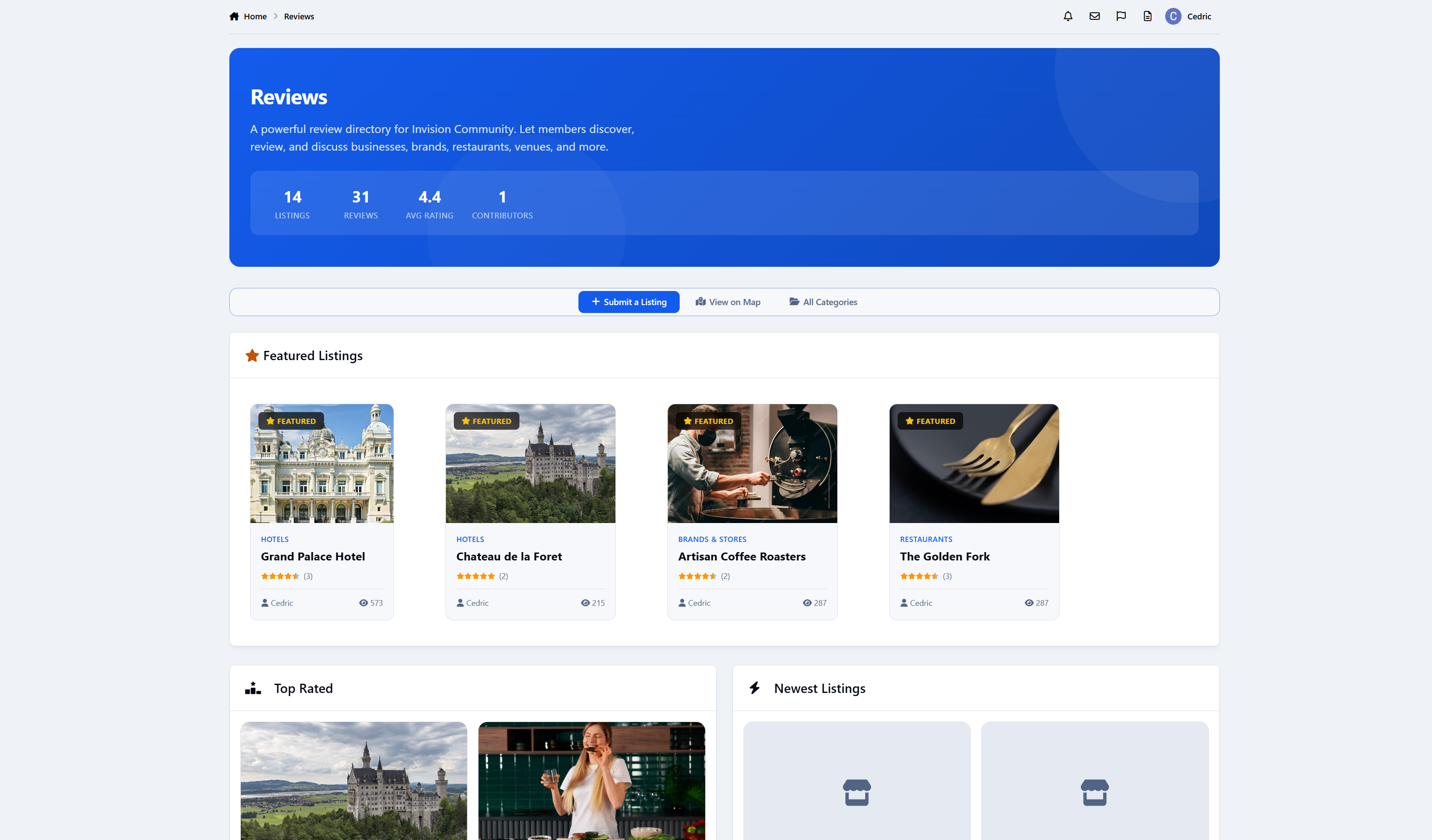
Hero stats dashboard: total listings, total reviews, average rating, contributor count
Featured listings (random rotation, configurable count 1–12)
Top Rated, Newest, and Recent Reviews sections on homepage
Unlimited nested categories with drag-and-drop ordering and custom icons
Grid and List view toggle for category browsing
Advanced sorting: newest, top rated, most reviewed, most viewed
Full pagination with AJAX load-more
SEO-friendly URLs with auto-generated slugs
IPS Search and Sitemap integration
Browse all listings with multi-sort and filtering
RSS feeds for new listings (global and per-category)
Side-by-side listing comparison (select 2–4 listings to compare ratings, pricing, location, and more)
Your directory looks native, fast, and fully integrated.
Listing Pages
Each listing includes:
Cover image with gallery tab for multiple screenshots
Interactive Lightbox for browsing screenshots
Star ratings with review count
Contact actions: website link, phone, email (toggleable via ACP setting)
Price range indicator ($$$)
Location with interactive map (Leaflet/OpenStreetMap)
Hours of operation (toggleable via ACP setting)
Social media links: Facebook, Twitter/X, Instagram, LinkedIn, YouTube, TikTok (toggleable via ACP setting)
Admin-defined custom fields (per-category, with sidebar/listing display options)
Tags and prefix support
Related listings ("More in this category")
Tabbed interface: Overview, Reviews, Gallery, Comments
Automatic forum topic creation (per-category, with configurable prefix/suffix)
Claim system - members can claim ownership of listings
Add to comparison directly from listing cards or detail pages
Reviews & Ratings
1-5 star rating system
Author responses - listing owners can reply to reviews
Photo reviews - attach images directly to reviews
Per-category review moderation (auto-approve or require approval)
Reactions on reviews, comments, and listings
Report Center integration for flagging abuse
Every review matters. Owners can respond. The community votes on helpfulness.
Comments & Social
Threaded comments on listings (per-category toggle)
Follow listings for updates
Follow categories for new listing notifications
Content sharing integration
Reactions support on all content types
Location & Mapping
Full geolocation support: address, city, region, country,
Interactive map view with up to 500 plotted listings
Per-category location settings: required, optional, or disabled
Map markers with listing info popups
"View on Map" link from homepage
Perfect for local business directories, travel guides, and venue reviews.
Comparison Tool
Compare 2-4 listings side by side in a detailed table
Persistent compare list via floating bottom bar
Add/remove listings from any browse page or listing detail page
Compares: rating, category, price range, website, phone, location, hours, claimed status, views, and date added
Moderation & Trust
Full approval workflows for listings, reviews, and comments
Per-category moderation settings
Hide with reason, edit history tracking
Moderator CP queue integration
Member restrictions (block submissions per-member)
IP address logging
Pin, feature, lock, and hide controls
Anonymous posting with staff visibility
You control the quality. Every piece of content goes through the gates you set.
Administration
Full IPS-native ACP experience:
Manage all listings: approve, feature, pin, hide, move, change author, delete
Advanced search: filter by name, author, rating, views, date, status
Quick filters: visible, hidden, unapproved, featured, pinned
Full Node-based category tree with permissions matrix
Custom fields builder (per-category assignment, multiple display locations)
Forum integration settings per category
Statistics: listings over time with area charts, date range filtering
Dashboard card with quick overview stats
Member ACP profile integration: listings submitted, reviews written, recent activity
Group permissions: view, submit, claim, review, comment, max listings per member
Landing page layout selector
Configurable limits for featured, per-page, and homepage sections
Toggle settings for contact fields, hours of operation, and social media links
Rebuild & Recount tool for recalculating all listing statistics
My Listings and My Reviews member pages accessible from front-end navigation
Built-in Widgets (5)
Widget
Description
Listing Feed
Configurable content feed of listings
Top Rated
Timeline-style top-rated listings with rank badges
Trending Listings
Engagement-scored trending items (7-day velocity algorithm)
Recent Reviews
Latest approved reviews with star ratings
Directory Stats
Overview statistics block
All widgets are sidebar/CMS compatible with configurable limits.
Background Automation
Review Reminder Task: Automatically notifies listing owners of unapproved reviews after 3 days without response. Runs every 6 hours, prevents duplicate notifications, scans a 14-day rolling window.
Rebuild & Recount Task: Recalculates review counts, comment counts, average ratings, and timestamps for all listings in batches of 50.
Trending Algorithm: 7-day engagement scoring: (reviews x 3) + (comments x 2) + views
Claiming System
Members can claim ownership of unclaimed listings
Permission-controlled per group
Tracked with full audit trail
Claimed listings show owner badge
Let your community build the directory - then let business owners step in and take ownership.
Forum Integration
Auto-create forum topics when listings are approved
Per-category forum assignment
Configurable topic title prefix and suffix
Two-way sync: edit listing => update topic
Optional: delete topic when listing is deleted
"View Forum Topic" and "Post to Forum" context menu links
Bridge your directory and your discussion forums seamlessly.
Perfect For
Restaurant and food review sites
Local business directories
Hotel and travel review platforms
Product review communities
Venue and event space directories
Service provider directories
Community-curated "best of" lists
Educational resource directories
IPS5.0.0+
Turn your community into a trusted review destination.
Reviews Directory is a comprehensive review and listing platform for Invision Community Suite v5 that lets you build a categorized directory of businesses, products, venues, or anything your community wants to review - complete with star ratings, location mapping, custom fields, forum integration, and deep IPS framework integration. Still in active development, more features coming soon!

Demo

Discovery & Browsing
4 configurable homepage layouts: Hero, Search-focused, Reviews-focused, and Feed/stream
Hero stats dashboard: total listings, total reviews, average rating, contributor count
Featured listings (random rotation, configurable count 1–12)
Top Rated, Newest, and Recent Reviews sections on homepage
Unlimited nested categories with drag-and-drop ordering and custom icons
Grid and List view toggle for category browsing
Advanced sorting: newest, top rated, most reviewed, most viewed
Full pagination with AJAX load-more
SEO-friendly URLs with auto-generated slugs
IPS Search and Sitemap integration
Browse all listings with multi-sort and filtering
RSS feeds for new listings (global and per-category)
Side-by-side listing comparison (select 2–4 listings to compare ratings, pricing, location, and more)
Your directory looks native, fast, and fully integrated.
Listing Pages
Each listing includes:
Cover image with gallery tab for multiple screenshots
Interactive Lightbox for browsing screenshots
Star ratings with review count
Contact actions: website link, phone, email (toggleable via ACP setting)
Price range indicator ($$$)
Location with interactive map (Leaflet/OpenStreetMap)
Hours of operation (toggleable via ACP setting)
Social media links: Facebook, Twitter/X, Instagram, LinkedIn, YouTube, TikTok (toggleable via ACP setting)
Admin-defined custom fields (per-category, with sidebar/listing display options)
Tags and prefix support
Related listings ("More in this category")
Tabbed interface: Overview, Reviews, Gallery, Comments
Automatic forum topic creation (per-category, with configurable prefix/suffix)
Claim system - members can claim ownership of listings
Add to comparison directly from listing cards or detail pages
Reviews & Ratings
1-5 star rating system
Author responses - listing owners can reply to reviews
Photo reviews - attach images directly to reviews
Per-category review moderation (auto-approve or require approval)
Reactions on reviews, comments, and listings
Report Center integration for flagging abuse
Every review matters. Owners can respond. The community votes on helpfulness.
Comments & Social
Threaded comments on listings (per-category toggle)
Follow listings for updates
Follow categories for new listing notifications
Content sharing integration
Reactions support on all content types
Location & Mapping
Full geolocation support: address, city, region, country,
Interactive map view with up to 500 plotted listings
Per-category location settings: required, optional, or disabled
Map markers with listing info popups
"View on Map" link from homepage
Perfect for local business directories, travel guides, and venue reviews.
Comparison Tool
Compare 2-4 listings side by side in a detailed table
Persistent compare list via floating bottom bar
Add/remove listings from any browse page or listing detail page
Compares: rating, category, price range, website, phone, location, hours, claimed status, views, and date added
Moderation & Trust
Full approval workflows for listings, reviews, and comments
Per-category moderation settings
Hide with reason, edit history tracking
Moderator CP queue integration
Member restrictions (block submissions per-member)
IP address logging
Pin, feature, lock, and hide controls
Anonymous posting with staff visibility
You control the quality. Every piece of content goes through the gates you set.
Administration
Full IPS-native ACP experience:
Manage all listings: approve, feature, pin, hide, move, change author, delete
Advanced search: filter by name, author, rating, views, date, status
Quick filters: visible, hidden, unapproved, featured, pinned
Full Node-based category tree with permissions matrix
Custom fields builder (per-category assignment, multiple display locations)
Forum integration settings per category
Statistics: listings over time with area charts, date range filtering
Dashboard card with quick overview stats
Member ACP profile integration: listings submitted, reviews written, recent activity
Group permissions: view, submit, claim, review, comment, max listings per member
Landing page layout selector
Configurable limits for featured, per-page, and homepage sections
Toggle settings for contact fields, hours of operation, and social media links
Rebuild & Recount tool for recalculating all listing statistics
My Listings and My Reviews member pages accessible from front-end navigation
Built-in Widgets (5)
Widget
Description
Listing Feed
Configurable content feed of listings
Top Rated
Timeline-style top-rated listings with rank badges
Trending Listings
Engagement-scored trending items (7-day velocity algorithm)
Recent Reviews
Latest approved reviews with star ratings
Directory Stats
Overview statistics block
All widgets are sidebar/CMS compatible with configurable limits.
Background Automation
Review Reminder Task: Automatically notifies listing owners of unapproved reviews after 3 days without response. Runs every 6 hours, prevents duplicate notifications, scans a 14-day rolling window.
Rebuild & Recount Task: Recalculates review counts, comment counts, average ratings, and timestamps for all listings in batches of 50.
Trending Algorithm: 7-day engagement scoring: (reviews x 3) + (comments x 2) + views
Claiming System
Members can claim ownership of unclaimed listings
Permission-controlled per group
Tracked with full audit trail
Claimed listings show owner badge
Let your community build the directory - then let business owners step in and take ownership.
Forum Integration
Auto-create forum topics when listings are approved
Per-category forum assignment
Configurable topic title prefix and suffix
Two-way sync: edit listing => update topic
Optional: delete topic when listing is deleted
"View Forum Topic" and "Post to Forum" context menu links
Bridge your directory and your discussion forums seamlessly.
Perfect For
Restaurant and food review sites
Local business directories
Hotel and travel review platforms
Product review communities
Venue and event space directories
Service provider directories
Community-curated "best of" lists
Educational resource directories
IPS ships with a built-in "Similar Content" feature. It works by matching tags - and only tags. If your members don't tag their content (and let's be honest, most don't), Similar Content shows nothing. Your sidebar stays empty, and your members never discover the conversations they'd actually care about.
Related Content does it differently.
Instead of relying on members to manually tag everything, Related Content reads the actual title of whatever your member is viewing and finds content that shares the same meaningful words. No tagging required. No manual curation. It just works.

Three matching methods, one widget
Keyword Matching: Extracts significant words from the title (filtering out noise like "the", "and", "how"), then searches across your entire content index using word-boundary matching. A topic called "Building REST APIs" will find other content about building, REST, and APIs - but won't false-match on words that merely contain those letters.
Tag Matching: For communities that do use tags, Related Content also supports tag-based discovery.
Hybrid Mode: Gets the best of both. Fills results from tag matches first, then supplements with keyword matches to always show relevant suggestions. No more empty sidebars.

Cross-content discovery
Related Content searches across your entire community:
Forum topics
Blog entries
Club posts
Pages/CMS articles
Database records
Any content type in the search index
A member reading a forum topic about "Migrating from MySQL 5 to MySQL 8" will see related blog posts, knowledge base articles, and database records - not just other forum topics.

Elasticsearch native support
If your community runs Elasticsearch, Related Content automatically uses its built-in "More Like This" query - a machine-learning-grade similarity engine that analyzes the full content, not just titles. No configuration change needed; it detects your search backend and adapts.

Permission-aware, always
Every result respects IPS group permissions. If a member can't see a forum, they won't see its topics in Related Content. If content is hidden or pending approval, it's excluded. No information leaks.

Configurable per widget
Drop the Discover widget into any sidebar, footer, or widget area. Each instance is independently configurable:
Custom title
Number of results (1-25)
Matching method (tags, keywords, or hybrid)
Place it on topic pages, blog entries, CMS articles - it automatically detects what content the member is viewing and finds related items.

ACP settings
Enable/disable globally with one toggle
Set the default matching method and result limit
Configure cache TTL for performance (default: 15 minutes)

More content discovery means more page views, longer sessions, and higher engagement. Members find conversations they didn't know existed. Old content resurfaces naturally. Your community feels bigger and more active - because it is.
IPS5.0.0+
IPS ships with a built-in "Similar Content" feature. It works by matching tags - and only tags. If your members don't tag their content (and let's be honest, most don't), Similar Content shows nothing. Your sidebar stays empty, and your members never discover the conversations they'd actually care about.
Related Content does it differently.
Instead of relying on members to manually tag everything, Related Content reads the actual title of whatever your member is viewing and finds content that shares the same meaningful words. No tagging required. No manual curation. It just works.

Three matching methods, one widget
Keyword Matching: Extracts significant words from the title (filtering out noise like "the", "and", "how"), then searches across your entire content index using word-boundary matching. A topic called "Building REST APIs" will find other content about building, REST, and APIs - but won't false-match on words that merely contain those letters.
Tag Matching: For communities that do use tags, Related Content also supports tag-based discovery.
Hybrid Mode: Gets the best of both. Fills results from tag matches first, then supplements with keyword matches to always show relevant suggestions. No more empty sidebars.

Cross-content discovery
Related Content searches across your entire community:
Forum topics
Blog entries
Club posts
Pages/CMS articles
Database records
Any content type in the search index
A member reading a forum topic about "Migrating from MySQL 5 to MySQL 8" will see related blog posts, knowledge base articles, and database records - not just other forum topics.

Elasticsearch native support
If your community runs Elasticsearch, Related Content automatically uses its built-in "More Like This" query - a machine-learning-grade similarity engine that analyzes the full content, not just titles. No configuration change needed; it detects your search backend and adapts.

Permission-aware, always
Every result respects IPS group permissions. If a member can't see a forum, they won't see its topics in Related Content. If content is hidden or pending approval, it's excluded. No information leaks.

Configurable per widget
Drop the Discover widget into any sidebar, footer, or widget area. Each instance is independently configurable:
Custom title
Number of results (1-25)
Matching method (tags, keywords, or hybrid)
Place it on topic pages, blog entries, CMS articles - it automatically detects what content the member is viewing and finds related items.

ACP settings
Enable/disable globally with one toggle
Set the default matching method and result limit
Configure cache TTL for performance (default: 15 minutes)

More content discovery means more page views, longer sessions, and higher engagement. Members find conversations they didn't know existed. Old content resurfaces naturally. Your community feels bigger and more active - because it is.
Automated Newsletter
The most powerful newsletter & digest system for Invision Community 5
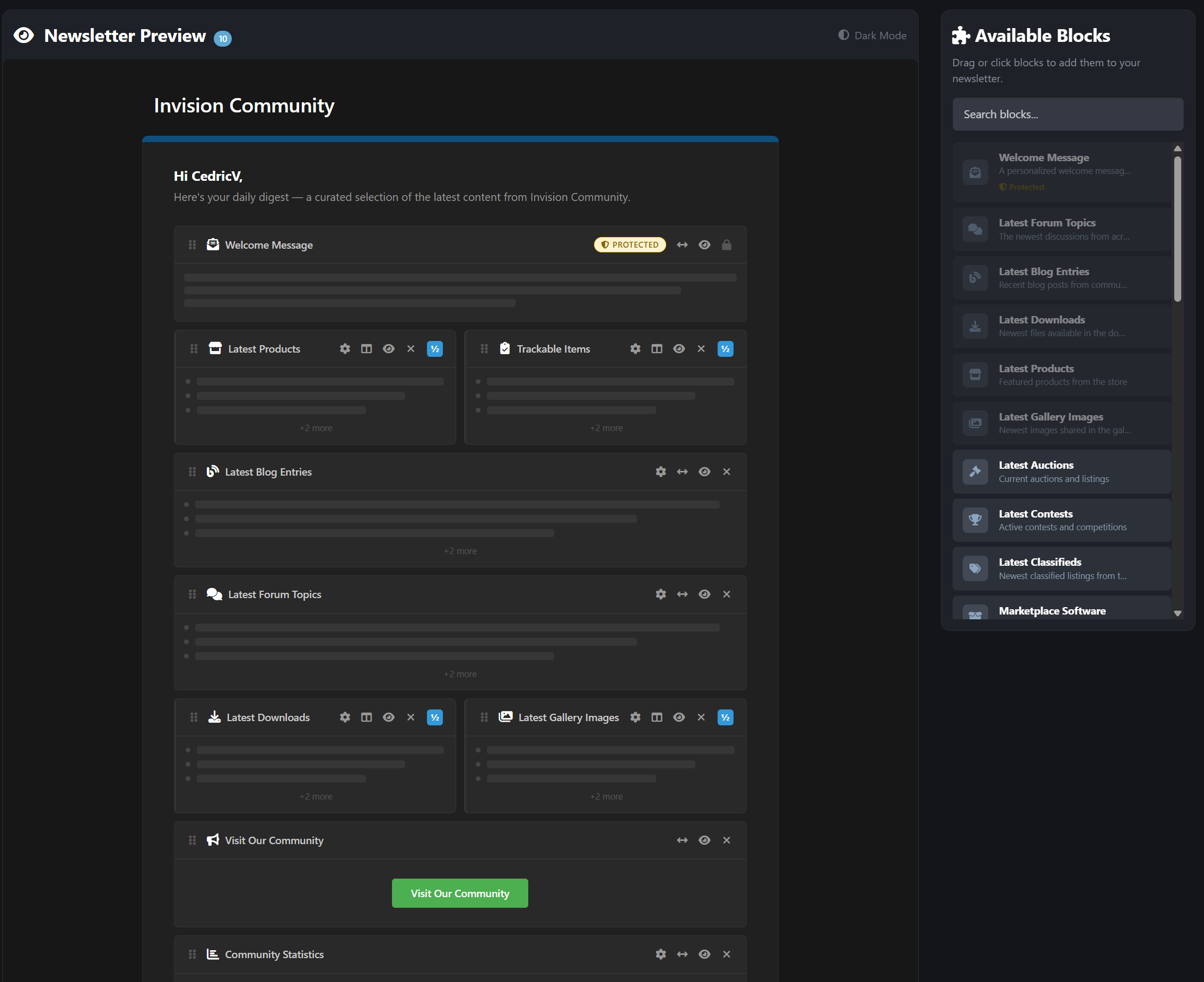
A powerful, fully block-based automated newsletter system for Invision Community 5 that lets administrators create structured, scheduled digests using native IPS email formatting.
Supports both official admin newsletters and customizable member-created digests, all delivered through IPS’s built-in email system without altering core templates. Simply create your newsletter by drag & dropping blocks inside the live preview. Even supporting 2-column design.

Core Features
Automated recurring newsletters - daily, weekly, monthly, or custom intervals
31 content block types pulling live data from major IPS applications
Visual drag-and-drop newsletter builder (admin & member)
Send-day scheduling - restrict sends to specific weekdays
Smart skip-empty - automatically skips sending when no new content exists
Two-column email layouts with side-by-side block support
Dark mode email preview inside the customizer
Configurable batch size per newsletter for server-friendly sending
31 Content Block Types
Pull live content dynamically from across your community:
Core IPS Applications
Forums + Specific forums selection
Blogs
Downloads
Gallery
Calendar
Commerce / Products
CMS / Pages Articles
Extended Content Support
Auctions
Contests
Classifieds
Marketplace
Links
Questions (Q&A)
Awards
Daily Prompts
Status Updates
Trending Content
Featured Content
Upcoming Events
Top Contributors
Recent Reviews
Active Clubs
Trackable Items (followed content)
Utility Blocks
Custom Text
Welcome Message
Call-to-Action Button
Sponsor / Advertiser Block
Image Block (with upload support)
Community Statistics Dashboard
Need compatibility with another 3rd-party app? I’m happy to add it. Feel free to post a feature request. Note: Depending on your installed 3rd party apps, your amount may be limited.
Member Personal Digests
Give your members control over what they receive.
Members can:
Create their own personalized newsletters
Use the drag-and-drop block customizer (front end)
Select content types
Configure limits and sorting
Choose frequency and send-days
Create up to 10 personal digests
Protected blocks ensure essential content always appears. These are automatically added when a member creates a new newsletter and cannot be disabled.
Each digest is fully independent with its own schedule.
Admin Newsletter Management
Powerful, intuitive control panel inside ACP:
Dashboard Overview
Total newsletters
Active newsletters
Subscriber counts
Send history
Per Newsletter Controls
Visual block customizer
Target by:
All members
Specific groups
Individual members
Force-subscribe option (mandatory newsletters)
One-click test email
Preview before send
Send now
Duplicate newsletter with all blocks
Import subscribers from targeting rules or IPS Bulk Email opt-ins
Logging
Complete send log
HTML content snapshots
Error tracking
Perfect For
Large communities
News & content-driven forums
Commerce-based sites
Membership communities
Private communities
Growing IPS sites that want structured communication
IPS5.0.0+
Automated Newsletter
The most powerful newsletter & digest system for Invision Community 5
A powerful, fully block-based automated newsletter system for Invision Community 5 that lets administrators create structured, scheduled digests using native IPS email formatting.
Supports both official admin newsletters and customizable member-created digests, all delivered through IPS’s built-in email system without altering core templates. Simply create your newsletter by drag & dropping blocks inside the live preview. Even supporting 2-column design.

Core Features
Automated recurring newsletters - daily, weekly, monthly, or custom intervals
31 content block types pulling live data from major IPS applications
Visual drag-and-drop newsletter builder (admin & member)
Send-day scheduling - restrict sends to specific weekdays
Smart skip-empty - automatically skips sending when no new content exists
Two-column email layouts with side-by-side block support
Dark mode email preview inside the customizer
Configurable batch size per newsletter for server-friendly sending
31 Content Block Types
Pull live content dynamically from across your community:
Core IPS Applications
Forums + Specific forums selection
Blogs
Downloads
Gallery
Calendar
Commerce / Products
CMS / Pages Articles
Extended Content Support
Auctions
Contests
Classifieds
Marketplace
Links
Questions (Q&A)
Awards
Daily Prompts
Status Updates
Trending Content
Featured Content
Upcoming Events
Top Contributors
Recent Reviews
Active Clubs
Trackable Items (followed content)
Utility Blocks
Custom Text
Welcome Message
Call-to-Action Button
Sponsor / Advertiser Block
Image Block (with upload support)
Community Statistics Dashboard
Need compatibility with another 3rd-party app? I’m happy to add it. Feel free to post a feature request. Note: Depending on your installed 3rd party apps, your amount may be limited.
Member Personal Digests
Give your members control over what they receive.
Members can:
Create their own personalized newsletters
Use the drag-and-drop block customizer (front end)
Select content types
Configure limits and sorting
Choose frequency and send-days
Create up to 10 personal digests
Protected blocks ensure essential content always appears. These are automatically added when a member creates a new newsletter and cannot be disabled.
Each digest is fully independent with its own schedule.
Admin Newsletter Management
Powerful, intuitive control panel inside ACP:
Dashboard Overview
Total newsletters
Active newsletters
Subscriber counts
Send history
Per Newsletter Controls
Visual block customizer
Target by:
All members
Specific groups
Individual members
Force-subscribe option (mandatory newsletters)
One-click test email
Preview before send
Send now
Duplicate newsletter with all blocks
Import subscribers from targeting rules or IPS Bulk Email opt-ins
Logging
Complete send log
HTML content snapshots
Error tracking
Perfect For
Large communities
News & content-driven forums
Commerce-based sites
Membership communities
Private communities
Growing IPS sites that want structured communication
Aqualis is the former Invisionite theme, now fully released for free and available. Fair warning: this theme does not play nice with a lot of navigation items.
Demo
Built with a modern ocean-inspired gradient, soft glass navigation, and a clean professional layout, this theme delivers a premium look without being overdesigned.

Features
Animated gradient hero header (animation can be simply disabled)
Glass-style navigation bar
Dark & light compatible design
Styled widgets & forum categories
Custom footer section (easily customizable)
Clean typography and spacing
Fully responsive
Design Style
Aqualis blends deep navy tones with aqua highlights and smooth wave accents.
It’s ideal for:
Community forums
Tech projects
Creative platforms
Premium product showcases
IPS5.0.0+
Aqualis is the former Invisionite theme, now fully released for free and available. Fair warning: this theme does not play nice with a lot of navigation items.
Demo
Built with a modern ocean-inspired gradient, soft glass navigation, and a clean professional layout, this theme delivers a premium look without being overdesigned.

Features
Animated gradient hero header (animation can be simply disabled)
Glass-style navigation bar
Dark & light compatible design
Styled widgets & forum categories
Custom footer section (easily customizable)
Clean typography and spacing
Fully responsive
Design Style
Aqualis blends deep navy tones with aqua highlights and smooth wave accents.
It’s ideal for:
Community forums
Tech projects
Creative platforms
Premium product showcases
See our demo here
PayWall Topics brings real monetization into Invision Community v5.
Members can sell locked premium content directly inside forum topics, fully integrated with IPS Commerce.
Sell guides, tutorials, exclusive insights, premium discussions, downloads, and private resources without sending users anywhere else.
Give your members the ability to earn and your platform the ability to scale.
Core Monetization Features
PayWall Topic Creation
When permitted, members can create topics with locked premium content using:
Rich text editor
Images, videos, etc.
Attachments
Custom pricing per topic
Premium links
The premium block appears directly inside the topic after the first post.
IPS Commerce Integration
Full checkout flow powered by IPS Nexus invoices with proper gateway support.
One-Time Purchase Model
Pay once
Permanent access
No subscriptions
No renewals
Simple and clean.
Seller Account Credit + Commission
Revenue is automatically credited to the topic creator’s Commerce account balance.
You set the platform commission from 0–100%.
The system automatically calculates the split and credits the seller’s net amount.
Transparent. Automated. Built for real marketplaces.

Access Control
Granular permission system designed for production communities.
Forum-Based Gating
Select exactly which forums allow PayWall topics.
Group Permissions
Separate controls for:
Who can create paywalls
Who can purchase
Who can bypass and view free

Frontend Experience
Clean, modern, and fully integrated into the topic view.
PayWall Block
A purple-bordered premium content block injected after the first post, featuring:
Lock icon
Price display
Purchase button
Custom lock message
It feels native, not bolted on.
Unlocked View
Purchased or bypassed users see the full rich-text premium content inline, exactly where it belongs.
Crown Badge
PayWall topics display a crown badge in topic listings for instant visibility.
Custom Lock Message
Admins can configure the lock message using a rich text editor. Add formatting, links, persuasion copy, anything you need.
Guest Handling
Guests see a clear “Log in to Purchase” button instead of checkout.

Member Dashboard
Members and sellers get a dedicated PayWall control center.
My Purchases
Members can see:
Purchased topics
Status
Price
Date
Browse Topics Directory
Lists all available PayWall topics with clear status badges:
Purchased
Access Granted
Available
My PayWall Topics
Sellers can view:
Their topics
Buyer count badges
Who bought their topics
Earnings
Buyers List
Sellers and admins can click the buyer badge to see exactly who purchased each topic.
Admins also see buyer counts across all topics.

Standalone Directory
PayWall Topics Directory
A dedicated /paywall/ page listing all premium topics with:
Forum name
Price
Purchase status
Monetization becomes discoverable instead of hidden inside random threads.

Notifications
Built-in notification system keeps everyone informed.
Buyer Notification
Sent instantly after successful purchase.
Seller Notification
Sent to topic creators when someone purchases their content.
Members can enable or disable PayWall notifications in their notification settings.

Admin Control Panel
Full IPS-native ACP experience.
General Settings
Forum selection
Group permissions for create, purchase, and bypass
Commission Settings
Set site commission percentage
Display Settings
Custom PayWall lock message editor
Manage Purchases
Complete purchase table including:
Member
Topic
Price
Date
Invoice ID
Active status


Perfect For
Premium guide communities
Trading and investment forums
Business and entrepreneurship boards
Education platforms
Creator-driven ecosystems
Digital resource hubs
Knowledge marketplaces
If your community produces value, PayWall Topics turns that value into revenue without changing how your forum works.
This is not a cosmetic add-on.
It adds a full creator monetization layer to Invision Community.
IPS5.0.0+
See our demo here
PayWall Topics brings real monetization into Invision Community v5.
Members can sell locked premium content directly inside forum topics, fully integrated with IPS Commerce.
Sell guides, tutorials, exclusive insights, premium discussions, downloads, and private resources without sending users anywhere else.
Give your members the ability to earn and your platform the ability to scale.
Core Monetization Features
PayWall Topic Creation
When permitted, members can create topics with locked premium content using:
Rich text editor
Images, videos, etc.
Attachments
Custom pricing per topic
Premium links
The premium block appears directly inside the topic after the first post.
IPS Commerce Integration
Full checkout flow powered by IPS Nexus invoices with proper gateway support.
One-Time Purchase Model
Pay once
Permanent access
No subscriptions
No renewals
Simple and clean.
Seller Account Credit + Commission
Revenue is automatically credited to the topic creator’s Commerce account balance.
You set the platform commission from 0–100%.
The system automatically calculates the split and credits the seller’s net amount.
Transparent. Automated. Built for real marketplaces.

Access Control
Granular permission system designed for production communities.
Forum-Based Gating
Select exactly which forums allow PayWall topics.
Group Permissions
Separate controls for:
Who can create paywalls
Who can purchase
Who can bypass and view free

Frontend Experience
Clean, modern, and fully integrated into the topic view.
PayWall Block
A purple-bordered premium content block injected after the first post, featuring:
Lock icon
Price display
Purchase button
Custom lock message
It feels native, not bolted on.
Unlocked View
Purchased or bypassed users see the full rich-text premium content inline, exactly where it belongs.
Crown Badge
PayWall topics display a crown badge in topic listings for instant visibility.
Custom Lock Message
Admins can configure the lock message using a rich text editor. Add formatting, links, persuasion copy, anything you need.
Guest Handling
Guests see a clear “Log in to Purchase” button instead of checkout.

Member Dashboard
Members and sellers get a dedicated PayWall control center.
My Purchases
Members can see:
Purchased topics
Status
Price
Date
Browse Topics Directory
Lists all available PayWall topics with clear status badges:
Purchased
Access Granted
Available
My PayWall Topics
Sellers can view:
Their topics
Buyer count badges
Who bought their topics
Earnings
Buyers List
Sellers and admins can click the buyer badge to see exactly who purchased each topic.
Admins also see buyer counts across all topics.

Standalone Directory
PayWall Topics Directory
A dedicated /paywall/ page listing all premium topics with:
Forum name
Price
Purchase status
Monetization becomes discoverable instead of hidden inside random threads.

Notifications
Built-in notification system keeps everyone informed.
Buyer Notification
Sent instantly after successful purchase.
Seller Notification
Sent to topic creators when someone purchases their content.
Members can enable or disable PayWall notifications in their notification settings.

Admin Control Panel
Full IPS-native ACP experience.
General Settings
Forum selection
Group permissions for create, purchase, and bypass
Commission Settings
Set site commission percentage
Display Settings
Custom PayWall lock message editor
Manage Purchases
Complete purchase table including:
Member
Topic
Price
Date
Invoice ID
Active status


Perfect For
Premium guide communities
Trading and investment forums
Business and entrepreneurship boards
Education platforms
Creator-driven ecosystems
Digital resource hubs
Knowledge marketplaces
If your community produces value, PayWall Topics turns that value into revenue without changing how your forum works.
This is not a cosmetic add-on.
It adds a full creator monetization layer to Invision Community.
Monthly Awards lets you run structured, recurring awards like Member of the Month, Site of the Month, or Post/Topic of the Month without spreadsheets, manual threads, or constant admin work.
Everything runs on a clear cycle. Submissions open, voting starts, winners are selected, rewards are handed out, and the next month is ready to go.
If you want recognition, engagement, and friendly competition that actually sticks, this app does the heavy lifting for you.
A demo of this can be found here on Administrata
Why this app exists
Communities thrive when people feel noticed.
Monthly Awards gives you a simple but powerful way to:
highlight great members
reward quality content
encourage participation
create recurring events people look forward to
It works just as well for public contests as it does for internal staff or team recognition.
Award programs that fit your community
Create as many award programs as you want, each with its own purpose and style.
You can run:
Member of the Month to reward helpful or active members
Content of the Month for posts, images, downloads, or any community content
Site of the Month to showcase member websites or projects
Each program has its own description, images, rules page, and schedule, so everything is clear and easy to follow.
Featured programs can be highlighted on the awards homepage to draw attention.
Automatic monthly cycles
Every award runs on a repeating monthly cycle with clear phases:
pending
submission
voting
completed
Phases move automatically based on dates, so you are not babysitting the system every month. You can still step in manually if needed.
Each cycle can have its own theme, prizes, and statistics, making every month feel fresh instead of copy-paste.
Simple submissions for members
Members can submit entries in ways that make sense for each award:
nominate another member
submit their own website or project
link to forum posts, gallery images, or other content
Entries support images and rich descriptions, so submissions feel polished instead of rushed.
Members can manage their own entries, and nominated users are notified so nothing goes unnoticed.
Voting that feels fair and fun
Voting is designed to encourage participation without chaos:
vote for one entry or multiple entries
optional anonymous voting
real-time vote counts
notifications when entries receive votes
This makes feature contests, content awards, and popularity-based recognition feel transparent and engaging.
Clear winners and permanent history
Winners can be selected automatically by vote count or manually if needed.
You can award:
first, second, and third place
multiple winners
tied positions
Every win is saved permanently. Past winners are never lost, making it easy to build a real history instead of resetting every month.
Rewards that actually matter
Winning an award should feel good.
Winners can receive:
badges
reputation points
group promotions
store credits
custom or digital prizes
Rewards are handed out automatically when winners are chosen, so there is no follow-up work or forgotten promises.
Prize pools for bigger contests
For giveaways and larger events, you can build prize pools with:
multiple prize types
limited inventory tracking
position-based prizes
random weighted selection
This is perfect for sponsor giveaways, digital keys, or seasonal competitions.
Announcements and notifications
Members stay informed without needing to hunt for updates:
new cycle started
submissions open
voting open
reminders before deadlines
winner announcements
prizes won
Announcements can also be posted automatically to your forums, keeping activity visible and driving traffic.
Leaderboards and recognition
Recognition does not stop at one win.
The app includes:
yearly leaderboards
per-program rankings
total wins and votes received
historical browsing of past years
This turns awards into long-term motivation instead of one-off events.
Profile integration
Members get a dedicated awards area on their profile showing:
awards won
prizes received
win and vote statistics
earned badges
It becomes a visible status symbol, not just a forgotten badge.
Widgets for visibility
Show awards across your community with widgets like:
active awards
awards currently in voting
recent winners
hall of fame
featured program
This keeps awards visible instead of hidden in a menu.
IPS5.0.0+
Monthly Awards lets you run structured, recurring awards like Member of the Month, Site of the Month, or Post/Topic of the Month without spreadsheets, manual threads, or constant admin work.
Everything runs on a clear cycle. Submissions open, voting starts, winners are selected, rewards are handed out, and the next month is ready to go.
If you want recognition, engagement, and friendly competition that actually sticks, this app does the heavy lifting for you.
A demo of this can be found here on Administrata
Why this app exists
Communities thrive when people feel noticed.
Monthly Awards gives you a simple but powerful way to:
highlight great members
reward quality content
encourage participation
create recurring events people look forward to
It works just as well for public contests as it does for internal staff or team recognition.
Award programs that fit your community
Create as many award programs as you want, each with its own purpose and style.
You can run:
Member of the Month to reward helpful or active members
Content of the Month for posts, images, downloads, or any community content
Site of the Month to showcase member websites or projects
Each program has its own description, images, rules page, and schedule, so everything is clear and easy to follow.
Featured programs can be highlighted on the awards homepage to draw attention.
Automatic monthly cycles
Every award runs on a repeating monthly cycle with clear phases:
pending
submission
voting
completed
Phases move automatically based on dates, so you are not babysitting the system every month. You can still step in manually if needed.
Each cycle can have its own theme, prizes, and statistics, making every month feel fresh instead of copy-paste.
Simple submissions for members
Members can submit entries in ways that make sense for each award:
nominate another member
submit their own website or project
link to forum posts, gallery images, or other content
Entries support images and rich descriptions, so submissions feel polished instead of rushed.
Members can manage their own entries, and nominated users are notified so nothing goes unnoticed.
Voting that feels fair and fun
Voting is designed to encourage participation without chaos:
vote for one entry or multiple entries
optional anonymous voting
real-time vote counts
notifications when entries receive votes
This makes feature contests, content awards, and popularity-based recognition feel transparent and engaging.
Clear winners and permanent history
Winners can be selected automatically by vote count or manually if needed.
You can award:
first, second, and third place
multiple winners
tied positions
Every win is saved permanently. Past winners are never lost, making it easy to build a real history instead of resetting every month.
Rewards that actually matter
Winning an award should feel good.
Winners can receive:
badges
reputation points
group promotions
store credits
custom or digital prizes
Rewards are handed out automatically when winners are chosen, so there is no follow-up work or forgotten promises.
Prize pools for bigger contests
For giveaways and larger events, you can build prize pools with:
multiple prize types
limited inventory tracking
position-based prizes
random weighted selection
This is perfect for sponsor giveaways, digital keys, or seasonal competitions.
Announcements and notifications
Members stay informed without needing to hunt for updates:
new cycle started
submissions open
voting open
reminders before deadlines
winner announcements
prizes won
Announcements can also be posted automatically to your forums, keeping activity visible and driving traffic.
Leaderboards and recognition
Recognition does not stop at one win.
The app includes:
yearly leaderboards
per-program rankings
total wins and votes received
historical browsing of past years
This turns awards into long-term motivation instead of one-off events.
Profile integration
Members get a dedicated awards area on their profile showing:
awards won
prizes received
win and vote statistics
earned badges
It becomes a visible status symbol, not just a forgotten badge.
Widgets for visibility
Show awards across your community with widgets like:
active awards
awards currently in voting
recent winners
hall of fame
featured program
This keeps awards visible instead of hidden in a menu.
Software Marketplace is a powerful storefront application for Invision Community Suite v5 that allows you to sell, distribute, manage, and monetize software, themes, plugins, and digital resources - complete with Commerce integration, reviews, creator dashboards, commissions, and deep IPS framework integration.
A demo can be found here: https://administrata.net/software/
Storefront & Discovery
Configurable homepage sections: Featured, Latest, Most Popular, Top Rated, Recently Updated
Unlimited nested categories with drag-and-drop ordering
Responsive CSS Grid layout (2–6 columns configurable)
Screenshot cycling on hover (adjustable speed)
Advanced sorting (date, updated, downloads, rating, price, name)
SEO-friendly URLs
IPS Search + Sitemap integration
Full pagination everywhere
Your marketplace looks modern, fast, and built-in.
Software Item Pages
Each item includes:
Full detail page with screenshots, description, version info
Interactive gallery
Complete version history with changelogs
Multi-file releases (up to 20 files per version)
“More from this Creator” auto section
Admin-defined custom fields (with purchasers-only visibility option)
Optional install URL requirement
Automatic forum topic creation (per category)
Creator TOS agreement dialog before purchase
Commerce & Monetization
Deep integration with Invision Community and its Commerce system.
Free & paid items
IPS Commerce (Nexus) invoice flow
Refund callbacks auto-deactivate licenses
Optional recurring renewals (1–60 months)
Platform commission system (0–100%, 2 decimals)
Automatic creator net calculation
External purchase links supported
You control the commission. Creators see transparent earnings. Everything is automated.
Reviews & Social Features
1–5 star purchaser-only reviews
Author replies
Up/down voting
Review editing & moderation
Report Center integration
Follow items or categories
Version update subscriptions
9 built-in notification types
Creator Dashboard
Creators get a professional control center:
Item management panel
Sales overview (gross, commission, net)
Sales history filtering
TOS template manager
Resource Teams (collaborator permissions)
Buyer Dashboard (My Licenses)
Buyers can:
View purchase history
Manage install URLs
Download latest or older versions
Access gated files securely
Powerful Admin Control Panel
Full IPS-native ACP experience:
Manage items (approval, feature, author change, delete)
Full Node-based category system
Advanced custom fields (IPS CustomField-powered)
Commission reporting with breakdown tables
Downloads importer
Background tasks (review reminders, trending algorithm snapshots)
Cross-app bridges (Support Tickets, Trackable)
Built-in Widgets (6)
Category Navigation
Latest Reviews
Latest Updates
Trending Resources (velocity-based algorithm)
Top Resources
Resource Stats
Each widget supports configurable limits (1–25 items).
Migration Tool Included
Import directly from IPS Downloads:
Files (multi-file supported)
Screenshots
Version history
Reviews
Comments are deliberately not a feature in Software Marketplace. Instead the comments will be imported to the forum topic
Nexus purchases
No manual rebuilding required. You don't lose ANY data.
Perfect For
Theme marketplaces
Plugin marketplaces
Code distribution hubs
Community-driven developer ecosystems
Premium add-on stores
Private licensing portals
IPS5.0.0+
Software Marketplace is a powerful storefront application for Invision Community Suite v5 that allows you to sell, distribute, manage, and monetize software, themes, plugins, and digital resources - complete with Commerce integration, reviews, creator dashboards, commissions, and deep IPS framework integration.
A demo can be found here: https://administrata.net/software/
Storefront & Discovery
Configurable homepage sections: Featured, Latest, Most Popular, Top Rated, Recently Updated
Unlimited nested categories with drag-and-drop ordering
Responsive CSS Grid layout (2–6 columns configurable)
Screenshot cycling on hover (adjustable speed)
Advanced sorting (date, updated, downloads, rating, price, name)
SEO-friendly URLs
IPS Search + Sitemap integration
Full pagination everywhere
Your marketplace looks modern, fast, and built-in.
Software Item Pages
Each item includes:
Full detail page with screenshots, description, version info
Interactive gallery
Complete version history with changelogs
Multi-file releases (up to 20 files per version)
“More from this Creator” auto section
Admin-defined custom fields (with purchasers-only visibility option)
Optional install URL requirement
Automatic forum topic creation (per category)
Creator TOS agreement dialog before purchase
Commerce & Monetization
Deep integration with Invision Community and its Commerce system.
Free & paid items
IPS Commerce (Nexus) invoice flow
Refund callbacks auto-deactivate licenses
Optional recurring renewals (1–60 months)
Platform commission system (0–100%, 2 decimals)
Automatic creator net calculation
External purchase links supported
You control the commission. Creators see transparent earnings. Everything is automated.
Reviews & Social Features
1–5 star purchaser-only reviews
Author replies
Up/down voting
Review editing & moderation
Report Center integration
Follow items or categories
Version update subscriptions
9 built-in notification types
Creator Dashboard
Creators get a professional control center:
Item management panel
Sales overview (gross, commission, net)
Sales history filtering
TOS template manager
Resource Teams (collaborator permissions)
Buyer Dashboard (My Licenses)
Buyers can:
View purchase history
Manage install URLs
Download latest or older versions
Access gated files securely
Powerful Admin Control Panel
Full IPS-native ACP experience:
Manage items (approval, feature, author change, delete)
Full Node-based category system
Advanced custom fields (IPS CustomField-powered)
Commission reporting with breakdown tables
Downloads importer
Background tasks (review reminders, trending algorithm snapshots)
Cross-app bridges (Support Tickets, Trackable)
Built-in Widgets (6)
Category Navigation
Latest Reviews
Latest Updates
Trending Resources (velocity-based algorithm)
Top Resources
Resource Stats
Each widget supports configurable limits (1–25 items).
Migration Tool Included
Import directly from IPS Downloads:
Files (multi-file supported)
Screenshots
Version history
Reviews
Comments are deliberately not a feature in Software Marketplace. Instead the comments will be imported to the forum topic
Nexus purchases
No manual rebuilding required. You don't lose ANY data.
Perfect For
Theme marketplaces
Plugin marketplaces
Code distribution hubs
Community-driven developer ecosystems
Premium add-on stores
Private licensing portals
Gravatar is widely adopted and used by millions of users across the web, making it a familiar and low-friction option for profile photos.
Gravatar Support adds optional Gravatar integration to your Invision Community, allowing members to automatically use their Gravatar as a profile photo.
When enabled, it automatically grabs their Gravatar if they haven’t uploaded a custom avatar/photo. Uploaded profile photos are always respected and never overridden. For communities with existing users, an optional ACP conversion tool lets administrators safely enable Gravatar for eligible members with a single click.
The app is lightweight, non-intrusive, and fully compatible with Invision Community v5.
Key features:
Global ACP toggle for Gravatar support
Safe fallback to default IPS avatars
Optional ACP tool to enable Gravatar for existing members
No impact on uploaded profile photos
Perfect for communities that want effortless profile photos with zero disruption.
IPS5.0.0+
Gravatar is widely adopted and used by millions of users across the web, making it a familiar and low-friction option for profile photos.
Gravatar Support adds optional Gravatar integration to your Invision Community, allowing members to automatically use their Gravatar as a profile photo.
When enabled, it automatically grabs their Gravatar if they haven’t uploaded a custom avatar/photo. Uploaded profile photos are always respected and never overridden. For communities with existing users, an optional ACP conversion tool lets administrators safely enable Gravatar for eligible members with a single click.
The app is lightweight, non-intrusive, and fully compatible with Invision Community v5.
Key features:
Global ACP toggle for Gravatar support
Safe fallback to default IPS avatars
Optional ACP tool to enable Gravatar for existing members
No impact on uploaded profile photos
Perfect for communities that want effortless profile photos with zero disruption.
Trackable for Invision Community 5
Bugs, features, tasks, and reminders. All tracked in one place.
Running a community or project usually means juggling bug reports, feature ideas, staff tasks, and personal notes across forum posts, messages, and spreadsheets. Trackable replaces all of that with one structured system built directly into Invision Community.
Trackable lets you create clear, organized items with states, priorities, ownership, history, and optional discussion, so nothing gets lost and everyone knows what is happening.

Why Trackable is Useful
As a bug tracker:

Members can submit bug reports with priority, detailed descriptions, and optional discussion. Staff can assign bugs, move them through states like Open, In Progress, and Fixed, and keep a full history of changes. No more guessing what was fixed or forgotten.

For feature requests

Feature ideas stay organized instead of buried in forum threads. Members can vote on requests, staff can respond, and progress is visible from suggestion to completion. This makes it easy to see what the community actually wants.

For tasks and internal work

Track staff tasks, moderation follow-ups, content plans, or admin reminders. Assign items, set due dates, and see workloads at a glance. It works just as well for private staff use as it does for public tracking.

Features
Flexible item types like Bug Reports, Feature Requests, Tasks, or Reminders
Priority levels with clear visual indicators
Assign items to members with proper permissions
Per-type workflows with custom states
Public, shared, or private visibility options
Voting for feature requests and ideas
Watch items and get notified when things change
In-app comments or linked forum discussions
Full activity timeline showing every change
Clean browse pages, filters, and personal dashboards
Powerful admin tools for managing everything from one place

If you run a community that needs structure without complexity, Trackable gives you clarity, accountability, and visibility without forcing you to rely on external tools or messy forum threads.
IPS5.0.0+
Trackable for Invision Community 5
Bugs, features, tasks, and reminders. All tracked in one place.
Running a community or project usually means juggling bug reports, feature ideas, staff tasks, and personal notes across forum posts, messages, and spreadsheets. Trackable replaces all of that with one structured system built directly into Invision Community.
Trackable lets you create clear, organized items with states, priorities, ownership, history, and optional discussion, so nothing gets lost and everyone knows what is happening.

Why Trackable is Useful
As a bug tracker:

Members can submit bug reports with priority, detailed descriptions, and optional discussion. Staff can assign bugs, move them through states like Open, In Progress, and Fixed, and keep a full history of changes. No more guessing what was fixed or forgotten.

For feature requests

Feature ideas stay organized instead of buried in forum threads. Members can vote on requests, staff can respond, and progress is visible from suggestion to completion. This makes it easy to see what the community actually wants.

For tasks and internal work

Track staff tasks, moderation follow-ups, content plans, or admin reminders. Assign items, set due dates, and see workloads at a glance. It works just as well for private staff use as it does for public tracking.

Features
Flexible item types like Bug Reports, Feature Requests, Tasks, or Reminders
Priority levels with clear visual indicators
Assign items to members with proper permissions
Per-type workflows with custom states
Public, shared, or private visibility options
Voting for feature requests and ideas
Watch items and get notified when things change
In-app comments or linked forum discussions
Full activity timeline showing every change
Clean browse pages, filters, and personal dashboards
Powerful admin tools for managing everything from one place

If you run a community that needs structure without complexity, Trackable gives you clarity, accountability, and visibility without forcing you to rely on external tools or messy forum threads.
Classifieds for Invision Community 5 lets your members buy, sell, trade, and promote items in a clean, modern interface.
Running a hobby forum, local community, gaming site, or niche marketplace? This app gives your users a familiar, easy way to list items and connect.

Simple, powerful listings
Members can create rich listings with:
Multiple images
Clear pricing (paid, free, or negotiable)
Item condition and location
Automatic expiration and renewals
Everything stays clean, organised, and easy to browse.

A browsing experience people enjoy
Grid and list views
Advanced filters and smart sorting
Save listings for later
It feels more like a real marketplace - not a forum pretending to be one.

Powerful moderation & control
Admins and moderators get:
Full category control with custom rules
Optional approval queues
Activity logs and bulk actions
Seller overviews and listing stats
Soft deletes to recover mistakes
Everything you’d expect from a serious IPS app.

Early Release
This app is actively under development.
Upcoming features include:
Featured listings
Paid packages and monetization options
Additional marketplace tools
Replies, reactions and auto topic creation
Digital file sales
....
Feedback and feature requests are very welcome - early adopters help shape the roadmap.
IPS5.0.0+
Classifieds for Invision Community 5 lets your members buy, sell, trade, and promote items in a clean, modern interface.
Running a hobby forum, local community, gaming site, or niche marketplace? This app gives your users a familiar, easy way to list items and connect.

Simple, powerful listings
Members can create rich listings with:
Multiple images
Clear pricing (paid, free, or negotiable)
Item condition and location
Automatic expiration and renewals
Everything stays clean, organised, and easy to browse.

A browsing experience people enjoy
Grid and list views
Advanced filters and smart sorting
Save listings for later
It feels more like a real marketplace - not a forum pretending to be one.

Powerful moderation & control
Admins and moderators get:
Full category control with custom rules
Optional approval queues
Activity logs and bulk actions
Seller overviews and listing stats
Soft deletes to recover mistakes
Everything you’d expect from a serious IPS app.

Early Release
This app is actively under development.
Upcoming features include:
Featured listings
Paid packages and monetization options
Additional marketplace tools
Replies, reactions and auto topic creation
Digital file sales
....
Feedback and feature requests are very welcome - early adopters help shape the roadmap.

Top Developers

Last reviews

Applications Directory

A complete and convenient directory of applications for Invision Community, with categorization and sorting options.

Ratings and feedback

Only verified and trusted reviews!

Add new Application

Any developer can add their application to this directory.

You need to create account

Configure browser push notifications

Chrome (Android)
  1. Tap the lock icon next to the address bar.
  2. Tap Permissions → Notifications.
  3. Adjust your preference.
Chrome (Desktop)
  1. Click the padlock icon in the address bar.
  2. Select Site settings.
  3. Find Notifications and adjust your preference.