Pulse — traffic analytics that never leave your database
- Category Analytics & Stats
- Downloads 59
- Compatibility IC5: 5.0.0+
- Updated
Description
Pulse — traffic analytics that never leave your database
Invision Community tells you a great deal about your content. Registrations, posts, reactions, badges, points, solved rate — there are forty statistics screens in the AdminCP and they are genuinely good.
None of them tell you about your traffic. Not pageviews. Not visitors. Not where anybody came from. Guests, who are most of the people reading your community, appear nowhere at all — they exist only in the sessions table, which is wiped continuously.
The official answer is Google Analytics
Invision Community ships an integration whose entire job is injecting Google's tracking script into your pages. That is the supported route, and for a lot of communities it is not a route at all: a cookie banner, a data-protection question you would rather not answer, and your members' browsing habits handed to an advertising company.
Pulse is the third option. Every figure below is measured on your own server, stored in your own database, and shown in your own AdminCP. Nothing is sent anywhere.
What it measures
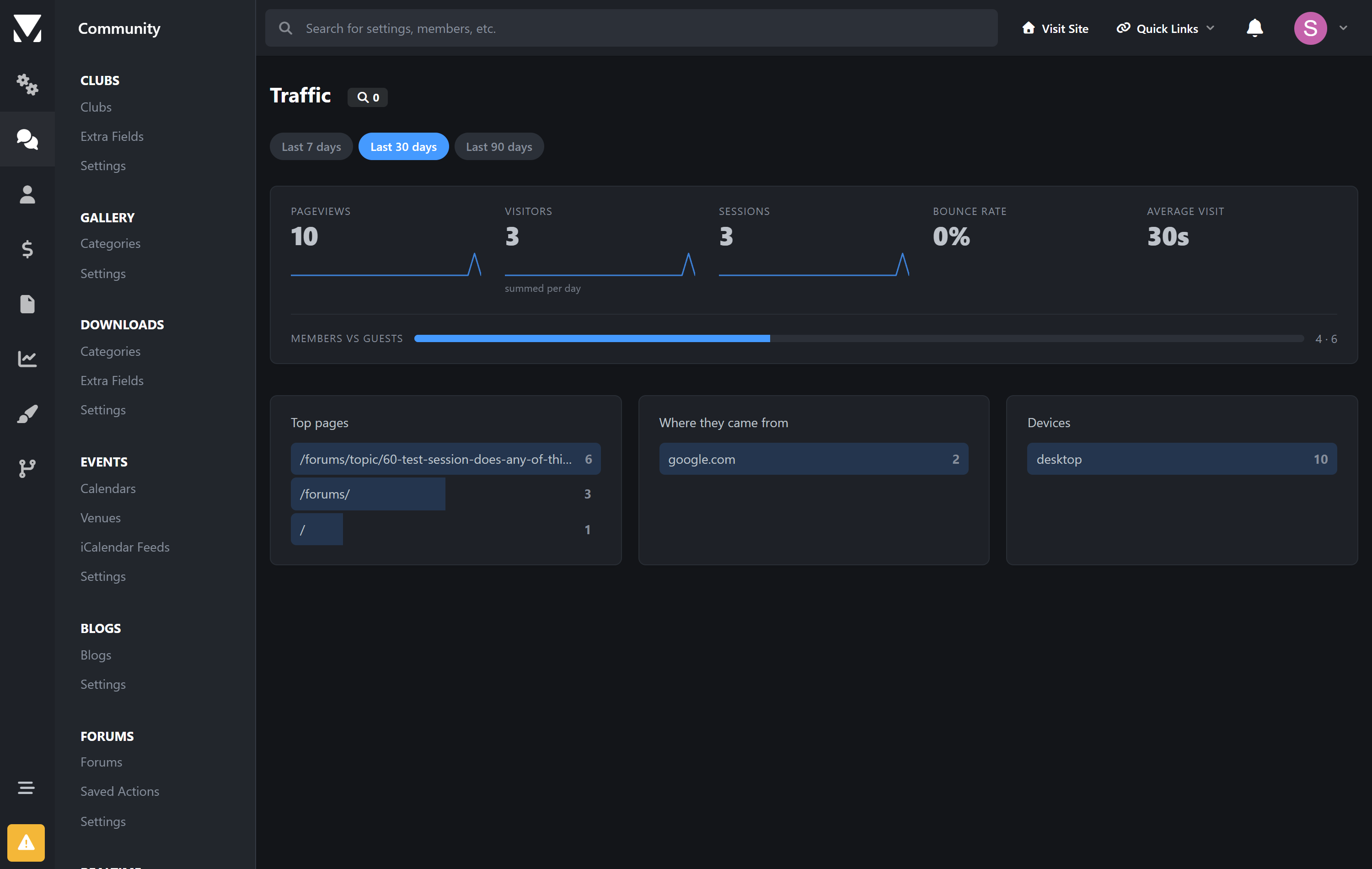
Headline | Pageviews · visitors · sessions · bounce rate · average visit length |
|---|---|
Where they went | Top pages, with the whole path — not just content items |
Where they came from | Referring sites, with your own domain excluded |
Who | Members against guests, and desktop against mobile and tablet |
Countries | A world map you can hover, country by country |
Every headline figure carries a trend line, and the whole dashboard can be read over seven, thirty or ninety days.
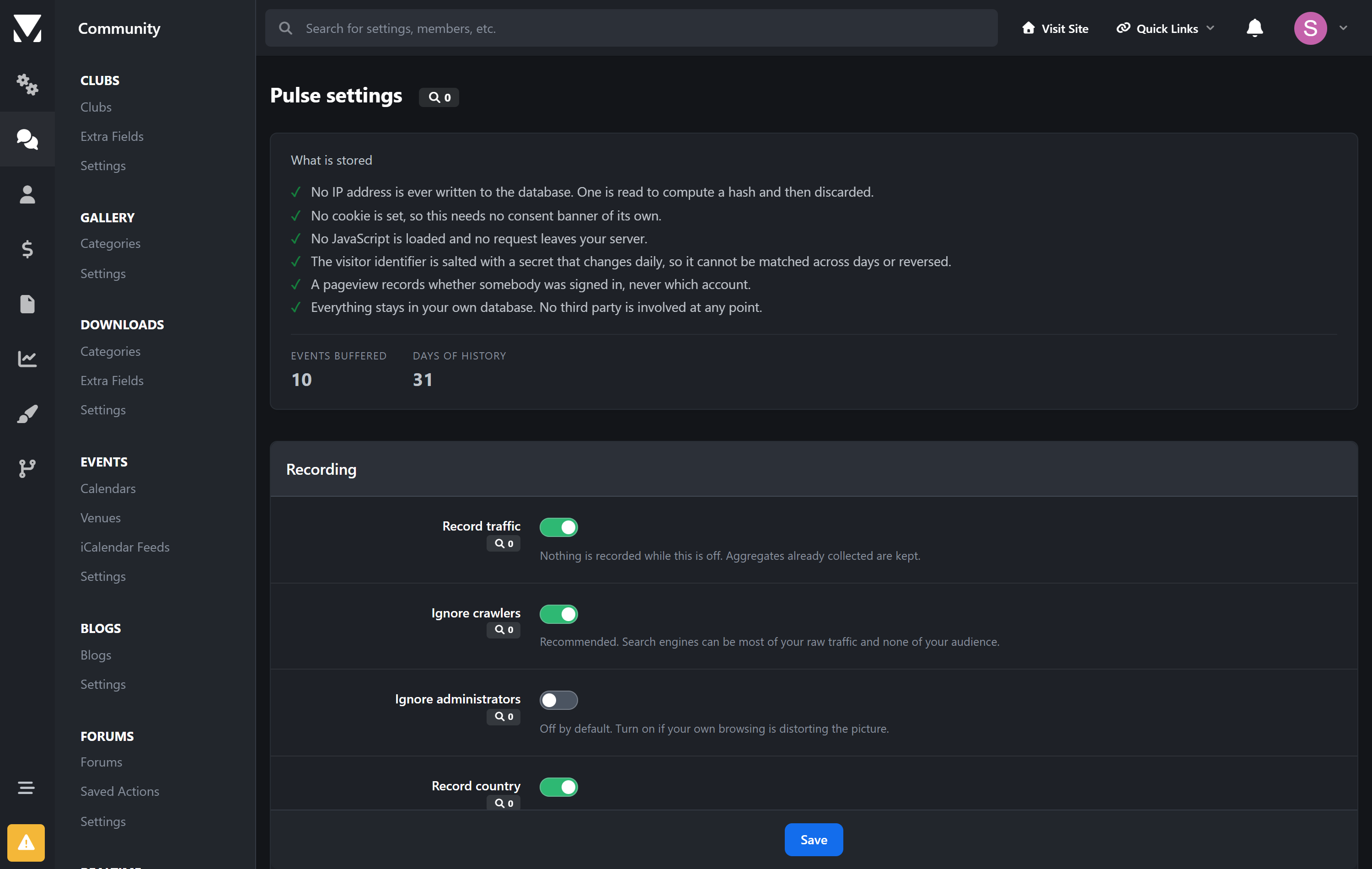
No JavaScript. No cookies. No IP addresses.
This matters enough to be specific about, because "privacy-friendly" is easy to claim.
No script is loaded. Not one byte of JavaScript, not even for the charts — the graphs and the world map are inline SVG. Nothing is fetched from anywhere.
No cookie is set, so Pulse adds nothing to a consent banner.
No IP address is ever written to the database. One is read to compute a hash and immediately discarded. There is no column to store it in.
The visitor identifier is salted with a secret that changes every day. It cannot be reversed, and it cannot be matched from one day to the next — so it counts visitors without following anybody.
A pageview records whether somebody was signed in, never which account. There is no member column.
Raw events last hours, not for ever. They are rolled into daily totals and deleted. After that a day exists only as a handful of numbers.
The settings screen lists all of this in the interface, with live counts, so you can answer a data-protection question by pointing at it.
It cannot slow your forum down
The recording happens after the page has already been delivered. Invision Community closes the connection to the browser before running its shutdown work, and Pulse writes its single row at that point. The visitor has their page before the database is touched. There is no query on the way in, no join, and nothing that can fail in a way that affects the page.
Honest about the limits
Some things cannot be measured without JavaScript, and it is better to say so than to invent them:
A one-page visit has no measurable length. There is no exit signal, so bounces contribute nothing to the average visit time rather than a made-up figure. The average is over visits that can actually be measured.
Visitors are counted per day and added up. Somebody who comes on Monday and Tuesday counts twice over a week. Counting them once would mean keeping the raw records for the whole period, which is exactly what this app is designed not to do.
Countries need a header from in front of your site. If you run Cloudflare or a load balancer that provides one, the map fills in. If nothing supplies it, the map is hidden rather than shown empty. Pulse does no geolocation lookups of its own — that would mean either an external request or shipping a database of IP ranges.
Also
Crawlers are separated out, using Invision Community's own spider detection. Search engines can be most of your raw traffic and none of your audience.
You can exclude your own staff, so your browsing does not become the story.
Retention is yours to set — hours of raw events, days of history.
No core files are edited. Upgrading Invision Community will not break it.
Requirements
Invision Community 5.0 or newer (self-hosted)
A running task scheduler — the hourly rollup is what produces every figure
Nothing else. No API key, no account, no external service.
Create an account or sign in to leave a review
There are no reviews to display.