Invision Community 5
- Category Admin & Mod Tools
- Downloads 22
- Compatibility IC5: 5.0.0+
- Updated

Overview
Managing tags in Invision Community can become increasingly cumbersome as a community grows.Description
The native IPS tagging system is useful for organising content, but the administrative side of managing those tags can be unnecessarily time-consuming. Once hundreds or thousands of tags have accumulated, determining which ones are still useful and which can safely be removed becomes a manual task.
One of the biggest limitations is that there is no convenient way to see whether a tag is actually in use, how frequently it is being used, or where those uses are coming from.
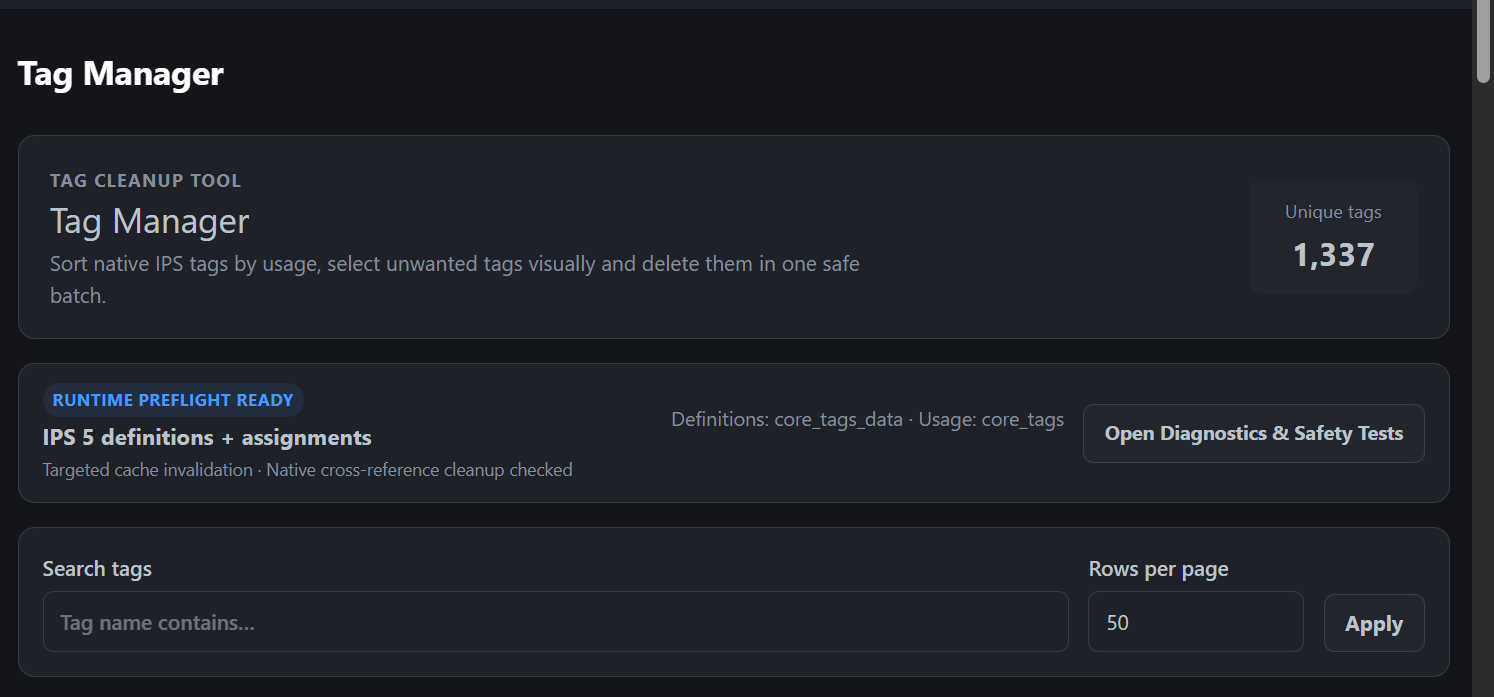
Tag Manager provides a dedicated ACP interface designed specifically to make reviewing, investigating and cleaning up your community's tags faster, clearer and safer.
Instead of working through tags blindly, administrators can see usage information directly, sort tags by how frequently they are used, identify unused tags and investigate existing assignments before deciding whether anything should be removed.
Key Features
Tag usage counts
See how many times each tag is currently assigned across your community.Find unused tags
Quickly identify tags with zero current uses instead of manually trying to determine whether they are still needed.Sort by usage
Sort tags by the number of uses, making unused and rarely used tags much easier to find.Alphabetical sorting
Sort tags by name when looking for particular tags or groups of similarly named tags.Tag search
Search the tag database directly from the ACP.Application usage information
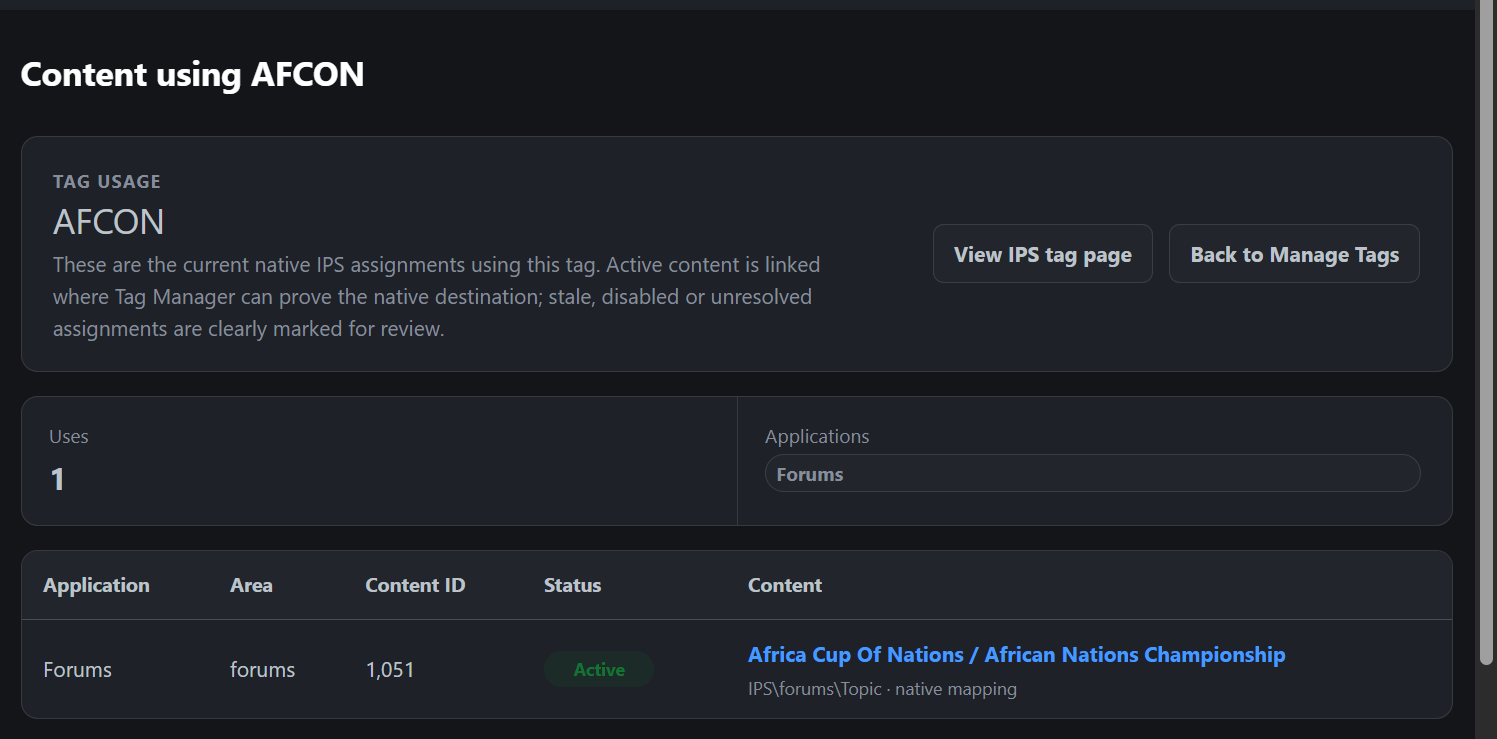
See which IPS applications are responsible for the assignments associated with a tag.View individual tag usage
Open a dedicated usage view to investigate where a particular tag is being used.Usage status information
Tag Manager can help distinguish between normal assignments and situations where the associated application or content may no longer be available.Native tag page links
Where supported, tags can be opened through the corresponding IPS tag page so related community content can be viewed directly.Configurable pagination
Choose how many tags are displayed at once, making the interface suitable for both small and very large tag databases.
Easier Bulk Tag Management
Tag Manager becomes particularly useful on established communities where years of accumulated tags may include spelling mistakes, one-off tags, abandoned terminology, duplicate ideas or tags that are no longer relevant.
Administrators can select individual tags or multiple tags directly from the listing.
This makes it possible to work through a large database methodically instead of deleting tags individually through a slow manual process.
Before deletion takes place, Tag Manager provides a confirmation stage so that administrators can review what has been selected and how many tag assignments will be affected.
The intention is simple:
Find → Inspect → Select → Confirm → Delete
More Resources from ClawOfWinterfell
If you find Tag Manager useful, take a look at my other Invision Community resources.
I develop practical IPS applications focused on administration, community management, maintenance and features that can make running an Invision Community easier.
Other available resources include:
And more
https://administrata.net/commissions/provider/2-clawofwinterfell/
Tag Manager is completely free.
If it saves you time managing your community, please consider taking a look at my other free and premium resources.
Safer Tag Deletion
Removing tags from an established community should not involve guesswork.
Tag Manager provides additional checks around the deletion process so administrators have an opportunity to inspect their selection before changes are made.
Features include:
Pre-deletion confirmation
Review the tags selected for removal before proceeding.Assignment information
See how many existing tag assignments may be affected.Bulk deletion support
Remove multiple unwanted tags in a controlled operation rather than processing them individually.Selection verification
Tag Manager can verify the state of the selected tags before completing the cleanup.Controlled cleanup
The application handles the relevant tag relationships as part of the removal process.Content protection
Removing a tag does not delete the topic, record or other community content that previously used it.
This makes Tag Manager useful not only for finding unwanted tags, but for understanding what you are removing before you remove it.
Diagnostics & Safety Tests
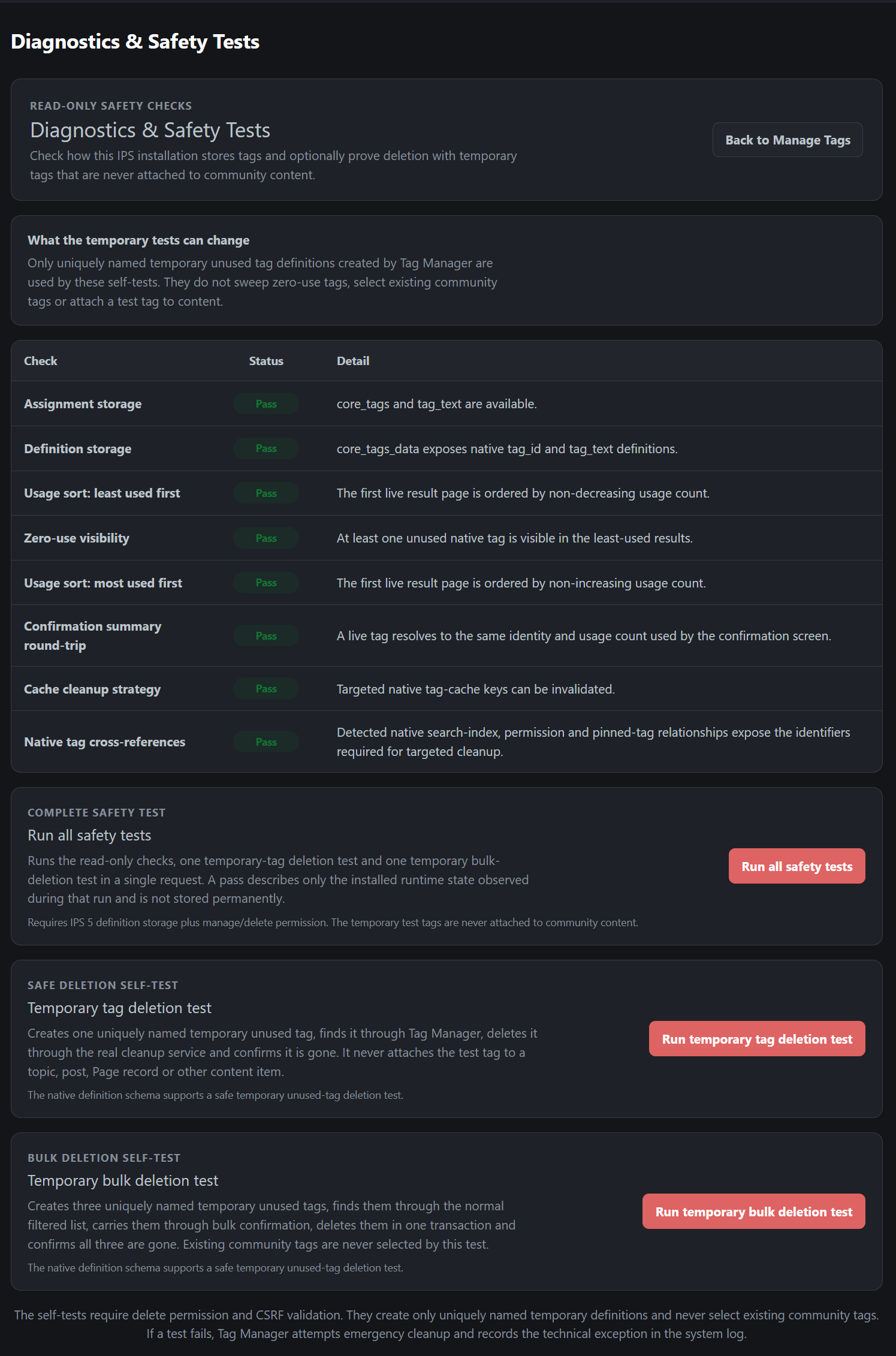
Tag Manager also includes dedicated diagnostics for administrators who want to verify that tag detection and cleanup are operating correctly on their installation.
The diagnostic tools can perform checks against the native IPS tag system and can also use temporary test tags to confirm that the cleanup process behaves as expected.
These tests can include:
Creating a temporary unused tag.
Confirming that Tag Manager can detect it.
Removing it through the normal cleanup process.
Confirming that the temporary tag has been removed successfully.
Testing multiple temporary tags through the bulk cleanup process.
Running the available safety checks together.
Temporary diagnostic tags are created specifically for testing purposes and are not intentionally attached to existing community content.
Administrator Permissions
Tag Manager operates from within the AdminCP and supports administrative permissions.
This allows access to tag management and destructive actions to be controlled appropriately.
An administrator may therefore be permitted to inspect tag information without necessarily being given permission to delete tags.
Normal IPS security protections are also respected during destructive operations.
Why Use Tag Manager?
The native IPS tagging system works well when tags are being added to content.
Managing those tags afterwards is considerably less convenient.
On a long-running community, the tag database can gradually accumulate:
Unused tags
Misspelled tags
Duplicate or very similar tags
One-off tags
Tags belonging to old content
Tags associated with applications that are no longer active
Tags that simply no longer serve a useful purpose
Without usage information, deciding what can safely be removed becomes unnecessarily time-restrictive.
Tag Manager gives administrators the information and tools needed to clean up that database properly.
You can see what is being used, investigate where it is being used, identify what is no longer needed and remove unwanted tags through a much more practical ACP workflow.
Tag Manager is available completely free of charge.
There are no reviews to display.