Invision Community 5
- Category Themes
- Downloads 64
- Compatibility IC5: 5.0.0+
- Updated
Overview
A Soft and Refreshing Theme for Invision Community v5Description
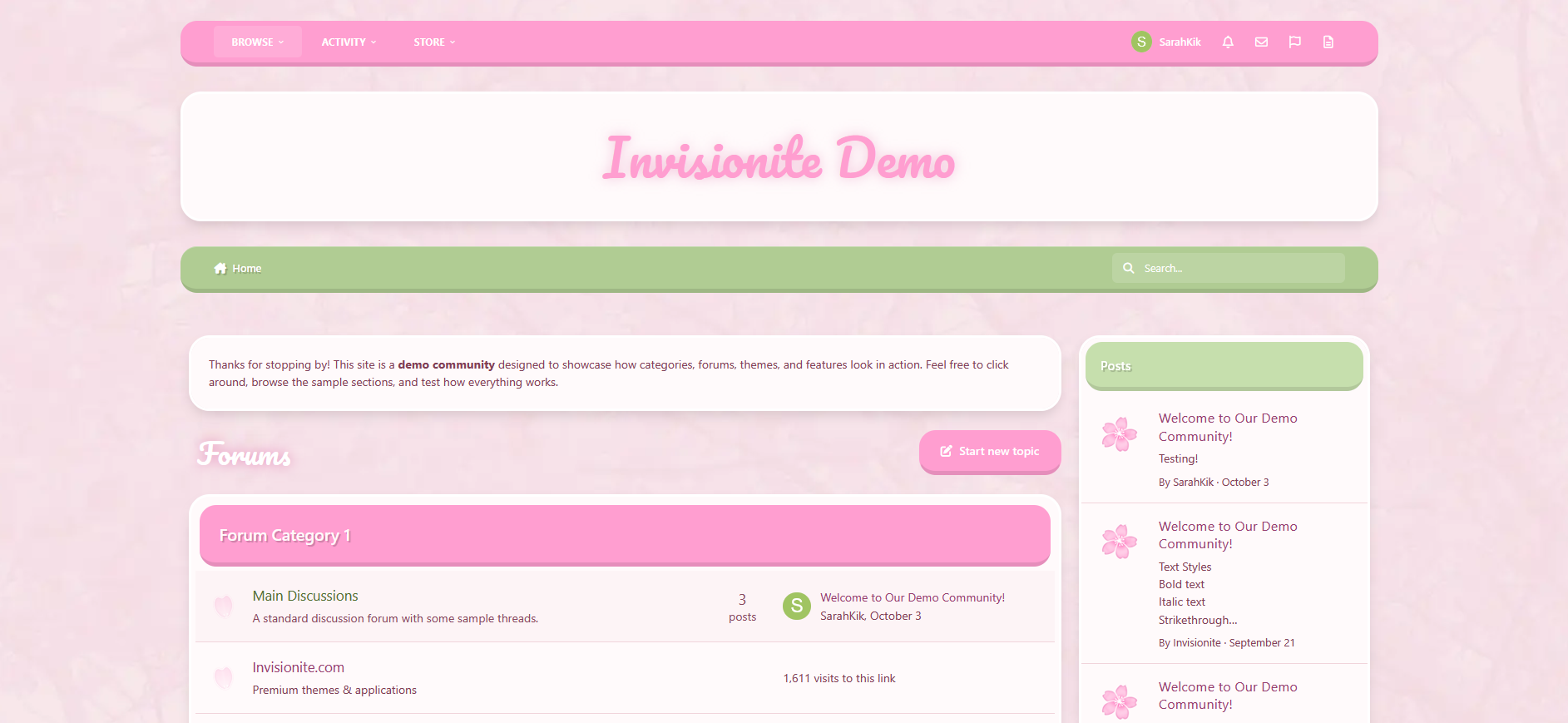
Cherry Blossom — A Soft and Refreshing Theme for Invision Community v5
Cherry Blossom brings a light and welcoming aesthetic to your community, inspired by spring tones and gentle design.
The theme focuses on clarity, comfort, and a sense of calm — perfect for communities that value friendliness, warmth, and a touch of color.
Live Demo (select Cherry Blossom)
Highlights
Soft color palette
A blend of pink and green hues gives the theme a peaceful, natural look. It feels bright without being overwhelming, ideal for daytime browsing.
Elegant minimal design
Rounded corners, light textures, and balanced spacing help your content stand out while maintaining a clean, cohesive presentation.
Custom header and forum styling
Distinct category headers and widget panels keep navigation intuitive, with thoughtful visual consistency throughout.
Optimized for Invision Community v5
Built using the latest template system, ensuring smooth performance, mobile responsiveness, and compatibility with all core applications.
Comfortable to read and use
The contrast and layout are tuned for easy legibility, making it suitable for long-form discussions, lifestyle communities, or creative projects.
What’s Included
Full Invision Community v5 theme
Custom header, footer, and content styling
Pink and green base colors with soft gradients
Light textured background for subtle depth
Styled widgets, buttons, and containers
Create an account or sign in to leave a review
There are no reviews to display.