Invision Community 5
- Category Themes
- Downloads 75
- Compatibility IC5: 5.0.0+
- Updated
Overview
A Playful Seasonal Theme for Invision Community v5Description
Cute Halloween — A Playful Seasonal Theme for Invision Community v5
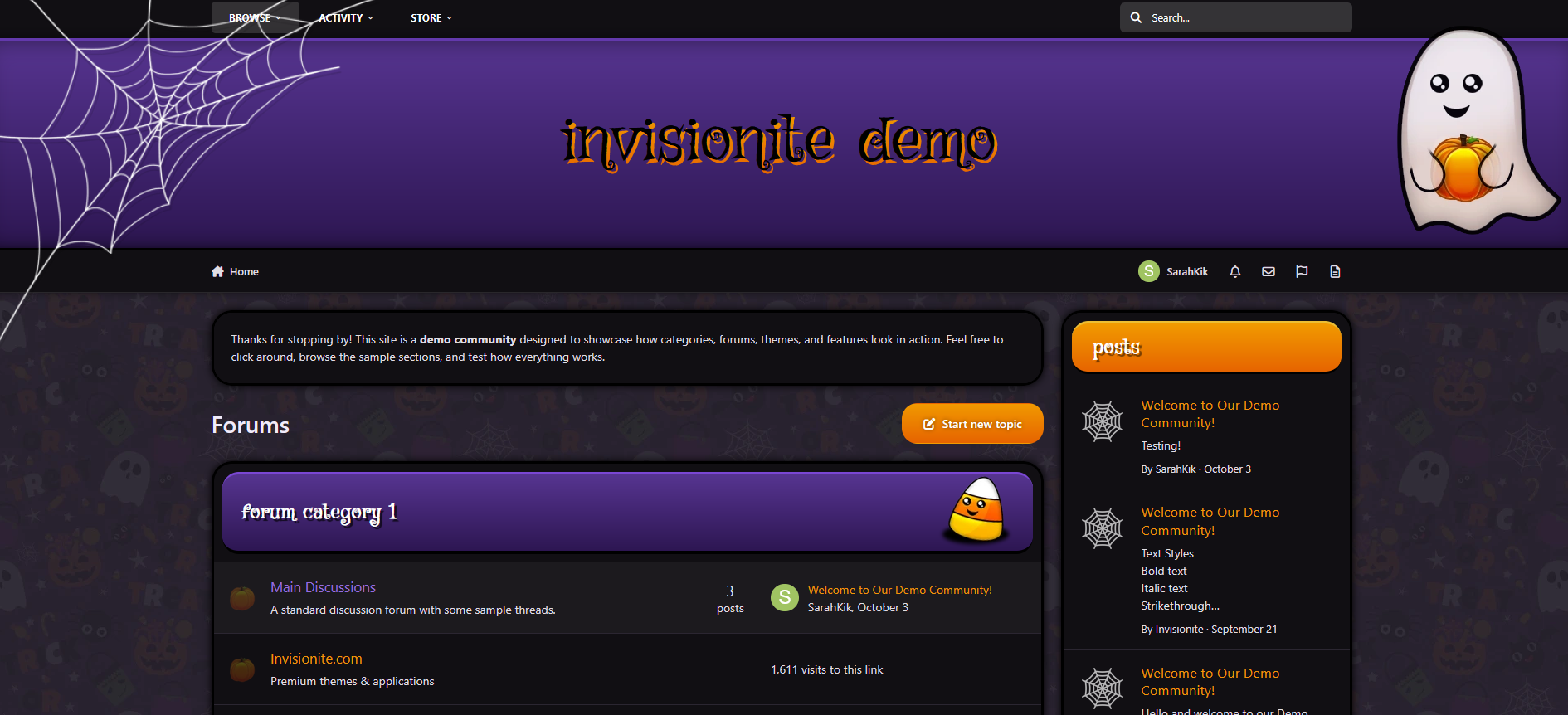
Cute Halloween is a warm, lighthearted take on the Halloween season — designed to bring a touch of charm and festivity to your community.
It blends cozy fall tones, subtle spooky accents, and clean readability to create a theme that feels both seasonal and inviting.
Live Demo (select Cute Halloween)
Highlights
A friendly take on Halloween
Cute Halloween keeps things approachable and fun, using cheerful ghosts, candy corn details, and soft shadows instead of dark, heavy horror styling.
Cozy dark layout
The purple and orange palette pairs beautifully with a dark background, giving your site a relaxed evening atmosphere that’s easy to read and navigate.
Custom seasonal touches
Decorative ghosts, spiderwebs, and themed forum icons help set the mood without overwhelming your content.
Built for Invision Community v5
Developed using v5’s updated template structure, ensuring modern design standards, improved responsiveness, and compatibility with all core apps.
Perfect for October events
If you’re a fan of Halloween, adding seasonal activities, or just decorating for the month, this theme fits right in.
What’s Included
Complete Invision Community v5 theme
Custom header, footer, and background artwork
Styled widgets and forum containers
Forum icons and accents
Create an account or sign in to leave a review
There are no reviews to display.