Invision Community 5
- Category Themes
- Downloads 120
- Compatibility IC5: 5.0.0+
- Updated
Overview
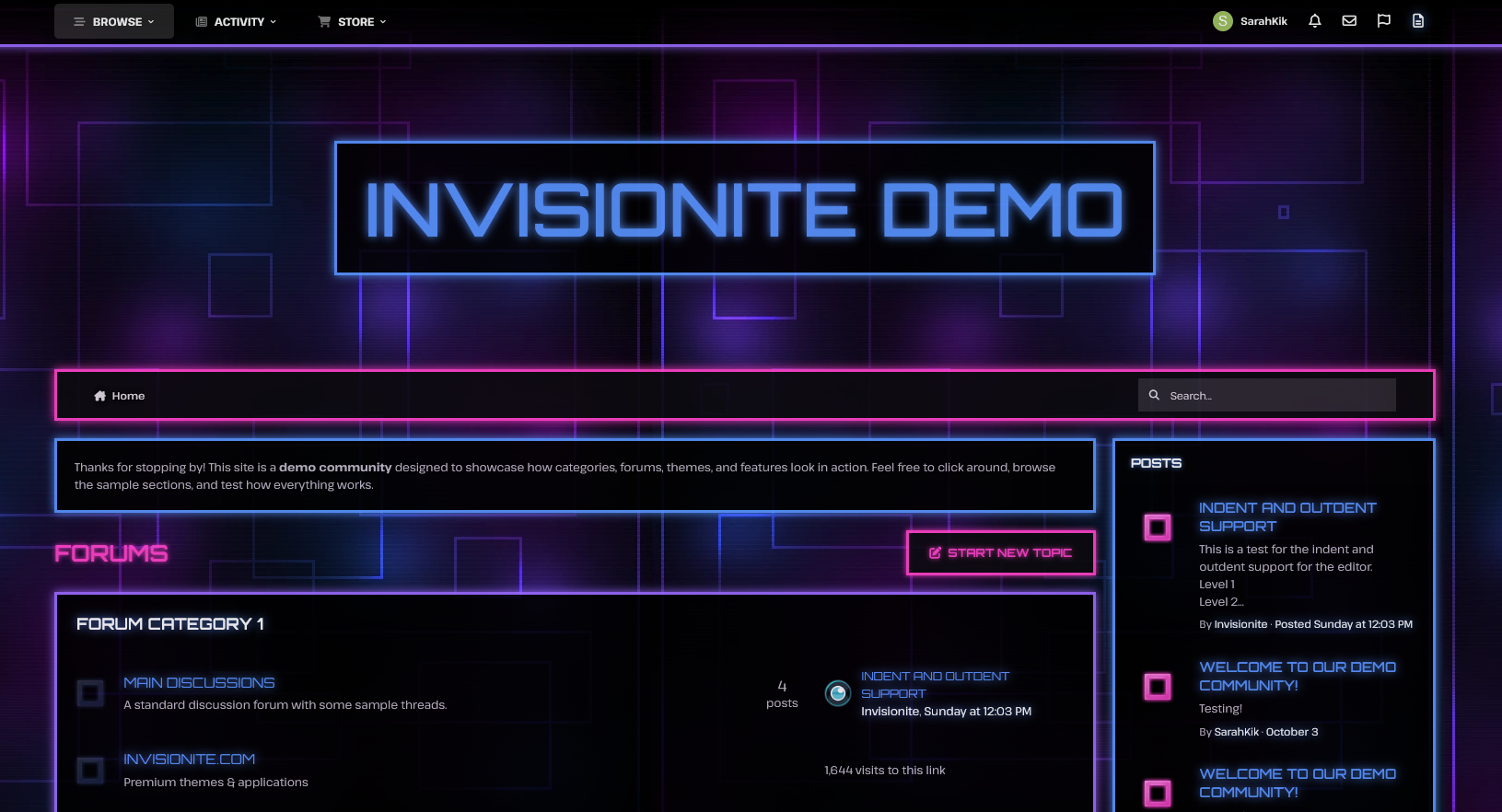
Neon Glow is a dramatic, high energy theme with Tron-esque vibes- perfect for communities focused on futuristic sci fi genres, technology, gaming, cyberpunk rpgs and more!Description
Neon Glow — A Techy Theme for Invision Community v5
Neon Glow is a dramatic, high energy theme with Tron-esque vibes- perfect for communities focused on futuristic sci fi genres, technology, gaming, cyberpunk rpgs and more!
Live Demo (select Neon Glow)
Highlights
Glows & animation
Vibrant glows of blue, pink and purple highlights important content and the animation back and forth blends all three colours.
Energetic and edgy
Neon colours dominate the theme against a dark, grid interface like background for a bold, contrasting aesthetic.
Built for Invision Community v5
Developed using v5’s updated template structure, ensuring modern design standards, improved responsiveness, and compatibility with all core apps.
What’s Included
Complete Invision Community v5 theme
Custom background artwork, forum icons and accents
Styled widgets and forum containers
Create an account or sign in to leave a review
There are no reviews to display.