Jump to content
View in the app

A better way to browse. Learn more.

Invision Marketplace

A full-screen app on your home screen with push notifications, badges and more.

To install this app on iOS and iPadOS
  1. Tap the Share icon in Safari
  2. Scroll the menu and tap Add to Home Screen.
  3. Tap Add in the top-right corner.
To install this app on Android
  1. Tap the 3-dot menu (⋮) in the top-right corner of the browser.
  2. Tap Add to Home screen or Install app.
  3. Confirm by tapping Install.

Everything you need for your community

We will be moving to a new server soon, some downtime is expected.

Everything you need for your community

Integrations

  1. IPS5.0.0+
    This application automatically generates a new post in the support topic whenever the file is updated with a new version.
    Setting:
    Enable Auto-Posting in Support Topics
    Post Template
    Requirement:
    Downloads app
    Forums app
  2. IPS5.0.0+
    According to your settings, this application will display, at the bottom of pages, club cards throughout the community or on specific application pages. Users will see the Clubs they have permission to view.
    Settings:
    Where to display: everywhere or in specific applications (Forums, Gallery, Blogs, Downloads, Tutorials, Videos Directory, Raffles, etc).
    Number of club cards to display
    Sort Clubs by Latest Activity, Most Members, Most Content, Latest Created, or Name
    Type of Clubs to show: All Clubs; Clubs NOT featured; ONLY featured clubs
    Show only Clubs that the user is a member of
    Show block to specific groups
    Note:
    It doesn't require the club setting Show Club Content Areas to be set to Throughout the community.
  3. IPS5.0.4+
    This resource uses The Movie Database API to grab data from Movies/TV Shows to your site.
    All you have to do is type a word from the movie/TV show title and then a list of matches will show up. From now on, with just a click, you will have the submission form:
    Title
    Subtitle, if available
    Description
    Poster
    Status
    Release Date (for Movies)
    Genres
    Language
    Homepage
    IMDB link
    Budget
    Revenue
    Running Time for movies or Episode Time for TV shows
    Season (for TV Show)
    Number of episodes (for TV Show)
    Tabs:
    You will also have tabs to display:
    Cast (with a link to a popup listing all their data)
    Crew (with a link to a popup listing all their data)
    Trailers (with videos from Youtube)
    Latest Reviews on TMDB
    Similar Movies or Similar TV Shows (will list all similar movies/TV shows and again with a click, you can have them in your database)
    All the tabs, except Information (the main one with the movie/TV show description), can be disabled via setting.
    TMDB API Key:
    You can get your free API Key on the TMDB site: https://www.themoviedb.org/settings/api
    Multi-Language:
    TMDB supports 62 languages. You just have to choose the one in the ACP setting.
    Other features:
    Fully integrated into the framework: Rest API, categories, extra fields, notifications, search, tags, follow, reactions, promote, etc.
    Settings:
    Settings to control the app behavior in several places/situations.
  4. IPS5.0.4+
    This resource uses the IGDB API to grab data from games for your site.
    All you have to do is type a word from the game title, and then a list of matches will show up. From now on, with just a click, you will have in the submission form:
    Title
    Storyline, if available
    Description
    Status
    Genres
    Themes
    Websites
    Modes
    Multiplayer modes
    Platforms
    Player perspectives
    Videos
    Similar games
    Tabs:
    You will also have tabs to display:
    Game Information
    Screenshots
    Videos
    Similar Games
    Settings allow you to disable all the tabs except Information (the main one with the game description).
    IGDB API Key:
    To use the IGDB API, you must have a Twitch Account. The IGDB.com API is free for non-commercial usage under the terms of the Twitch Developer Service Agreement.
    Sign up with Twitch for a free account
    Ensure you have Two Factor Authentication enabled
    Register your application
    Manage your newly created application
    Generate a Client Secret by pressing [New Secret]
    Take note of the Client ID and Client Secret
    Enter the Client ID and Client Secret in the app settings on Admin CP
    Other features:
    Fully integrated into the framework: Rest API, categories, extra fields, notifications, search, tags, follow, reactions, promote, etc.
    Settings:
    Settings to control the app's behavior in several places/situations.
  5. IPS5.0.4+
    This resource uses the Spotify API to grab data from artists for your site.
    IMPORTANT NOTICE: Please do not purchase this application if you do not agree with the terms. All sales are final and non-refundable.
    Spotify does not provide artist biographies, monthly listeners, photos, and playlists in their api endpoints anymore.
    You will have to get the biography elsewhere (Google, Wikipedia, official site, etc.) and paste it into the editor.
    Photos and playlists are manually added now.

    Music integrates with Perplexity AI to automatically retrieve the artist’s biography when creating a record
    All you have to do is type a word from the artist's name, and then a list of matches will appear. From now on, with just a click, you will have to submit the form:
    Name
    Main Photo
    Global Chart Position
    Followers
    Popularity
    Genres
    Spotify link
    Social Media links (X, Facebook, and Instagram) if available
    Tabs:
    You will also have tabs to display:
    Photos from the artist in a grouped lightbox
    Albums (linked to Spotify)
    Playlists (linked to Spotify)
    Popular Releases (linked to Spotify)
    Related Artists
    The tabs ALBUMS, POPULAR RELEASES, and RELATED ARTISTS are Ajax-loaded and represent the artist's current state on Spotify.
    Other features:
    Fully integrated into the framework: Rest API, categories, extra fields, notifications, search, tags, follow, reactions, promote, etc.
    Settings:
    Settings to control the app's behavior in several places/situations.
  6. IPS5.0.0+
    This application will display files from subcategories when the category you're browsing hasn't files.
    It is compatible with the layout chosen for the categories (table or grid).
    Requirement:
    Downloads app
  7. IPS5.0.0+
    OpenAI: Topic Replies
    Revolutionize your Invision Community forum with intelligent AI-powered auto-replies using OpenAI's cutting-edge GPT models. This advanced application leverages the latest in artificial intelligence to automatically generate thoughtful, contextual responses to forum topics, enhancing community engagement and providing instant assistance.
    🤖 What It Does
    OpenAI: Topic Replies automatically analyzes new forum topics and generates intelligent, contextually relevant responses using OpenAI's most advanced GPT models. From GPT-4o to the latest GPT-5.2 reasoning models, it provides sophisticated AI assistance that adapts to your community's needs and maintains natural conversation flow.
    ✨ Key Features
    Advanced AI Integration
    Multiple GPT Models: Choose from GPT-5.2 (latest reasoning), GPT-5 series, GPT-4o, GPT-4 Turbo, and GPT-3.5 Turbo models
    Intelligent Content Analysis: AI understands topic context, user intent, and discussion dynamics
    Reasoning Models: GPT-5.2 provides advanced reasoning capabilities for complex topics
    Customizable AI Personality: Define system prompts to match your community's tone and expertise level
    Precise Control & Targeting
    Forum Selection: Enable AI replies for specific forums or across your entire community
    User Group Filtering: Control which member groups can trigger intelligent responses
    Content Length Requirements: Set minimum topic lengths to ensure quality AI engagement
    Reply Member Assignment: Designate dedicated bot accounts for AI-generated responses
    Enterprise-Grade Architecture
    Asynchronous Processing: Queue-based system prevents forum performance degradation
    Reliable Delivery: Background task processing ensures responses are posted without delays
    Comprehensive Error Handling: Automatic retry mechanisms with configurable failure thresholds
    Detailed Logging: Full audit trail for monitoring AI activity and troubleshooting
    Admin Management
    Intuitive Control Panel: Easy-to-use settings interface for all configuration options
    Real-Time Monitoring: Live queue status and processing statistics dashboard
    Performance Analytics: Response time tracking and usage metrics
    Queue Management: View pending, processing, completed, and failed AI responses
    🚀 Perfect For
    Support Communities: Instant, intelligent responses to common questions and issues
    Technical Forums: Advanced reasoning for complex coding and technical discussions
    Educational Platforms: Contextual explanations and additional insights
    Professional Networks: Maintain engagement in industry-specific conversations
    Large Communities: Scale support without increasing moderator workload
    🎯 Technical Specifications
    AI Provider: OpenAI (Chat Completions API)
    Supported Models: GPT-5.2, GPT-5 series, GPT-4o, GPT-4 Turbo, GPT-4, GPT-3.5 Turbo
    Token Management: Dynamic handling of max_tokens vs max_completion_tokens
    Temperature Control: Adjustable creativity levels (0.0-1.0 range for compatible models)
    Queue System: Asynchronous processing with intelligent retry logic
    Error Handling: Comprehensive logging and automatic recovery mechanisms
    Security: Proper API key management and permission controls
    💡 Why Choose OpenAI Auto-Replies?
    Latest AI Technology: Access to OpenAI's most advanced reasoning models
    Production Ready: Enterprise-grade reliability for high-traffic forums
    Flexible Configuration: Adapt to your community's unique requirements
    Cost Effective: Optimize API usage with intelligent token management
    Future Proof: Regular updates to support new OpenAI model releases
    🔧 Easy Setup
    Install the Application: Upload to your Invision Community applications folder
    Configure API Key: Add your OpenAI API key in the settings
    Choose Model: Select GPT-4o or GPT-5.2 based on your needs
    Set Preferences: Configure forums, user groups, and response parameters
    Go Live: Start enjoying intelligent AI-generated replies on your forum!
    Transform your forum into an intelligent, responsive community hub with OpenAI-powered automation that enhances rather than replaces human interaction. OpenAI: Topic Replies brings the future of conversational AI to your Invision Community forum.
    Developed by InvisionMarketplace.com - Professional Invision Community applications with enterprise-grade OpenAI integration.
    What's New in Version 1.0.1:
    Added OpenAI Usage & Cost tracking with daily/weekly/monthly aggregation.
    Added AI Pricing settings (pricing map, defaults, unit selection) for cost estimation.
    Added per-call AI usage logging table.
    Added aggregated usage/cost table for charts.
    Added OpenAI Usage & Cost chart in ACP (OpenAI statistics module).
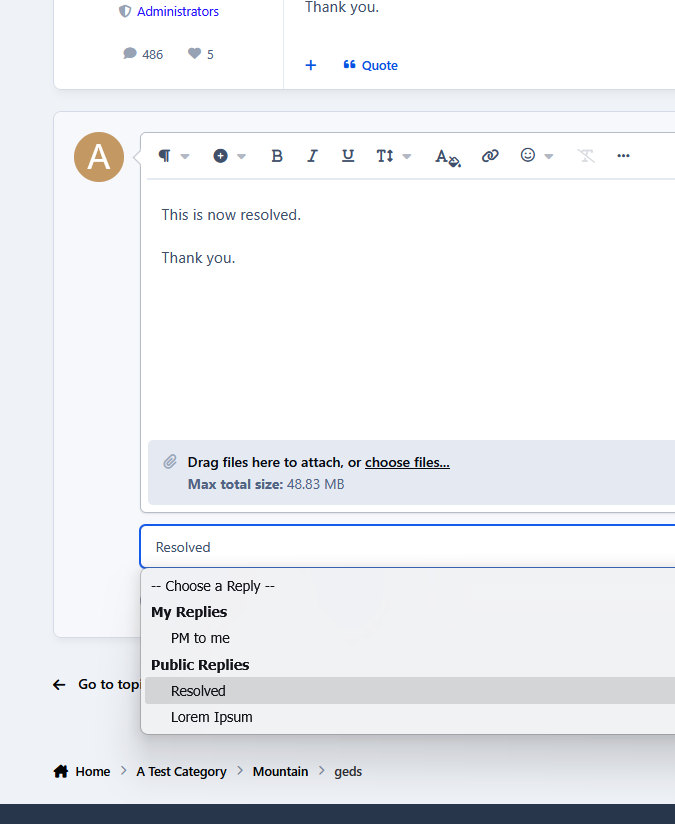
    Added AI reply request links for topics (public + PM) with permissions, limits, cooldowns, and group rules.
    Added PM reply support with optional signature and quoting.
    Added queue history tracking with history dialog and rerun actions.
    Added PM history tracking and combined logs view with filtering.
    Added new ACP permissions for logs management and rerun actions.
    Added OpenAI usage/cost sync task support.
    Added support for PM Viewer link in Queue Logs.
  8. IPS5.0.4+
    This application will allow members to submit job opportunities and curriculum vitae to help people find jobs.
    Job Opportunity submissions:
    You can build your forms with the fields you judge necessary.
    Each form can be assigned to specific groups via permission.
    You can add email addresses to be alerted when someone applies for a job opportunity.
    Unlimited categories, plus the unlimited depth of parent-child relationships.
    The ability to set a category as a container to other categories so it won't accept submissions.
    Polls.
    Extra fields (grouped).
    Feature Color.
    Icon.
    Comments and Reviews.
    Ability to choose which packages will work in the category, If you have Commerce installed.
    Etc.
    Curriculum Vitae submissions:
    You can add the fields you judge as necessary.
    You have permission to submit your CV and to view submitted CVs.
    Search:
    This application has an internal search so you can easily find job opportunities by:
    Title
    Category
    Type
    Country
    State/Region
    City
    Work from home
    Monetize your site:
    You can create Packages to charge for job opportunity submissions, with renewals.
    Package features:
    Number of days to keep the submission active
    Paid submissions with their cost
    If submissions can be renewed, with the term and cost
    Groups allowed to use that package
    If new submissions will be pinned
    Settings:
    Settings to control the app's behavior in several places/situations.
  9. IPS5.0.4+
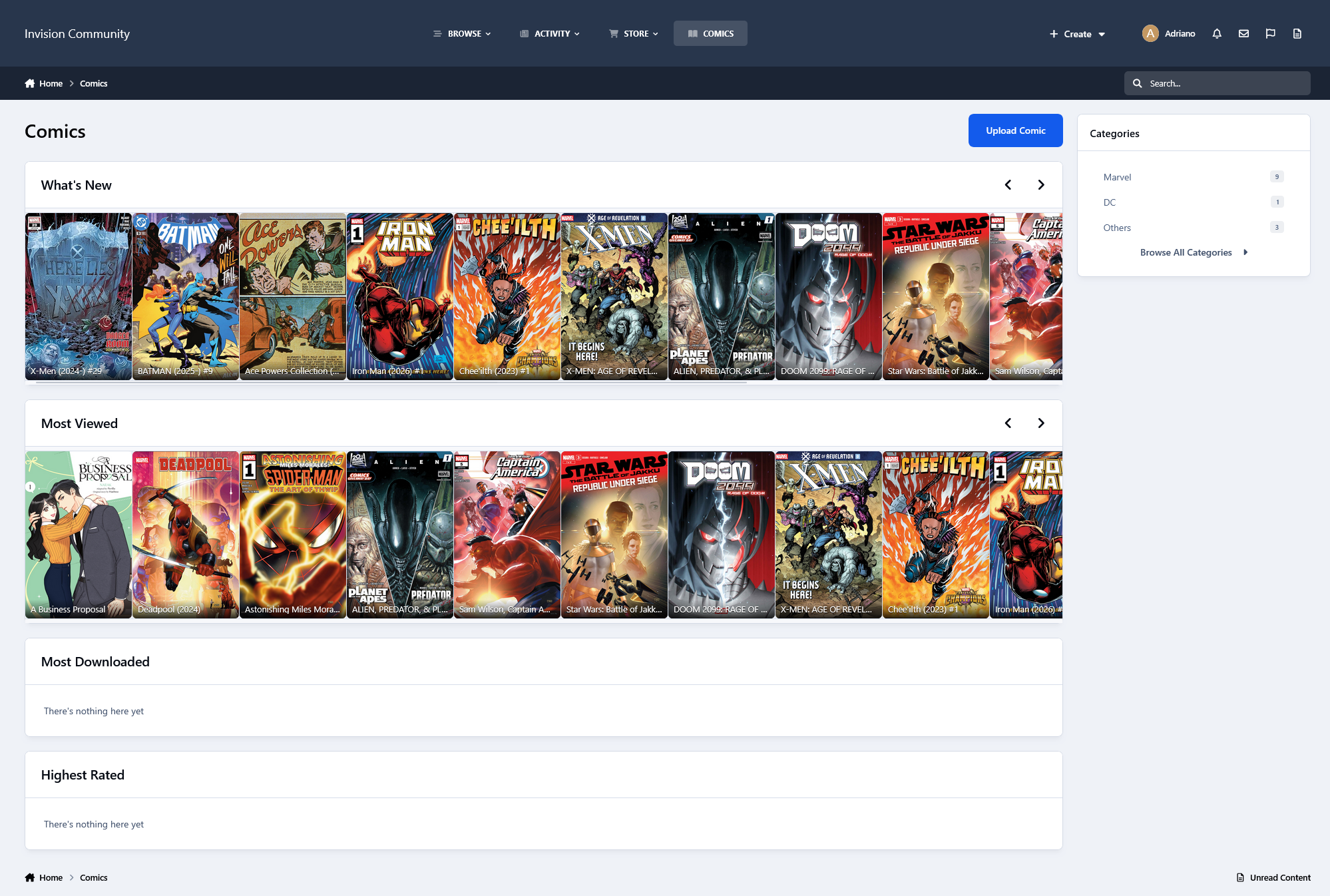
    This application will allow users to create records from their preferred videos on YouTube (including regular and short videos), Vimeo, and Dailymotion, or even upload videos. The application automatically retrieves video thumbnails, so all you need to do is enter the video title, paste the URL, and optionally add a description—that's it.
    Key features of this application include:
    Integrated with the YouTube Data API to grab data from videos via search to add them quickly.
    Two options to choose how the index will look like: Blocks or Tabs.
    Unlimited categories with support for unlimited parent-child relationships.
    Customizable category icons.
    Flexible options to enable a comments and reviews system per category.
    Ability to add polls to videos.
    An Extra Fields group that can be used per category.
    Additional Videos: videos added within a video.
    The Profile tab displays the videos submitted by the profile owner.
    Thumbnail management.
    Several places to display advertisements.
    Other features:
    Integrated with the framework, including features such as search, tags, follow functionality, reactions, and more.
    Integration to RSS/Atom Feed Imports.
    Support for Rest API
    Support for Webhooks
    Settings:
    Settings to control the application behavior in several places/situations.
    Note:
    This version does not include a converter for the old Videos application by Mike J. It will be reworked and added in a future update.
  10. IPS5.0.4+
    Links Directory is an application that provides your community with a member-driven web directory. Allow members to submit websites for approval in categories you define. Users can comment and rate other member’s submissions. You can also mark websites as official affiliates, fostering traffic between friends.
    Features
    Submit links to websites along with a title, description, and an image generated from extensible APIs: Sneak.pw, WebThumbnail, Thumbshots (requires an API Key), and Upload field. You can also save the image locally, which will reduce the API call. The image is updated when you update the link. The admin can choose if new links are moderated, per category.
    Ability to charge per link, integrated into Commerce.
    Submit comments to links. Admin can choose if new comments are moderated, per category.
    Rate links using the star rating system used throughout the IPS4. Per category setting.
    Integrates to Share Links to share or email inks.
    Integrates to Google Maps if an address is provided in the link submission (IPS 4.1.13+: Google Map APIs now require an API key. Go to AdminCP -> System -> Community Enhancements to enable Google Maps support)
    The ability for users to report potentially offensive content or broken links using the built-in Report Center
    Search integration: search links along with the rest of your community’s content
    Supports item marking, allowing your users to see what links have been added or commented on
    Integrates into Activity Streams.
    Supports the built-in tagging system including prefixes.
    Support for notifications such as new links and comments on user links.
    Ability to follow/like categories and individual links.
    Unlimited categories of links, plus the unlimited depth of parent-child relationships
    Category Icons
    Drag & drop reordering of categories in the ACP.
    Per-category permissions to show categories, view links, submit links, add comments, and avoid approval queues
    Provide a “link back” code so other websites can link back to yours.
    Mark links as official affiliates and display them in a different section on the Links Directory Index
    Integrates into IPS4 Moderating system, which all common permissions, such as pin, unpin, delete, feature, move, etc.
    Per-category Permissions allow you to specify which permission sets are allowed to view categories, view links, add links, edit links, comment, rate, and avoid moderation at a granular level.
    Robust Admin Restrictions.
    Integration with the Advertisement system
    Integration with the Sitemap system to include links in your sitemap
    Ability to create RSS feeds of all links
    Integration with ACP Live Seach (Links categories)
    Support Extra Fields so you can define different fields per category
    Friendly URLs for links and categories
    Ability to configure the Links Index page to display the blocks you want
    And much, much more!
    Notes
    Each purchase entitles you to the use of Links on one Community installation.
  11. IPS5.0.4+
    Visually based on the Providers Directory from IPS, this app will allow members to offer their services in your community. You can verify the record and allow members to bump their records, which will bring them to the top of the listing.
    Features:
    Integration with Commerce to charge for record submission
    Flexible options to enable a comments and reviews system.
    Extra Fields.
    The Profile tab displays the record submitted by the profile owner.
    Areas:
    You can establish designated badges to refine and focus the organization of records.
    Other Features:
    Integrated with the framework, including features such as search, tags, follow functionality, reactions, and more.
    Support to Rest API
    Support for Webhooks
    More...
    Settings:
    Settings to control the app behavior in several places/situations.
  12. IPS5.0.4+
    A full-featured Tutorials/Article system for your IPS Community.
    Here's a quick rundown of some of the features of this application:
    Fully compatible with the framework:
    Clubs, Reactions, Recommended Comments, Follow categories and tutorials, Content Messages, Search, Tags, Reports, RSS Feed, RSS/Atom Feed Imports, Advertisement, Bulk Mail, Sitemap, etc.
    Unlimited categories of articles, plus the unlimited depth of parent-child relationships
    Category Image and Icon
    Ability to use the comments system or support topics, or both
    Per-category permissions to show categories, read articles, submit articles, add comments, and avoid approval queues
    Extra Fields that can be used per category, grouped (just like profile fields)
    Ability to create polls in tutorials
    Group permissions on specific actions
    Moderator actions on articles and comments
    Ability to attach files to tutorials and comments
    Ability to quickly convert a forum post into a new tutorial
    Ability to copy a tutorial from one category to another or the same category
    Friendly URLs for tutorials and categories
    Ability to rate tutorials
    Ability to follow categories and tutorials to receive notifications on updates
    Tools to create topics for existing tutorials, make tutorials of topics, and rebuild support topics text if you have changed the template on Tutorials settings.
    And much, much more!
  13. IPS5.0.6+
    This application will allow members to create and manage raffles and giveaways on your board.
    Features:
    Ability to choose which type of content per category: only Raffles, only Giveaways, or both
    Up to 100 prizes per raffle/giveaway (category setting)
    Restrict members' participation per raffle/giveaway by:
    Tickets per member (raffles only)
    Number of participants
    Content count
    Reputation points/likes
    Number of days as a member
    Groups
    Multiple participants per raffle/giveaway (participants can buy more than one ticket (raffle only) to increase their odds)
    Unlimited categories of raffles/giveaways with permissions, and extra fields, plus the unlimited depth of parent-child relationships with a lot of settings, permissions, and extra fields
    Category Icons
    Integrates with Commerce, so you can choose a specific payment gateway, tax, fee, and commission, and use multiple currencies
    Ability to force users to fill in the price in currencies
    Ability to switch between currencies with a click to display raffle prices
    Raffles Management on ACP: a place where admins can control the status of raffles: activate raffle, change expiration date, and perform mod actions like pin/unpin, lock/unlock, etc
    Per member settings: allows access to the app and allows submission of raffles
    Per group settings: allows access to the app, how many approved content items must be accessed to access the app, and restricts X raffles/giveaways by a period (day, week, month, and year)
    Robust Admin CP Restrictions
    Ability to take specific actions when a member is deleted or flagged as a spammer
    The ability for users to report potentially offensive content using the built-in Report Center
    Supports item marking, allowing your users to see what adverts have been added, commented/reviewed on
    Integrates to:
    Activity Streams
    Share Links
    Tag/Prefixes system
    Notifications such as new raffles/giveaways, etc
    Ability to follow raffles/giveaways and categories
    Announcements
    Advertisements
    Search system
    ACP Live Search (categories)
    Moderating system, which includes all common permissions, such as pin, unpin, delete, feature, move, etc., for Raffles, Comments, and Reviews
    Ability to create RSS feeds of all adverts
    More...
    Notice:
    Each purchase entitles you to use the Raffles System on one Community installation.
    Be aware that there may be local laws regarding paying for the tickets unless you are registered as a non-profit organization or have special authorization to do so. Some sites, like PayPal, usually shut accounts down or even take action against the accounts of people using their site in that manner.
  14. IPS5.0.4+
    Quizzes is a fun (graded quiz - one or multiple right answers) application that allows you and your members to add Quizzes to your forum. With leaderboards, categories, and a unique layout, The Quizzes is sure to be a hit with your members. The Quizzes come, among other things, with the following features:
    Three types of quizzes: graded mode (with time challenge and leaderboard ranking - ONE or MULTIPLE RIGHT ANSWERS and study mode (with no time challenge and leaderboard)
    Unlimited categories of quizzes, plus the unlimited depth of parent-child relationships with a lot of settings, including:
    Category icon
    Extra fields
    Minimum and maximum number of questions and answers per quiz
    Comments and reviews, including the requirement to play the quiz to submit a review
    Tags & Prefixes
    The requirement to take quizzes by:
    Number of content items
    Number of reputation points/likes
    Number of days as a member
    Groups
    Discussion topic: will create a topic when a new quiz is submitted. Also, there's an option to create a reply showing the score/time when someone completes the quiz
    Integration with the Open Trivia Database to create an automatic quiz per day with questions and answers from Trivia.
    Per-category permissions to show categories, view quizzes, submit quizzes, comment, and review quizzes
    Per member settings: allows access to the app and allows submission of quizzes
    Per group settings: allows access to the app, and how many approved content items must be accessed to access the app
    Integrates into the IPS4 Moderating system, which includes all common permissions, such as pin, unpin, delete, feature, move, etc.
    Robust Admin Restrictions
    Type of content field: textarea for plain text or IPS4 editor
    Ability to add an image to the quiz question
    Ability to set the minimum/maximum title length and description length
    The ability for users to report potentially offensive content using the built-in Report Center
    Search integration: search adverts along with the rest of your community’s content
     Supports item marking, allowing your users to see what adverts have been added or commented/reviewed on
    Integrates into Activity Streams
     Integrates to Share Links to share
    Integration to Member Filters (Bulk Mail, etc.)
    Integration with ACP Live Search (categories)
    Support for notifications such as new quizzes, comments, reviews, and when someone completes a quiz
    Ability to follow/like categories and individual quizzes
    Ability to upload or import an image from a URL to be the Quiz image. The image will be displayed on quiz view, categories, etc.
    Quiz protection: the game will be aborted if you leave the current tab/browser. This is to prevent users from searching elsewhere. That's a setting.
    Setting to allow users to play a quiz only once
    Feedback: you can create funny phrases to be used on the quiz results according to the user's score
    New setting to randomize quiz questions
    A new setting to promote members to a group when they reach a specific rank in the quiz
    Functional on mobile devices
    More...
     
    INTEGRATION:
    Raffles System
    Members who play the quiz and score 100% on it will earn a ticket to a Raffle chosen by the quiz submitter
    The quiz submitter will be able to choose only their raffles
     
    NOTICE:
    GUESTS CANNOT PLAY QUIZZES!
  15. IPS5.0.0+
    Google Gemini: Topic Replies
    Transform your Invision Community forum with intelligent AI-powered auto-replies! This advanced application uses Google's cutting-edge Gemini AI models to automatically generate thoughtful, contextual responses to forum topics, keeping conversations flowing and providing instant engagement.
    🤖 What It Does
    Google Gemini: Topic Replies automatically analyzes new forum topics and generates relevant, helpful AI responses using Google's advanced Gemini AI models. It's perfect for maintaining active discussions, providing quick answers to common questions, and enhancing community engagement without manual intervention.
    ✨ Key Features
    Advanced AI Integration
    Multiple Gemini Models: Choose from Gemini 2.5 Flash, 2.0 Flash, and preview models optimized for different use cases
    Intelligent Content Analysis: AI understands topic context, user intent, and discussion flow
    Customizable AI Personality: Define system prompts to match your community's tone and style
    Smart Response Generation: Creates natural, conversational replies that fit seamlessly into discussions
    Precise Control & Targeting
    Forum Selection: Choose specific forums or enable across all boards
    User Group Filtering: Control which member groups can trigger AI responses
    Content Length Requirements: Set minimum topic lengths to ensure quality responses
    Reply Member Assignment: Designate specific bot accounts for AI-generated posts
    Enterprise-Grade Architecture
    Asynchronous Processing: Queue-based system prevents forum performance impact
    Reliable Delivery: Background task processing ensures responses are posted even during high traffic
    Comprehensive Error Handling: Automatic retry logic with configurable failure limits
    Detailed Logging: Full audit trail for monitoring AI activity and troubleshooting
    Admin Management
    Intuitive Control Panel: Easy-to-use settings interface for all configurations
    Real-Time Monitoring: Live queue status and processing statistics
    Performance Analytics: Response time tracking and usage metrics
    Queue Management: View pending, processing, completed, and failed responses
    🚀 Perfect For
    Support Forums: Instant responses to common questions and issues
    Community Discussions: Keep conversations active with thoughtful follow-ups
    Educational Platforms: Provide additional insights and explanations
    Professional Networks: Maintain engagement in industry discussions
    Large Communities: Scale support without increasing moderator workload
    🎯 Technical Specifications
    AI Provider: Google Gemini (Generative AI API)
    Supported Models: Gemini 2.5 Flash series, Gemini 2.0 Flash series
    Token Limits: Configurable up to 8192 tokens with smart defaults
    Temperature Control: Adjustable creativity (0.0-2.0 range)
    Queue System: Asynchronous processing with retry logic
    Error Handling: Comprehensive logging and automatic recovery
    Security: Proper API key management and permission controls
    💡 Why Choose Google Gemini Auto-Replies?
    Latest AI Technology: Powered by Google's most advanced Gemini models
    Production Ready: Enterprise-grade reliability for high-traffic forums
    Flexible Configuration: Adapt to your community's unique needs and style
    Cost Effective: Optimize API usage with intelligent token management
    Future Proof: Regular updates to support new Gemini capabilities
    🔧 Easy Setup
    Install the Application: Upload to your Invision Community applications folder
    Configure API Key: Add your Google AI API key in the settings
    Choose Model: Select your preferred Gemini model (2.5 Flash recommended)
    Set Preferences: Configure forums, user groups, and response parameters
    Go Live: Start enjoying intelligent auto-replies on your forum!
    Elevate your forum's responsiveness and engagement with AI-powered automation that enhances community interaction. Google Gemini: Topic Replies brings the future of conversational AI to your Invision Community forum.
    Developed by InvisionMarketplace.com - Professional Invision Community applications with enterprise-grade AI integration.
    What's New in Version 1.0.1:
    Added:
    Added AdminCP “Usage & Cost” page with charts to track Gemini usage locally.
    Added AI Pricing tab so communities can enter Gemini model rates (per 1M/1K tokens) and default fallback pricing.
    Added AI Reply requests on posts with the choice of public reply or private message.
    Added configuration for who can use AI replies (forums, groups, min post length, daily and per‑topic limits).
    Added cooldown controls plus a bypass group option for trusted staff.
    Added PM reply support with custom subject/signature and optional quoting of the original post.
    Added detailed queue history and new actions (rerun failed, view history) in the logs.
    Added PM history logging alongside topic reply logs.
    Added new AdminCP permissions and improved log filtering/sorting.
    Added support for PM Viewer link in Queue Logs.

Configure browser push notifications

Chrome (Android)
  1. Tap the lock icon next to the address bar.
  2. Tap Permissions → Notifications.
  3. Adjust your preference.
Chrome (Desktop)
  1. Click the padlock icon in the address bar.
  2. Select Site settings.
  3. Find Notifications and adjust your preference.