Themes
-
IPS5.0.0+
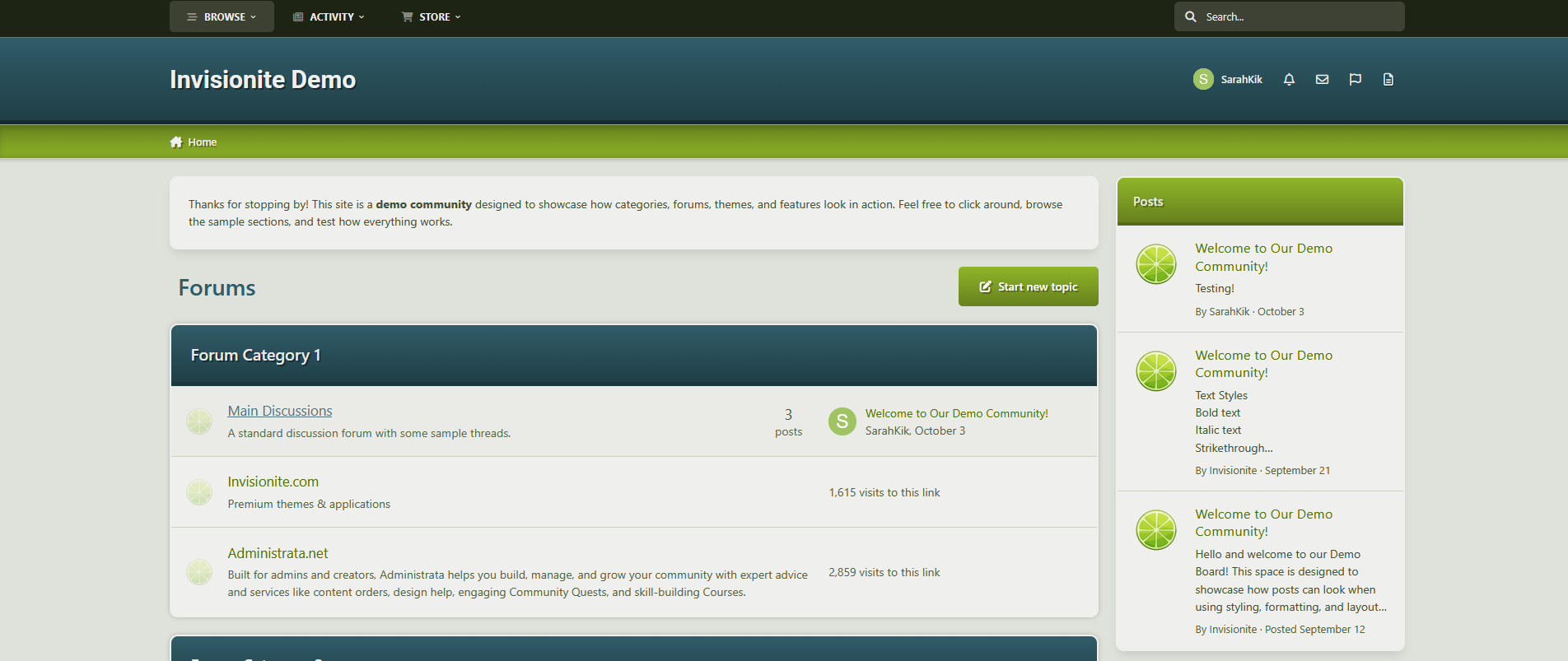
JuicyFruit — A Vibrant Theme for Invision Community v5
JuicyFruit is a theme that highlights vibrant colours while having the option of a light mode that's soft and inviting and a dark mode that's sleek and high contrast.
Live Demo (select JuicyFruit)
Highlights
Clean and fresh
JuicyFruit minimal and professional but visually structured for colours to pop and draw the eye in.
Built for Invision Community v5
Developed using v5’s updated template structure, ensuring modern design standards, improved responsiveness, and compatibility with all core apps.
What’s Included
Complete Invision Community v5 theme
Styled widgets and forum containers
Forum icons and accents
-
White & Blue
A new template for your forum straight from the author. It has many built-in functions. It will be enhanced with additional features in future updates.
( IPS version 4.7 )
-
Astroside
A new template for your forum straight from the author. It has many built-in functions. It will be enhanced with additional features in future updates.
( IPS version 4.7 )
The template requires the Better Statistics plugin, I recommend installing this plugin before installing the template.
-
Venus
A new template for your forum straight from the author. It has many built-in functions. It will be enhanced with additional features in future updates.
( IPS version 4.7 )
----- DEMO -----
The template requires the Better Statistics plugin, I recommend installing this plugin before installing the template.
-
IPS5.0.x
Flux is a modern and elegant theme designed for gaming forums, RP servers, and general community boards. Its dark, refined color palette, clean layout, and polished details give the site a professional look and a unique atmosphere. An ideal choice for communities that value both aesthetics and functionality.
If you’re interested in checking out a demo or learning more, you can explore further here.
-
IPS5.0.x
Codey is a new template for forums based on Invision Community 5. Designed by the author with extended functionality in mind, it will be enhanced with additional features in future updates.
Main Features:
Built-in tools – numerous useful features for efficient forum management.
Regular updates – each new version introduces additional improvements.
Two color versions – available in both dark and light themes.
If you’re interested in checking out a demo or learning more, you can explore further here.
-
IPS5.0.x
Popp Theme is a fresh template for forums running on Invision Community 5. Designed by the author with extended functionality in mind, it is continuously updated with new features.
Main Features:
Built-in tools – numerous useful features to enhance forum management.
Regular updates – each new version introduces additional improvements.
Dark Mode option – available in an alternative dark-themed version.
If you’re interested in checking out a demo or learning more, you can explore further here.
-
IPS5.0.0+
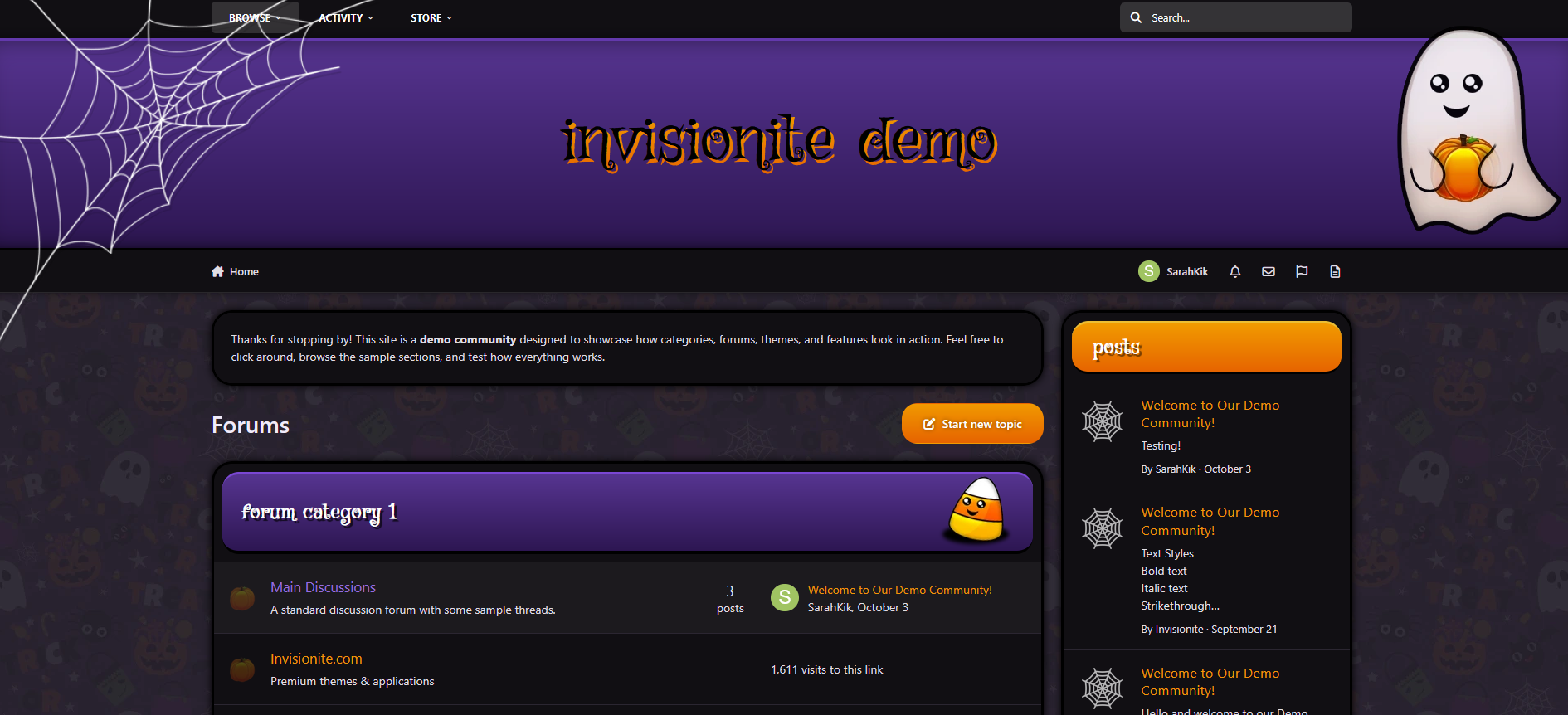
Cute Halloween — A Playful Seasonal Theme for Invision Community v5
Cute Halloween is a warm, lighthearted take on the Halloween season — designed to bring a touch of charm and festivity to your community.
It blends cozy fall tones, subtle spooky accents, and clean readability to create a theme that feels both seasonal and inviting.
Live Demo (select Cute Halloween)
Highlights
A friendly take on Halloween
Cute Halloween keeps things approachable and fun, using cheerful ghosts, candy corn details, and soft shadows instead of dark, heavy horror styling.
Cozy dark layout
The purple and orange palette pairs beautifully with a dark background, giving your site a relaxed evening atmosphere that’s easy to read and navigate.
Custom seasonal touches
Decorative ghosts, spiderwebs, and themed forum icons help set the mood without overwhelming your content.
Built for Invision Community v5
Developed using v5’s updated template structure, ensuring modern design standards, improved responsiveness, and compatibility with all core apps.
Perfect for October events
If you’re a fan of Halloween, adding seasonal activities, or just decorating for the month, this theme fits right in.
What’s Included
Complete Invision Community v5 theme
Custom header, footer, and background artwork
Styled widgets and forum containers
Forum icons and accents
-
IPS5.0.0+
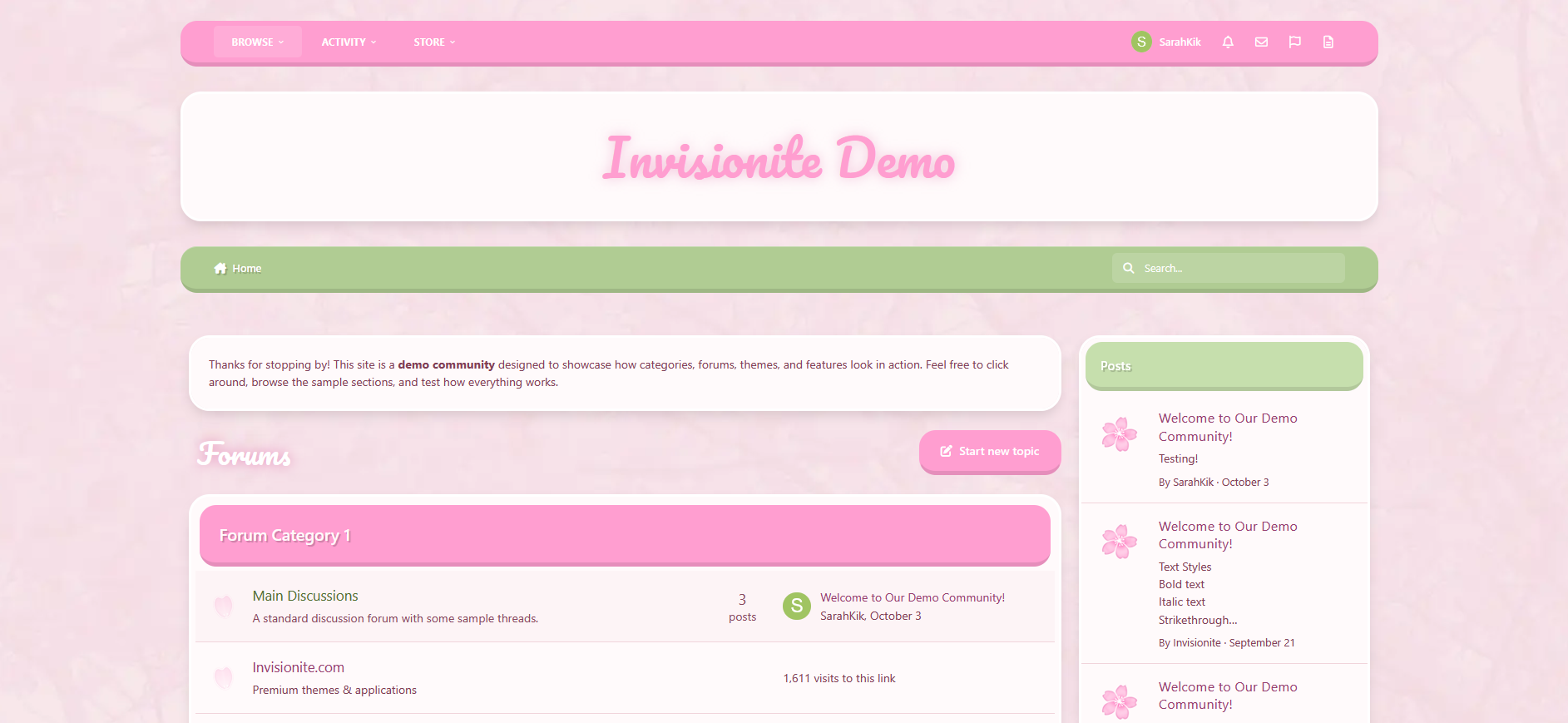
Cherry Blossom — A Soft and Refreshing Theme for Invision Community v5
Cherry Blossom brings a light and welcoming aesthetic to your community, inspired by spring tones and gentle design.
The theme focuses on clarity, comfort, and a sense of calm — perfect for communities that value friendliness, warmth, and a touch of color.
Live Demo (select Cherry Blossom)
Highlights
Soft color palette
A blend of pink and green hues gives the theme a peaceful, natural look. It feels bright without being overwhelming, ideal for daytime browsing.
Elegant minimal design
Rounded corners, light textures, and balanced spacing help your content stand out while maintaining a clean, cohesive presentation.
Custom header and forum styling
Distinct category headers and widget panels keep navigation intuitive, with thoughtful visual consistency throughout.
Optimized for Invision Community v5
Built using the latest template system, ensuring smooth performance, mobile responsiveness, and compatibility with all core applications.
Comfortable to read and use
The contrast and layout are tuned for easy legibility, making it suitable for long-form discussions, lifestyle communities, or creative projects.
What’s Included
Full Invision Community v5 theme
Custom header, footer, and content styling
Pink and green base colors with soft gradients
Light textured background for subtle depth
Styled widgets, buttons, and containers
-
IPS5.0.0+
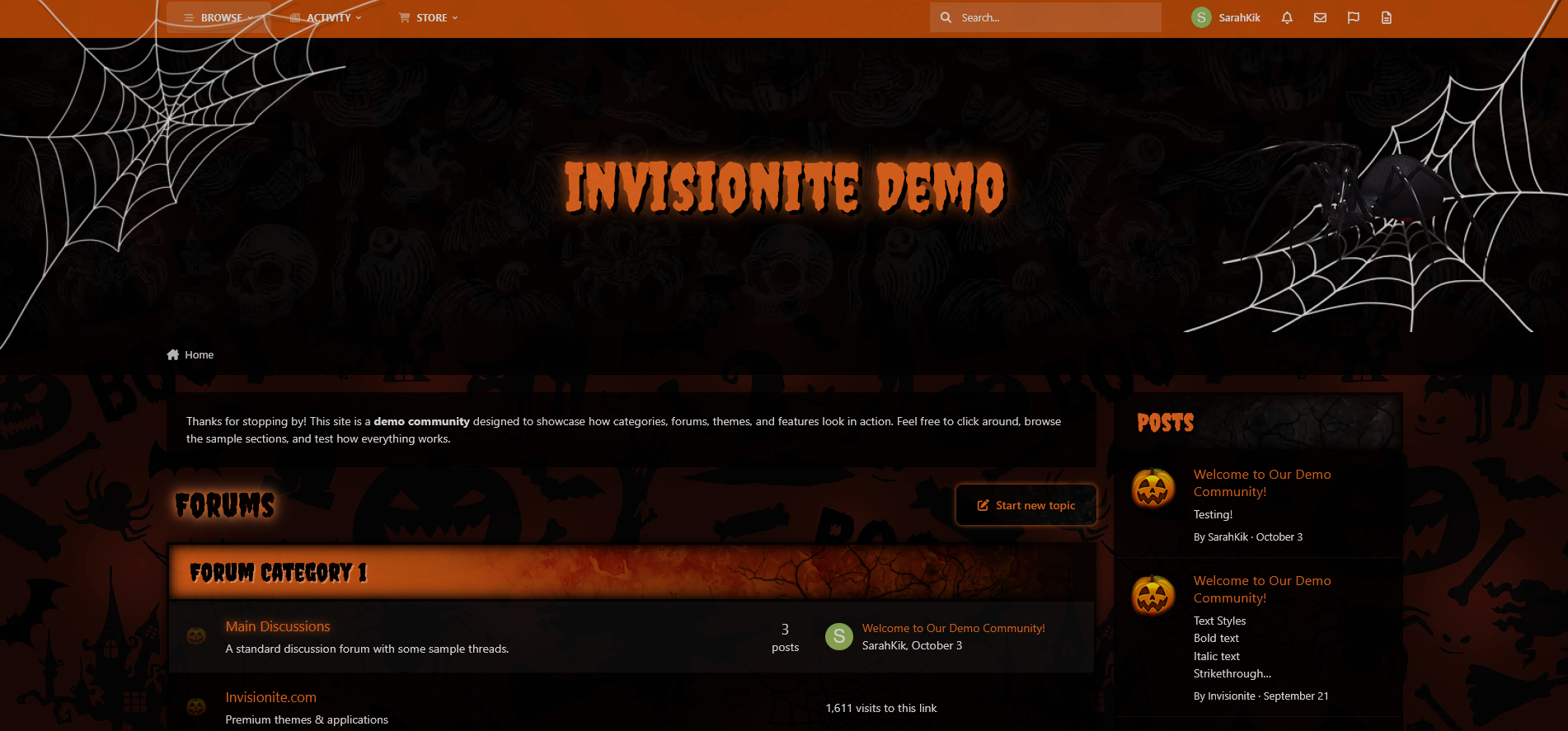
Spooky Halloween — A Haunting Seasonal Theme for Invision Community v5
Spooky Halloween is a dark, classic take on the Halloween season — designed to evoke nostalgic creepy night time vibes.
Live Demo (select Spooky Halloween)
Highlights
A scary, classic take
Iconic Halloween symbols subtly displayed throughout dark backgrounds with pops of orange help maintain an eerie atmosphere while still making things easy to read and find.
Creepy and kooky, all around spooky
Distressed and grungy elements, bold ragged fonts and orange glows reminiscent of old horror movie posters.
Custom seasonal touches
Decorative webs, spiders, trees, and themed forum icons help set the mood without overwhelming your content.
Built for Invision Community v5
Developed using v5’s updated template structure, ensuring modern design standards, improved responsiveness, and compatibility with all core apps.
Perfect for October events
If you’re a fan of Halloween, horror movies, adding seasonal activities, or just decorating for the month, this theme fits right in.
What’s Included
Complete Invision Community v5 theme
Custom header, footer, and background artwork
Styled widgets and forum containers
Forum icons and accents
-
IPS5.0.0+
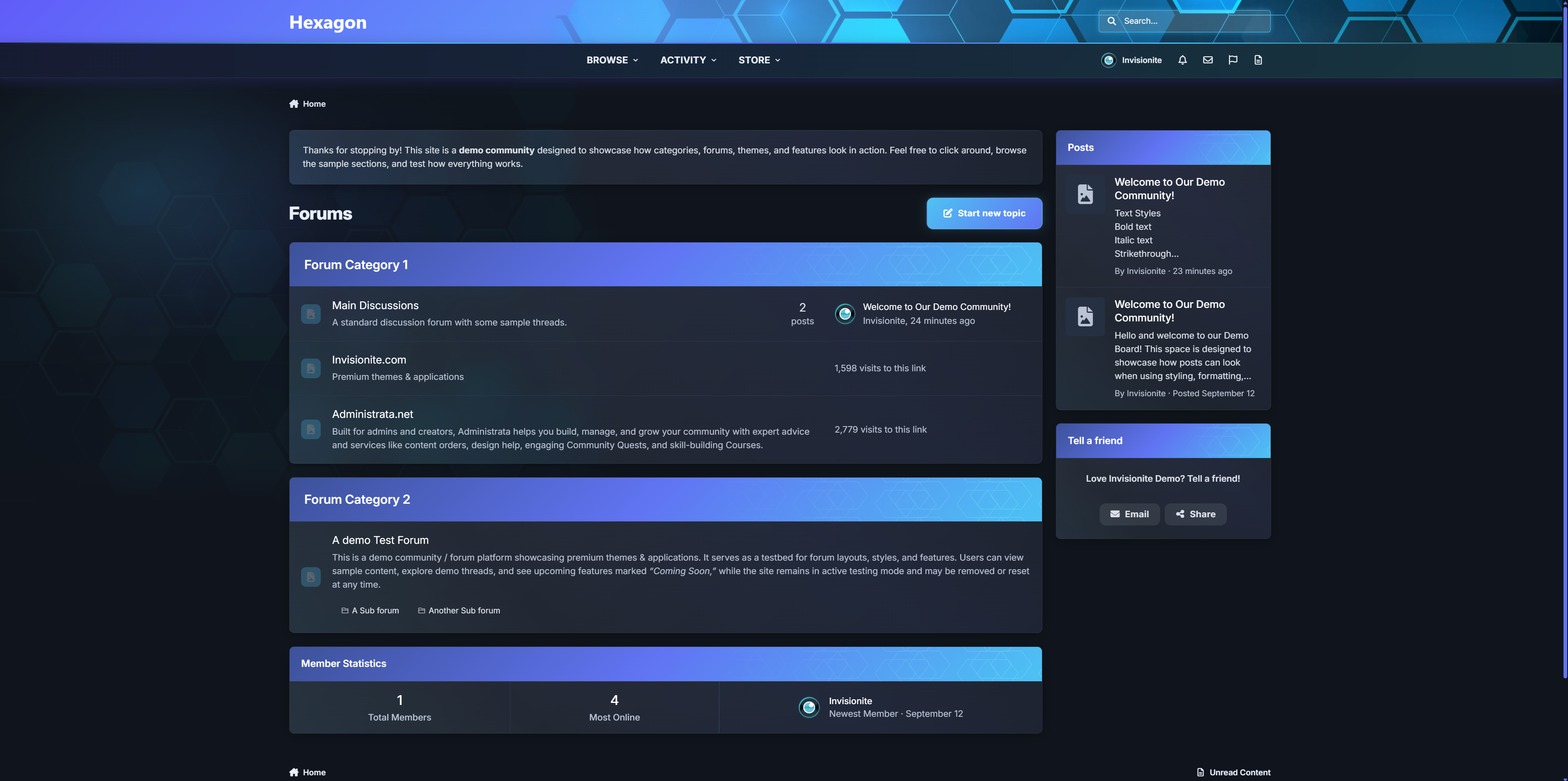
A premium Invision Community theme that blends soft glass surfaces, neon cyan accents, and a subtle hex-mesh motif. Hexagon ships with both dark and light modes, a refined mobile experience, and dozens of tasteful micro-interactions that make communities feel premium without feeling flashy.
LIVE DEMO
Pricing
Price: $39
Renewal: $15 / 6 months
License: 1 community
Highlights
Signature Gradient Header - cyan to purple blend with a hex overlay and masked shine.
Polished Components - boxes, widgets, and cards use glass surfaces, soft shadows, and glowing borders (light & dark tuned).
Elegant Menus - user menu, nav dropdowns, etc share one cohesive “glass panel” look with animated highlights.
Premium Mobile Header & Footer - beautifully styled with blurred transparent look.
Refined Off-Canvas Panels - notifications, messages, and search use a translucent sheet with drag-handle, blur and depth.
Focused Inputs - search/editor/fields get cyan focus rings, and subtle glow.
First Post - First post in topic is optically styled different to put focus on OP.
Theming Tokens - change a few CSS variables to rebrand colors fast (--accent-cyan, --new-purple, radii, shadows).
Performance-friendly - pure CSS (no JS added), prefers-reduced-motion support, and iOS z-index/safe-area fixes baked in.
Accessibility touches - larger targets, clear focus, high-contrast hover states, semantic aria-expanded behaviors.
Roadmap: extra color presets, and “no-hex” variant.
-
IPS5.0.0+
Elegant. Modern. Designed to Flow.
Aurora returns — now rebuilt for Invision Community v5.
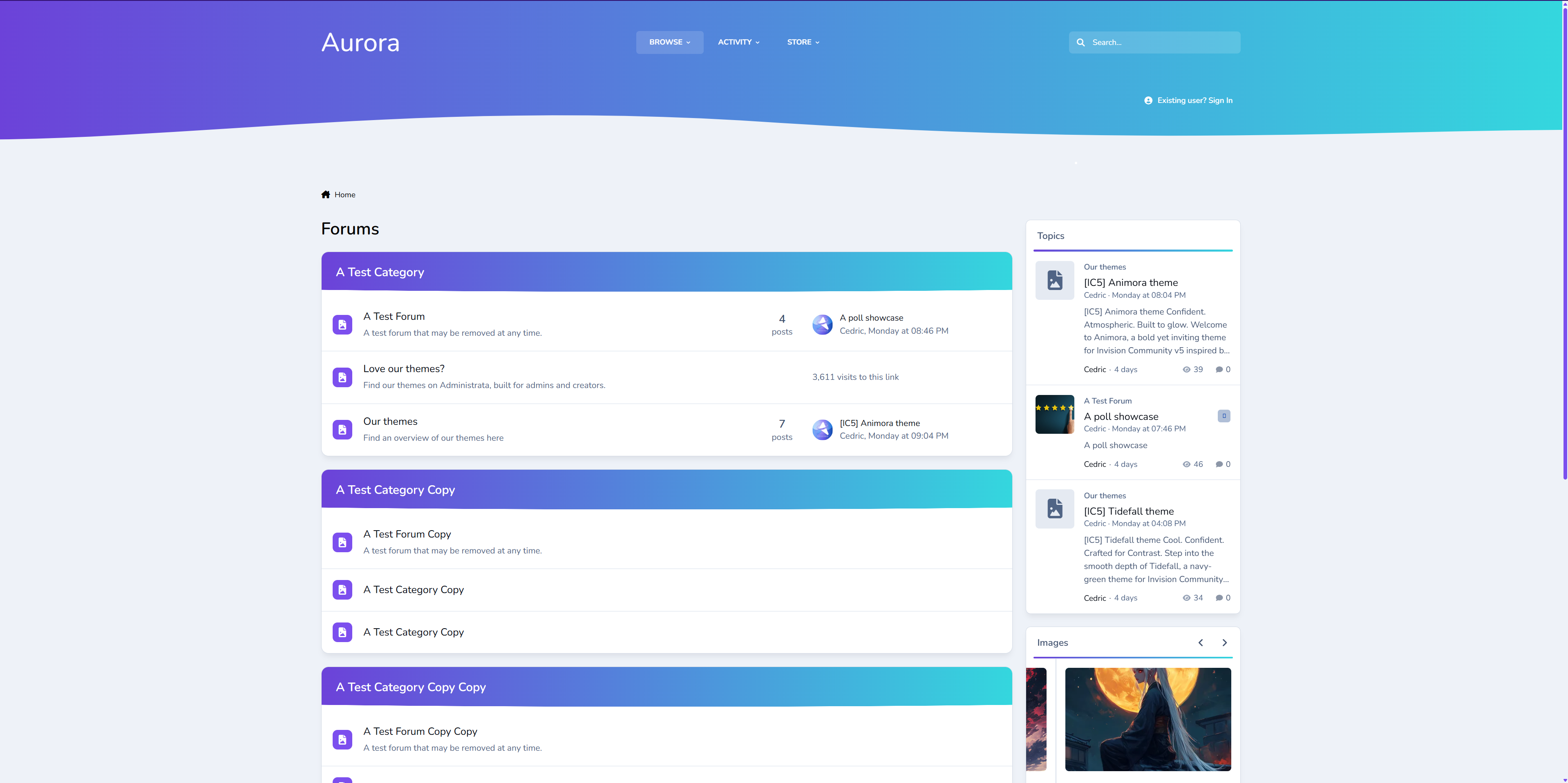
A refined remake of our popular XenForo variant, this version of Aurora blends soft gradients, clean panels, and adaptive dark/light modes for a theme that feels as smooth as it looks. It’s professional without being cold, stylish without losing usability.
Perfect for communities that want a premium, future-ready design that still feels effortless.
Demo: Select Aurora from the theme switcher.
✔️ Classic Aurora Reimagined
Our beloved XenForo Aurora design is now optimized for IPS v5 — keeping the signature flowing gradients while reworking every element for Invision’s modern framework.
✔️ Adaptive Dark & Light Modes
Aurora automatically adapts to the user’s theme choice or OS setting, delivering consistent, balanced visuals in any environment.
✔️ Gradient Category & Widget Headers
Forum categories and widgets feature Aurora’s signature gradient trim — crisp, modern, and seamlessly blending with the rest of the UI.
✔️ Smooth UI
Panels, widgets, and dropdowns keep it clean, assuring focus on your content while adding depth.
✔️ Styled Scrollbars & Details
Custom-themed scrollbars, button accents, and header lines ensure even the smallest details feel consistent.
✔️ Pixel-Perfect for Any Niche
From tech forums to creative communities, Aurora delivers a clean canvas that’s ready for your brand and content.
We've redefined Aurora — A more polished experience built for today’s IPS communities. If you loved the XenForo version, you’ll feel right at home here.
-
IPS5.0.0+
Striking. Immersive. Built for motion.
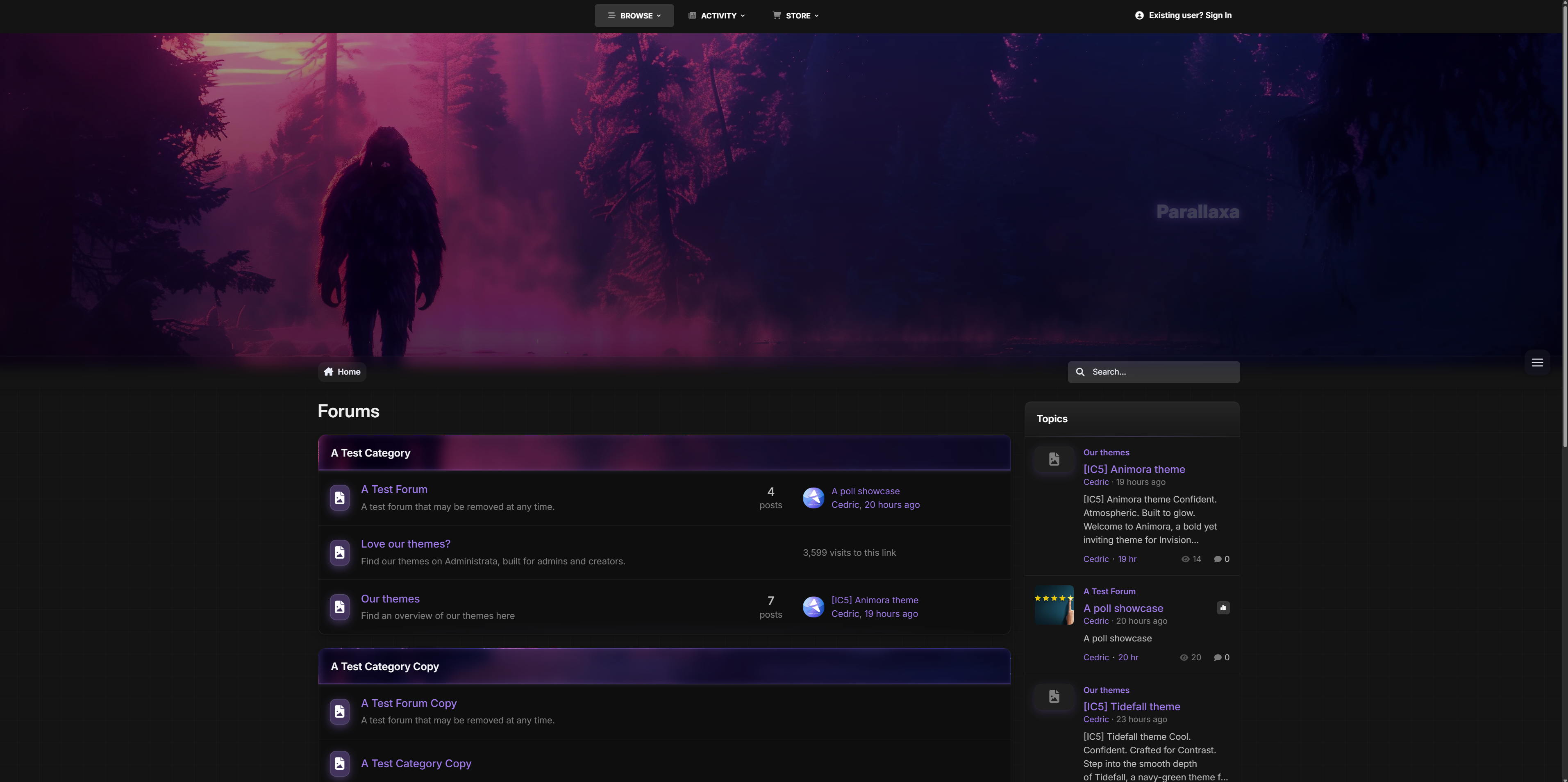
Step into Parallaxa, a game-inspired Invision Community v5 theme designed for depth, energy, and customization. With a responsive parallax header, animated accents, glass surfaces, and dynamic color presets, Parallaxa sets the stage for communities that want more than just a basic skin — they want a vibe.
Whether you run a gaming forum, creative project hub, or a content-heavy platform, Parallaxa delivers immersive style with functional clarity.
Demo: Select Parallaxa from the theme switcher.
✔️ Live Parallax Header
A responsive hero header with optional background selector, layered gradients, and gentle movement to add dimension and presence.
✔️ Dynamic Background Selector
Let your users switch between multiple thematic backgrounds with a seamless, mobile-friendly overlay — complete with animated previews and dark blur effect.
✔️ Accent Color Presets
Switch between vibrant preset colors like blue, red, lime, purple, and more. All UI elements update instantly — from icons to buttons to glow effects.
✔️ Glass UI with Depth
Menus, widgets, and content areas feature soft blurs and transparent panels, evoking that frosted-glass feel while keeping everything readable and responsive.
✔️ Shiny Buttons & Animated Glow
Buttons are styled with a layered gloss and animated sheen. Hover states glow, but never feel jarring. Perfect for modern, sleek navigation.
✔️ Adaptive Widgets & Headers
Box headers match your current background with darkened blur overlays and subtle glowing trims for contrast. Widget headers are styled to blend into the theme softly.
✔️ Built-in Game-Style Elements
From neon-glow badges to pill-style icons and soft-animated dropdowns, Parallaxa brings subtle game UI cues without overwhelming your content.
Ideal for modern forums, gaming clans, project showcases, and creative platforms that want to combine visual punch with polished design.
Need help adding your own backgrounds or expanding the presets? Just ask - Parallaxa was built for flexibility.
-
IPS5.0.0+
Confident. Atmospheric. Built to glow.
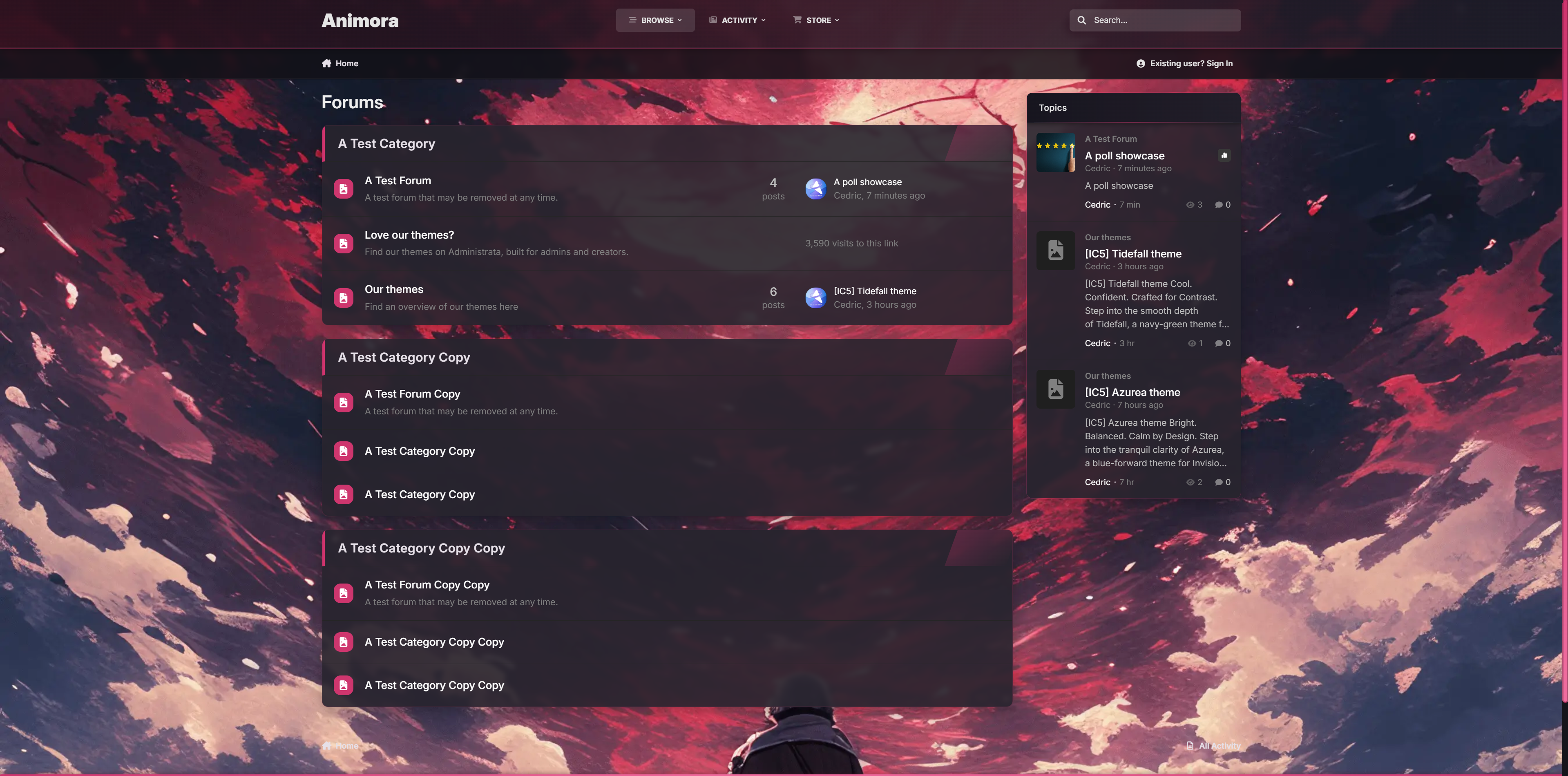
Welcome to Animora, a bold yet inviting theme for Invision Community v5 inspired by the ambiance of animated landscapes. With smooth blurs, glowing accents, and a selectable background system, Animora gives your forum a sense of motion and personality without sacrificing readability or performance.
Perfect when you're building a cozy creative space, an anime community, or just want something that feels alive, Animora blends beauty with usability in all the right ways.
Demo: Select Animora from the theme switcher.
✔️ Background Selector System
Let your members personalize their view. Choose from 4 animated-style background scenes.
✔️ Floating Glass Interface
Light blurs, glowing buttons, and modern transparency give everything a soft, premium touch.
✔️ Warm Highlighting & Accent Glow
From buttons to borders, subtle pink gradients add a radiant glow that lifts the design without overpowering it.
✔️ Fully Responsive Picker UI
The background selector opens in a modal-style overlay, works on all devices, and adapts with custom scrollbars and animated highlights.
✔️ Pink Line Borders & Pill Headers
Widgets and boxes feature frosted edges with glowing trims for structure and contrast.
✔️ Optional Background Sync
Users can preview backgrounds instantly.
Ideal for communities that love expressive visuals but want to stay sleek and usable.
If you would like to have different backgrounds, feel free to ask for a how-to.
-
IPS5.0.0+
Cool. Confident. Crafted for Contrast.
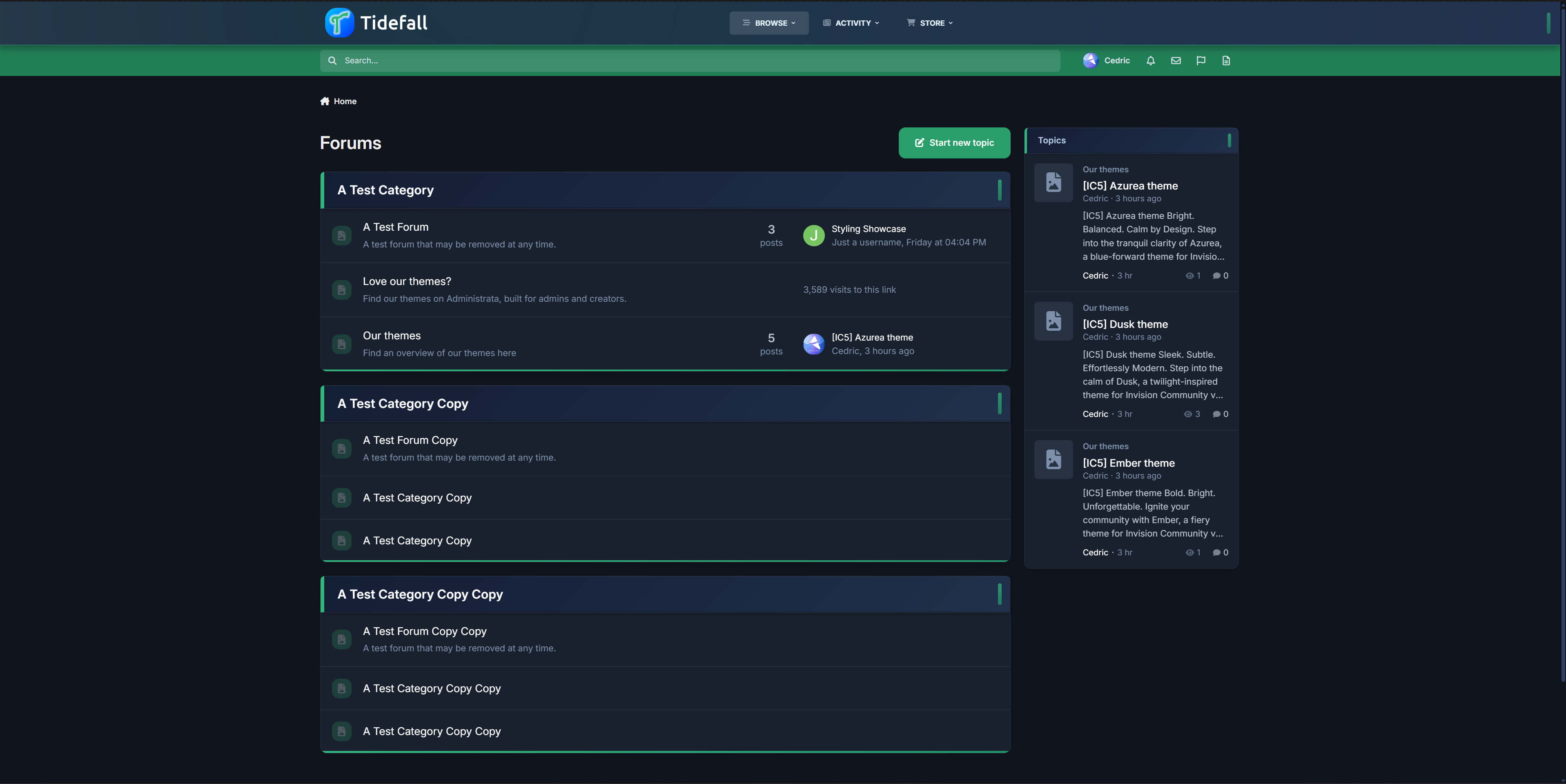
Step into the smooth depth of Tidefall, a navy-green theme for Invision Community v5 that balances vibrant clarity with grounded style. With a shifting header, soft blurs, and crisp lines, Tidefall brings a modern edge to any forum—quietly bold, intentionally clean.
Demo – Select Tidefall
✔️ Deep Navy & Emerald Palette – Designed for contrast and readability, with rich blues and a refined, confident green.
✔️ Modern Box Styling – Frosted headers, soft shadows, and vertical accent pills give your categories just the right touch of presence.
✔️ Animated Header Gradient – The primary header smoothly shifts tones, adding movement without noise.
✔️ Subtle Gradient Highlights – Forum bars and buttons use delicate fades to keep the interface lively and engaging.
✔️ Refined UI Elements – Custom scrollbars, clean navigation, and minimalist icons tie the whole theme together.
✔️ Light & Dark Included – Every detail adjusted for both modes, with consistent branding and polish.
Ideal for communities that want a sharp, distinctive style without being overbearing.