Jump to content
View in the app

A better way to browse. Learn more.

Invision Marketplace

A full-screen app on your home screen with push notifications, badges and more.

To install this app on iOS and iPadOS
  1. Tap the Share icon in Safari
  2. Scroll the menu and tap Add to Home Screen.
  3. Tap Add in the top-right corner.
To install this app on Android
  1. Tap the 3-dot menu (⋮) in the top-right corner of the browser.
  2. Tap Add to Home screen or Install app.
  3. Confirm by tapping Install.

Everything you need for your community

We will be moving to a new server soon, some downtime is expected.

Everything you need for your community

 Loading...
 Loading...
 Loading...
I have a bit of clients hosted offshore and seems a mix between high latency and IPS default chunk size was causing larger uploads to his -200 error.

The fix I found for this issue was to patch plupload options to 5mb instead of the default. This will also add in a retry so if one chunk fails it will retry that chunk instead of failing.
This is likely only needed when very specific environment conditions are met, but I needed it so maybe it will help you as well.


I have a bit of clients hosted offshore and seems a mix between high latency and IPS default chunk size was causing larger uploads to his -200 error.

The fix I found for this issue was to patch plupload options to 5mb instead of the default. This will also add in a retry so if one chunk fails it will retry that chunk instead of failing.
This is likely only needed when very specific environment conditions are met, but I needed it so maybe it will help you as well.
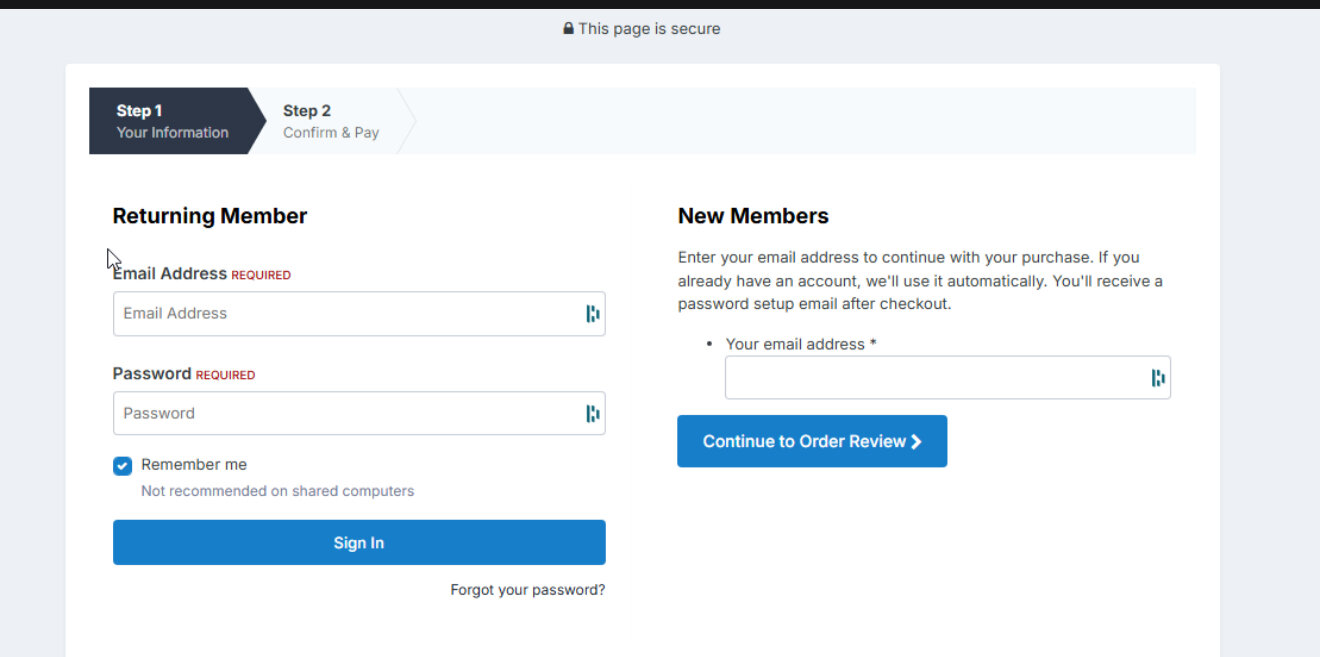


this plugin will allow your users to complete checkout without needing to register. simply input your email for your new or existing account and new users it will automatically create their user and existing users it will tie the order to your existing account!


this plugin will allow your users to complete checkout without needing to register. simply input your email for your new or existing account and new users it will automatically create their user and existing users it will tie the order to your existing account!


Top Developers

Last reviews

Applications Directory

A complete and convenient directory of applications for Invision Community, with categorization and sorting options.

Ratings and feedback

Only verified and trusted reviews!

Add new Application

Any developer can add their application to this directory.

You need to create account

Configure browser push notifications

Chrome (Android)
  1. Tap the lock icon next to the address bar.
  2. Tap Permissions → Notifications.
  3. Adjust your preference.
Chrome (Desktop)
  1. Click the padlock icon in the address bar.
  2. Select Site settings.
  3. Find Notifications and adjust your preference.







