Essential tools and enhancements to customize and improve your community experience.
Community Essentials is an application for Invision Community 5 that bundles multiple features into a single, lightweight package. Every feature has its own settings page in the AdminCP and works out of the box — no core file edits, no complicated setup.
Group Legend
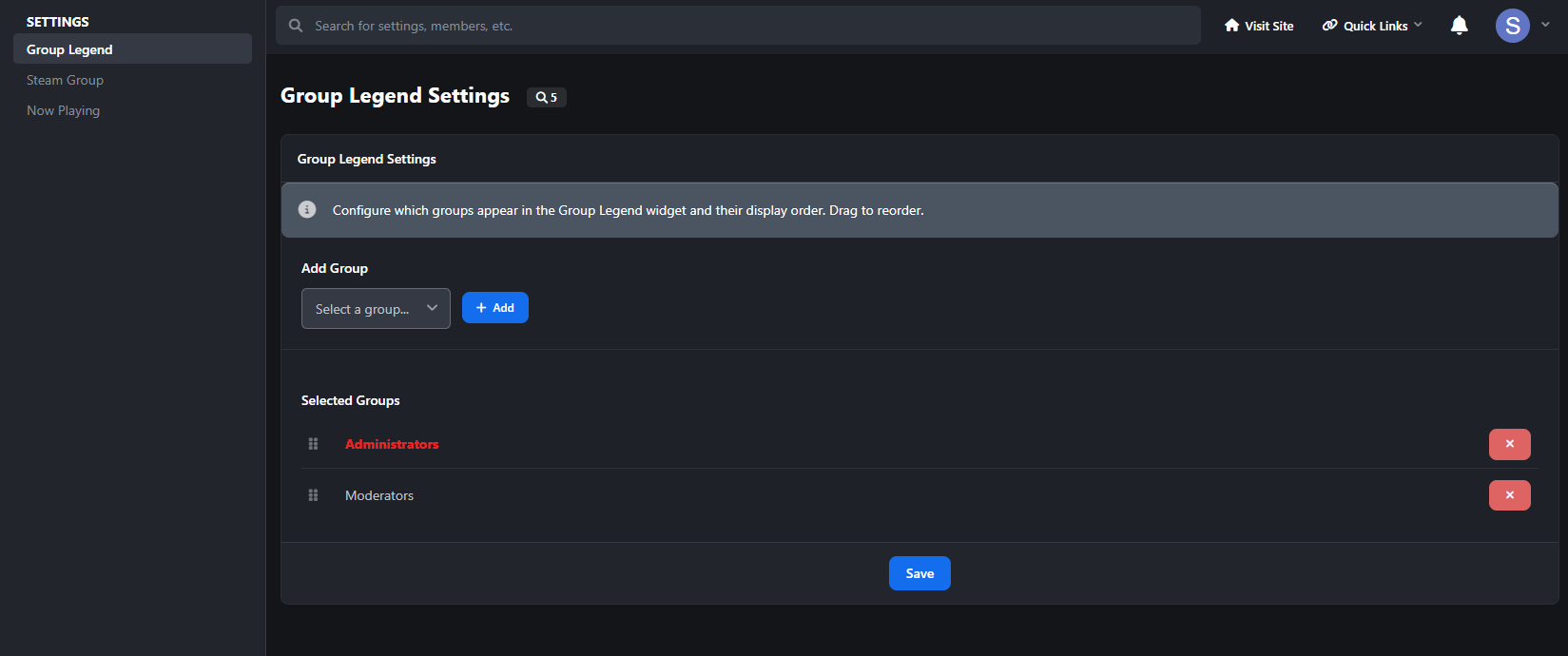
A color-coded legend of your member groups, displayed as a sidebar widget. Admins pick which groups to show and drag them into the desired display order. Each group appears with its formatted name and color styling. Clicking a group name takes visitors to a member search filtered by that group.
Choose which groups appear in the legend
Drag-and-drop reordering
Sidebar widget with static caching for performance
Steam Group
Display your Steam community group's live information in a beautiful sidebar widget. Enter your Steam group's custom URL name or numeric ID, and the widget pulls live data from Steam's public feed. Toggle exactly which info to show and pick from four visual themes.
Four themes included: Steam (classic dark blue gradients and teal accents), Modern (clean light design with purple accents), Pulse (cyberpunk HUD style with terminal-style stat readouts and scan line animations), and Aurora (hero banner with animated gradient background, orbiting avatar ring, and shimmer text).
Configurable elements you can toggle on/off: Group Name, Group Avatar, Total Members, Members Online, Members In Game, Members In Chat, Join Group Button.
Now Playing
Let members showcase what they're listening to or watching directly on their profile page. Members paste a YouTube or Spotify link on a dedicated settings page. When someone visits their profile, they see an embedded player with a branded header (platform icon + "Now Playing" label). An optional autoplay toggle lets the music start automatically.
Supports YouTube (videos, shorts, music, embeds) and Spotify (tracks, albums, playlists, episodes).
For members: dedicated settings page, autoplay toggle, "Now Playing" button in the profile header for quick access, and a "Set Now Playing" prompt on their own profile when no URL is set (invisible to others).
For admins: set a default URL that shows on profiles of members who haven't picked their own, control which member groups can use the feature, and add it to the site's main navigation menu. Spotify embeds automatically adjust their height — compact for single tracks, taller for albums and playlists.

IPS5.0.19
Essential tools and enhancements to customize and improve your community experience.
Community Essentials is an application for Invision Community 5 that bundles multiple features into a single, lightweight package. Every feature has its own settings page in the AdminCP and works out of the box — no core file edits, no complicated setup.
Group Legend
A color-coded legend of your member groups, displayed as a sidebar widget. Admins pick which groups to show and drag them into the desired display order. Each group appears with its formatted name and color styling. Clicking a group name takes visitors to a member search filtered by that group.
Choose which groups appear in the legend
Drag-and-drop reordering
Sidebar widget with static caching for performance
Steam Group
Display your Steam community group's live information in a beautiful sidebar widget. Enter your Steam group's custom URL name or numeric ID, and the widget pulls live data from Steam's public feed. Toggle exactly which info to show and pick from four visual themes.
Four themes included: Steam (classic dark blue gradients and teal accents), Modern (clean light design with purple accents), Pulse (cyberpunk HUD style with terminal-style stat readouts and scan line animations), and Aurora (hero banner with animated gradient background, orbiting avatar ring, and shimmer text).
Configurable elements you can toggle on/off: Group Name, Group Avatar, Total Members, Members Online, Members In Game, Members In Chat, Join Group Button.
Now Playing
Let members showcase what they're listening to or watching directly on their profile page. Members paste a YouTube or Spotify link on a dedicated settings page. When someone visits their profile, they see an embedded player with a branded header (platform icon + "Now Playing" label). An optional autoplay toggle lets the music start automatically.
Supports YouTube (videos, shorts, music, embeds) and Spotify (tracks, albums, playlists, episodes).
For members: dedicated settings page, autoplay toggle, "Now Playing" button in the profile header for quick access, and a "Set Now Playing" prompt on their own profile when no URL is set (invisible to others).
For admins: set a default URL that shows on profiles of members who haven't picked their own, control which member groups can use the feature, and add it to the site's main navigation menu. Spotify embeds automatically adjust their height — compact for single tracks, taller for albums and playlists.