Jump to content
View in the app

A better way to browse. Learn more.

Invision Marketplace

A full-screen app on your home screen with push notifications, badges and more.

To install this app on iOS and iPadOS
  1. Tap the Share icon in Safari
  2. Scroll the menu and tap Add to Home Screen.
  3. Tap Add in the top-right corner.
To install this app on Android
  1. Tap the 3-dot menu (⋮) in the top-right corner of the browser.
  2. Tap Add to Home screen or Install app.
  3. Confirm by tapping Install.

Everything you need for your community

We will be moving to a new server soon, some downtime is expected.

Everything you need for your community

 Loading...
 Loading...
 Loading...
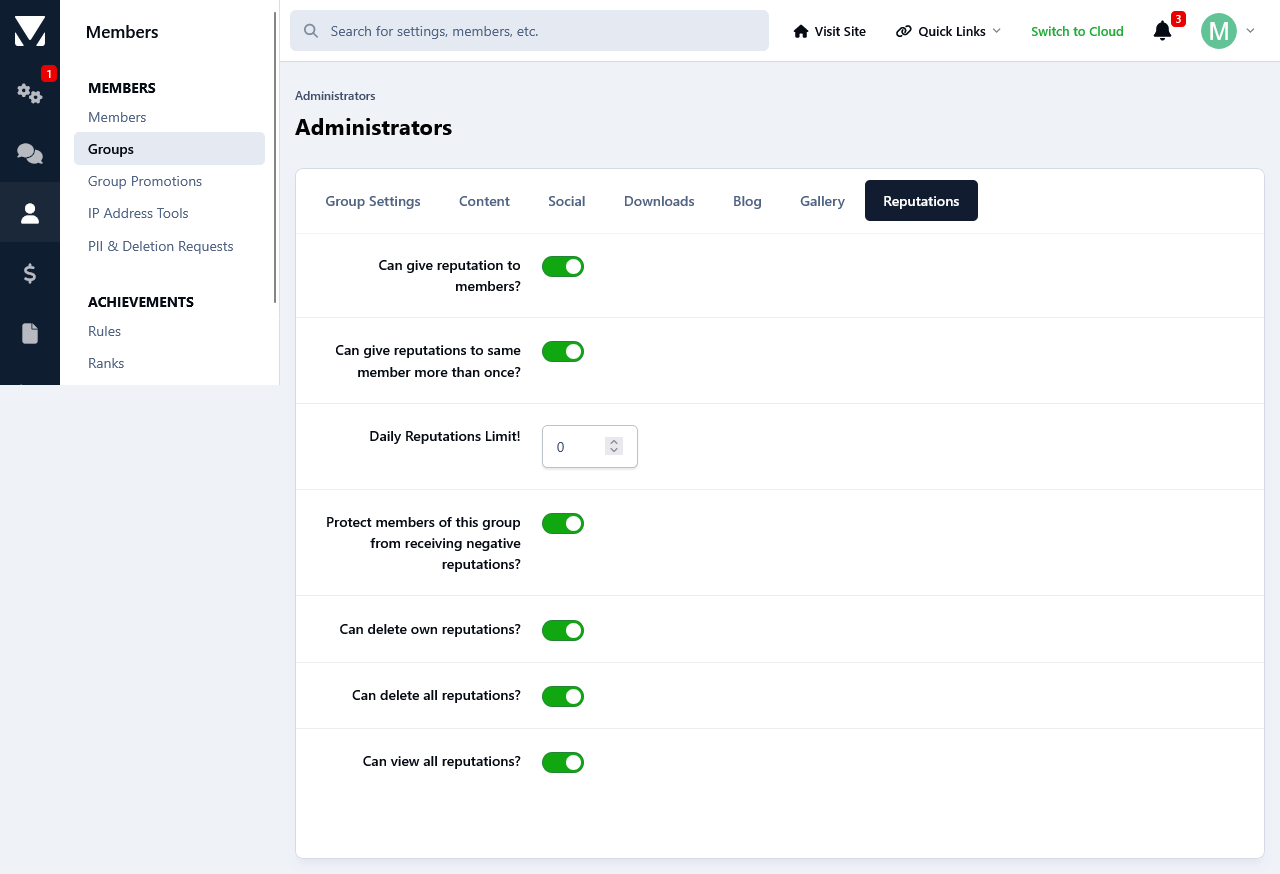
This app will give the members at your forum the possibility to leave reputations feedback to each other. Reputation feedback are positive,neutral and negative. After a member has received a reputation feedback, they will receive a notification letting them know about it. The Reputation notification can be enabled/disabled from members notification settings page. Depending on their permissions members can delete reputations that they have given themselves or all reputations.
Permissions:
You can set the permissions for groups to use it on a group per group basis. 
Restrictions:
Banned members can't receive reputation feedback.
The same goes for members that are on someone's ignore list.
Depending on the group permissions members can give the same member either only one specific reputation feedback or unlimited. 
Group based daily reputation feedback limit.
Group based negative feedback protection.
Privacy:
From their Account Settings->Reputation Privacy, members can set it so only their followers will be able to give them reputation feedback, everyone or disable it completely so none one will be able to send them reputations. Members with the appropriate permissions will still be able to give them reputation feedback regardless of the privacy setting.
Display:
A new page linked to the navigation manager has been added that will display all the reputation feedback that members have given and received. Reputations can be filtered based on their status and a search option is available for member to search through the reputations.
Three sidebar blocks are available that will list the most positive/negative members as well as a total of all reputations stats.
A new tab has been added on members profiles where they can see all reputations that they have received.
Members reputations stats will be displayed on their postbits.
Logs:
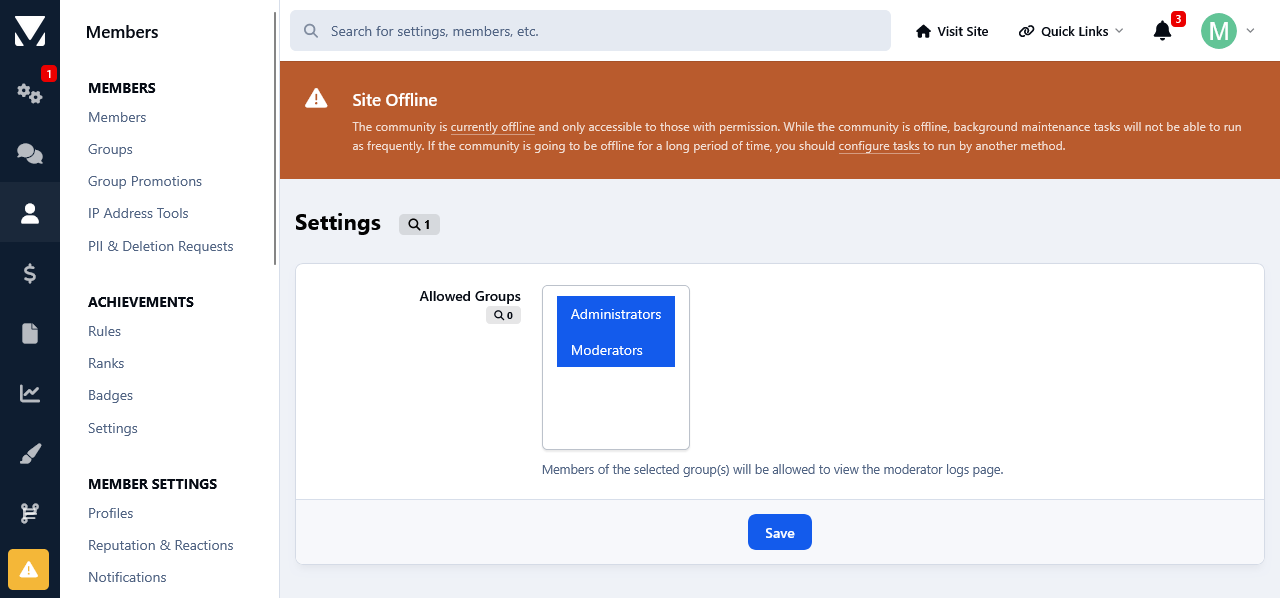
Whenever someone is deleting a reputation feedback, that action will be logged at the Moderators log page. 
IPS5.0.0
This app will give the members at your forum the possibility to leave reputations feedback to each other. Reputation feedback are positive,neutral and negative. After a member has received a reputation feedback, they will receive a notification letting them know about it. The Reputation notification can be enabled/disabled from members notification settings page. Depending on their permissions members can delete reputations that they have given themselves or all reputations.
Permissions:
You can set the permissions for groups to use it on a group per group basis. 
Restrictions:
Banned members can't receive reputation feedback.
The same goes for members that are on someone's ignore list.
Depending on the group permissions members can give the same member either only one specific reputation feedback or unlimited. 
Group based daily reputation feedback limit.
Group based negative feedback protection.
Privacy:
From their Account Settings->Reputation Privacy, members can set it so only their followers will be able to give them reputation feedback, everyone or disable it completely so none one will be able to send them reputations. Members with the appropriate permissions will still be able to give them reputation feedback regardless of the privacy setting.
Display:
A new page linked to the navigation manager has been added that will display all the reputation feedback that members have given and received. Reputations can be filtered based on their status and a search option is available for member to search through the reputations.
Three sidebar blocks are available that will list the most positive/negative members as well as a total of all reputations stats.
A new tab has been added on members profiles where they can see all reputations that they have received.
Members reputations stats will be displayed on their postbits.
Logs:
Whenever someone is deleting a reputation feedback, that action will be logged at the Moderators log page. 
This app allows your staff, with the appropriate permissions, to see topic viewers/readers as well as track your members topic viewing/reading behavior. 
Topic readers will be displayed on topic view. Only unique views are logged. This means that whenever someone visits a topic, their latest visit will be logged and displayed.
To track members topic reading history, go to their profiles where a new tab has been added called: Recent Viewed Topics.
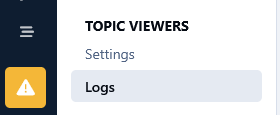
And as last, but not least, topic view logs can be kept permanently or pruned after a certain amount of time.
 
IPS5.0.0
This app allows your staff, with the appropriate permissions, to see topic viewers/readers as well as track your members topic viewing/reading behavior. 
Topic readers will be displayed on topic view. Only unique views are logged. This means that whenever someone visits a topic, their latest visit will be logged and displayed.
To track members topic reading history, go to their profiles where a new tab has been added called: Recent Viewed Topics.
And as last, but not least, topic view logs can be kept permanently or pruned after a certain amount of time.
 
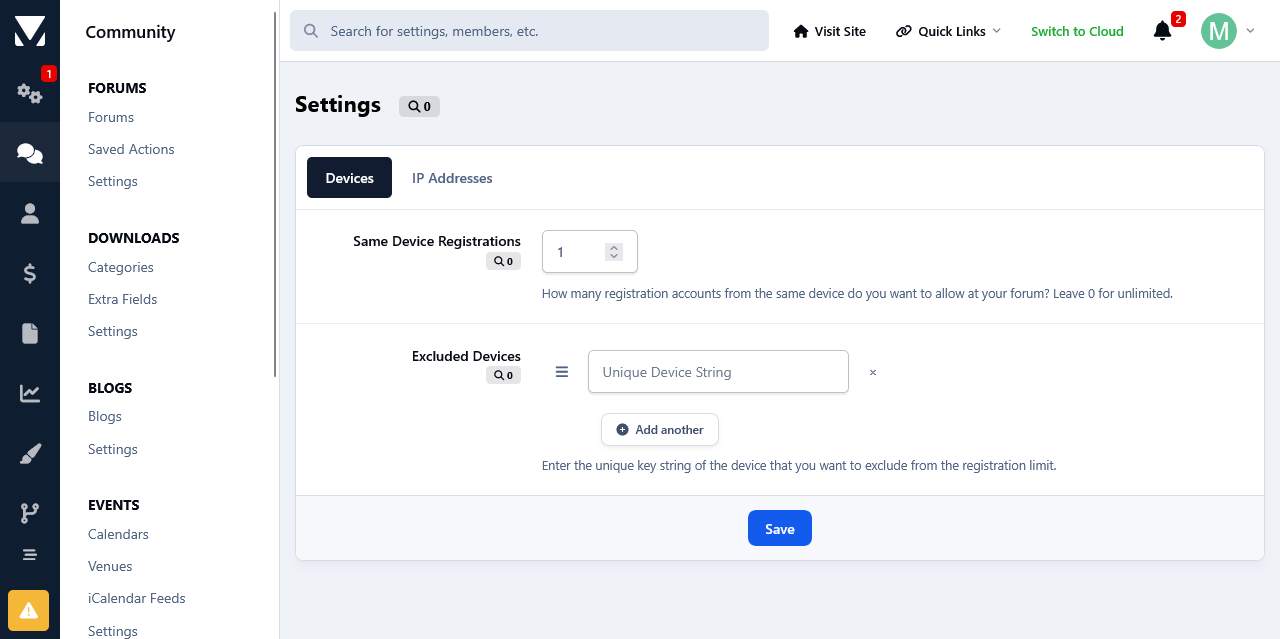
This app will limit the number of accounts that users can register from the same device and/or ip address. Devices and/or IP Addresses can be excluded from this restriction at the app's settings page.
IPS5.0.0
This app will limit the number of accounts that users can register from the same device and/or ip address. Devices and/or IP Addresses can be excluded from this restriction at the app's settings page.
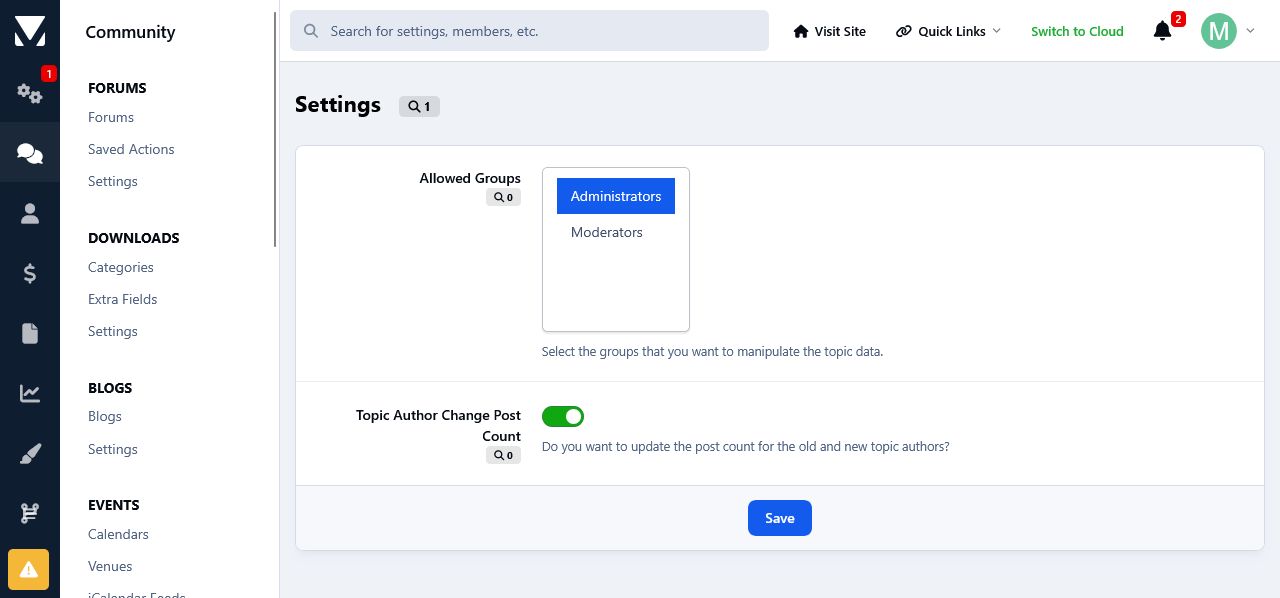
This app will allow the admins and your staff, with the appropriate permissions, to change several topic data such as views, author and start date.
Permissions:
You can set the permissions at the app 's settings page which can be found at your Admin Panel->Community->Manipulate Topic Data.
Members with the permissions to change topic data, will see 3 new links added inside the Moderation Actions drop down list. The are as follow:
1) Change Views:
When clicked upon it will display the current views for that topic with the option to add to them.
2) Change Author:
When clicked upon it will display the topic author with the option to select a new author. After the changes are saved, the topic info will be updated accordingly to reflect the new author. The new changes will be updated in the search and activity page as well.
You have the options to decrease old author 's post count and increase the post count of the new author.
3) Change Start Date: 
When clicked upon it will display the topic start date with the option to select a new date. After the changes are saved, the topic info will be updated accordingly to reflect the new start date. The new changes will be updated in the search and activity page as well.
Moderator Log:
All the aforementioned topic changes will be logged in the Moderator Log page in the admin panel.
IPS5.0.0
This app will allow the admins and your staff, with the appropriate permissions, to change several topic data such as views, author and start date.
Permissions:
You can set the permissions at the app 's settings page which can be found at your Admin Panel->Community->Manipulate Topic Data.
Members with the permissions to change topic data, will see 3 new links added inside the Moderation Actions drop down list. The are as follow:
1) Change Views:
When clicked upon it will display the current views for that topic with the option to add to them.
2) Change Author:
When clicked upon it will display the topic author with the option to select a new author. After the changes are saved, the topic info will be updated accordingly to reflect the new author. The new changes will be updated in the search and activity page as well.
You have the options to decrease old author 's post count and increase the post count of the new author.
3) Change Start Date: 
When clicked upon it will display the topic start date with the option to select a new date. After the changes are saved, the topic info will be updated accordingly to reflect the new start date. The new changes will be updated in the search and activity page as well.
Moderator Log:
All the aforementioned topic changes will be logged in the Moderator Log page in the admin panel.
This app will list all of your database tables at its settings in your Admin Panel.
Table Structure Details:
You can view the structure of each database table as well as other details, such as how many rows do they have, their collation and engine type. The date when the table was first added to the database and when it was last modified. 
Commands:
You can run several commands such as Showing the create structure of tables, Checking tables, Repair and Optimizing.
Details:
A list of your database details such as the total tables, its size and how much free size is left is available as well.
This can be very useful imo especially if you don't have direct access to the server, and no utilities such as phpMyAdmin are installed. Or if you aren't very comfortable with dealing with the database from phpmyadmin for fear of messing things up, you can use this app as there is Zero chance of messing anything.
It can also come in handy if you have installed a lot of third party custom stuff like apps, plugins etc over the years and you want to have a clear overview of your database. You can do that with ease without having to go to your phpmyadmin.  
IPS5.0.0
This app will list all of your database tables at its settings in your Admin Panel.
Table Structure Details:
You can view the structure of each database table as well as other details, such as how many rows do they have, their collation and engine type. The date when the table was first added to the database and when it was last modified. 
Commands:
You can run several commands such as Showing the create structure of tables, Checking tables, Repair and Optimizing.
Details:
A list of your database details such as the total tables, its size and how much free size is left is available as well.
This can be very useful imo especially if you don't have direct access to the server, and no utilities such as phpMyAdmin are installed. Or if you aren't very comfortable with dealing with the database from phpmyadmin for fear of messing things up, you can use this app as there is Zero chance of messing anything.
It can also come in handy if you have installed a lot of third party custom stuff like apps, plugins etc over the years and you want to have a clear overview of your database. You can do that with ease without having to go to your phpmyadmin.  
.
This app will monitor your forum and list all changes done to the files within a time frame set by the admin. It will also scan all folders and files inside your forum folder for any potential malicious code and/or backdoor scripts.

File Change Detection:

If the files that have been listed as modified, haven't been changed by you yourself and/or haven't been updated automatically by the system, it could indicate that your forum most likely has been tampered with. Those files might have been changed to include malicious code.

In addition to an existed file being changed/modified, the upload of new file(s) is detected too.

In that case it would be best to immediately check the file(s) in question and contact your host so they can look into the unauthorized file changes and take the necessary actions to plugin the point of entry.

Potential Backdoor Scanning:

What Is a Backdoor?

A backdoor is malicious code injected to valid file(s)  of whatever scripts one is running on their server space, as only one short line of code that looks rather innocent. Or, a backdoor can be a standalone file as well.

They are left behind by hackers once they breach the security of a website to make sure they can get back in even after you secure your website. i.e. it allows them unauthorized and often unrestricted access to a compromised site. Unless you can remove the backdoor(s), there's no stopping them.

Backdoors are hidden from view, and made to look like legitimate files and therefore it can be extremely difficult to find. And that's where this app comes in.

It will scan all lines of code on every single file inside your forum folder for exploitable PHP Functions, PHP Code Execution, Command Execution and Filesystem Functions.

A few Examples:

The mod scans for a very wide array of php&filesystem functions, code&command executions. Below are few of them along with how they can be exploited by hackers.
Command Execution!
exec  - Returns last line of commands output
passthru - Passes commands output directly to the browser
system  - Passes commands output directly to the browser and returns last line
shell_exec - Returns commands output
popen - Opens read or write pipe to process of a command
proc_open  - Similar to popen() but greater degree of control
pcntl_exec - Executes a program
PHP Code Execution!
Apart from eval there are other ways to execute PHP code: include/require can be used for remote code execution in the form of Local File Include and Remote File Include vulnerabilities.
assert()  - identical to eval()
preg_replace('/.*/e',...) - /e does an eval() on the match
create_function()
include()
include_once()
require()
require_once()
Disguised Malicious Code
The use of eval(base64_decode(....)) or eval(gzinflate(base64_decode(..))) which are intended to disguise the nature of the malicious code.

The use of str_rot13 which is heavily used in pair with base64_decode. This too is used to disguise the nature of the malicious code.
False Positives:

All the aforementioned php functions, commands, executions etc are all legit. Ips and all the other php/mysql forum/cms scripts etc make use of them. But unfortunately they are also the most commonly used functions by the bad actors to inject malicious code. Therefore there will be false positives reports.

If you see your forum files mentioned as containing the aforementioned code, you can ignore it. But if any of the forum files is reported as recently modified file(s) by the app and you haven't touched the file(s) in question, then you should check it immediately as the chances are that it's foul play.
IPS5.0.0
.
This app will monitor your forum and list all changes done to the files within a time frame set by the admin. It will also scan all folders and files inside your forum folder for any potential malicious code and/or backdoor scripts.

File Change Detection:

If the files that have been listed as modified, haven't been changed by you yourself and/or haven't been updated automatically by the system, it could indicate that your forum most likely has been tampered with. Those files might have been changed to include malicious code.

In addition to an existed file being changed/modified, the upload of new file(s) is detected too.

In that case it would be best to immediately check the file(s) in question and contact your host so they can look into the unauthorized file changes and take the necessary actions to plugin the point of entry.

Potential Backdoor Scanning:

What Is a Backdoor?

A backdoor is malicious code injected to valid file(s)  of whatever scripts one is running on their server space, as only one short line of code that looks rather innocent. Or, a backdoor can be a standalone file as well.

They are left behind by hackers once they breach the security of a website to make sure they can get back in even after you secure your website. i.e. it allows them unauthorized and often unrestricted access to a compromised site. Unless you can remove the backdoor(s), there's no stopping them.

Backdoors are hidden from view, and made to look like legitimate files and therefore it can be extremely difficult to find. And that's where this app comes in.

It will scan all lines of code on every single file inside your forum folder for exploitable PHP Functions, PHP Code Execution, Command Execution and Filesystem Functions.

A few Examples:

The mod scans for a very wide array of php&filesystem functions, code&command executions. Below are few of them along with how they can be exploited by hackers.
Command Execution!
exec  - Returns last line of commands output
passthru - Passes commands output directly to the browser
system  - Passes commands output directly to the browser and returns last line
shell_exec - Returns commands output
popen - Opens read or write pipe to process of a command
proc_open  - Similar to popen() but greater degree of control
pcntl_exec - Executes a program
PHP Code Execution!
Apart from eval there are other ways to execute PHP code: include/require can be used for remote code execution in the form of Local File Include and Remote File Include vulnerabilities.
assert()  - identical to eval()
preg_replace('/.*/e',...) - /e does an eval() on the match
create_function()
include()
include_once()
require()
require_once()
Disguised Malicious Code
The use of eval(base64_decode(....)) or eval(gzinflate(base64_decode(..))) which are intended to disguise the nature of the malicious code.

The use of str_rot13 which is heavily used in pair with base64_decode. This too is used to disguise the nature of the malicious code.
False Positives:

All the aforementioned php functions, commands, executions etc are all legit. Ips and all the other php/mysql forum/cms scripts etc make use of them. But unfortunately they are also the most commonly used functions by the bad actors to inject malicious code. Therefore there will be false positives reports.

If you see your forum files mentioned as containing the aforementioned code, you can ignore it. But if any of the forum files is reported as recently modified file(s) by the app and you haven't touched the file(s) in question, then you should check it immediately as the chances are that it's foul play.
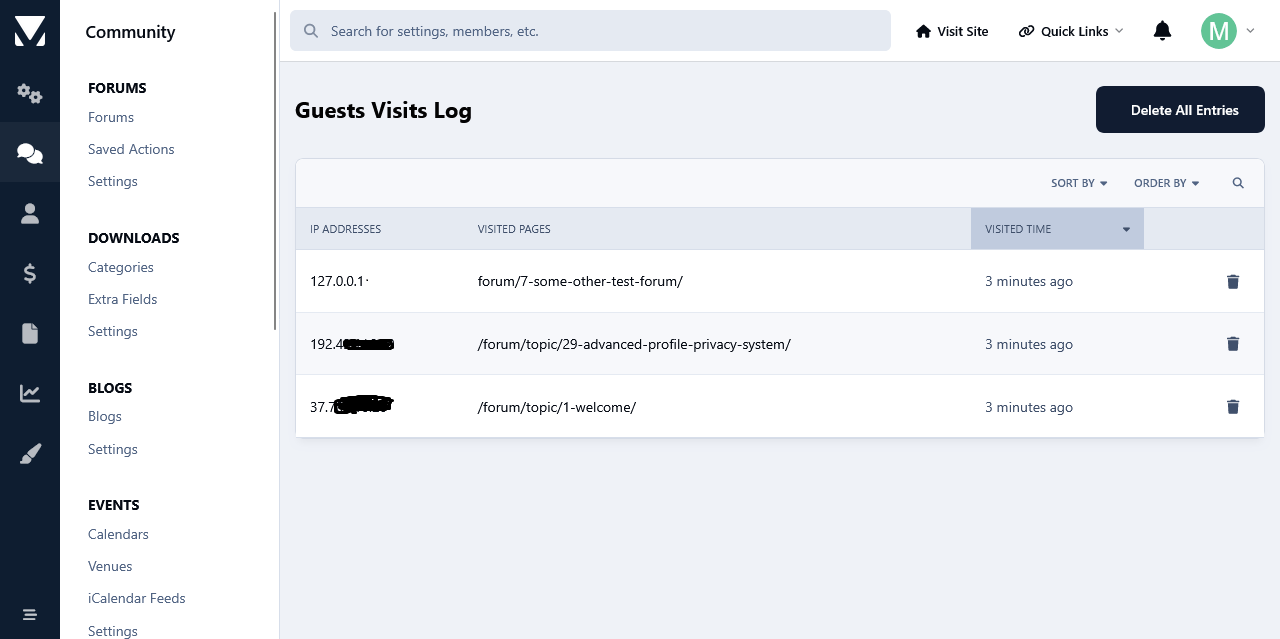
This app will log all guests visits at your forum from the moment that it's installed and it will display them in the app's log page. Like that you will have an overview as to what pages hold the interest of your guests. Logs can be then searched based on ip addresses and visit time frame.
Another feature of this app is the use cookies to limit the number of times that your  guests can view pages at your forum. The limit will be for a day, after which it will expire and it will be repeated again after the number of page view limit has been reached again. The whole idea behind this concept is to hopefully motivate guests to register. 
The search bots will not be impacted by this when it comes to spidering your site, because usually bots do not generally use cookies. However, this is an on/off setting.
IPS5.0.0
This app will log all guests visits at your forum from the moment that it's installed and it will display them in the app's log page. Like that you will have an overview as to what pages hold the interest of your guests. Logs can be then searched based on ip addresses and visit time frame.
Another feature of this app is the use cookies to limit the number of times that your  guests can view pages at your forum. The limit will be for a day, after which it will expire and it will be repeated again after the number of page view limit has been reached again. The whole idea behind this concept is to hopefully motivate guests to register. 
The search bots will not be impacted by this when it comes to spidering your site, because usually bots do not generally use cookies. However, this is an on/off setting.
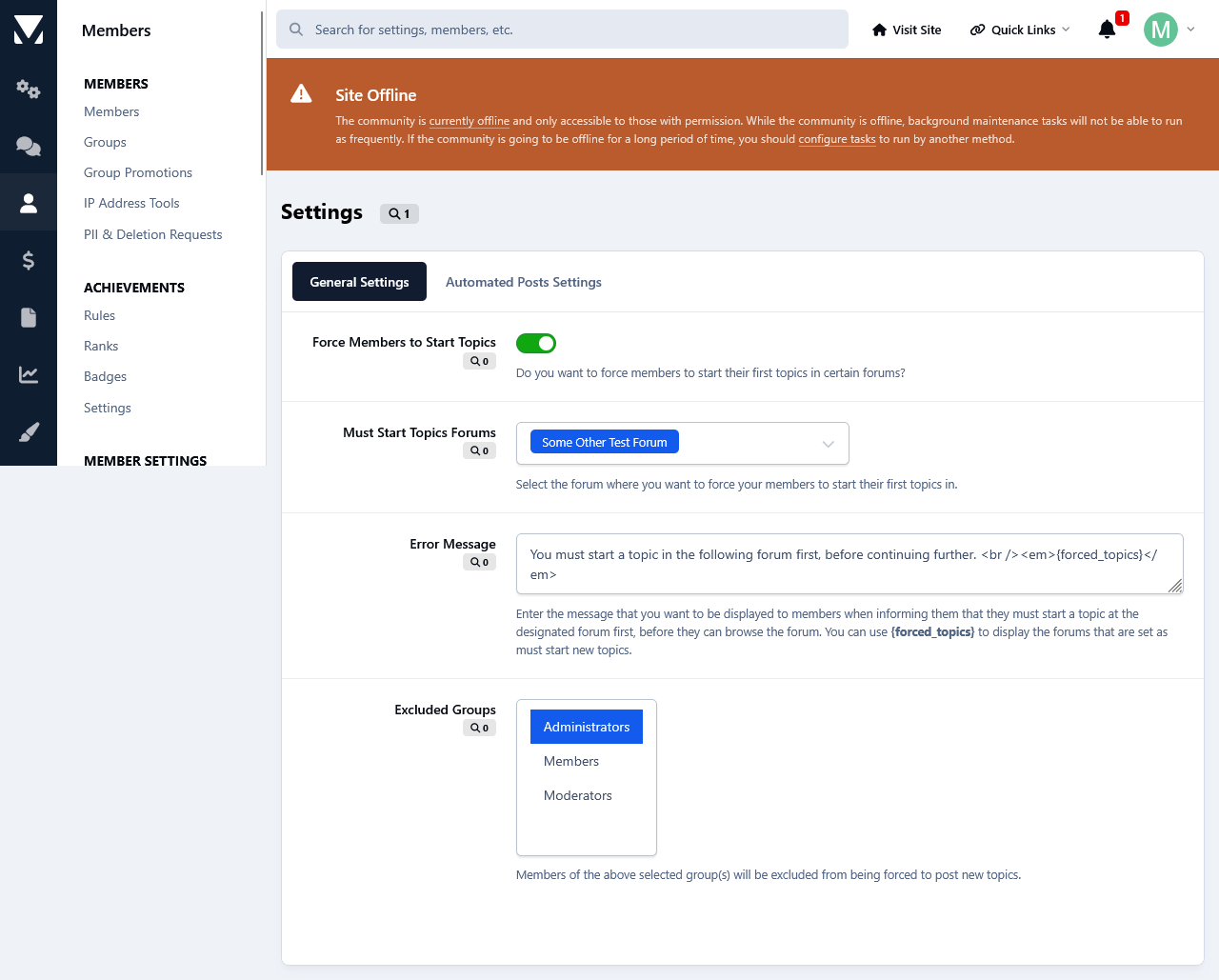
This app will force members to make their first topic in the forum of your choice in order to browse the forums and topics at your forum. 
From the app's settings you can enable/disable the app, select the forum where you want your members to post their first topic, enter your custom error message and exclude groups from this restriction.
IPS5.0.0
This app will force members to make their first topic in the forum of your choice in order to browse the forums and topics at your forum. 
From the app's settings you can enable/disable the app, select the forum where you want your members to post their first topic, enter your custom error message and exclude groups from this restriction.
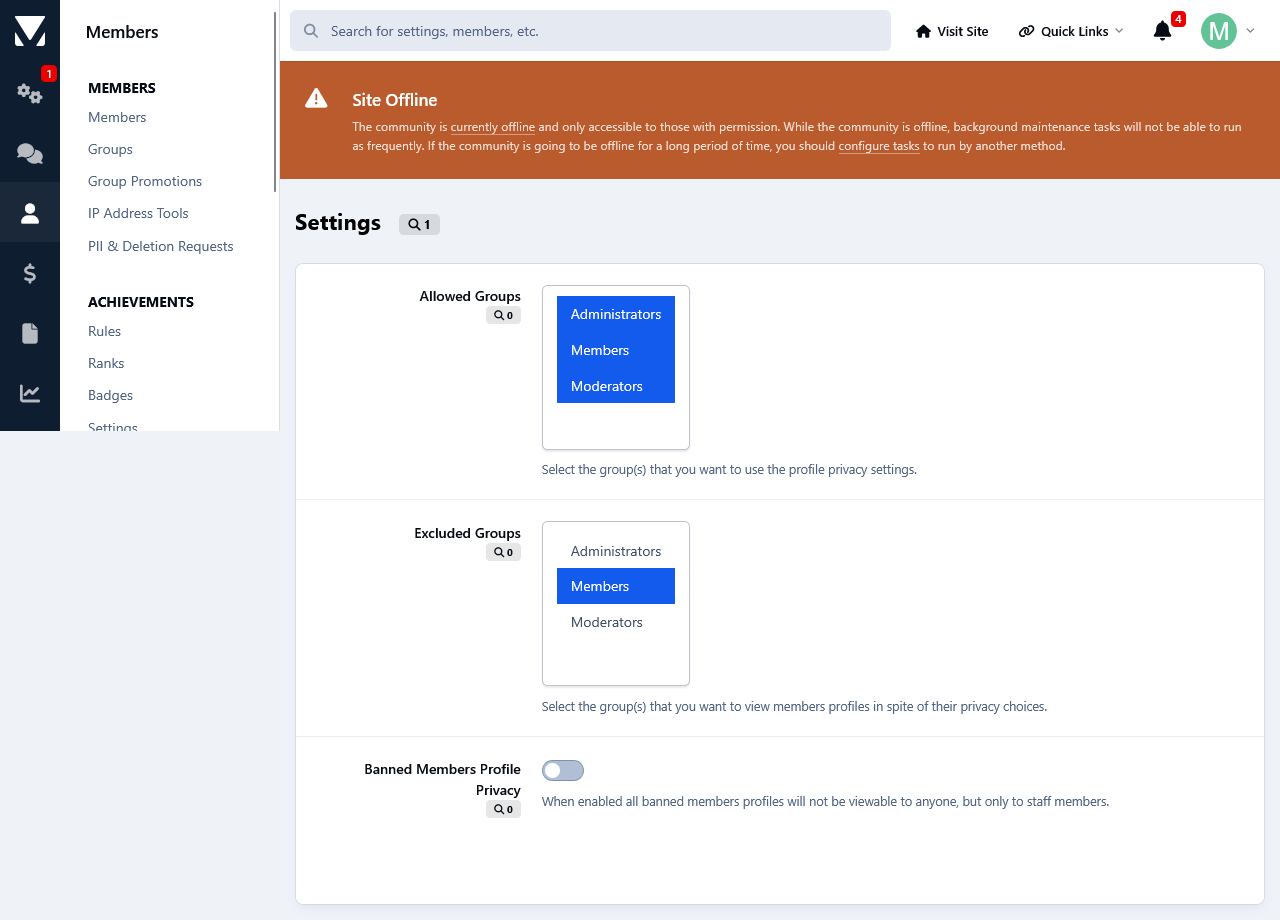
This app will give your members a new option for their profiles, which is who can view them.
Privacy Settings:
Members can turn their profiles visible for members only, for their followers only or they can turn them private so no one will be able to view them but groups with the appropriate permissions set by the admin. By default it is set to everyone.
Members History Logs:
Admins can view how members set their privacy from members history logs. 
Logs:
Admins can view all members privacy settings from the app's log page. There they can edit members privacy settings as well as reset all privacy settings to Everyone.
Filtering:
Admins can filter each privacy setting to see the members who selected them.
Search:
From the log page admins can also search for a member 's privacy settings.
Banned Members:
Admins can make banned members profiles unviewable for everyone, but the staff members.
IPS5.0.0
This app will give your members a new option for their profiles, which is who can view them.
Privacy Settings:
Members can turn their profiles visible for members only, for their followers only or they can turn them private so no one will be able to view them but groups with the appropriate permissions set by the admin. By default it is set to everyone.
Members History Logs:
Admins can view how members set their privacy from members history logs. 
Logs:
Admins can view all members privacy settings from the app's log page. There they can edit members privacy settings as well as reset all privacy settings to Everyone.
Filtering:
Admins can filter each privacy setting to see the members who selected them.
Search:
From the log page admins can also search for a member 's privacy settings.
Banned Members:
Admins can make banned members profiles unviewable for everyone, but the staff members.
This app will add a poking system giving your members the ability to poke each other. Members with the appropriate permissions can poke other members from either their profiles or hoover card. Once a member pokes someone, they can't poke the same member twice, unless that member pokes them back. Then they can poke them again. 
Individual Group Permissions.
Can poke members. 
Poke Same Members Only Once.
Daily Poke Limit.
View All Pokes.
Unpockable.
Notification System Integration:
Whenever a members gets poked, they will receive an alert. Members can disable the poke alert at their Notification Settings.
Profile Pokes Tab:
A new tab has been added on members profiles containing all the pokes that they have received. Members can view their own pokes. Whereas all members pokes are viewable only to members with the appropriate permissions. 
Postbit Poke Count:
A settings to show members poke count on their postbit is available. 
Recent Activity Integration:
Whenever a members pokes someone, it will will be displayed on their Recent Activity block on their profile in the Admin Panel.
Task System Integration:
A task has been added for pruning of old poke stats.
Admin Logs:
An overview of all members pokes is available in the admin panel as well as an advanced search form. Admins can search for who was poked and by whom and they can also select a time frame for the results.
Moderator Log Integration:
Anytime that an admin will delete a poke, the action will be logged in the Moderator Logs.
IPS5.0.0
This app will add a poking system giving your members the ability to poke each other. Members with the appropriate permissions can poke other members from either their profiles or hoover card. Once a member pokes someone, they can't poke the same member twice, unless that member pokes them back. Then they can poke them again. 
Individual Group Permissions.
Can poke members. 
Poke Same Members Only Once.
Daily Poke Limit.
View All Pokes.
Unpockable.
Notification System Integration:
Whenever a members gets poked, they will receive an alert. Members can disable the poke alert at their Notification Settings.
Profile Pokes Tab:
A new tab has been added on members profiles containing all the pokes that they have received. Members can view their own pokes. Whereas all members pokes are viewable only to members with the appropriate permissions. 
Postbit Poke Count:
A settings to show members poke count on their postbit is available. 
Recent Activity Integration:
Whenever a members pokes someone, it will will be displayed on their Recent Activity block on their profile in the Admin Panel.
Task System Integration:
A task has been added for pruning of old poke stats.
Admin Logs:
An overview of all members pokes is available in the admin panel as well as an advanced search form. Admins can search for who was poked and by whom and they can also select a time frame for the results.
Moderator Log Integration:
Anytime that an admin will delete a poke, the action will be logged in the Moderator Logs.
This app will subject your troublesome/annoying users to page delays, blank pages and redirects with the aim of making them leave your forum and never come back. This is much better than banning them imho.
Options:
Minimum Loading Delay (seconds). (This field holds the percentage of minimum delays of forum loading.)
Maximum Loading Delay (seconds). (This field holds the percentage of minimum delays of forum loading.)
Blank Pages Chance. (This field holds the percentage of displaying blank pages.)
Redirection URL. (This field holds the url for the  redirection.)
IPS5.0.0
This app will subject your troublesome/annoying users to page delays, blank pages and redirects with the aim of making them leave your forum and never come back. This is much better than banning them imho.
Options:
Minimum Loading Delay (seconds). (This field holds the percentage of minimum delays of forum loading.)
Maximum Loading Delay (seconds). (This field holds the percentage of minimum delays of forum loading.)
Blank Pages Chance. (This field holds the percentage of displaying blank pages.)
Redirection URL. (This field holds the url for the  redirection.)
This app will give your members, with the appropriate permissions to block other members and/or groups from viewing their topics and profiles. Personal Messages are not included since they can be blocked if you ignore someone. When a member blocks someone, they can enter a reason as well. This is to server as a reminder if you will will, as to why that member has been blocked. They, blocked members, will not see it.
Group Protection:
Member belonging to certain groups, like admins and moderators for example, are unblockable.
Blocked Members Log:
A complete overview log of who is blocking whom is available in the Admin Panel and Mod CP. The latter is accessible only to groups with the appropriate permissions. Both logs have a search option as well.
IPS5.0.0
This app will give your members, with the appropriate permissions to block other members and/or groups from viewing their topics and profiles. Personal Messages are not included since they can be blocked if you ignore someone. When a member blocks someone, they can enter a reason as well. This is to server as a reminder if you will will, as to why that member has been blocked. They, blocked members, will not see it.
Group Protection:
Member belonging to certain groups, like admins and moderators for example, are unblockable.
Blocked Members Log:
A complete overview log of who is blocking whom is available in the Admin Panel and Mod CP. The latter is accessible only to groups with the appropriate permissions. Both logs have a search option as well.
Do you have important topics at your forum, and you want to be sure that your members and/or guests really read them? Then this app can come in handy as it will help you with that. 
It will force your members as well as guests to read a particular topic and only then can they enter the forums and/or the other topics. 
Setting a topic as must read can be done separately for members and guests. i.e. You can set one topic as must read for your members, and another one for your guests. Topics are hidden in the activity and search pages for members/guests till they read the forced topics.
You can exclude certain groups and ip addresses from being forced to read topics. You can also enter a custom error message to be displayed to members/guests when informing them that they must read first the forced topic before they can read the rest of the topics.
All the options are set at the app 's settings page.
Each time a member/guest will read the topic that has been set as must read, the action will be logged and be available to the admins so they can keep track of things. For guests, their ip is logged. The members log can be searched for members and time frame, whereas the guests log can be searched for ip addresses and time frame.
If you want a particular member to re-read the must read topic, all you can do is delete their forced topic entry from the logs. Or you can delete the whole log for a do over of forced readings again. The same goes for guests logs too.
Logs can be kept permanently or pruned after a certain amount of time.
IPS5.0.0
Do you have important topics at your forum, and you want to be sure that your members and/or guests really read them? Then this app can come in handy as it will help you with that. 
It will force your members as well as guests to read a particular topic and only then can they enter the forums and/or the other topics. 
Setting a topic as must read can be done separately for members and guests. i.e. You can set one topic as must read for your members, and another one for your guests. Topics are hidden in the activity and search pages for members/guests till they read the forced topics.
You can exclude certain groups and ip addresses from being forced to read topics. You can also enter a custom error message to be displayed to members/guests when informing them that they must read first the forced topic before they can read the rest of the topics.
All the options are set at the app 's settings page.
Each time a member/guest will read the topic that has been set as must read, the action will be logged and be available to the admins so they can keep track of things. For guests, their ip is logged. The members log can be searched for members and time frame, whereas the guests log can be searched for ip addresses and time frame.
If you want a particular member to re-read the must read topic, all you can do is delete their forced topic entry from the logs. Or you can delete the whole log for a do over of forced readings again. The same goes for guests logs too.
Logs can be kept permanently or pruned after a certain amount of time.
This app adds a new tab containing all the members marked as spammers at your forum, to the Member Management section in the Moderator CP. It might come in handy especially if you have a large number of spammers, as it allows the admins to get some help in managing them from their staff members without giving them access to the Admin Panel.
Permissions:
This app adds a new permission tab to the Moderator Permissions. To select the staff members that you want to manage spammers at the Moderator CP, set the permission: Can manage spammers from the Mod CP? to Yes and save the changes. 
Settings:
From the app 's settings page you can decide if you want to either delete or hide spammers content.
IP Address Check:
Moderators with permissions to view the ip addresses can check the ip addresses of the spammers.
Bulk Deletion:
All spammers shown at the ModCP can be deleted in bulk through the selection check boxes. 
Settings:
You can either delete or hide the content of members marked as spammer when they are deleted from the ModCP.
Moderator Log:
Whenever a member is approved the action will be logged in the Moderator Log page.
IPS5.0.0
This app adds a new tab containing all the members marked as spammers at your forum, to the Member Management section in the Moderator CP. It might come in handy especially if you have a large number of spammers, as it allows the admins to get some help in managing them from their staff members without giving them access to the Admin Panel.
Permissions:
This app adds a new permission tab to the Moderator Permissions. To select the staff members that you want to manage spammers at the Moderator CP, set the permission: Can manage spammers from the Mod CP? to Yes and save the changes. 
Settings:
From the app 's settings page you can decide if you want to either delete or hide spammers content.
IP Address Check:
Moderators with permissions to view the ip addresses can check the ip addresses of the spammers.
Bulk Deletion:
All spammers shown at the ModCP can be deleted in bulk through the selection check boxes. 
Settings:
You can either delete or hide the content of members marked as spammer when they are deleted from the ModCP.
Moderator Log:
Whenever a member is approved the action will be logged in the Moderator Log page.
This app will add 2 features to the Ignore System. One is an overview log where the admins will be able to see who ignored whom. The other feature will allow the admin(s) to force members to ignore each other by adding them to members ignore list. 
IPS5.0.0+
This app will add 2 features to the Ignore System. One is an overview log where the admins will be able to see who ignored whom. The other feature will allow the admin(s) to force members to ignore each other by adding them to members ignore list. 

Top Developers

Last reviews

Applications Directory

A complete and convenient directory of applications for Invision Community, with categorization and sorting options.

Ratings and feedback

Only verified and trusted reviews!

Add new Application

Any developer can add their application to this directory.

You need to create account

Configure browser push notifications

Chrome (Android)
  1. Tap the lock icon next to the address bar.
  2. Tap Permissions → Notifications.
  3. Adjust your preference.
Chrome (Desktop)
  1. Click the padlock icon in the address bar.
  2. Select Site settings.
  3. Find Notifications and adjust your preference.