Jump to content
View in the app

A better way to browse. Learn more.

Invision Marketplace

A full-screen app on your home screen with push notifications, badges and more.

To install this app on iOS and iPadOS
  1. Tap the Share icon in Safari
  2. Scroll the menu and tap Add to Home Screen.
  3. Tap Add in the top-right corner.
To install this app on Android
  1. Tap the 3-dot menu (⋮) in the top-right corner of the browser.
  2. Tap Add to Home screen or Install app.
  3. Confirm by tapping Install.

Everything you need for your community

We will be moving to a new server soon, some downtime is expected.

Everything you need for your community

 Loading...
 Loading...
 Loading...
This resource utilizes the Spoonacular API to retrieve data from recipes and display them on your site.
All you have to do is type a word from a recipe title, and then a list of matches will show up. From now on, with just a click, you will have added to your database:
Title
Description
Instructions
Diet types
Servings
Time to be ready
Cuisines
Meal types
Ingredients
Nutrition information
Nutrition facts
Wine pairing
Similar recipes
Tabs:
You will also have tabs in the recipe view to display:
General
Summary
Instructions
Diets
Ingredients
Nutrition information
Nutrition Facts
Wine pairing
Similar Recipes
All the tabs, except General (the main one with the recipe summary, instructions, and diets), can be disabled via settings.
NOTE:
You can use the app without the Spoonacular API. In this case, only the General tab will show up. You can enter the data manually: Description, Instructions, Diet types, Servings, Time to be ready, Cuisines, and Meal types.
Spoonacular API languages: Currently, the API only works in English: https://spoonacular.com/food-api/faq?faq-query=language
 
About Spoonacular API:
You can subscribe to a FREE plan, which has limitations: https://spoonacular.com/food-api/docs#Quotas
Overview: https://spoonacular.com/food-api
Frequently Asked Questions: https://spoonacular.com/food-api/faq
Uptime Status: https://status.spoonacular.com/
Other features:
Fully integrated into the framework: Rest API, categories, extra fields, notifications, search, tags, follow, reactions, promote, etc.
Settings:
Settings to control the app behavior in several places/situations.
IPS5.0.0+
This resource utilizes the Spoonacular API to retrieve data from recipes and display them on your site.
All you have to do is type a word from a recipe title, and then a list of matches will show up. From now on, with just a click, you will have added to your database:
Title
Description
Instructions
Diet types
Servings
Time to be ready
Cuisines
Meal types
Ingredients
Nutrition information
Nutrition facts
Wine pairing
Similar recipes
Tabs:
You will also have tabs in the recipe view to display:
General
Summary
Instructions
Diets
Ingredients
Nutrition information
Nutrition Facts
Wine pairing
Similar Recipes
All the tabs, except General (the main one with the recipe summary, instructions, and diets), can be disabled via settings.
NOTE:
You can use the app without the Spoonacular API. In this case, only the General tab will show up. You can enter the data manually: Description, Instructions, Diet types, Servings, Time to be ready, Cuisines, and Meal types.
Spoonacular API languages: Currently, the API only works in English: https://spoonacular.com/food-api/faq?faq-query=language
 
About Spoonacular API:
You can subscribe to a FREE plan, which has limitations: https://spoonacular.com/food-api/docs#Quotas
Overview: https://spoonacular.com/food-api
Frequently Asked Questions: https://spoonacular.com/food-api/faq
Uptime Status: https://status.spoonacular.com/
Other features:
Fully integrated into the framework: Rest API, categories, extra fields, notifications, search, tags, follow, reactions, promote, etc.
Settings:
Settings to control the app behavior in several places/situations.
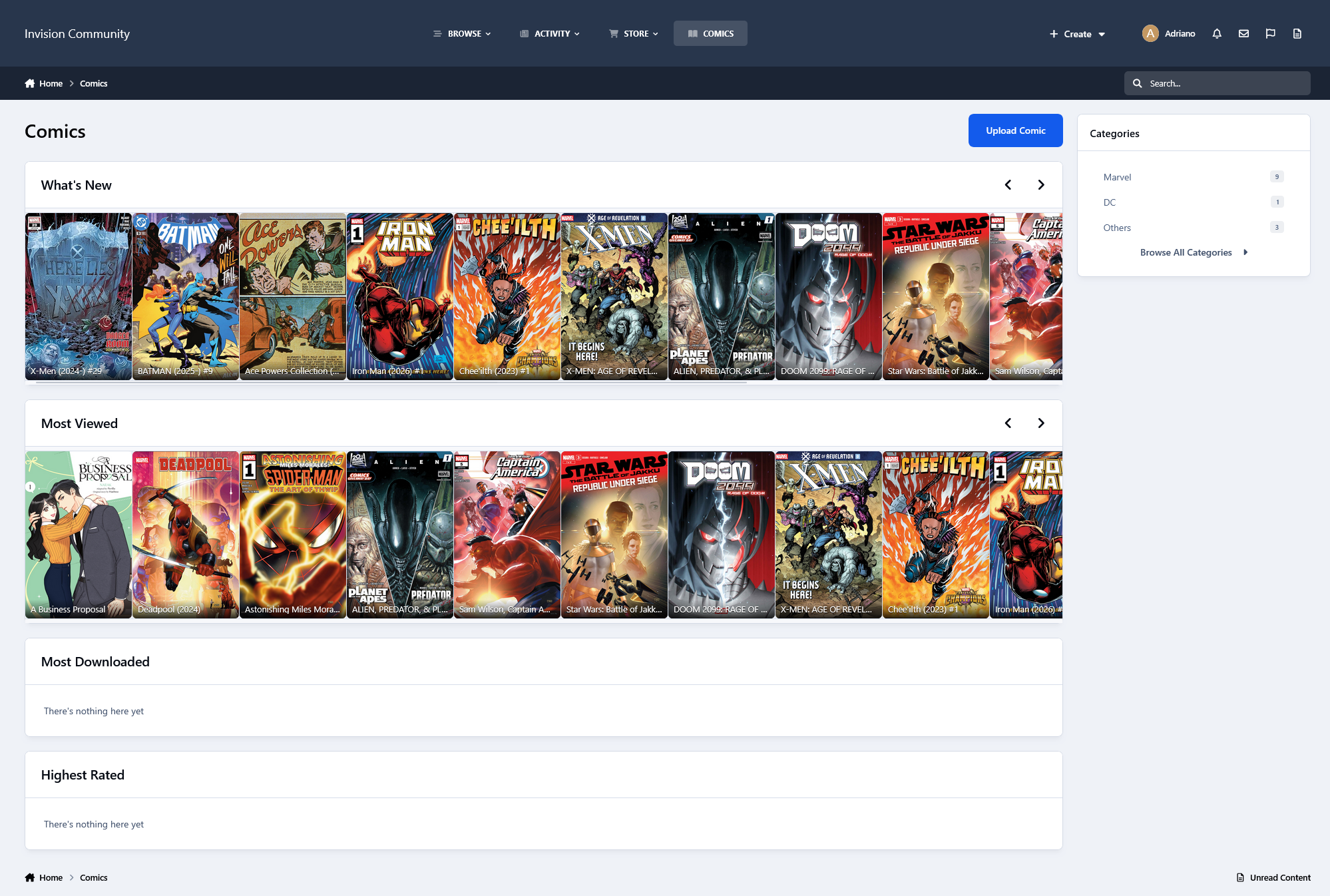
This application restores an IPS4 feature that allows members to switch between the Downloads category layout views quickly. Currently, members can switch between views on Account Settings -> Content Preferences, enable Change layout views, and then choose a view on the Downloads Category View.
Note
This feature must be enabled by an administrator in the ACP -> Members -> edit any group -> Group Settings tab -> enable Can change layouts.
Available choices:
Table view
Grid view
Requirement:
Downloads application.
IPS5.0.0+
This application restores an IPS4 feature that allows members to switch between the Downloads category layout views quickly. Currently, members can switch between views on Account Settings -> Content Preferences, enable Change layout views, and then choose a view on the Downloads Category View.
Note
This feature must be enabled by an administrator in the ACP -> Members -> edit any group -> Group Settings tab -> enable Can change layouts.
Available choices:
Table view
Grid view
Requirement:
Downloads application.
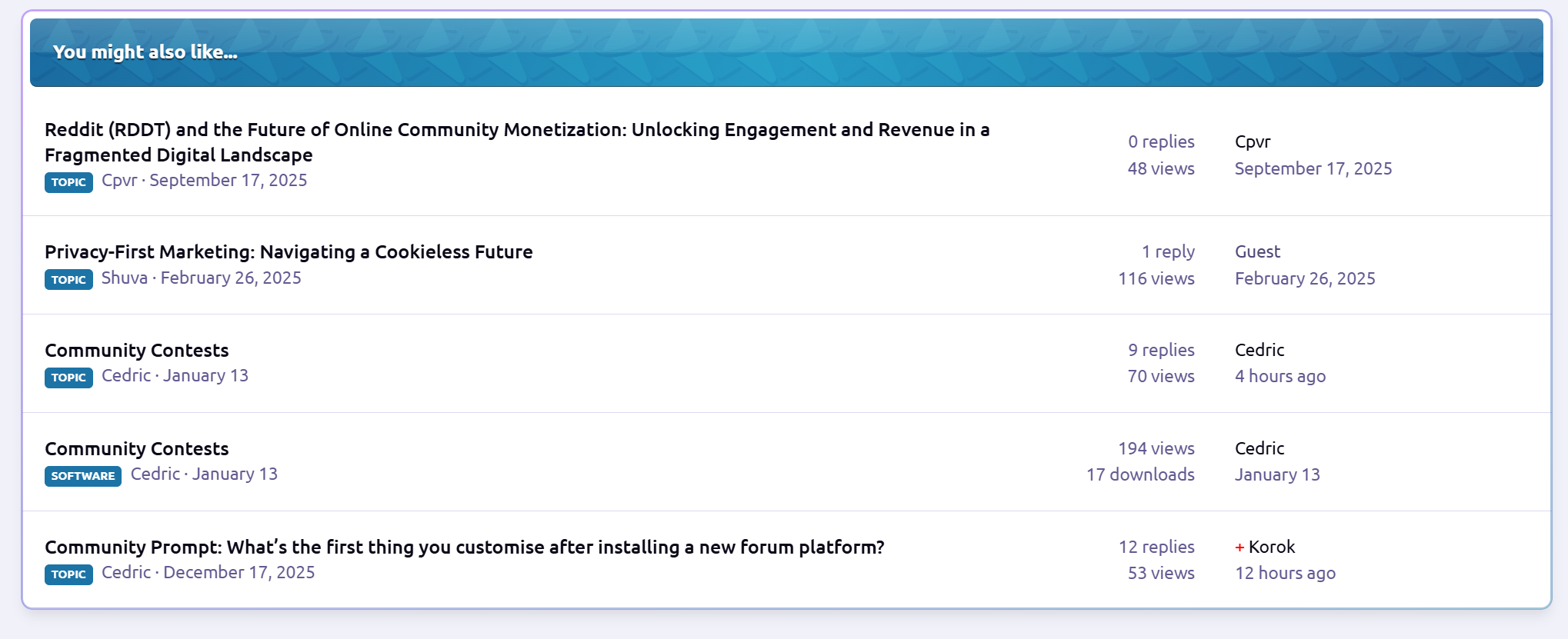
This application automatically displays similar existing topics while a member is creating a new topic, helping prevent duplicates and encouraging better discussions. As soon as the user finishes typing the topic title, the app searches the community using the IPS Core Search engine and shows an expanded list of relevant topics directly on the posting screen. Some benefits for your community include Elasticsearch compatibility, fewer duplicate topics, improved content discovery, enhanced posting quality, and cleaner forums with reduced moderation effort.
How it works:
User starts creating a new topic
When the title field loses focus, the app:
Builds a search query
Executes a Core Search request
Matching topics are shown instantly below the title field
Users can review existing discussions before posting
Settings:
Number of topics to display
Minimum topic title length
Can view Similar Topics
View Similar Topics in (specific forums)
IPS5.0.0+
This application automatically displays similar existing topics while a member is creating a new topic, helping prevent duplicates and encouraging better discussions. As soon as the user finishes typing the topic title, the app searches the community using the IPS Core Search engine and shows an expanded list of relevant topics directly on the posting screen. Some benefits for your community include Elasticsearch compatibility, fewer duplicate topics, improved content discovery, enhanced posting quality, and cleaner forums with reduced moderation effort.
How it works:
User starts creating a new topic
When the title field loses focus, the app:
Builds a search query
Executes a Core Search request
Matching topics are shown instantly below the title field
Users can review existing discussions before posting
Settings:
Number of topics to display
Minimum topic title length
Can view Similar Topics
View Similar Topics in (specific forums)
This application adds a Share This Post link to posts that are not visible to guests, to easily and quickly copy the post URL. Because IPS does not provide this option, users must manually copy the post URL from the post date, meaning registered users lose the ability to easily share posts when guest access is restricted.
IPS5.0.0+
This application adds a Share This Post link to posts that are not visible to guests, to easily and quickly copy the post URL. Because IPS does not provide this option, users must manually copy the post URL from the post date, meaning registered users lose the ability to easily share posts when guest access is restricted.
This application utilizes Perplexity AI or Google Gemini AI to generate replies to new topics automatically. Replies are processed via a background task (running every 5 minutes) to prevent delays during topic creation. All automated replies are written in the same language as the original post, helping to increase engagement and responsiveness across the community.
Perplexity AI is a paid artificial intelligence platform focused on delivering fast, accurate, and well-sourced answers. It combines large language models with real-time web search to produce clear and concise responses grounded in up-to-date information. Initially, only English is supported, with additional languages planned for future releases.
Google Gemini AI is Google’s generative AI platform, designed to provide high-quality, natural, and context-aware responses. It excels at understanding forum discussions and producing helpful replies efficiently, making it well-suited for automated background processing in community environments.
Settings
AI to use: Perplexity AI or Gemini AI
Select which forums the AI will generate automatic replies for
Select which member groups are allowed to receive automated replies on newly created topics
Topic first post minimum length
Reply Author
AI provider selection (Perplexity AI or Gemini AI)
Requirements
API key from Perplexity AI (for Perplexity AI)
API key from Google AI Studio (for Gemini AI)
Forums application
IPS5.0.0+
This application utilizes Perplexity AI or Google Gemini AI to generate replies to new topics automatically. Replies are processed via a background task (running every 5 minutes) to prevent delays during topic creation. All automated replies are written in the same language as the original post, helping to increase engagement and responsiveness across the community.
Perplexity AI is a paid artificial intelligence platform focused on delivering fast, accurate, and well-sourced answers. It combines large language models with real-time web search to produce clear and concise responses grounded in up-to-date information. Initially, only English is supported, with additional languages planned for future releases.
Google Gemini AI is Google’s generative AI platform, designed to provide high-quality, natural, and context-aware responses. It excels at understanding forum discussions and producing helpful replies efficiently, making it well-suited for automated background processing in community environments.
Settings
AI to use: Perplexity AI or Gemini AI
Select which forums the AI will generate automatic replies for
Select which member groups are allowed to receive automated replies on newly created topics
Topic first post minimum length
Reply Author
AI provider selection (Perplexity AI or Gemini AI)
Requirements
API key from Perplexity AI (for Perplexity AI)
API key from Google AI Studio (for Gemini AI)
Forums application
ChatPRO Doodle is an add-on for Chatbox PRO that lets users draw simple doodles directly inside conversations. It makes chatting more expressive and fun by allowing quick hand-drawn sketches with basic colors. Because sometimes a doodle says more than a thousand words. ✏️😊
Demo: https://demo.ipsappzone.com/chatpro/
(Click the Trial account button in the top-right corner to create a trial account and test the demo application)
IPS5.0.0+
ChatPRO Doodle is an add-on for Chatbox PRO that lets users draw simple doodles directly inside conversations. It makes chatting more expressive and fun by allowing quick hand-drawn sketches with basic colors. Because sometimes a doodle says more than a thousand words. ✏️😊
Demo: https://demo.ipsappzone.com/chatpro/
(Click the Trial account button in the top-right corner to create a trial account and test the demo application)
This application will allow members (from specific groups) to rejoin users who left or were banned from conversations.
Setting:
Groups who can rejoin members
IPS5.0.0+
This application will allow members (from specific groups) to rejoin users who left or were banned from conversations.
Setting:
Groups who can rejoin members
Ignore Preferences gives your members full control over their browsing experience. This app lets each user decide what content they personally want to hide.
No drama. No clutter. Just a cleaner, more enjoyable community.

What It Does
Members can:
Hide entire forums
Ignore specific topics
Filter out posts using keywords or phrases
Everything is 100% personal and fully reversible.
Forum Filtering
Don’t care about certain sections anymore?
Members can hide whole forums with one click.
Features:
Ignore any forum or category
Button appears directly on forum pages
Easy “Stop Ignoring” option
Perfect for keeping feeds relevant and clutter-free.
Topic Filtering
Seen enough of a certain topic?
Users can ignore individual topics too.
Features:
Ignore button in topic header
Hidden from forum listings
Removed from activity feeds
Reversible anytime
Great for avoiding repetitive or unwanted discussions.
Keyword Filtering
This is where personalization really shines.
Members can block posts containing specific words or phrases.
Features:
Add custom keywords or phrases
Case-insensitive matching
Hidden posts show a clear notice
“Show this post” option if they change their mind
Ideal for avoiding spoilers, drama, politics, or any unwanted topics.
Where Filtering Works
Ignore Preferences works across your entire community:
Forum index
Topic listings
Activity / Discover feed
Widgets
Topic posts (for keywords)
Content is still accessible via direct links - because this is about personal choice, not censorship.
Member-Friendly Interface
Members get a dedicated Preferences Page with:
Tabs for Forums, Topics, and Keywords
Easy removal buttons
Keyword manager
Clear item lists with links
Bonus: Easy access for ignoring members
Everything is simple and intuitive.
Admin Control
You stay in control with:
Enable/disable each filter type
Set limits per user
Optional filtering for notifications & search
Full flexibility for your community’s needs
Why Use Ignore Preferences?
Because not every member wants to see everything.
This app:
Improves user experience
Reduces frustration
Encourages longer visits
Keeps feeds relevant
Respects personal choice

Smarter personalization.
IPS5.0.0+
Ignore Preferences gives your members full control over their browsing experience. This app lets each user decide what content they personally want to hide.
No drama. No clutter. Just a cleaner, more enjoyable community.

What It Does
Members can:
Hide entire forums
Ignore specific topics
Filter out posts using keywords or phrases
Everything is 100% personal and fully reversible.
Forum Filtering
Don’t care about certain sections anymore?
Members can hide whole forums with one click.
Features:
Ignore any forum or category
Button appears directly on forum pages
Easy “Stop Ignoring” option
Perfect for keeping feeds relevant and clutter-free.
Topic Filtering
Seen enough of a certain topic?
Users can ignore individual topics too.
Features:
Ignore button in topic header
Hidden from forum listings
Removed from activity feeds
Reversible anytime
Great for avoiding repetitive or unwanted discussions.
Keyword Filtering
This is where personalization really shines.
Members can block posts containing specific words or phrases.
Features:
Add custom keywords or phrases
Case-insensitive matching
Hidden posts show a clear notice
“Show this post” option if they change their mind
Ideal for avoiding spoilers, drama, politics, or any unwanted topics.
Where Filtering Works
Ignore Preferences works across your entire community:
Forum index
Topic listings
Activity / Discover feed
Widgets
Topic posts (for keywords)
Content is still accessible via direct links - because this is about personal choice, not censorship.
Member-Friendly Interface
Members get a dedicated Preferences Page with:
Tabs for Forums, Topics, and Keywords
Easy removal buttons
Keyword manager
Clear item lists with links
Bonus: Easy access for ignoring members
Everything is simple and intuitive.
Admin Control
You stay in control with:
Enable/disable each filter type
Set limits per user
Optional filtering for notifications & search
Full flexibility for your community’s needs
Why Use Ignore Preferences?
Because not every member wants to see everything.
This app:
Improves user experience
Reduces frustration
Encourages longer visits
Keeps feeds relevant
Respects personal choice

Smarter personalization.
Seamlessly integrated and globally styled, Enhanced Tags allows you to transform tags from simple labels into meaningful visual and organizational elements across your community.
Key Features
Native IPS Integration
Fully integrated with the default IPS 5 Tags system
Manage all enhancements directly from the same admin module used for standard tags
No duplicate systems or separate workflows
Custom Tag Styling
Assign a custom label color to each tag
Tag styles are applied consistently across all community pages
Optional controls to:
Enable or disable border color styling
Enable or disable background color styling
Forum & Topic Visual Enhancements
Apply tag colors to:
Topics/posts in forum views
Individual topic views
Improve content scanning and visual hierarchy for users
Granular Access Control
Restrict access to tag pages by specific user groups
Prevent selected groups from reaching or viewing tag-related pages
Why Enhanced Tags?
Improves content visibility and organization
Adds brand-consistent visual identity to tags
Gives admins fine-grained control without breaking IPS core behavior
Ideal for communities that rely heavily on tagging for navigation or moderation
IPS5.0.0+
Seamlessly integrated and globally styled, Enhanced Tags allows you to transform tags from simple labels into meaningful visual and organizational elements across your community.
Key Features
Native IPS Integration
Fully integrated with the default IPS 5 Tags system
Manage all enhancements directly from the same admin module used for standard tags
No duplicate systems or separate workflows
Custom Tag Styling
Assign a custom label color to each tag
Tag styles are applied consistently across all community pages
Optional controls to:
Enable or disable border color styling
Enable or disable background color styling
Forum & Topic Visual Enhancements
Apply tag colors to:
Topics/posts in forum views
Individual topic views
Improve content scanning and visual hierarchy for users
Granular Access Control
Restrict access to tag pages by specific user groups
Prevent selected groups from reaching or viewing tag-related pages
Why Enhanced Tags?
Improves content visibility and organization
Adds brand-consistent visual identity to tags
Gives admins fine-grained control without breaking IPS core behavior
Ideal for communities that rely heavily on tagging for navigation or moderation
Service Manager is a complete service-order and task-fulfilment system for Invision Community v5.
It allows communities to sell structured services, assign work to staff or providers, track progress, manage commissions, and collect public feedback - all inside the IPS ecosystem.
You can offer things like:
Content services
Moderation teams
Design or development services
Consulting
Community management
Coaching
Support services
etc
Service Manager provides a professional, automated workflow to monetize your community’s expertise.
What Service Manager Does
For Customers
Browse service packages
Place structured orders
Track progress in real time
Communicate with staff
Leave public feedback
For Workers
View available task units
Claim and complete work
Track earnings
View performance statistics
Receive secure account credit payouts
For Admins
Create and manage service packages
Control commission and system rules
View all orders
Monitor staff performance
Access financial reports
Configure the entire system
Service Packages
Admins can create fully configurable service packages with:
Categories
Pricing
Images
Rich text descriptions
Estimated completion time
Task unit quantities
Custom fields (13 types)
Enable/disable controls
Per-package rules
Each purchase automatically creates a Service Order and splits it into Task Units for workers to claim.
Automated Workflow
Customer purchases a service
Payment is confirmed via Nexus
A service order is created
Task units are generated
Workers claim units
Work is completed
Earnings are credited
Customer leaves feedback
All activity is logged, tracked, and secure.
Built-In Communication
Customer to staff messaging
Internal staff notes
Message editing (15-minute window)
Order activity timeline
Notification system
Financial System
Configurable commission system
Earnings ledger
Automatic credit to Nexus accounts
Financial overview in the ACP
Worker performance statistics
Date range filtering
Feedback System
One review per completed order
Publicly visible feedback
Marketplace integration
Automated 3-day reminder
Dashboards
Customer Dashboard
Order history
Status tracking
Feedback submission
Worker Dashboard
Available work
Active work
Earnings overview
Performance statistics
Admin Control Panel
Order management
Financial reports
Staff performance
System settings
Widgets
Open Orders Counter
Recent Feedback Display
No private data is exposed.
Fully Customizable Marketplace Landing Page
Service Manager includes a fully configurable marketplace landing page that lets you control how your services are presented to visitors.
From the Admin Control Panel, you can customize:
Hero section (title, subtitle, benefits)
“How it works” steps
Trust and transparency content
Social proof (stats and testimonials)
Final call-to-action section
Each section can be enabled, disabled, and edited without touching any code, making it easy to adapt the marketplace to any service type or community style.
32+ Configurable Settings
Commission percentage
Worker group eligibility
Maximum claims per worker
Auto-splitting rules
Auto-credit behavior
Feedback reminder delay
Marketplace visibility
Terminology customization
All system terminology can be renamed, for example:
Package => Job
Worker => Staff
Task Unit => Task
Order => Project
Feedback => Review
No logic changes required.
Nexus Commerce Integration
Custom invoice item type
Supports all Nexus payment methods
Free packages supported
Invoice cancellation handling
Automatic order creation

Coming Soon
Front-end service creation: Allow members to create and sell their own services
Worker ratings and reviews: Customers can rate individual workers.
Dispute and refund system: Handle service issues and payment disputes
Worker / Provider Directory
Public profiles showing:
Services offered
Ratings
Reviews
Performance history

IPS5.0.0+
Service Manager is a complete service-order and task-fulfilment system for Invision Community v5.
It allows communities to sell structured services, assign work to staff or providers, track progress, manage commissions, and collect public feedback - all inside the IPS ecosystem.
You can offer things like:
Content services
Moderation teams
Design or development services
Consulting
Community management
Coaching
Support services
etc
Service Manager provides a professional, automated workflow to monetize your community’s expertise.
What Service Manager Does
For Customers
Browse service packages
Place structured orders
Track progress in real time
Communicate with staff
Leave public feedback
For Workers
View available task units
Claim and complete work
Track earnings
View performance statistics
Receive secure account credit payouts
For Admins
Create and manage service packages
Control commission and system rules
View all orders
Monitor staff performance
Access financial reports
Configure the entire system
Service Packages
Admins can create fully configurable service packages with:
Categories
Pricing
Images
Rich text descriptions
Estimated completion time
Task unit quantities
Custom fields (13 types)
Enable/disable controls
Per-package rules
Each purchase automatically creates a Service Order and splits it into Task Units for workers to claim.
Automated Workflow
Customer purchases a service
Payment is confirmed via Nexus
A service order is created
Task units are generated
Workers claim units
Work is completed
Earnings are credited
Customer leaves feedback
All activity is logged, tracked, and secure.
Built-In Communication
Customer to staff messaging
Internal staff notes
Message editing (15-minute window)
Order activity timeline
Notification system
Financial System
Configurable commission system
Earnings ledger
Automatic credit to Nexus accounts
Financial overview in the ACP
Worker performance statistics
Date range filtering
Feedback System
One review per completed order
Publicly visible feedback
Marketplace integration
Automated 3-day reminder
Dashboards
Customer Dashboard
Order history
Status tracking
Feedback submission
Worker Dashboard
Available work
Active work
Earnings overview
Performance statistics
Admin Control Panel
Order management
Financial reports
Staff performance
System settings
Widgets
Open Orders Counter
Recent Feedback Display
No private data is exposed.
Fully Customizable Marketplace Landing Page
Service Manager includes a fully configurable marketplace landing page that lets you control how your services are presented to visitors.
From the Admin Control Panel, you can customize:
Hero section (title, subtitle, benefits)
“How it works” steps
Trust and transparency content
Social proof (stats and testimonials)
Final call-to-action section
Each section can be enabled, disabled, and edited without touching any code, making it easy to adapt the marketplace to any service type or community style.
32+ Configurable Settings
Commission percentage
Worker group eligibility
Maximum claims per worker
Auto-splitting rules
Auto-credit behavior
Feedback reminder delay
Marketplace visibility
Terminology customization
All system terminology can be renamed, for example:
Package => Job
Worker => Staff
Task Unit => Task
Order => Project
Feedback => Review
No logic changes required.
Nexus Commerce Integration
Custom invoice item type
Supports all Nexus payment methods
Free packages supported
Invoice cancellation handling
Automatic order creation

Coming Soon
Front-end service creation: Allow members to create and sell their own services
Worker ratings and reviews: Customers can rate individual workers.
Dispute and refund system: Handle service issues and payment disputes
Worker / Provider Directory
Public profiles showing:
Services offered
Ratings
Reviews
Performance history

ChatPro is the next generation of our chat solutions, built completely from scratch.
It preserves what worked best in previous products while introducing modern features designed for today's communication needs with a strong focus on simplicity, usability, and intuitive management.
⚡ Connectivity
AJAX Short Polling: Stable and reliable across all hosting environments
AJAX Long Polling: Faster message delivery, near real-time experience
RTHub Integration: High-performance real-time chat with reduced server load and improved responsiveness
Please note that AJAX connections do not work on IPS Cloud

💬 Chat & Interaction
Public Chat Rooms: Admin-managed rooms with rules, scheduling, and group-based permissions
Private Chat (1–1): Direct messaging between members
Group Chat: Create private group conversations with ease
Club Chat: Dedicated chat rooms for clubs and communities
Message Replies: Reply directly to specific messages
Reactions: React to messages with emojis to boost engagement
Typing Indicators: See when other users are typing
Pin Messages: Highlight important messages by pinning them to the top of the chat
Notification Controls: Enable or disable chat notifications per user
Legacy Plugin Support: Compatible with existing plugins from Chatbox Free and Chatbox Plus

📎 Message Content & Moderation
A lightweight editor with just the right features:
Automatically renders emojis, images, videos, audio, and rich media instantly when you paste a link
Supports essential Markdown formatting such as Ctrl + B, Ctrl + I, and Ctrl + Shift + X
File & Media Uploads: Upload and share images, videos, audio files, and attachments
Message Search: Quickly find past conversations
Auto-Delete Messages: Automatically remove messages after a defined period
Message Reporting: Report inappropriate or abusive content
Ignore Users: Hide messages from unwanted users
Flood Control: Prevent spam by limiting message frequency

🎛️ Interface & Integration
Global Chat Window: Floating chat accessible from all pages
Embeddable Chat Widget: Easily integrate chat into any page or layout
Modern Responsive UI: Clean, mobile-friendly interface optimized for all devices

🚀 Discover ChatPro add-ons!
Download high-quality addons to extend features, boost performance, and customize your ChatPro experience.
https://ipsappzone.com/tags/chatpro-addons/

👀 DEMO
https://demo.ipsappzone.com/chatpro/
(Click the Trial account button in the top-right corner to create a trial account and test the demo application)

IPS5.0.0+
ChatPro is the next generation of our chat solutions, built completely from scratch.
It preserves what worked best in previous products while introducing modern features designed for today's communication needs with a strong focus on simplicity, usability, and intuitive management.
⚡ Connectivity
AJAX Short Polling: Stable and reliable across all hosting environments
AJAX Long Polling: Faster message delivery, near real-time experience
RTHub Integration: High-performance real-time chat with reduced server load and improved responsiveness
Please note that AJAX connections do not work on IPS Cloud

💬 Chat & Interaction
Public Chat Rooms: Admin-managed rooms with rules, scheduling, and group-based permissions
Private Chat (1–1): Direct messaging between members
Group Chat: Create private group conversations with ease
Club Chat: Dedicated chat rooms for clubs and communities
Message Replies: Reply directly to specific messages
Reactions: React to messages with emojis to boost engagement
Typing Indicators: See when other users are typing
Pin Messages: Highlight important messages by pinning them to the top of the chat
Notification Controls: Enable or disable chat notifications per user
Legacy Plugin Support: Compatible with existing plugins from Chatbox Free and Chatbox Plus

📎 Message Content & Moderation
A lightweight editor with just the right features:
Automatically renders emojis, images, videos, audio, and rich media instantly when you paste a link
Supports essential Markdown formatting such as Ctrl + B, Ctrl + I, and Ctrl + Shift + X
File & Media Uploads: Upload and share images, videos, audio files, and attachments
Message Search: Quickly find past conversations
Auto-Delete Messages: Automatically remove messages after a defined period
Message Reporting: Report inappropriate or abusive content
Ignore Users: Hide messages from unwanted users
Flood Control: Prevent spam by limiting message frequency

🎛️ Interface & Integration
Global Chat Window: Floating chat accessible from all pages
Embeddable Chat Widget: Easily integrate chat into any page or layout
Modern Responsive UI: Clean, mobile-friendly interface optimized for all devices

🚀 Discover ChatPro add-ons!
Download high-quality addons to extend features, boost performance, and customize your ChatPro experience.
https://ipsappzone.com/tags/chatpro-addons/

👀 DEMO
https://demo.ipsappzone.com/chatpro/
(Click the Trial account button in the top-right corner to create a trial account and test the demo application)

Support Tickets is a full-featured helpdesk and ticket management application built specifically for Invision Community 5.
It gives communities, SaaS platforms, and marketplaces a clean, structured way to handle user support, billing issues, reports, and internal requests - all inside their existing IPS ecosystem.
From simple support questions to urgent billing problems, everything is organized, trackable, and easy to manage.
Support Tickets is perfect for:
Communities & Forums
Handle member support, reports, and account issues professionally.
SaaS Platforms
Manage customer support, bug reports, and feature requests.
Marketplaces
Resolve disputes, billing problems, and seller/buyer questions.
Membership Sites
Support premium users with structured ticket workflows.
If you run anything that involves users, payments, or support, this app fits right in.
Core Features
Ticket - Main support request with 5 statuses
Department - Organize tickets by support category
Reply - Threaded staff & user responses
Priority - Low / Normal / High / Urgent
Canned Responses - Quick staff replies
Notes - Internal staff-only comments
Logs - Full activity tracking
Admin & Staff Tools
Full ticket management (view, reply, assign, delete, close)
Department management with staff group assignments
Priority system with color-coded levels
Canned response management
Statistics dashboard with date filtering
Configurable settings for fine-tuning
Staff dashboard with filters (status, priority, department, assigned)
User Features
Submit support tickets from the front-end
Track ticket status and replies
Reply to staff responses
View ticket history
Upload attachments
Staff Workflow
Assign tickets to yourself
Change status, priority, and department
Add internal notes
View full activity history
Use canned responses
Staff-only dashboard
Automation & Notifications
Auto-close inactive tickets
4 notification types
Custom email templates
Navigation menu integration
Clean, Modern Interface
Support Tickets is designed to feel:
Professional
Clean
Easy to scan
Optimized for staff workflows
Friendly for users
No clutter, no confusion - just efficient support management.
IPS5.0.0+
Support Tickets is a full-featured helpdesk and ticket management application built specifically for Invision Community 5.
It gives communities, SaaS platforms, and marketplaces a clean, structured way to handle user support, billing issues, reports, and internal requests - all inside their existing IPS ecosystem.
From simple support questions to urgent billing problems, everything is organized, trackable, and easy to manage.
Support Tickets is perfect for:
Communities & Forums
Handle member support, reports, and account issues professionally.
SaaS Platforms
Manage customer support, bug reports, and feature requests.
Marketplaces
Resolve disputes, billing problems, and seller/buyer questions.
Membership Sites
Support premium users with structured ticket workflows.
If you run anything that involves users, payments, or support, this app fits right in.
Core Features
Ticket - Main support request with 5 statuses
Department - Organize tickets by support category
Reply - Threaded staff & user responses
Priority - Low / Normal / High / Urgent
Canned Responses - Quick staff replies
Notes - Internal staff-only comments
Logs - Full activity tracking
Admin & Staff Tools
Full ticket management (view, reply, assign, delete, close)
Department management with staff group assignments
Priority system with color-coded levels
Canned response management
Statistics dashboard with date filtering
Configurable settings for fine-tuning
Staff dashboard with filters (status, priority, department, assigned)
User Features
Submit support tickets from the front-end
Track ticket status and replies
Reply to staff responses
View ticket history
Upload attachments
Staff Workflow
Assign tickets to yourself
Change status, priority, and department
Add internal notes
View full activity history
Use canned responses
Staff-only dashboard
Automation & Notifications
Auto-close inactive tickets
4 notification types
Custom email templates
Navigation menu integration
Clean, Modern Interface
Support Tickets is designed to feel:
Professional
Clean
Easy to scan
Optimized for staff workflows
Friendly for users
No clutter, no confusion - just efficient support management.
Theme Profiles is a simple styling tool for who don’t want to install or manage multiple themes, or those who prefer a clean, minimal, and hassle-free experience.
Instead of switching themes or editing custom.css, you create CSS profiles and change your site's appearance instantly. You can create profiles for seasons, special events, or different design styles, then switch between them with one click.
No duplicated themes, no broken updates, no wasted time. One theme. Multiple styles.
Note: The application works best with the IPS Default Theme.
You can also download ready-made profile presets here:
https://ipsappzone.com/file/67-profile-presets-for-themeprofiles/
Demo:
https://demo.ipsappzone.com
(Scroll down to the footer and select Styles)
IPS5.0.0+
Theme Profiles is a simple styling tool for who don’t want to install or manage multiple themes, or those who prefer a clean, minimal, and hassle-free experience.
Instead of switching themes or editing custom.css, you create CSS profiles and change your site's appearance instantly. You can create profiles for seasons, special events, or different design styles, then switch between them with one click.
No duplicated themes, no broken updates, no wasted time. One theme. Multiple styles.
Note: The application works best with the IPS Default Theme.
You can also download ready-made profile presets here:
https://ipsappzone.com/file/67-profile-presets-for-themeprofiles/
Demo:
https://demo.ipsappzone.com
(Scroll down to the footer and select Styles)
Turn your community into an active, competitive, and creative space with Community Contests - a full-featured contest management application for Invision Community v5.
Run photography contests, writing challenges, video competitions, design battles, and more - all with automated phases, voting, judges, prizes, and leaderboards.
Reward creativity, boost engagement, or run paid competitions, this app has you covered.

What Is Community Contests?
Community Contests is a complete contest system that lets you:
Create structured competitions
Accept member submissions
Enable voting or judging
Pick winners automatically
Award prizes
Track stats and achievements

Everything is fully integrated into Invision Community’s content system.
Contest Types
Create contests for:
Photo submissions
Video entries
Writing / essays
File uploads
External links
Or any mixed format
Each contest can have its own rules, images, categories, and settings.
Automated Contest Phases
No manual switching required.
Contests automatically move through:
Pending
Accepting Submissions
Voting
Completed
You control the dates, and the system handles the rest.
Flexible Voting System
Choose how winners are decided:
Public Voting
Members rate entries (1–5 stars)
Judge Scoring
Assigned judges have a dedicated dashboard to score entries (1–10) with optional feedback
Hybrid Mode
Combine public votes + judge scores
Features include:
Vote change options
Anonymous voting
Live leaderboards
Automatic score calculation
Built-In Judge System
Assign multiple judges per contest with:
A dedicated judging dashboard
Progress tracking
Visual status indicators
Score + feedback per entry
Perfect for serious competitions or staff-run events.
Winners & Prizes
Support for:
1st, 2nd, and 3rd place
Automatic or manual winner selection
Winner announcements & notifications
Prize options:
Cash
Store credit (Nexus), Invoices included
Or just recognition
Paid contests are supported with:
Entry fees
Invoice-based prize funding
Automatic payouts
Multi-currency support
Submission System
Members can submit:
Rich text entries
Images & files
External links
With features like:
View counters
Comment system
Edit permissions
Approval queues
Admin moderation tools
Smart Notifications
Members are notified when:
Contests start
Voting opens
Contests end
They win
Prizes are paid
Submissions are approved
New comments arrive
Keeps everyone engaged without manual announcements.
Achievements Integration
Automatically unlock achievements for:
Entering contests
Voting
Winning
Great for gamification and motivation.
Stats & Leaderboards
Track everything:
Total contests
Submissions
Votes
Prize money
Top winners
Earnings leaderboard
Hall of Fame
Recent winners
Includes live leaderboards during voting.
Widgets Included
Display contests across your community with:
Active Contests
Featured Contests
Countdown Timers
Categories
Recent Winners
Perfect for the homepage or sidebars.
Frontend Experience
Mobile-friendly
SEO URLs
Category filtering
Contest search
Image lightbox
Tabbed contest layout
Clean, theme-aware design
Looks great on any device.
Admin Control Panel
Full admin control:
Create & manage contests
Moderate submissions
Assign judges
Manage winners
Track payouts
Configure global settings
View statistics
Permissions System
Control who can:
View contests
Create contests
Submit entries
Vote
Moderate
Manage contests
Works with Invision’s permission system.
Perfect For
Photography communities
Writers & bloggers
Designers
YouTubers
Gaming events
Recipe contests
Music challenges
Creative communities
If your members create content – this app makes it competitive and fun.
IPS5.0.0+
Turn your community into an active, competitive, and creative space with Community Contests - a full-featured contest management application for Invision Community v5.
Run photography contests, writing challenges, video competitions, design battles, and more - all with automated phases, voting, judges, prizes, and leaderboards.
Reward creativity, boost engagement, or run paid competitions, this app has you covered.

What Is Community Contests?
Community Contests is a complete contest system that lets you:
Create structured competitions
Accept member submissions
Enable voting or judging
Pick winners automatically
Award prizes
Track stats and achievements

Everything is fully integrated into Invision Community’s content system.
Contest Types
Create contests for:
Photo submissions
Video entries
Writing / essays
File uploads
External links
Or any mixed format
Each contest can have its own rules, images, categories, and settings.
Automated Contest Phases
No manual switching required.
Contests automatically move through:
Pending
Accepting Submissions
Voting
Completed
You control the dates, and the system handles the rest.
Flexible Voting System
Choose how winners are decided:
Public Voting
Members rate entries (1–5 stars)
Judge Scoring
Assigned judges have a dedicated dashboard to score entries (1–10) with optional feedback
Hybrid Mode
Combine public votes + judge scores
Features include:
Vote change options
Anonymous voting
Live leaderboards
Automatic score calculation
Built-In Judge System
Assign multiple judges per contest with:
A dedicated judging dashboard
Progress tracking
Visual status indicators
Score + feedback per entry
Perfect for serious competitions or staff-run events.
Winners & Prizes
Support for:
1st, 2nd, and 3rd place
Automatic or manual winner selection
Winner announcements & notifications
Prize options:
Cash
Store credit (Nexus), Invoices included
Or just recognition
Paid contests are supported with:
Entry fees
Invoice-based prize funding
Automatic payouts
Multi-currency support
Submission System
Members can submit:
Rich text entries
Images & files
External links
With features like:
View counters
Comment system
Edit permissions
Approval queues
Admin moderation tools
Smart Notifications
Members are notified when:
Contests start
Voting opens
Contests end
They win
Prizes are paid
Submissions are approved
New comments arrive
Keeps everyone engaged without manual announcements.
Achievements Integration
Automatically unlock achievements for:
Entering contests
Voting
Winning
Great for gamification and motivation.
Stats & Leaderboards
Track everything:
Total contests
Submissions
Votes
Prize money
Top winners
Earnings leaderboard
Hall of Fame
Recent winners
Includes live leaderboards during voting.
Widgets Included
Display contests across your community with:
Active Contests
Featured Contests
Countdown Timers
Categories
Recent Winners
Perfect for the homepage or sidebars.
Frontend Experience
Mobile-friendly
SEO URLs
Category filtering
Contest search
Image lightbox
Tabbed contest layout
Clean, theme-aware design
Looks great on any device.
Admin Control Panel
Full admin control:
Create & manage contests
Moderate submissions
Assign judges
Manage winners
Track payouts
Configure global settings
View statistics
Permissions System
Control who can:
View contests
Create contests
Submit entries
Vote
Moderate
Manage contests
Works with Invision’s permission system.
Perfect For
Photography communities
Writers & bloggers
Designers
YouTubers
Gaming events
Recipe contests
Music challenges
Creative communities
If your members create content – this app makes it competitive and fun.
Auctions turns your community into a complete buying and selling platform. Members can list items, place bids, sell digital or physical products, and manage everything through simple dashboards. It feels like a proper marketplace, not just a forum add-on.

Built-In Commission for Admins
Every completed auction automatically applies a platform commission. You set the percentage, and the system handles the rest.
When a buyer pays, the commission is deducted instantly and the seller receives the remaining balance. No manual math, no extra steps, and no chasing payments.
Your marketplace doesn’t just run itself - it can generate revenue for you at the same time.

Key Features at a Glance
Members can create auctions with images, pricing options, durations, and categories
Manual bidding, auto-bidding, and Buy Now purchases
Automatic winner selection and Nexus invoice creation
Seller and buyer dashboards with earnings, bids, and history
Built-in rating system with public trust scores, integrated in profile once rated is given.
Commission system
Full moderation tools and approval queues
Integrated profile rating tabs
Payments handled through Nexus (PayPal, Stripe, Account Credit, etc.)
Admin control over permissions, pricing rules, and marketplace settings

Smart, Fair Bidding
Bidding is simple and transparent. Users can place manual bids, use auto-bidding, or buy instantly if Buy Now is enabled.
The system enforces bid increments, and sends notifications when users are outbid. Anti-snipe protection keeps things fair by extending the timer if last-minute bids come in.

Clean Dashboards for Buyers & Sellers
Sellers get a clear overview of their auctions, sales, earnings, and ratings.
Buyers can track their bids, wins, watchlisted auctions, and payment status.
Everything is organized, easy to understand, and designed to save time.
Sellers can withdraw funds on the dashboard

Ratings & Trust
After each sale, both buyers and sellers can leave ratings. Over time, this builds a public trust score that helps users know who they’re dealing with.
Seller profiles show ratings, sales history, and overall reputation.

Payments Through Nexus
When an auction ends, a Nexus invoice is created automatically. Buyers can pay using any payment method you already support.
The platform takes its commission, and the seller receives their earnings as Account Credit. Withdrawals are handled through Nexus, keeping everything clean and controlled.

Full Moderation Control
Staff can approve listings, hide or lock auctions, feature selected items.
There’s a dedicated approval queue and full moderation support, just like any other IPS content.

Full Admin Control
The ACP gives you control over everything:
Pricing rules, durations, bidding options, commissions, approvals, reputation requirements, category permissions, and more.
You decide how strict or open your marketplace should be.

Coming Soon
Featured monetization tools
Listing Fees
Digital file delivery for downloads
Built-in dispute system for buyer/seller issues
Relist unsold items
IPS5.0.0+
Auctions turns your community into a complete buying and selling platform. Members can list items, place bids, sell digital or physical products, and manage everything through simple dashboards. It feels like a proper marketplace, not just a forum add-on.

Built-In Commission for Admins
Every completed auction automatically applies a platform commission. You set the percentage, and the system handles the rest.
When a buyer pays, the commission is deducted instantly and the seller receives the remaining balance. No manual math, no extra steps, and no chasing payments.
Your marketplace doesn’t just run itself - it can generate revenue for you at the same time.

Key Features at a Glance
Members can create auctions with images, pricing options, durations, and categories
Manual bidding, auto-bidding, and Buy Now purchases
Automatic winner selection and Nexus invoice creation
Seller and buyer dashboards with earnings, bids, and history
Built-in rating system with public trust scores, integrated in profile once rated is given.
Commission system
Full moderation tools and approval queues
Integrated profile rating tabs
Payments handled through Nexus (PayPal, Stripe, Account Credit, etc.)
Admin control over permissions, pricing rules, and marketplace settings

Smart, Fair Bidding
Bidding is simple and transparent. Users can place manual bids, use auto-bidding, or buy instantly if Buy Now is enabled.
The system enforces bid increments, and sends notifications when users are outbid. Anti-snipe protection keeps things fair by extending the timer if last-minute bids come in.

Clean Dashboards for Buyers & Sellers
Sellers get a clear overview of their auctions, sales, earnings, and ratings.
Buyers can track their bids, wins, watchlisted auctions, and payment status.
Everything is organized, easy to understand, and designed to save time.
Sellers can withdraw funds on the dashboard

Ratings & Trust
After each sale, both buyers and sellers can leave ratings. Over time, this builds a public trust score that helps users know who they’re dealing with.
Seller profiles show ratings, sales history, and overall reputation.

Payments Through Nexus
When an auction ends, a Nexus invoice is created automatically. Buyers can pay using any payment method you already support.
The platform takes its commission, and the seller receives their earnings as Account Credit. Withdrawals are handled through Nexus, keeping everything clean and controlled.

Full Moderation Control
Staff can approve listings, hide or lock auctions, feature selected items.
There’s a dedicated approval queue and full moderation support, just like any other IPS content.

Full Admin Control
The ACP gives you control over everything:
Pricing rules, durations, bidding options, commissions, approvals, reputation requirements, category permissions, and more.
You decide how strict or open your marketplace should be.

Coming Soon
Featured monetization tools
Listing Fees
Digital file delivery for downloads
Built-in dispute system for buyer/seller issues
Relist unsold items

Top Developers

Last reviews

Applications Directory

A complete and convenient directory of applications for Invision Community, with categorization and sorting options.

Ratings and feedback

Only verified and trusted reviews!

Add new Application

Any developer can add their application to this directory.

You need to create account

Configure browser push notifications

Chrome (Android)
  1. Tap the lock icon next to the address bar.
  2. Tap Permissions → Notifications.
  3. Adjust your preference.
Chrome (Desktop)
  1. Click the padlock icon in the address bar.
  2. Select Site settings.
  3. Find Notifications and adjust your preference.