Jump to content
View in the app

A better way to browse. Learn more.

Invision Marketplace

A full-screen app on your home screen with push notifications, badges and more.

To install this app on iOS and iPadOS
  1. Tap the Share icon in Safari
  2. Scroll the menu and tap Add to Home Screen.
  3. Tap Add in the top-right corner.
To install this app on Android
  1. Tap the 3-dot menu (⋮) in the top-right corner of the browser.
  2. Tap Add to Home screen or Install app.
  3. Confirm by tapping Install.

Everything you need for your community

Everything you need for your community

 Loading...
 Loading...
 Loading...
Features:
Import videos to Forums.
Import videos to Pages.
Import videos to Videobox.
Supports Youtube feed: User, Channel, Playlist, Search Term
Creating tasks to import videos automatically.
Running task manually to import latest 10 videos or all videos.
IPS5.0.0+
Features:
Import videos to Forums.
Import videos to Pages.
Import videos to Videobox.
Supports Youtube feed: User, Channel, Playlist, Search Term
Creating tasks to import videos automatically.
Running task manually to import latest 10 videos or all videos.
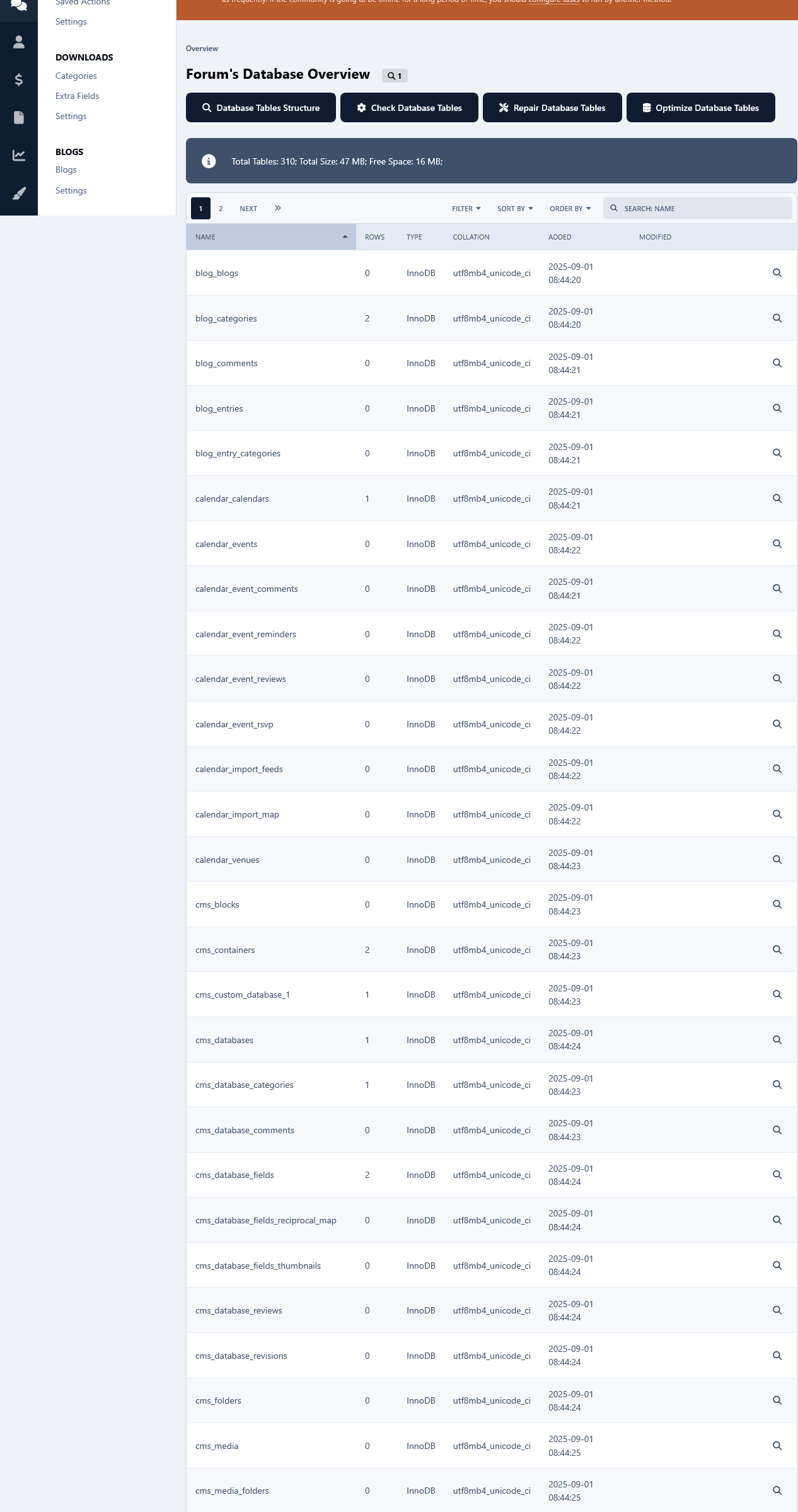
This app will list all of your database tables at its settings in your Admin Panel.
Table Structure Details:
You can view the structure of each database table as well as other details, such as how many rows do they have, their collation and engine type. The date when the table was first added to the database and when it was last modified. 
Commands:
You can run several commands such as Showing the create structure of tables, Checking tables, Repair and Optimizing.
Details:
A list of your database details such as the total tables, its size and how much free size is left is available as well.
This can be very useful imo especially if you don't have direct access to the server, and no utilities such as phpMyAdmin are installed. Or if you aren't very comfortable with dealing with the database from phpmyadmin for fear of messing things up, you can use this app as there is Zero chance of messing anything.
It can also come in handy if you have installed a lot of third party custom stuff like apps, plugins etc over the years and you want to have a clear overview of your database. You can do that with ease without having to go to your phpmyadmin.  
IPS5.0.0
This app will list all of your database tables at its settings in your Admin Panel.
Table Structure Details:
You can view the structure of each database table as well as other details, such as how many rows do they have, their collation and engine type. The date when the table was first added to the database and when it was last modified. 
Commands:
You can run several commands such as Showing the create structure of tables, Checking tables, Repair and Optimizing.
Details:
A list of your database details such as the total tables, its size and how much free size is left is available as well.
This can be very useful imo especially if you don't have direct access to the server, and no utilities such as phpMyAdmin are installed. Or if you aren't very comfortable with dealing with the database from phpmyadmin for fear of messing things up, you can use this app as there is Zero chance of messing anything.
It can also come in handy if you have installed a lot of third party custom stuff like apps, plugins etc over the years and you want to have a clear overview of your database. You can do that with ease without having to go to your phpmyadmin.  
🏆 Key Features

League Management
Create and manage multiple leagues with logo, banner, info, custom fields...
Custom league rules and score
Automatically updated league tables based on fixture results
Team Organization
Comprehensive team profiles with logos, descriptions, and statistics
Team roster management with detailed player information
Team fixtures tracking across seasons
Player Database
Complete player profiles with name, photos, info, custom fields...
Highlights of matches involving players.
Custom player fields for sport-specific data
Fixture Management
Easy to create multiple fixtures
Countdown timer
Result recording with detailed match statistics
Comment system
Rating System
Match Event System
Custom fields system
Auto post a topic when a fixture is created
Widget System
Ready-to-use widgets for any page on your site
Fixture lists, league tables, and team information widgets
Supports multiple layouts: list, table, grid, carousel
Support for API integration from thesportsdb.com:
Ability to import leagues, teams, players, and fixtures
Automatic synchronization of fixture scores
Get SportsApp today and transform your sports community into a dynamic, engaging platform that keeps members coming back for more!
IPS5.0.0+
🏆 Key Features

League Management
Create and manage multiple leagues with logo, banner, info, custom fields...
Custom league rules and score
Automatically updated league tables based on fixture results
Team Organization
Comprehensive team profiles with logos, descriptions, and statistics
Team roster management with detailed player information
Team fixtures tracking across seasons
Player Database
Complete player profiles with name, photos, info, custom fields...
Highlights of matches involving players.
Custom player fields for sport-specific data
Fixture Management
Easy to create multiple fixtures
Countdown timer
Result recording with detailed match statistics
Comment system
Rating System
Match Event System
Custom fields system
Auto post a topic when a fixture is created
Widget System
Ready-to-use widgets for any page on your site
Fixture lists, league tables, and team information widgets
Supports multiple layouts: list, table, grid, carousel
Support for API integration from thesportsdb.com:
Ability to import leagues, teams, players, and fixtures
Automatic synchronization of fixture scores
Get SportsApp today and transform your sports community into a dynamic, engaging platform that keeps members coming back for more!
Created to replace the outdated Edit HTML of posts.
Possibilities:
Select users/groups (only admins) that can change HTML code.
Enable/disable logging.
Add/remove icon next to the link.
Supports applications:
Pages
Forums
Commerce
Events
Blogs
Personal Messages
Gallery
Downloads
IPS5.0.0+
Created to replace the outdated Edit HTML of posts.
Possibilities:
Select users/groups (only admins) that can change HTML code.
Enable/disable logging.
Add/remove icon next to the link.
Supports applications:
Pages
Forums
Commerce
Events
Blogs
Personal Messages
Gallery
Downloads
.
This app will monitor your forum and list all changes done to the files within a time frame set by the admin. It will also scan all folders and files inside your forum folder for any potential malicious code and/or backdoor scripts.

File Change Detection:

If the files that have been listed as modified, haven't been changed by you yourself and/or haven't been updated automatically by the system, it could indicate that your forum most likely has been tampered with. Those files might have been changed to include malicious code.

In addition to an existed file being changed/modified, the upload of new file(s) is detected too.

In that case it would be best to immediately check the file(s) in question and contact your host so they can look into the unauthorized file changes and take the necessary actions to plugin the point of entry.

Potential Backdoor Scanning:

What Is a Backdoor?

A backdoor is malicious code injected to valid file(s)  of whatever scripts one is running on their server space, as only one short line of code that looks rather innocent. Or, a backdoor can be a standalone file as well.

They are left behind by hackers once they breach the security of a website to make sure they can get back in even after you secure your website. i.e. it allows them unauthorized and often unrestricted access to a compromised site. Unless you can remove the backdoor(s), there's no stopping them.

Backdoors are hidden from view, and made to look like legitimate files and therefore it can be extremely difficult to find. And that's where this app comes in.

It will scan all lines of code on every single file inside your forum folder for exploitable PHP Functions, PHP Code Execution, Command Execution and Filesystem Functions.

A few Examples:

The mod scans for a very wide array of php&filesystem functions, code&command executions. Below are few of them along with how they can be exploited by hackers.
Command Execution!
exec  - Returns last line of commands output
passthru - Passes commands output directly to the browser
system  - Passes commands output directly to the browser and returns last line
shell_exec - Returns commands output
popen - Opens read or write pipe to process of a command
proc_open  - Similar to popen() but greater degree of control
pcntl_exec - Executes a program
PHP Code Execution!
Apart from eval there are other ways to execute PHP code: include/require can be used for remote code execution in the form of Local File Include and Remote File Include vulnerabilities.
assert()  - identical to eval()
preg_replace('/.*/e',...) - /e does an eval() on the match
create_function()
include()
include_once()
require()
require_once()
Disguised Malicious Code
The use of eval(base64_decode(....)) or eval(gzinflate(base64_decode(..))) which are intended to disguise the nature of the malicious code.

The use of str_rot13 which is heavily used in pair with base64_decode. This too is used to disguise the nature of the malicious code.
False Positives:

All the aforementioned php functions, commands, executions etc are all legit. Ips and all the other php/mysql forum/cms scripts etc make use of them. But unfortunately they are also the most commonly used functions by the bad actors to inject malicious code. Therefore there will be false positives reports.

If you see your forum files mentioned as containing the aforementioned code, you can ignore it. But if any of the forum files is reported as recently modified file(s) by the app and you haven't touched the file(s) in question, then you should check it immediately as the chances are that it's foul play.
IPS5.0.0
.
This app will monitor your forum and list all changes done to the files within a time frame set by the admin. It will also scan all folders and files inside your forum folder for any potential malicious code and/or backdoor scripts.

File Change Detection:

If the files that have been listed as modified, haven't been changed by you yourself and/or haven't been updated automatically by the system, it could indicate that your forum most likely has been tampered with. Those files might have been changed to include malicious code.

In addition to an existed file being changed/modified, the upload of new file(s) is detected too.

In that case it would be best to immediately check the file(s) in question and contact your host so they can look into the unauthorized file changes and take the necessary actions to plugin the point of entry.

Potential Backdoor Scanning:

What Is a Backdoor?

A backdoor is malicious code injected to valid file(s)  of whatever scripts one is running on their server space, as only one short line of code that looks rather innocent. Or, a backdoor can be a standalone file as well.

They are left behind by hackers once they breach the security of a website to make sure they can get back in even after you secure your website. i.e. it allows them unauthorized and often unrestricted access to a compromised site. Unless you can remove the backdoor(s), there's no stopping them.

Backdoors are hidden from view, and made to look like legitimate files and therefore it can be extremely difficult to find. And that's where this app comes in.

It will scan all lines of code on every single file inside your forum folder for exploitable PHP Functions, PHP Code Execution, Command Execution and Filesystem Functions.

A few Examples:

The mod scans for a very wide array of php&filesystem functions, code&command executions. Below are few of them along with how they can be exploited by hackers.
Command Execution!
exec  - Returns last line of commands output
passthru - Passes commands output directly to the browser
system  - Passes commands output directly to the browser and returns last line
shell_exec - Returns commands output
popen - Opens read or write pipe to process of a command
proc_open  - Similar to popen() but greater degree of control
pcntl_exec - Executes a program
PHP Code Execution!
Apart from eval there are other ways to execute PHP code: include/require can be used for remote code execution in the form of Local File Include and Remote File Include vulnerabilities.
assert()  - identical to eval()
preg_replace('/.*/e',...) - /e does an eval() on the match
create_function()
include()
include_once()
require()
require_once()
Disguised Malicious Code
The use of eval(base64_decode(....)) or eval(gzinflate(base64_decode(..))) which are intended to disguise the nature of the malicious code.

The use of str_rot13 which is heavily used in pair with base64_decode. This too is used to disguise the nature of the malicious code.
False Positives:

All the aforementioned php functions, commands, executions etc are all legit. Ips and all the other php/mysql forum/cms scripts etc make use of them. But unfortunately they are also the most commonly used functions by the bad actors to inject malicious code. Therefore there will be false positives reports.

If you see your forum files mentioned as containing the aforementioned code, you can ignore it. But if any of the forum files is reported as recently modified file(s) by the app and you haven't touched the file(s) in question, then you should check it immediately as the chances are that it's foul play.
this plugin will allow your users to complete checkout without needing to register. simply input your email for your new or existing account and new users it will automatically create their user and existing users it will tie the order to your existing account!


this plugin will allow your users to complete checkout without needing to register. simply input your email for your new or existing account and new users it will automatically create their user and existing users it will tie the order to your existing account!


A tiny app that drops members into a random discussion to help them discover great topics they’d otherwise miss. It adds a “Random Topic” button right next to “Start new topic.” The buttons are placed intentionally so members can keep hitting that button again and again.

Drive engagement
Surface long-tail content: Old-but-gold threads get fresh eyes, comments, and reactions.
Reduce choice paralysis: One click, one destination - perfect for new or casual visitors.
Boost session depth: Random jumps keep people moving, increasing time on site and pageviews.


Pro tip: Pair with onboarding or your “Welcome” widget - new members love a guided first click.

Changelog
v1.0.0 – Initial release.
Feedback, bugs, or feature requests? Don’t hesitate to reach out.
IPS5.0.0+
A tiny app that drops members into a random discussion to help them discover great topics they’d otherwise miss. It adds a “Random Topic” button right next to “Start new topic.” The buttons are placed intentionally so members can keep hitting that button again and again.

Drive engagement
Surface long-tail content: Old-but-gold threads get fresh eyes, comments, and reactions.
Reduce choice paralysis: One click, one destination - perfect for new or casual visitors.
Boost session depth: Random jumps keep people moving, increasing time on site and pageviews.


Pro tip: Pair with onboarding or your “Welcome” widget - new members love a guided first click.

Changelog
v1.0.0 – Initial release.
Feedback, bugs, or feature requests? Don’t hesitate to reach out.
Drive engagement - give members a reason to come back tomorrow. Activity Streaks tracks consecutive posting days, shows a friendly widget, and plugs into Achievements so you can award points/badges at milestones (3, 7, 14, 30, 100… you choose).

Highlights
Streak widget with multiple visualizations: Dots (classic), Weekly goal meter, Big number badge, Milestone progress bar, Compact sparkline, Donut meter.
“Best streak” label (member & profile sidebar support).
Achievements action: Streak reaches N days — award points/badges at the exact day threshold.
Admin-friendly rules: create multiple thresholds (e.g., 3/7/14/30/100) with your own points/badges.
End-of-day nudge (optional): configurable reminder hour.
Visibility controls: limit the widget to selected member groups.
Performance aware: lightweight queries with caching; adjustable TTL.
No external services: respects IPS permissions; zero tracking.

nudge.mp4
"Enable end-of-day nudge by default" will show a subtle effect reminding people to post.


Admin controls
Per-widget override of visualization style.
Fixed or auto milestones for bar/donut views.
Optional custom donut goals (CSV).
Group visibility allow-list.
Cache TTL (seconds).
What’s included
Application
Example rule presets to import.
Install & setup (2 minutes)
Upload & install the app in ACP.
Add the Activity Streak widget to a sidebar or block area.
(Optional) In Achievements → Rules, add rules like:
3 days → 10 pts + “Getting Warm” badge
7 days → 25 pts + “1-Week Streak” badge
14 days → 50 pts + “Two Weeks on Fire” badge
30 days → 100 pts + Silver badge
100 days → 300 pts + Gold badge
Save. Members earn awards the moment they hit each threshold.
Notes
Streaks are based on days with at least one qualifying post (or allowed content) - not logins.
Timezone behavior follows your IPS configuration.

Changelog
v1.0.0 – Initial release.

Feedback, bugs or feature requests? Don't hesitate to let me know.
IPS5.0.0+
Drive engagement - give members a reason to come back tomorrow. Activity Streaks tracks consecutive posting days, shows a friendly widget, and plugs into Achievements so you can award points/badges at milestones (3, 7, 14, 30, 100… you choose).

Highlights
Streak widget with multiple visualizations: Dots (classic), Weekly goal meter, Big number badge, Milestone progress bar, Compact sparkline, Donut meter.
“Best streak” label (member & profile sidebar support).
Achievements action: Streak reaches N days — award points/badges at the exact day threshold.
Admin-friendly rules: create multiple thresholds (e.g., 3/7/14/30/100) with your own points/badges.
End-of-day nudge (optional): configurable reminder hour.
Visibility controls: limit the widget to selected member groups.
Performance aware: lightweight queries with caching; adjustable TTL.
No external services: respects IPS permissions; zero tracking.

nudge.mp4
"Enable end-of-day nudge by default" will show a subtle effect reminding people to post.


Admin controls
Per-widget override of visualization style.
Fixed or auto milestones for bar/donut views.
Optional custom donut goals (CSV).
Group visibility allow-list.
Cache TTL (seconds).
What’s included
Application
Example rule presets to import.
Install & setup (2 minutes)
Upload & install the app in ACP.
Add the Activity Streak widget to a sidebar or block area.
(Optional) In Achievements → Rules, add rules like:
3 days → 10 pts + “Getting Warm” badge
7 days → 25 pts + “1-Week Streak” badge
14 days → 50 pts + “Two Weeks on Fire” badge
30 days → 100 pts + Silver badge
100 days → 300 pts + Gold badge
Save. Members earn awards the moment they hit each threshold.
Notes
Streaks are based on days with at least one qualifying post (or allowed content) - not logins.
Timezone behavior follows your IPS configuration.

Changelog
v1.0.0 – Initial release.

Feedback, bugs or feature requests? Don't hesitate to let me know.
This app will log all guests visits at your forum from the moment that it's installed and it will display them in the app's log page. Like that you will have an overview as to what pages hold the interest of your guests. Logs can be then searched based on ip addresses and visit time frame.
Another feature of this app is the use cookies to limit the number of times that your  guests can view pages at your forum. The limit will be for a day, after which it will expire and it will be repeated again after the number of page view limit has been reached again. The whole idea behind this concept is to hopefully motivate guests to register. 
The search bots will not be impacted by this when it comes to spidering your site, because usually bots do not generally use cookies. However, this is an on/off setting.
IPS5.0.0
This app will log all guests visits at your forum from the moment that it's installed and it will display them in the app's log page. Like that you will have an overview as to what pages hold the interest of your guests. Logs can be then searched based on ip addresses and visit time frame.
Another feature of this app is the use cookies to limit the number of times that your  guests can view pages at your forum. The limit will be for a day, after which it will expire and it will be repeated again after the number of page view limit has been reached again. The whole idea behind this concept is to hopefully motivate guests to register. 
The search bots will not be impacted by this when it comes to spidering your site, because usually bots do not generally use cookies. However, this is an on/off setting.
This app will force members to make their first topic in the forum of your choice in order to browse the forums and topics at your forum. 
From the app's settings you can enable/disable the app, select the forum where you want your members to post their first topic, enter your custom error message and exclude groups from this restriction.
IPS5.0.0
This app will force members to make their first topic in the forum of your choice in order to browse the forums and topics at your forum. 
From the app's settings you can enable/disable the app, select the forum where you want your members to post their first topic, enter your custom error message and exclude groups from this restriction.
A tiny add-on that puts a single theme icon next to the user area. Tap it to choose Light, Dark, or System—using IPS’s built-in color-scheme logic. Clean, fast, and theme-friendly.
Highlights
One neutral “theme” icon with a dropdown (Light / Dark / System).
Works in the desktop header and mobile header (same UX everywhere).
Uses IPS core controller—no custom JS frameworks, no settings, no bloat.
Respects safe areas, tooltips, accessibility labels, and your header colors.
IPS5.0.0+
A tiny add-on that puts a single theme icon next to the user area. Tap it to choose Light, Dark, or System—using IPS’s built-in color-scheme logic. Clean, fast, and theme-friendly.
Highlights
One neutral “theme” icon with a dropdown (Light / Dark / System).
Works in the desktop header and mobile header (same UX everywhere).
Uses IPS core controller—no custom JS frameworks, no settings, no bloat.
Respects safe areas, tooltips, accessibility labels, and your header colors.
Topper — smart “back to top” button for Invision Community v5
A tiny, polished utility that adds a floating Back to Top button across your community. It stays out of the way at the top of a page and appears only after you scroll halfway (or near the bottom). On desktop you can also show a “go down” button; on mobile the Up button is placed precisely above bottom bars and iOS safe areas (including PWAs).

Highlights
Clean UI with optional circular progress ring around the button.
Mobile-perfect placement (safe-area aware, PWA-aware, above the hamburger bar).
Desktop/phone behavior tuned separately (Down button hidden on mobile).
Keyboard access: press T to jump to the top.

Admin controls (ACP)
Find it under Customization → Appearance → Topper.
You can configure:
Position: bottom-right / bottom-left / top-right / top-left
Offsets (X/Y) + a separate mobile offset
Visibility: “Always show”, or show after N px (button also shows when near the bottom)
Size (desktop + mobile), shape (circle / rounded)
Colors: background, hover, icon, opacity
Smooth scroll on click
Progress ring toggle
Show on mobile toggle
Keyboard shortcut (T) toggle
Compatibility
Invision Community v5 (tested on recent builds)
Works with light/dark themes and custom themes

1.0.0
Initial release: progress ring, mobile/PWA safe positioning, desktop “Down” button, keyboard shortcut, half-page/near-bottom reveal logic, full ACP settings.
IPS5.0.0+
Topper — smart “back to top” button for Invision Community v5
A tiny, polished utility that adds a floating Back to Top button across your community. It stays out of the way at the top of a page and appears only after you scroll halfway (or near the bottom). On desktop you can also show a “go down” button; on mobile the Up button is placed precisely above bottom bars and iOS safe areas (including PWAs).

Highlights
Clean UI with optional circular progress ring around the button.
Mobile-perfect placement (safe-area aware, PWA-aware, above the hamburger bar).
Desktop/phone behavior tuned separately (Down button hidden on mobile).
Keyboard access: press T to jump to the top.

Admin controls (ACP)
Find it under Customization → Appearance → Topper.
You can configure:
Position: bottom-right / bottom-left / top-right / top-left
Offsets (X/Y) + a separate mobile offset
Visibility: “Always show”, or show after N px (button also shows when near the bottom)
Size (desktop + mobile), shape (circle / rounded)
Colors: background, hover, icon, opacity
Smooth scroll on click
Progress ring toggle
Show on mobile toggle
Keyboard shortcut (T) toggle
Compatibility
Invision Community v5 (tested on recent builds)
Works with light/dark themes and custom themes

1.0.0
Initial release: progress ring, mobile/PWA safe positioning, desktop “Down” button, keyboard shortcut, half-page/near-bottom reveal logic, full ACP settings.
Bring your Downloads section to life with HoverShots - a smooth, eye-catching way to preview multiple screenshots right from the file card.
On desktop, simply hover over a file’s thumbnail and watch the screenshots cycle automatically. On mobile, a discreet Preview button appears inside the image, letting visitors tap to start a short preview without opening the file page.
HoverShots works seamlessly in category listings, the main Downloads page, and other grid-based displays. It respects mobile usability as it skips small/minimal grid items, and avoids interfering with clicks or navigation.
Give your files the attention they deserve and make browsing more engaging for your community.

preview.mp4
IPS5.0.0+
Bring your Downloads section to life with HoverShots - a smooth, eye-catching way to preview multiple screenshots right from the file card.
On desktop, simply hover over a file’s thumbnail and watch the screenshots cycle automatically. On mobile, a discreet Preview button appears inside the image, letting visitors tap to start a short preview without opening the file page.
HoverShots works seamlessly in category listings, the main Downloads page, and other grid-based displays. It respects mobile usability as it skips small/minimal grid items, and avoids interfering with clicks or navigation.
Give your files the attention they deserve and make browsing more engaging for your community.

preview.mp4
Elegant. Modern. Designed to Flow.
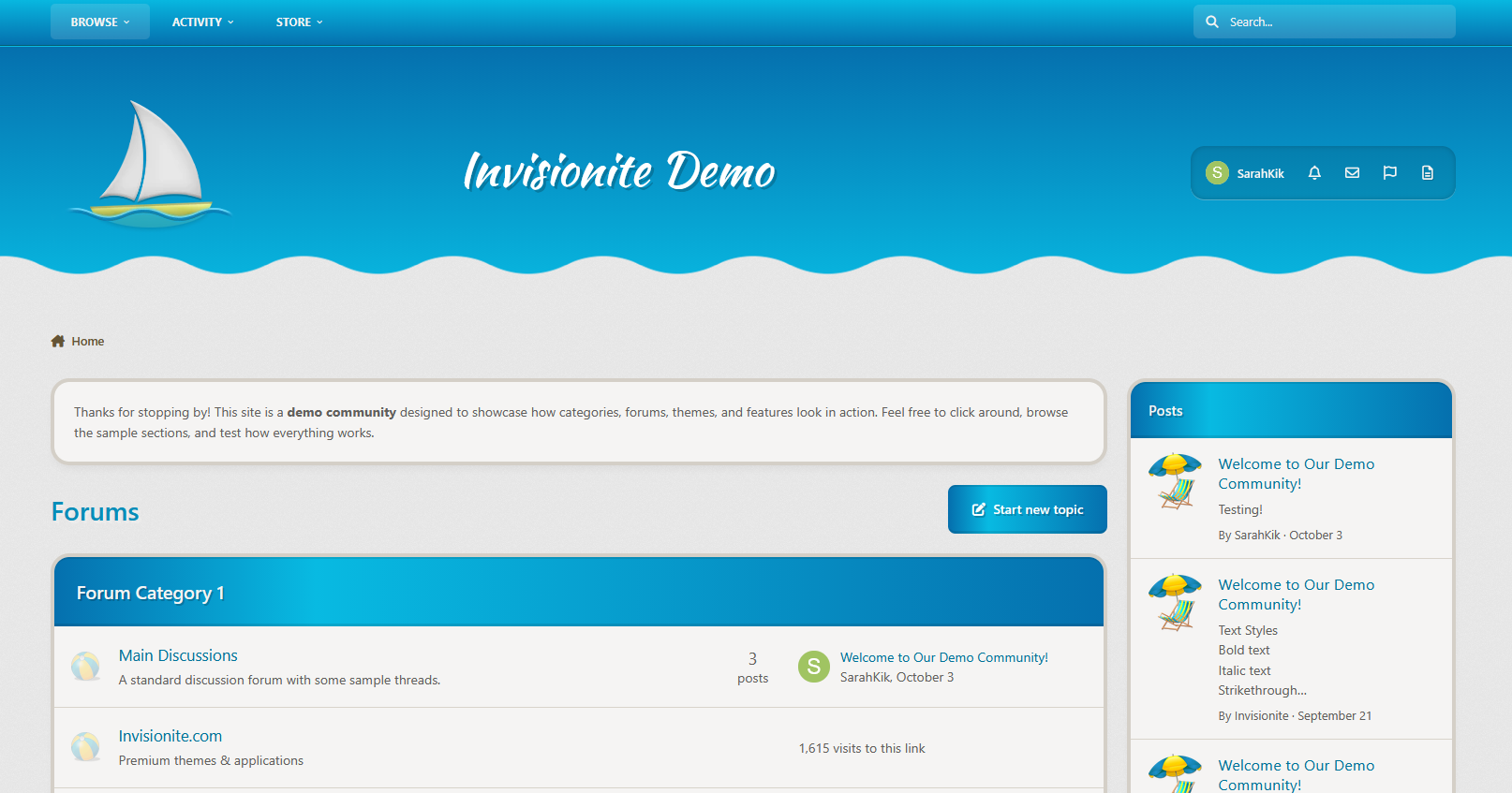
Aurora returns — now rebuilt for Invision Community v5.
A refined remake of our popular XenForo variant, this version of Aurora blends soft gradients, clean panels, and adaptive dark/light modes for a theme that feels as smooth as it looks. It’s professional without being cold, stylish without losing usability.
Perfect for communities that want a premium, future-ready design that still feels effortless.
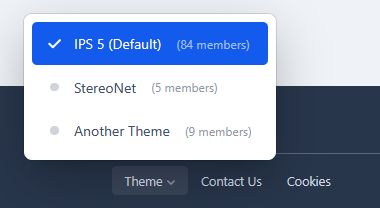
Demo: Select Aurora from the theme switcher.

✔️ Classic Aurora Reimagined
Our beloved XenForo Aurora design is now optimized for IPS v5 — keeping the signature flowing gradients while reworking every element for Invision’s modern framework.
✔️ Adaptive Dark & Light Modes
Aurora automatically adapts to the user’s theme choice or OS setting, delivering consistent, balanced visuals in any environment.
✔️ Gradient Category & Widget Headers
Forum categories and widgets feature Aurora’s signature gradient trim — crisp, modern, and seamlessly blending with the rest of the UI.
✔️ Smooth UI
Panels, widgets, and dropdowns keep it clean, assuring focus on your content while adding depth.
✔️ Styled Scrollbars & Details
Custom-themed scrollbars, button accents, and header lines ensure even the smallest details feel consistent.
✔️ Pixel-Perfect for Any Niche
From tech forums to creative communities, Aurora delivers a clean canvas that’s ready for your brand and content.

We've redefined Aurora — A more polished experience built for today’s IPS communities. If you loved the XenForo version, you’ll feel right at home here.
IPS5.0.0+
Elegant. Modern. Designed to Flow.
Aurora returns — now rebuilt for Invision Community v5.
A refined remake of our popular XenForo variant, this version of Aurora blends soft gradients, clean panels, and adaptive dark/light modes for a theme that feels as smooth as it looks. It’s professional without being cold, stylish without losing usability.
Perfect for communities that want a premium, future-ready design that still feels effortless.
Demo: Select Aurora from the theme switcher.

✔️ Classic Aurora Reimagined
Our beloved XenForo Aurora design is now optimized for IPS v5 — keeping the signature flowing gradients while reworking every element for Invision’s modern framework.
✔️ Adaptive Dark & Light Modes
Aurora automatically adapts to the user’s theme choice or OS setting, delivering consistent, balanced visuals in any environment.
✔️ Gradient Category & Widget Headers
Forum categories and widgets feature Aurora’s signature gradient trim — crisp, modern, and seamlessly blending with the rest of the UI.
✔️ Smooth UI
Panels, widgets, and dropdowns keep it clean, assuring focus on your content while adding depth.
✔️ Styled Scrollbars & Details
Custom-themed scrollbars, button accents, and header lines ensure even the smallest details feel consistent.
✔️ Pixel-Perfect for Any Niche
From tech forums to creative communities, Aurora delivers a clean canvas that’s ready for your brand and content.

We've redefined Aurora — A more polished experience built for today’s IPS communities. If you loved the XenForo version, you’ll feel right at home here.
Striking. Immersive. Built for motion.
Step into Parallaxa, a game-inspired Invision Community v5 theme designed for depth, energy, and customization. With a responsive parallax header, animated accents, glass surfaces, and dynamic color presets, Parallaxa sets the stage for communities that want more than just a basic skin — they want a vibe.
Whether you run a gaming forum, creative project hub, or a content-heavy platform, Parallaxa delivers immersive style with functional clarity.
Demo: Select Parallaxa from the theme switcher.

✔️ Live Parallax Header
A responsive hero header with optional background selector, layered gradients, and gentle movement to add dimension and presence.
✔️ Dynamic Background Selector
Let your users switch between multiple thematic backgrounds with a seamless, mobile-friendly overlay — complete with animated previews and dark blur effect.
✔️ Accent Color Presets
Switch between vibrant preset colors like blue, red, lime, purple, and more. All UI elements update instantly — from icons to buttons to glow effects.
✔️ Glass UI with Depth
Menus, widgets, and content areas feature soft blurs and transparent panels, evoking that frosted-glass feel while keeping everything readable and responsive.
✔️ Shiny Buttons & Animated Glow
Buttons are styled with a layered gloss and animated sheen. Hover states glow, but never feel jarring. Perfect for modern, sleek navigation.
✔️ Adaptive Widgets & Headers
Box headers match your current background with darkened blur overlays and subtle glowing trims for contrast. Widget headers are styled to blend into the theme softly.
✔️ Built-in Game-Style Elements
From neon-glow badges to pill-style icons and soft-animated dropdowns, Parallaxa brings subtle game UI cues without overwhelming your content.

Ideal for modern forums, gaming clans, project showcases, and creative platforms that want to combine visual punch with polished design.

Need help adding your own backgrounds or expanding the presets? Just ask - Parallaxa was built for flexibility.
IPS5.0.0+
Striking. Immersive. Built for motion.
Step into Parallaxa, a game-inspired Invision Community v5 theme designed for depth, energy, and customization. With a responsive parallax header, animated accents, glass surfaces, and dynamic color presets, Parallaxa sets the stage for communities that want more than just a basic skin — they want a vibe.
Whether you run a gaming forum, creative project hub, or a content-heavy platform, Parallaxa delivers immersive style with functional clarity.
Demo: Select Parallaxa from the theme switcher.

✔️ Live Parallax Header
A responsive hero header with optional background selector, layered gradients, and gentle movement to add dimension and presence.
✔️ Dynamic Background Selector
Let your users switch between multiple thematic backgrounds with a seamless, mobile-friendly overlay — complete with animated previews and dark blur effect.
✔️ Accent Color Presets
Switch between vibrant preset colors like blue, red, lime, purple, and more. All UI elements update instantly — from icons to buttons to glow effects.
✔️ Glass UI with Depth
Menus, widgets, and content areas feature soft blurs and transparent panels, evoking that frosted-glass feel while keeping everything readable and responsive.
✔️ Shiny Buttons & Animated Glow
Buttons are styled with a layered gloss and animated sheen. Hover states glow, but never feel jarring. Perfect for modern, sleek navigation.
✔️ Adaptive Widgets & Headers
Box headers match your current background with darkened blur overlays and subtle glowing trims for contrast. Widget headers are styled to blend into the theme softly.
✔️ Built-in Game-Style Elements
From neon-glow badges to pill-style icons and soft-animated dropdowns, Parallaxa brings subtle game UI cues without overwhelming your content.

Ideal for modern forums, gaming clans, project showcases, and creative platforms that want to combine visual punch with polished design.

Need help adding your own backgrounds or expanding the presets? Just ask - Parallaxa was built for flexibility.

Top Developers

Last reviews

Applications Directory

A complete and convenient directory of applications for Invision Community, with categorization and sorting options.

Ratings and feedback

Only verified and trusted reviews!

Add new Application

Any developer can add their application to this directory.

You need to create account

Configure browser push notifications

Chrome (Android)
  1. Tap the lock icon next to the address bar.
  2. Tap Permissions → Notifications.
  3. Adjust your preference.
Chrome (Desktop)
  1. Click the padlock icon in the address bar.
  2. Select Site settings.
  3. Find Notifications and adjust your preference.