Admin & Mod Tools
-
IPS5.0.0+
Ask your community anything, and actually understand the answers.
Advanced Surveys & Forms is a complete survey, intake, and application system for Invision Community v5. Build unlimited forms with branching logic, collect responses through a guided flow your members will actually finish, and turn the results into clean charts that can be shown publicly, after submission, after closing, or to staff only.
How it works
Create a form, place it in a category, and add questions through the visual builder. Members find it in the hub, complete it step by step, and depending on your settings, either see the results right away or simply move on. Staff can watch responses roll in, chart them in a way that makes sense, and export the raw data whenever needed.
Every form runs in one of two modes. A Survey gathers opinions and presents the results as charts. An Intake form collects structured information without the results-page framing. Enable application review and that same form becomes a full reviewable application, with staff approvals, group changes, and applicant notifications.
The member experience
Long forms get abandoned. This one does not feel long.
Instead of dumping twenty fields onto a single page, Advanced Surveys presents one question at a time, with a progress bar, a clear “Question 4 of 12” counter, and Back and Next controls. Members always know how far they have to go, can answer at their own pace, and are never overwhelmed by a wall of inputs.
The flow includes:
A live progress bar and step counter
Required-question protection, so mandatory answers are not skipped by accident
An estimated completion time and question count up front
An anonymous badge when responses are not tied to a name
Category color theming and fa icons so each form feels connected to its section
Conditional questions appear inline the moment they become relevant, directly after the answer that triggers them.
Question types
Eleven question types cover just about anything you would want to ask:
Single choice
Multiple choice
Dropdown
Rating
Short text
Long text
Number
Date
Email
File upload
Info text and page breaks for structure and instructions
Each question can be marked required, given help text, and reordered in the builder.
Branching and conditional logic
This is where it stops being a plain form.
Any question can be shown only when other answers match. Open the conditional visibility panel, choose whether to match All or Any conditions, and build rules like “show this question when Role is Content Contributor” or “when Country is not United States.” Conditions support “is” and “is not,” multiple rules at once, and any choice-based question as a trigger.
The logic runs live as the member fills in the form, and it is enforced again on the server. A required question that was never shown will not block a valid submission, while a required question that was shown must still be answered.
Results as charts
When a form closes, or the moment a member submits, the results page turns raw responses into something readable.
Every question can be charted independently. Pick the style per question or let the system choose automatically:
Horizontal bars and columns
Doughnut and pie charts
100% stacked bars
Ranked lists and data tables
Big number and NPS score
Review summaries for ratings
Emoji faces and word clouds
Charts are rendered with a bundled charting library, so there are no external calls and nothing extra to configure. Prefer the raw numbers? Export any form’s responses to CSV in one click.
Who sees the results
You decide, per form:
Public, visible to anyone who can see the form
After submit, unlocked once a member responds
After close, held back until the form closes
Staff only, kept private for your team
Category permissions can also grant a dedicated results permission, letting specific groups see outcomes without opening them to everyone.
Turn a survey into an application
Advanced Surveys also doubles as a full application system, perfect for staff recruitment, club membership, event signups, or anything that needs a human decision.
Enable application review on a form and its behavior changes:
Submissions go into a review queue instead of a results chart
A reviewer group you choose can approve, reject, and leave a private message
Administrators can always review applications
On approval, the applicant can be added to a secondary group automatically
The applicant is notified of the decision, inline and by email, along with any message the reviewers left
Applications to review queue in the AdminCP, plus a compact question-and-answer review panel with applicant details and a status badge. Applicants get their own “My applications” view, where they can see exactly what they submitted and whether it is pending, approved, or not accepted.
Categories and permissions
Forms live in categories with nesting, drag ordering, colors, and icons. Every category carries the standard Invision permission matrix, so you control who can view, who can respond, and who can see results section by section.
Guests can be allowed or blocked globally, and any form can require sign-in on its own.
Response controls
Fine-tune how each form behaves:
Require login, or allow guests
One response per member, or allow repeats
Set a cooldown before a member can respond again
Schedule opening and closing dates
Show a custom confirmation message after submission
Notifications
Advanced Surveys uses the notification system, with inline, email, and push support. Members and staff can be notified about:
New responses on a form they own or manage
A survey closing soon
Results becoming available
A new application waiting for review
An application being approved
An application being rejected
A background task handles closing reminders and results notifications automatically.
Built into Invision, not beside it
Global search and activity stream integration
Following, with notifications on new activity
Moderation, hiding, and reporting through the standard tools
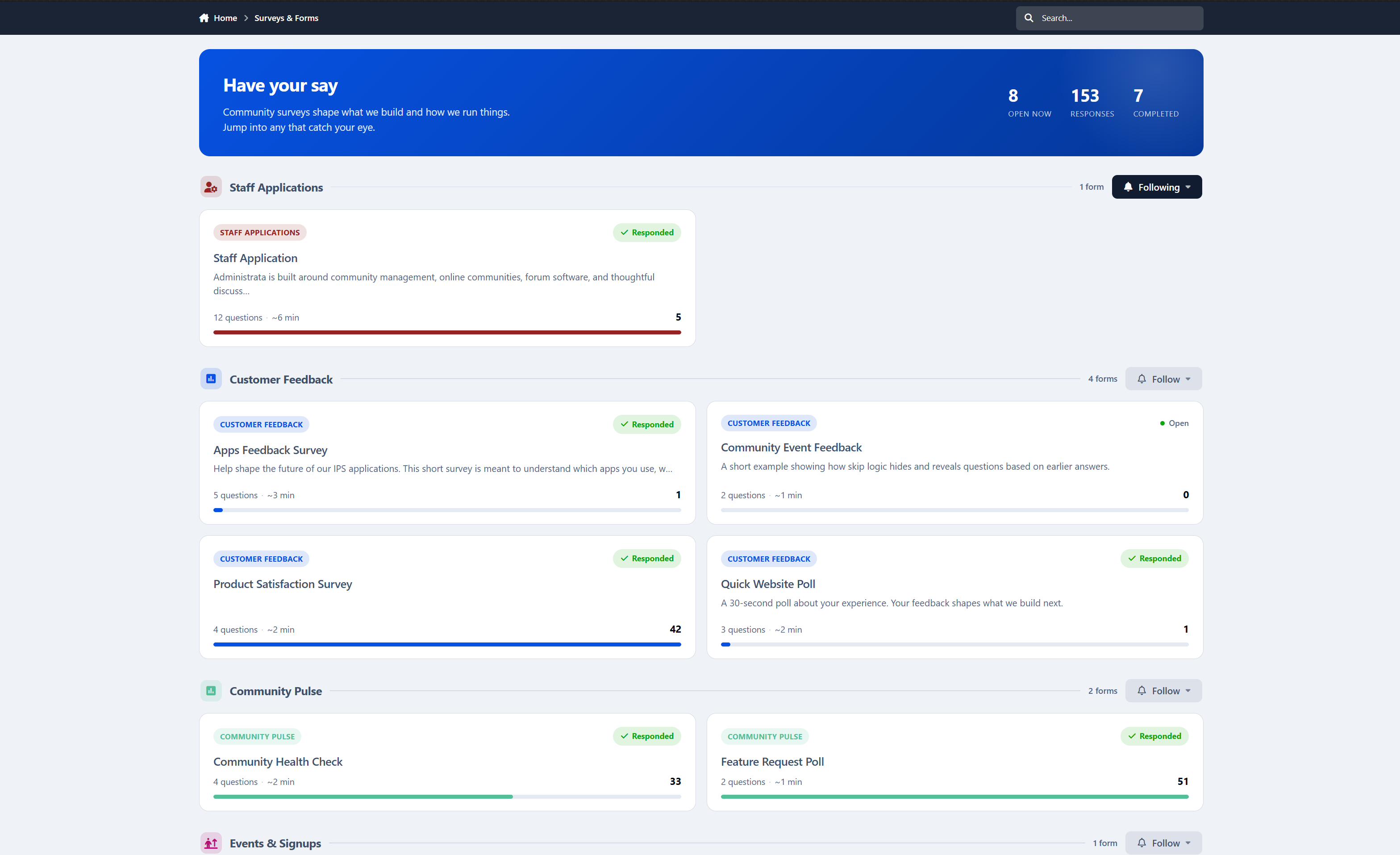
A followable, permission-aware hub with a hero and live stats for open forms, total responses, and completed counts
A Recent Surveys widget you can place anywhere blocks are supported, including Pages layouts
Admin control panel
Visual question builder with question type, required toggle, help text, reordering, and conditional visibility
Cross-form application review queue
Category management with permissions, colors, and icons
Per-question chart selection on the results side
CSV export of responses
Settings for guest access, per-page counts, and the member-facing applications link
Granular admin restrictions for forms, categories, and settings, so you can give staff exactly the access they need
Perfect for
Advanced Surveys & Forms is ideal for:
Community feedback and opinion polls that deserve more than a one-line poll
Staff recruitment and volunteer applications, end to end
Club membership and event intake
Onboarding questionnaires with branching that adapts to each member
Teams that want clean, shareable charts instead of another spreadsheet
Communities that need some answers public and others locked to staff
Advanced Surveys & Forms 1.0 is just the start. Need a question type or workflow it does not cover yet? Let me know.
-
IPS5.0.7+
This application allows administrators and moderators with the appropriate permission to ban specific users from selected forums directly from the Admin CP or the user's front-end profile.
Restricted members will not be able to:
View the forum's topic list
Access topics inside restricted forums
Create new topics in restricted forums
Banned forums are removed from the Forums index, and content from restricted forums is also hidden from Activity Streams, Search results, and user profiles.
Administrators can view and manage all forum restrictions from a dedicated page in the Admin CP.
-
IPS5.0.0+
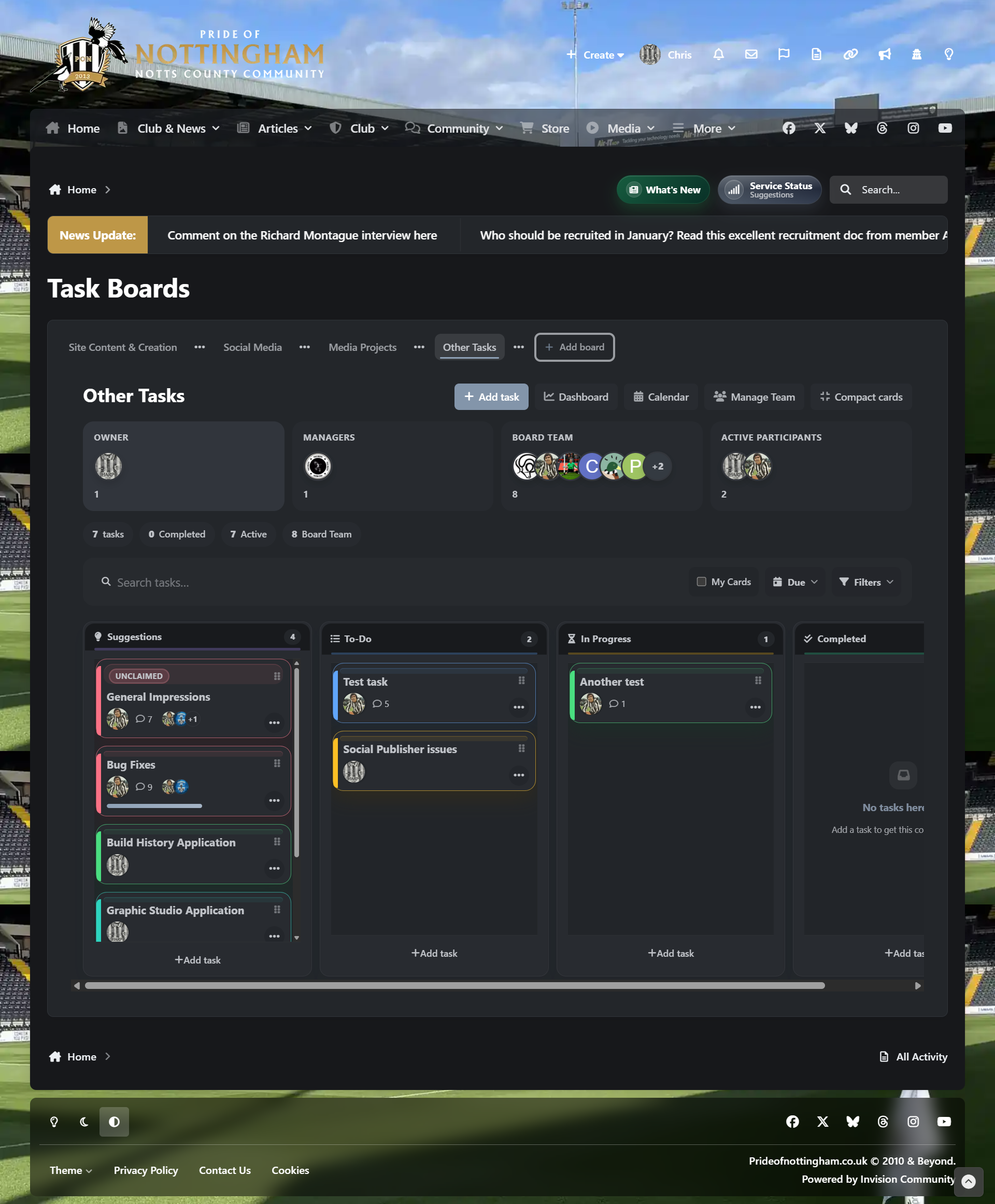
It allows communities, staff teams, project groups, content teams and support teams to create boards, manage tasks, assign work, track progress, discuss tasks, use labels and tags, organise deadlines and build repeatable workflows without relying on an external platform.
This application has been under development for several months and is the result of working very closely with another client, shaping the app around real workflow needs, practical project management and day-to-day community use.
Feature set
Fully responsive layout for desktop, tablet and mobile users
Front-end task boards for community and team workflows
Multiple board layouts, including Kanban, Compact, Editorial, Triage, Release QA, Focus Workspace, Matrix Workspace and Roadmap Timeline
Board dashboard with search, filters, task groups and key task metrics
Calendar view for due dates and scheduled tasks
Task creation, editing, archiving and deletion
Task assignments, followers and ownership controls
Task claiming, release and takeover options
Task priorities, due dates, reminder dates and completion percentage tracking
Task comments with mentions, reactions and pagination
Checklist support with completion tracking
File attachments with configurable upload size limits
Labels and tags for better task organisation
Custom fields for board-specific task data
Board cover images and visual board themes
Board team management with owners, managers, members and pending invites
Board-specific permissions for viewing, creating, claiming, editing and managing tasks
Group-level Task Manager permissions
Activity logging for task updates, comments, movement, assignments, checklists and attachments
Built-in task search across available boards
Drag-and-drop style task movement between workflow columns
Workflow states and custom columns
Automation rules for actions such as moving cards, changing priority and adding labels
Packaged board templates for quick setup
Ready-made templates for bug tracking, content production, project planning, software release QA, community moderation, event planning, eLearning, student management and personal productivity
Optional sample tasks when creating boards from templates
Suggestions column support for community-driven workflows
Time tracking with manual time logging and task timers
Task notifications for comments, mentions, assignments and claims
Backup and import tools for Task Manager data
ACP tools for boards, columns, workflow states, labels, tags, custom fields, templates, automations, logs and backup
Built to use native Invision Community 5 styling, permissions, editor handling, notifications and front navigation
Front end path
Domain > Task Manager
ACP path
ACP > Community > Task Manager
-
IPS5.0.0+
Application features for Birthday Greeter:
Automatic Birthday Greetings
Finds members with birthdays today and sends greetings through enabled channels.
Personal Messages
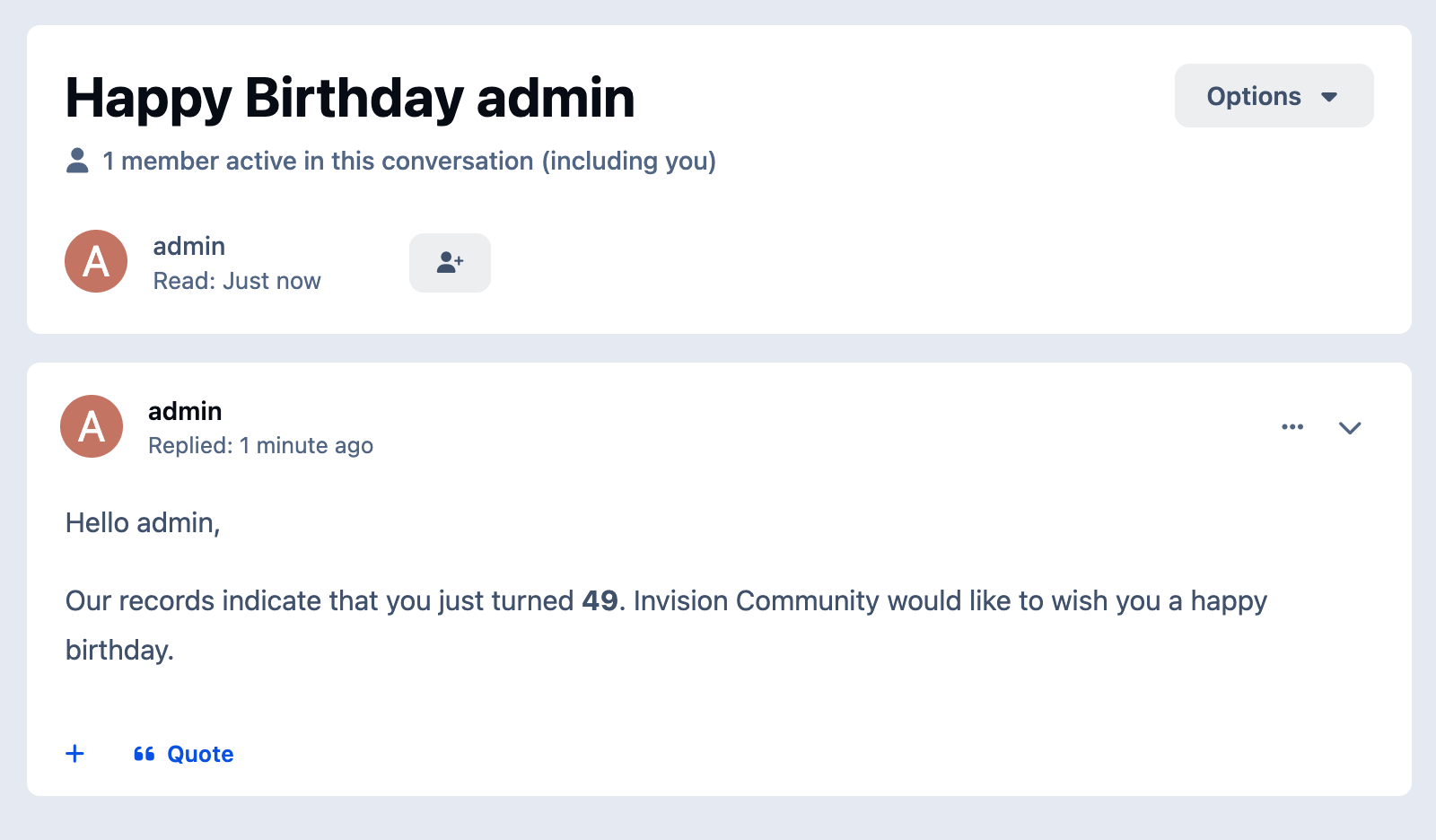
Sends a birthday PM from a selected sender account.
Email Greetings
Sends a birthday email when the member allows admin emails.
Forum Topics and Replies
Can create individual topics, one daily topic, or post replies into an existing topic.
Topic Settings
Supports forum selection, author selection, title, message body, pinning, and closing topics.
Chatbox Greetings
Posts birthday messages to a supported chat application when available.
Status Updates
Publishes birthday greetings through the status channel when supported.
Today’s Birthdays Widget
Displays members celebrating a birthday today.
Birthday Message Widget
Shows a configurable birthday greeting message on the site.
Activity Filter
Excludes members who have been inactive for a configured number of days.
Content Count Filter
Sends greetings only to members with a minimum amount of content.
Age Range Filter
Limits greetings to members within a configured age range.
Group Exclusions
Excludes selected member groups from receiving greetings.
Duplicate Protection
Tracks sent PM greetings and prevents duplicate birthday messages on the same day.
Recipient Safety Limit
Stops the task if the recipient list is unexpectedly large.
Scheduled Delivery Window
Lets admins configure send time, timezone, and delivery buffer.
Quick Tags
Supports dynamic placeholders in greeting templates.
Optional Logs
Allows delivery, duplicate, error, and safety logs to be enabled or disabled.
Based on the app from devfuse!
-
IPS5.0.0+
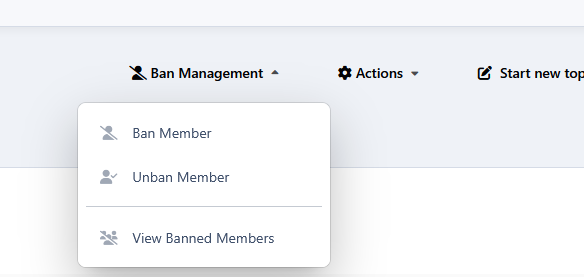
Ban Members From Topics allows moderators to restrict specific members from accessing selected topics without affecting their access to the rest of the community.
Banned members will no longer be able to view the topic content in any area where the topic appears.
Covered areas:
Topic view
Forum view AJAX preview
Activity streams
Profile activity
Profile content tabs (Topics and Posts)
Topic and post embeds
Moderator permissions:
Can ban members from topics
Can unban members from topics
Can view the list of banned members in a topic
Moderator notifications:
Moderators can be notified when:
Another moderator bans a member from a topic
Another moderator removes a member's ban from a topic
Another moderator removes all banned members from a topic
Member notifications:
Members can be notified when:
A moderator bans them from a topic
A moderator unbans them from a topic
Profile integration:
Adds a profile tab displaying all topics where the profile owner is banned
The tab is only visible to moderators with permission
-
IPS5.0.0+
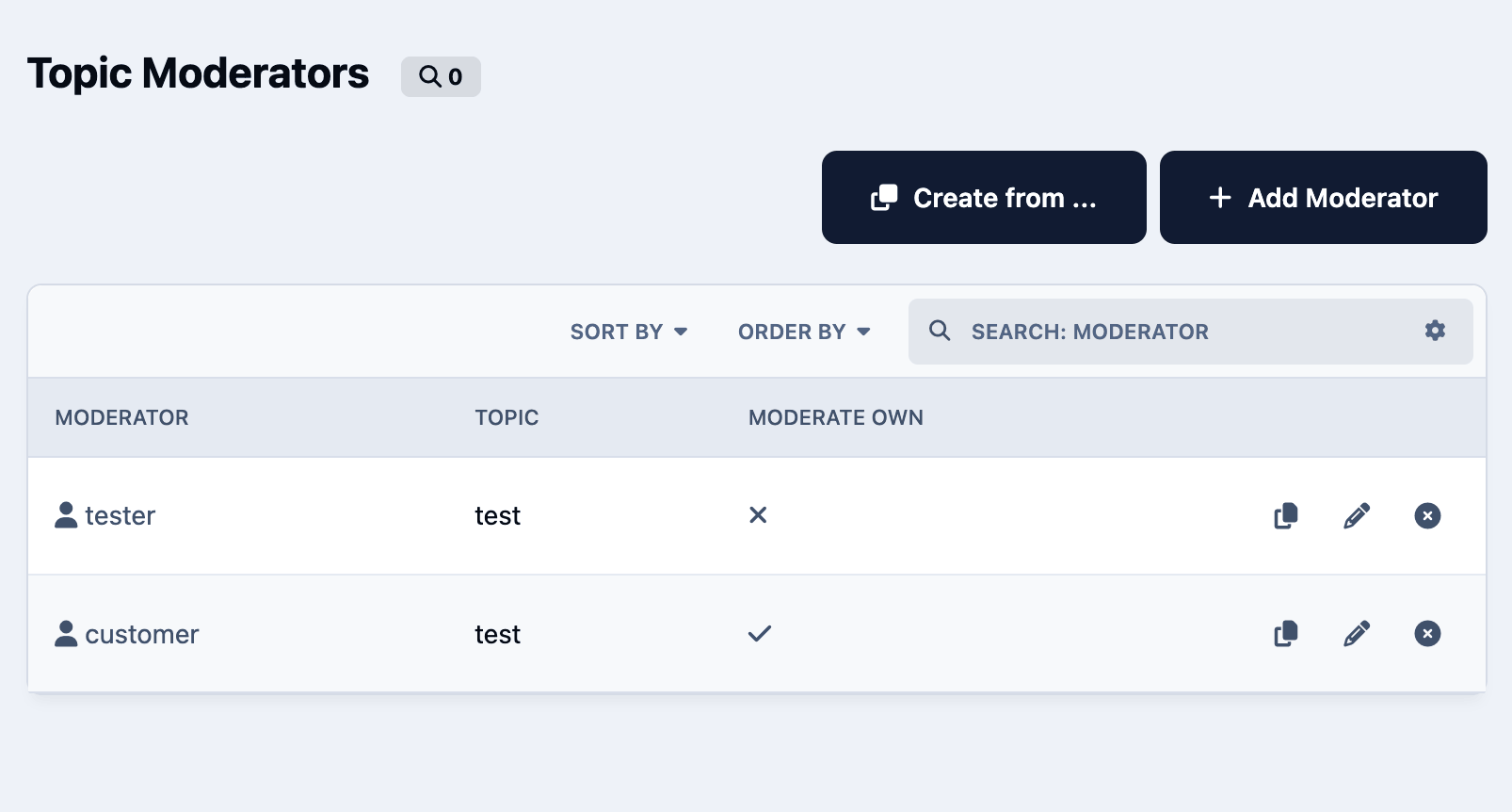
Administrators can assign specific members or groups to moderate selected topics and define exactly which actions they are allowed to perform, such as editing, hiding, approving, pinning, locking, moving, deleting, or viewing hidden content.
The app includes configurable permission tabs, permission copying between moderators, front-end management access, and controls for who can add, edit, or delete topic moderators. It also supports optional moderator badges, including global HTML/image badges or custom badges per moderator.
Feature List
Assign members or groups as moderators for specific topics
Configure detailed moderation permissions per moderator
Allow selected users or groups to manage topic moderators
Copy permissions from an existing moderator
Optionally allow moderators to moderate their own topics in selected forums
Display moderator badges in topic posts
Use global or custom HTML/image badges
Manage moderators from the front end or AdminCP
Choose how topics are selected in the moderator form
Analogue of the NB42 application for IPS4. There is a data converter from the NB42 app to this app.
-
IPS5.0.11+
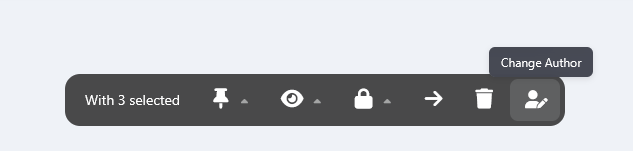
This application allows moderators with the proper permissions to mass change file submitters directly from the Downloads category view. Moderators can select multiple files using the moderation tools and quickly assign a new author via a simple dialog.
All author changes are automatically logged in the Moderator Logs.
-
IPS5.0.11+
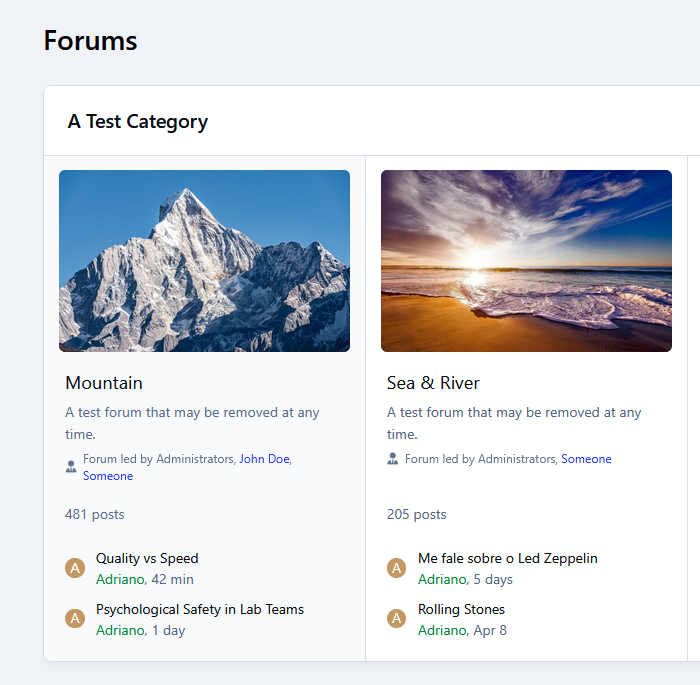
This app adds a simple line under every forum showing its moderators, including both groups and individual members. It also appears inside the forum view, keeping everything consistent and easy to find.
Clean, lightweight, and fully integrated with IPS5, and integrates seamlessly with your community’s design. It uses the core moderators cache, so it runs efficiently without adding extra database queries.
Display moderators on the Forums index:
Table view
Grid view
-
IPS5.0.11+
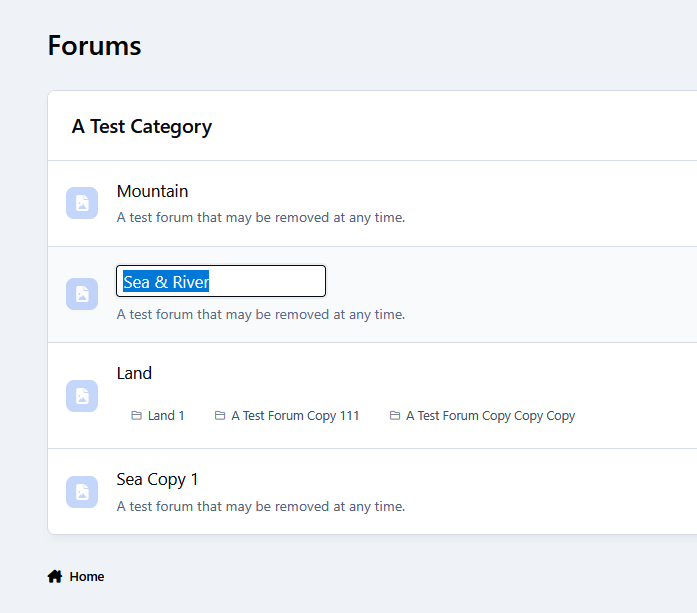
Quick Forum Name Edit lets administrators rename forums/subforums directly from the front-end (Forums index only), right where they’re already working. No need to jump into the Admin CP just to make a small change — simply edit the name in place and move on.
It’s a small feature that can save you a surprising amount of time, especially when you’re organizing or refining your forum structure. For peace of mind, all changes are restricted to administrators and are automatically recorded in the Admin Logs, so you always have a clear history of what was updated.
-
IPS5.0.0+
(M.A.C.) Multiple Accounts Checker
Overview
Multiple Accounts Checker is a powerful security tool for Invision Community Suite v5 that detects and prevents multiple account registrations using advanced multi-layered tracking technology.
Detection Methods
Device Cookie Tracking
Assigns unique persistent cookies to each device
Tracks device fingerprints and user agent information
1-year cookie expiration for long-term monitoring
Browser Fingerprinting
Integrates FingerprintJS v4 for advanced browser identification
Persists across cookie clearing and incognito mode
Optional feature with independent enable/disable
IP Address Monitoring
Tracks registration IP addresses
Supports IPv4 and IPv6
Cross-references with existing accounts
Registration Prevention
Set maximum accounts per device, fingerprint, or IP address
Configurable exclusion lists for whitelisting
Real-time validation during registration
Clear error messages for blocked registrations
Frontend-only validation (doesn't affect ACP or logins)
Administrative Tools
Monitoring Dashboards
Cookie ID Management: View shared devices and associated accounts
Fingerprint Management: Track shared browser fingerprints
IP Address Management: Monitor shared IP addresses
Toggle between "Shared" and "Single" account views
Search, filter, and delete capabilities
Automatic Topic Creation
Two Tracking Modes
Per-Identifier: One topic per device/IP/fingerprint
Per-Member: One topic per suspicious member
Detection Options
Track by device cookie, IP address, fingerprint, or combination
Trigger on registration, login, or both
Set minimum account threshold before creating topics
Topic Configuration
Choose detection forum and topic author
Auto-pin and auto-lock options
Custom topic prefixes
Fully customizable templates with dynamic variables
Key Features
✅ Three independent detection methods
✅ Configurable registration limits with unlimited option
✅ Exclusion lists for trusted devices/IPs/fingerprints
✅ Automated staff alerts via forum topics
✅ Comprehensive admin monitoring tools
✅ Granular permission system
✅ Frontend-only tracking (no ACP interference)
✅ Clean uninstall with full data removal
✅ IPS v5 native with modern architecture
Use Cases
Prevent spam account creation
Detect ban evasion attempts
Identify sockpuppet accounts
Monitor suspicious registration patterns
Maintain community security and integrity
Protect your community with comprehensive multiple account detection for Invision Community Suite v5.
Version Updates
Version 2.0.2
Added
- Per-member auto-topic template variables:
- {matched_members} for the full matched member list with front-end profile links
- {matched_members_plain} for a plain-text matched member list
- {matched_members_short} for compact title output such as name1, name2 (+3)
- {matched_member_count} for the total matched member count
- Added a normalized per-member detection-state snapshot to support reply deduplication.
- Added ACP member links in M.A.C. report tables so usernames now open the related ACP member page.
IMPROVED
- Per-member forum report defaults now include the matched member list directly in report content.
- Per-member topic titles now use a more moderator-friendly compact matched-member summary by default.
- Per-member template help text and editor tag menus now document the richer matched-member variables.
FIXED
- Fixed per-member auto-topic detection so fingerprint-only matches are no longer missed when the fingerprint is first stored by the deferred AJAX save.
- Fixed duplicate per-member forum replies being generated when the detected match state has not changed.
- Fixed M.A.C. ACP report tables so member names are no longer rendered as plain text where ACP member links are available.
Version 2.0.1
Added
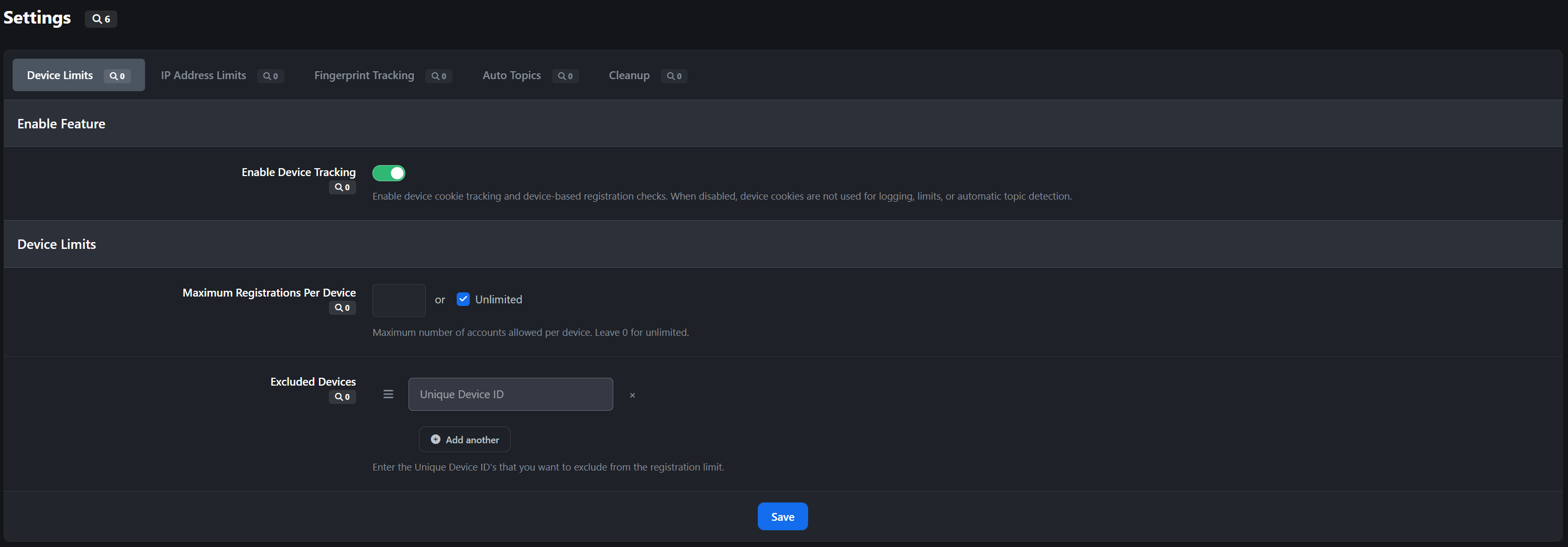
Added mac_registration_enabled to let admins disable device-cookie tracking and device-based registration checks.
Added mac_ipaddress_enabled to let admins disable IP logging and IP-based registration checks.
Both settings default to enabled during upgrade so existing communities keep current behavior until changed in ACP.
Improved
What was added
- Retention settings for cookie IDs, IP addresses, and fingerprints.
- A reusable cleanup manager used by both the scheduled MACCleanup task and ACP sidebar actions.
- Task Settings, Prune Now, and Delete Now sidebar buttons on the device, IP, and fingerprint log controllers.
- first_seen and last_seen tracking on multipleaccountscheck_devices so cookie/IP retention is based on actual activity timestamps.
Cleanup behavior
- Prune Now deletes only rows in the current view that are older than that view's configured retention period.
- Delete Now deletes all rows in the current view immediately.
- Shared views operate on identifiers used by more than one distinct member.
- Single views operate on identifiers used by exactly one distinct member.
Legacy data
- Existing device/IP rows created before last_seen existed will have 0 until that member/device combination is seen again.
- Cleanup treats those legacy rows as stale so they can be cleared by prune actions or the scheduled task.
-
IPS5.0.0+
Managing permissions across multiple member groups in IPS can quickly become confusing. Even small differences between groups may go unnoticed, and tracking them down manually is tedious.
Group Compare makes this easy.
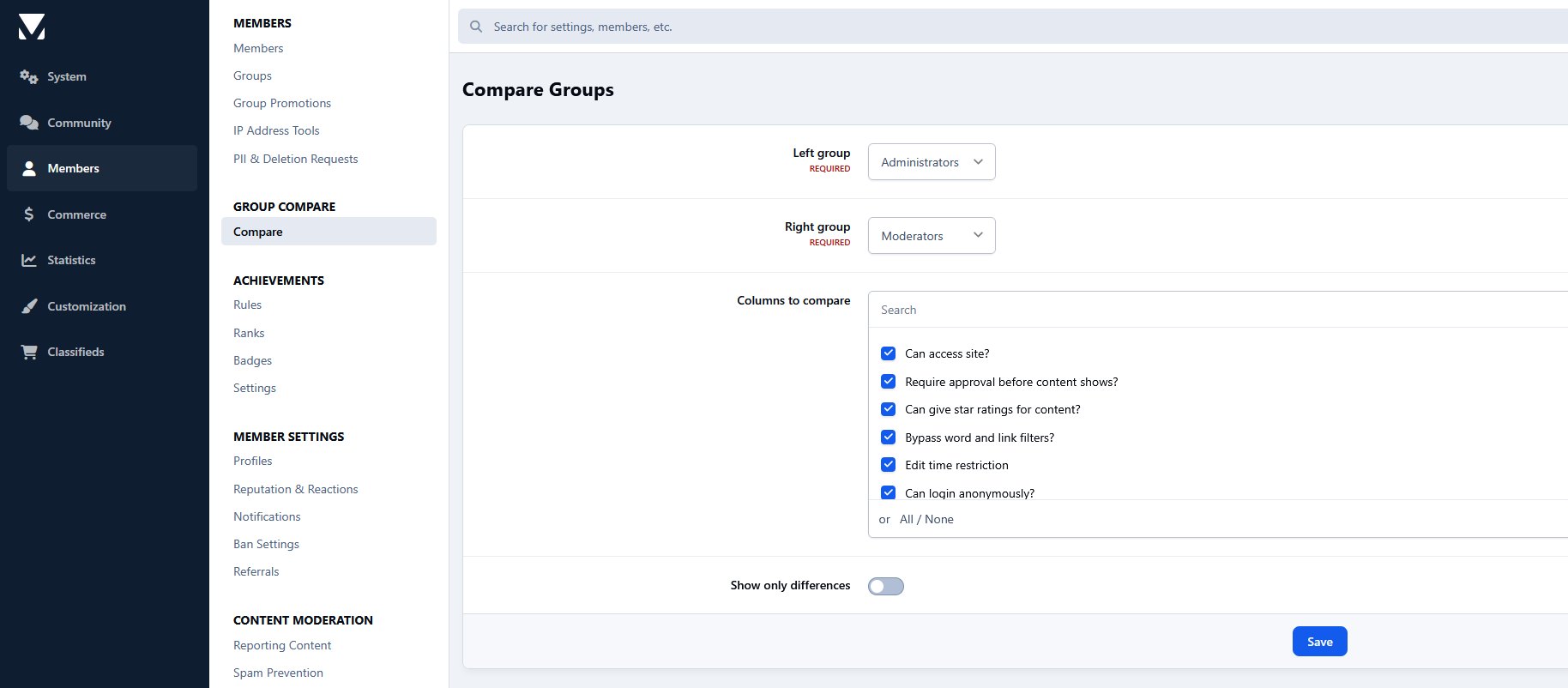
This tool allows administrators to select any two member groups and instantly see their differences side by side. Each permission and setting is stored in the core_groups table is displayed clearly, making it simple to identify where groups differ and how they are configured.
Instead of jumping between multiple ACP pages trying to remember which group has which setting, you can compare everything in a single view.
Key features include:
Side-by-side comparison of any two member groups
Option to display only the differences for faster review
Clear visual indicators for enabled/disabled permissions
Quick actions to copy a value from one group to the other
Whether you are auditing permissions, troubleshooting group behavior, or trying to keep several groups aligned, Group Compare provides a much clearer overview of how your groups are configured.
A simple tool that saves administrators a surprising amount of time.
-
IPS5.0.0+
As with the original plugin, you can not only add as many links as you want to your footer in no time at all, but you can now also choose whether they should be displayed before or after the standard links. Optionally, the extra links can be disabled in the mobile view to save space.
The really big innovation in this application is that you can now add social profiles too. You can choose which icon to use for this, as well as the background color when you hover over it.
So you could say you get two add-ons for the price of one, if it weren't free anyway
-
IPS5.0.0+
See our demo here
PayWall Topics brings real monetization into Invision Community v5.
Members can sell locked premium content directly inside forum topics, fully integrated with IPS Commerce.
Sell guides, tutorials, exclusive insights, premium discussions, downloads, and private resources without sending users anywhere else.
Give your members the ability to earn and your platform the ability to scale.
Core Monetization Features
PayWall Topic Creation
When permitted, members can create topics with locked premium content using:
Rich text editor
Images, videos, etc.
Attachments
Custom pricing per topic
Premium links
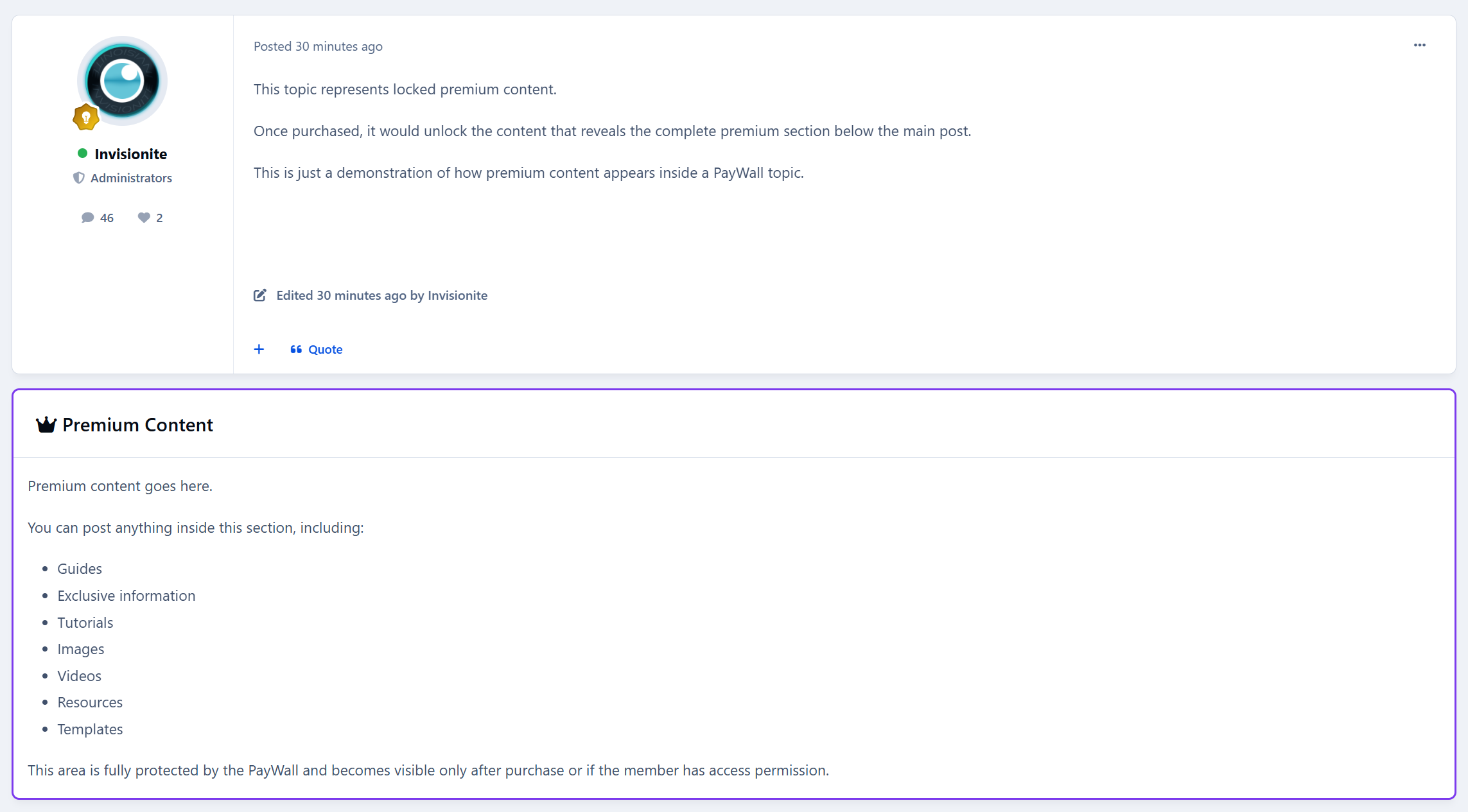
The premium block appears directly inside the topic after the first post.
IPS Commerce Integration
Full checkout flow powered by IPS Nexus invoices with proper gateway support.
One-Time Purchase Model
Pay once
Permanent access
No subscriptions
No renewals
Simple and clean.
Seller Account Credit + Commission
Revenue is automatically credited to the topic creator’s Commerce account balance.
You set the platform commission from 0–100%.
The system automatically calculates the split and credits the seller’s net amount.
Transparent. Automated. Built for real marketplaces.
Access Control
Granular permission system designed for production communities.
Forum-Based Gating
Select exactly which forums allow PayWall topics.
Group Permissions
Separate controls for:
Who can create paywalls
Who can purchase
Who can bypass and view free
Frontend Experience
Clean, modern, and fully integrated into the topic view.
PayWall Block
A purple-bordered premium content block injected after the first post, featuring:
Lock icon
Price display
Purchase button
Custom lock message
It feels native, not bolted on.
Unlocked View
Purchased or bypassed users see the full rich-text premium content inline, exactly where it belongs.
Crown Badge
PayWall topics display a crown badge in topic listings for instant visibility.
Custom Lock Message
Admins can configure the lock message using a rich text editor. Add formatting, links, persuasion copy, anything you need.
Guest Handling
Guests see a clear “Log in to Purchase” button instead of checkout.
Member Dashboard
Members and sellers get a dedicated PayWall control center.
My Purchases
Members can see:
Purchased topics
Status
Price
Date
Browse Topics Directory
Lists all available PayWall topics with clear status badges:
Purchased
Access Granted
Available
My PayWall Topics
Sellers can view:
Their topics
Buyer count badges
Who bought their topics
Earnings
Buyers List
Sellers and admins can click the buyer badge to see exactly who purchased each topic.
Admins also see buyer counts across all topics.
Standalone Directory
PayWall Topics Directory
A dedicated /paywall/ page listing all premium topics with:
Forum name
Price
Purchase status
Monetization becomes discoverable instead of hidden inside random threads.
Notifications
Built-in notification system keeps everyone informed.
Buyer Notification
Sent instantly after successful purchase.
Seller Notification
Sent to topic creators when someone purchases their content.
Members can enable or disable PayWall notifications in their notification settings.
Admin Control Panel
Full IPS-native ACP experience.
General Settings
Forum selection
Group permissions for create, purchase, and bypass
Commission Settings
Set site commission percentage
Display Settings
Custom PayWall lock message editor
Manage Purchases
Complete purchase table including:
Member
Topic
Price
Date
Invoice ID
Active status
Perfect For
Premium guide communities
Trading and investment forums
Business and entrepreneurship boards
Education platforms
Creator-driven ecosystems
Digital resource hubs
Knowledge marketplaces
If your community produces value, PayWall Topics turns that value into revenue without changing how your forum works.
This is not a cosmetic add-on.
It adds a full creator monetization layer to Invision Community.
-
IPS5.0.0+
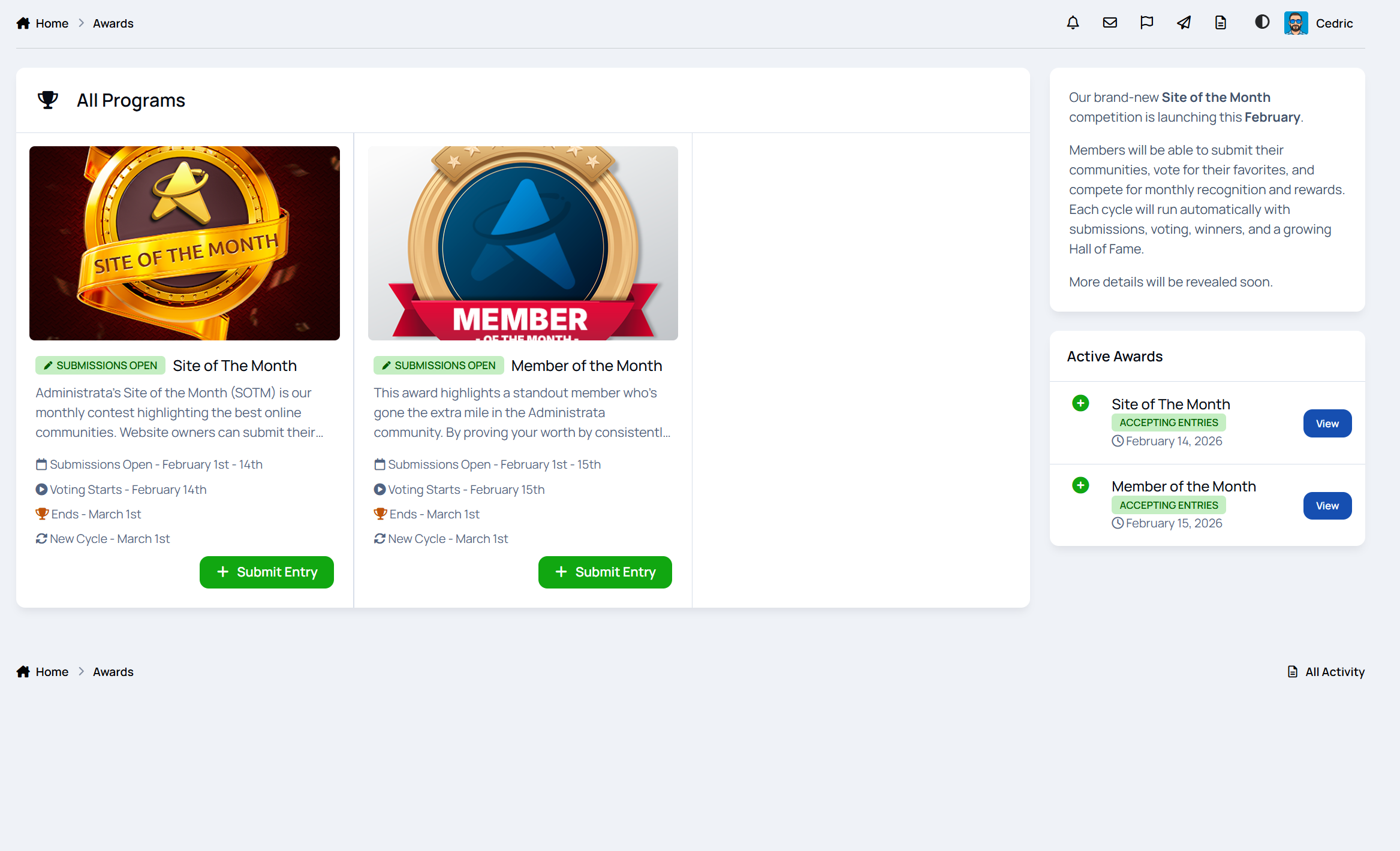
Monthly Awards lets you run structured, recurring awards like Member of the Month, Site of the Month, or Post/Topic of the Month without spreadsheets, manual threads, or constant admin work.
Everything runs on a clear cycle. Submissions open, voting starts, winners are selected, rewards are handed out, and the next month is ready to go.
If you want recognition, engagement, and friendly competition that actually sticks, this app does the heavy lifting for you.
A demo of this can be found here on Administrata
Why this app exists
Communities thrive when people feel noticed.
Monthly Awards gives you a simple but powerful way to:
highlight great members
reward quality content
encourage participation
create recurring events people look forward to
It works just as well for public contests as it does for internal staff or team recognition.
Award programs that fit your community
Create as many award programs as you want, each with its own purpose and style.
You can run:
Member of the Month to reward helpful or active members
Content of the Month for posts, images, downloads, or any community content
Site of the Month to showcase member websites or projects
Each program has its own description, images, rules page, and schedule, so everything is clear and easy to follow.
Featured programs can be highlighted on the awards homepage to draw attention.
Automatic monthly cycles
Every award runs on a repeating monthly cycle with clear phases:
pending
submission
voting
completed
Phases move automatically based on dates, so you are not babysitting the system every month. You can still step in manually if needed.
Each cycle can have its own theme, prizes, and statistics, making every month feel fresh instead of copy-paste.
Simple submissions for members
Members can submit entries in ways that make sense for each award:
nominate another member
submit their own website or project
link to forum posts, gallery images, or other content
Entries support images and rich descriptions, so submissions feel polished instead of rushed.
Members can manage their own entries, and nominated users are notified so nothing goes unnoticed.
Voting that feels fair and fun
Voting is designed to encourage participation without chaos:
vote for one entry or multiple entries
optional anonymous voting
real-time vote counts
notifications when entries receive votes
This makes feature contests, content awards, and popularity-based recognition feel transparent and engaging.
Clear winners and permanent history
Winners can be selected automatically by vote count or manually if needed.
You can award:
first, second, and third place
multiple winners
tied positions
Every win is saved permanently. Past winners are never lost, making it easy to build a real history instead of resetting every month.
Rewards that actually matter
Winning an award should feel good.
Winners can receive:
badges
reputation points
group promotions
store credits
custom or digital prizes
Rewards are handed out automatically when winners are chosen, so there is no follow-up work or forgotten promises.
Prize pools for bigger contests
For giveaways and larger events, you can build prize pools with:
multiple prize types
limited inventory tracking
position-based prizes
random weighted selection
This is perfect for sponsor giveaways, digital keys, or seasonal competitions.
Announcements and notifications
Members stay informed without needing to hunt for updates:
new cycle started
submissions open
voting open
reminders before deadlines
winner announcements
prizes won
Announcements can also be posted automatically to your forums, keeping activity visible and driving traffic.
Leaderboards and recognition
Recognition does not stop at one win.
The app includes:
yearly leaderboards
per-program rankings
total wins and votes received
historical browsing of past years
This turns awards into long-term motivation instead of one-off events.
Profile integration
Members get a dedicated awards area on their profile showing:
awards won
prizes received
win and vote statistics
earned badges
It becomes a visible status symbol, not just a forgotten badge.
Widgets for visibility
Show awards across your community with widgets like:
active awards
awards currently in voting
recent winners
hall of fame
featured program
This keeps awards visible instead of hidden in a menu.
-
IPS5.0.0+
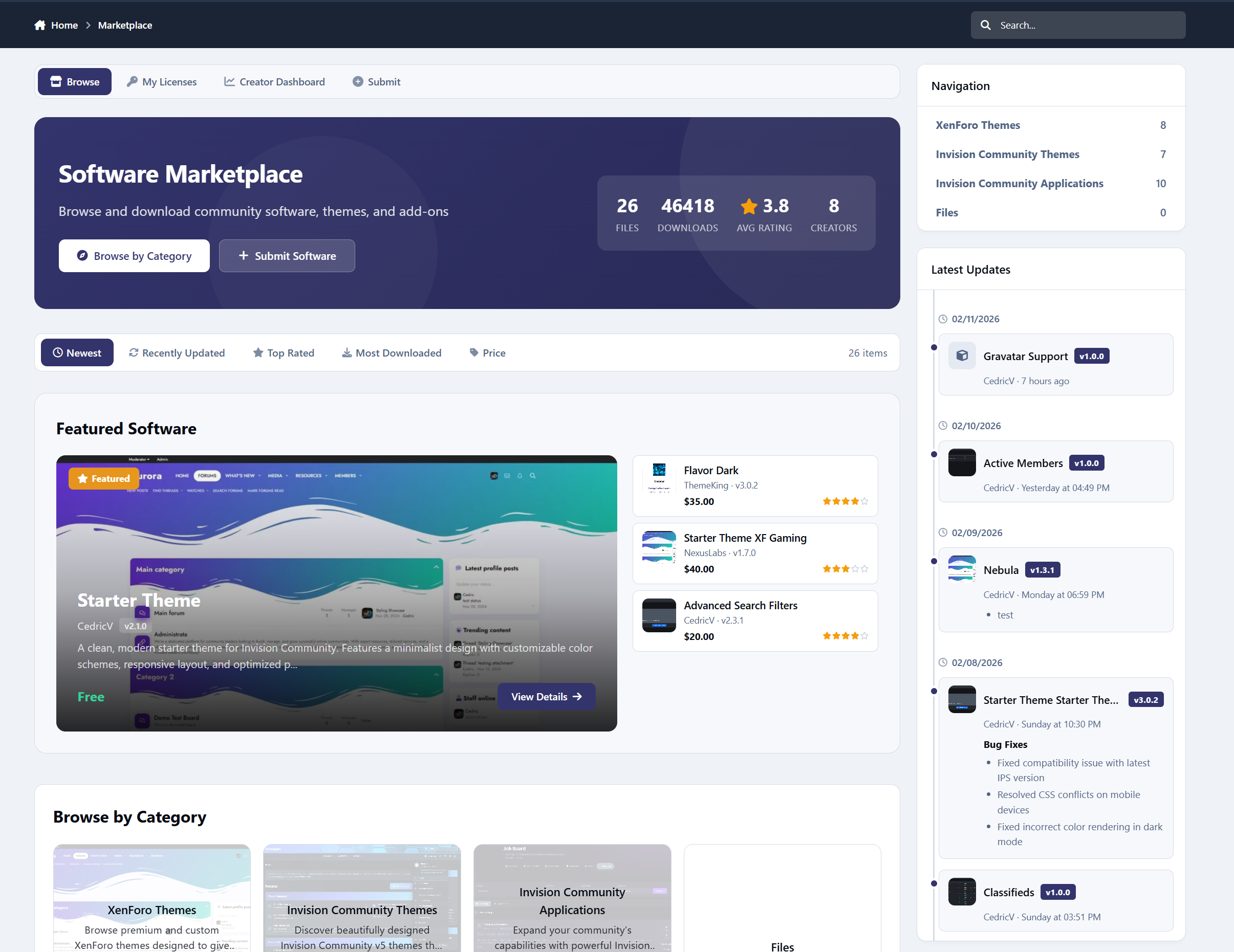
Software Marketplace is a powerful storefront application for Invision Community Suite v5 that allows you to sell, distribute, manage, and monetize software, themes, plugins, and digital resources - complete with Commerce integration, reviews, creator dashboards, commissions, and deep IPS framework integration.
A demo can be found here: https://administrata.net/software/
Storefront & Discovery
Configurable homepage sections: Featured, Latest, Most Popular, Top Rated, Recently Updated
Unlimited nested categories with drag-and-drop ordering
Responsive CSS Grid layout (2–6 columns configurable)
Screenshot cycling on hover (adjustable speed)
Advanced sorting (date, updated, downloads, rating, price, name)
SEO-friendly URLs
IPS Search + Sitemap integration
Full pagination everywhere
Your marketplace looks modern, fast, and built-in.
Software Item Pages
Each item includes:
Full detail page with screenshots, description, version info
Interactive gallery
Complete version history with changelogs
Multi-file releases (up to 20 files per version)
“More from this Creator” auto section
Admin-defined custom fields (with purchasers-only visibility option)
Optional install URL requirement
Automatic forum topic creation (per category)
Creator TOS agreement dialog before purchase
Commerce & Monetization
Deep integration with Invision Community and its Commerce system.
Free & paid items
IPS Commerce (Nexus) invoice flow
Refund callbacks auto-deactivate licenses
Optional recurring renewals (1–60 months)
Platform commission system (0–100%, 2 decimals)
Automatic creator net calculation
External purchase links supported
You control the commission. Creators see transparent earnings. Everything is automated.
Reviews & Social Features
1–5 star purchaser-only reviews
Author replies
Up/down voting
Review editing & moderation
Report Center integration
Follow items or categories
Version update subscriptions
9 built-in notification types
Creator Dashboard
Creators get a professional control center:
Item management panel
Sales overview (gross, commission, net)
Sales history filtering
TOS template manager
Resource Teams (collaborator permissions)
Buyer Dashboard (My Licenses)
Buyers can:
View purchase history
Manage install URLs
Download latest or older versions
Access gated files securely
Powerful Admin Control Panel
Full IPS-native ACP experience:
Manage items (approval, feature, author change, delete)
Full Node-based category system
Advanced custom fields (IPS CustomField-powered)
Commission reporting with breakdown tables
Downloads importer
Background tasks (review reminders, trending algorithm snapshots)
Cross-app bridges (Support Tickets, Trackable)
Built-in Widgets (6)
Category Navigation
Latest Reviews
Latest Updates
Trending Resources (velocity-based algorithm)
Top Resources
Resource Stats
Each widget supports configurable limits (1–25 items).
Migration Tool Included
Import directly from IPS Downloads:
Files (multi-file supported)
Screenshots
Version history
Reviews
Comments are deliberately not a feature in Software Marketplace. Instead the comments will be imported to the forum topic
Nexus purchases
No manual rebuilding required. You don't lose ANY data.
Perfect For
Theme marketplaces
Plugin marketplaces
Code distribution hubs
Community-driven developer ecosystems
Premium add-on stores
Private licensing portals