Member Tools
-
IPS5.0.0+
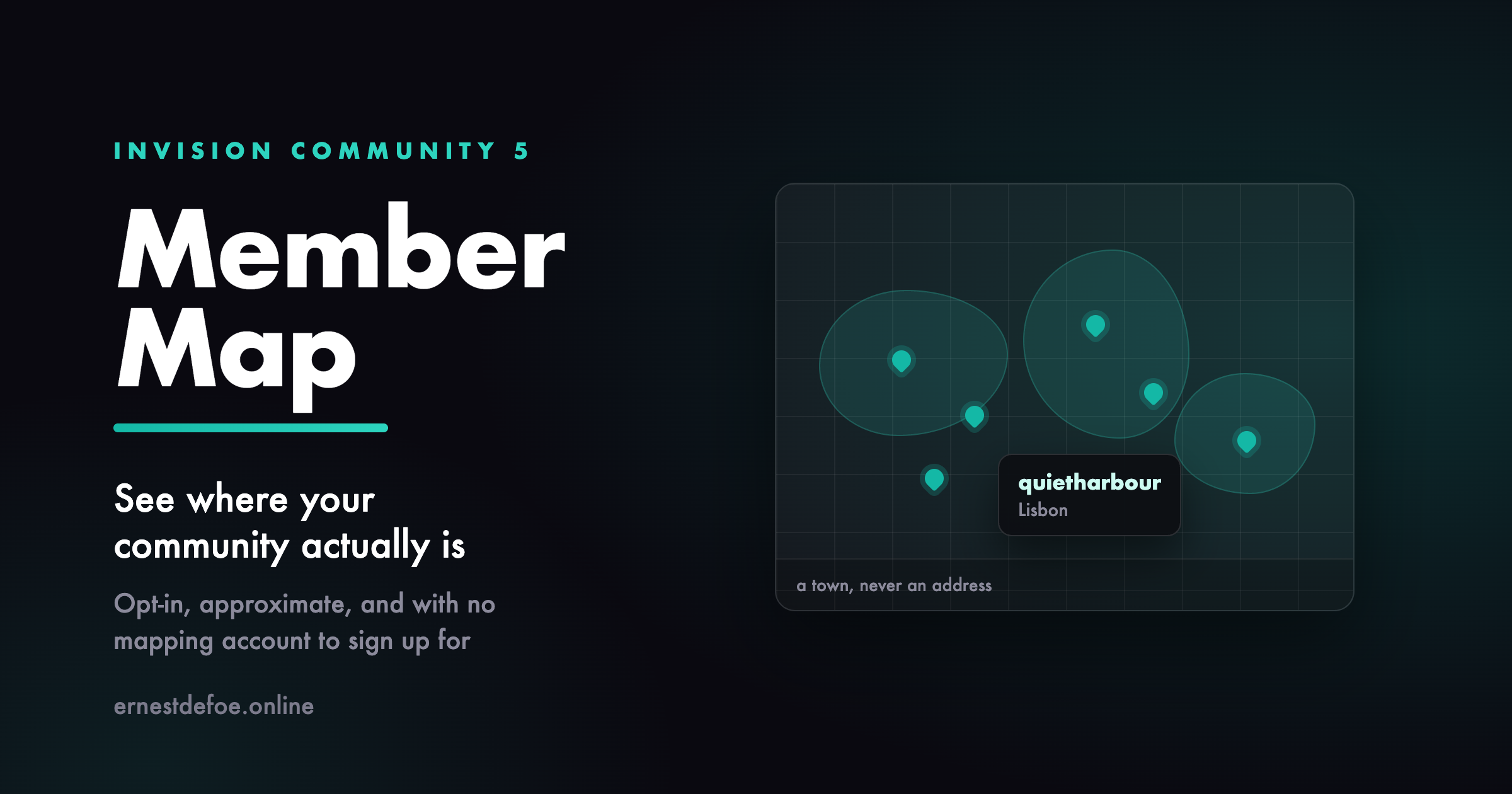
Member Map see where your community actually is
Most communities have no idea where their members are. You can guess from the timezone spread in your statistics, but you cannot see it, and neither can anyone else. A map turns a list of usernames into a group of people in places, and it is one of the few features that members genuinely enjoy adding themselves to.
Nobody appears without choosing to
There is no import, no bulk geocoding of profile fields, and no automatic placement of anyone. A member types a town on the map page and presses a button. That is the only way a pin ever appears. They can take themselves off again at any time, and doing so deletes the row rather than hiding it.
Nothing is ever read from a member's browser. No location prompt, no IP lookup, no GPS. Somebody types "Berlin" because they want you to know they are in Berlin.
It stores a town, never an address
This is the part that matters, and it is a design decision rather than a setting you have to get right. Coordinates are rounded before they are written, and the precise ones are never stored at all. At the default precision a pin describes roughly a kilometre enough to show someone is in Lisbon, not enough to show which street. A database that never held the exact point cannot leak it, and a member who removes themselves leaves nothing behind.
You can make it vaguer still. One decimal place is roughly ten kilometres, which suits a community that would rather show countries than cities.
No mapping account, no card on file
The map uses OpenStreetMap, and place names are looked up with OpenStreetMap's own geocoder. Neither needs an account, an API key, or a billing relationship, so this app costs nothing to run and there is no quota to blow through on a busy day.
Every lookup is cached, so a hundred members in Berlin cost one lookup between them. If you would rather use your own tile server or a commercial provider, both the tile URL and the geocoder URL are settings.
Guests do not see it by default
Your members agreed to be visible to a community, which is not the same as being visible to the internet. Guest access is off until you turn it on.
What you get
A map page listing everyone who has opted in, each pin linking to their profile
A single field for members to add or change where they are
Adjustable precision, so you decide how vague a pin is
Your choice of tile server and geocoder
A count of who is on the map, and a one-click purge in the AdminCP
Two honest limits. OpenStreetMap's tiles and geocoder are run by a volunteer project and their usage policy expects modest traffic — fine for a forum map, and the settings let a large community point at its own tile server instead. And the map draws in the browser using Leaflet, so a member browsing with JavaScript disabled sees the page but not the map.
-
IPS5.0.0+
Topic Summary — 108 minutes of thread, in 8
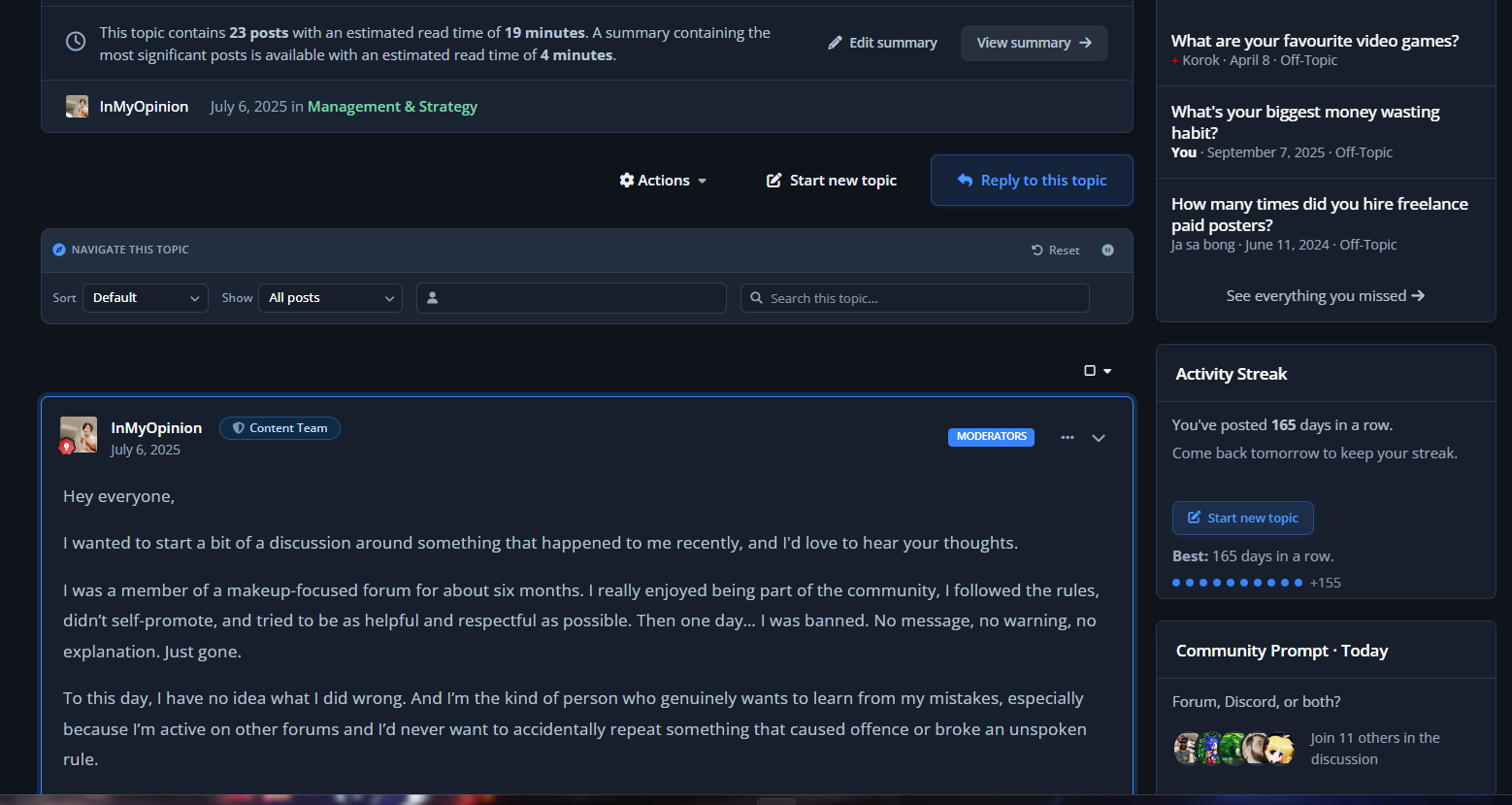
Every busy community has them: the 200-post thread nobody new will ever read. Topic Summary offers a short version built from the posts that actually mattered, so a newcomer can catch up in minutes instead of bouncing off a wall of replies.
Your topics are never altered. Nothing is deleted, nothing is hidden — it is simply an alternative way to read.
What your members see
On any topic long enough to warrant it, a quiet banner appears above the posts:
"This topic contains 154 posts and takes about 108 minutes to read. A summary of the most significant posts takes about 8 minutes."
One click and they get those posts, in the order they were written, with the opening post and the accepted answer clearly marked, and honest "19 posts skipped" markers between them so the conversation still makes sense. Every post links back to its place in the full topic.
How the significant posts are chosen
Significance blends two kinds of signal, which matters more than it sounds:
Engagement — reactions, quotes, "helpful" marks, featured posts, and the accepted answer
Structure — the opening post, how substantial a post is relative to the rest of that topic, and the topic starter returning with an update
Short "thanks" and "+1" replies are pushed down. The opening post and a marked answer are always included.
Blending both is deliberate. A younger community with few reactions would get nothing useful from an engagement-only score — the structural half means the summary is worth reading from day one.
Honest by design
No banner unless it helps. If the summary would not actually save reading time, nothing is shown.
Nothing is hidden from anyone. The summary only ever shows posts from a topic the member can already read, and always offers the full topic.
Skipped posts are admitted. Gaps are labelled rather than glossed over, so nobody is misled about what they have and have not seen.
What you control
How many posts a topic needs before a summary is offered
How many posts a summary contains
The reading speed used for the estimates
Turn the whole thing off at any time — your topics are untouched
The settings screen also shows how many of your topics are currently long enough to qualify, so you can pitch the threshold sensibly.
Requirements
Invision Community 5.0 or newer (self-hosted), with the Forums application
Nothing else — no external service, no API key, no background jobs to configure
Summaries are worked out on demand and nothing is stored, so there is no index to build and nothing to keep in sync.
It is upgrade-safe — it reads Invision Community's own data and never edits a single core file.
-
IPS5.0.0+
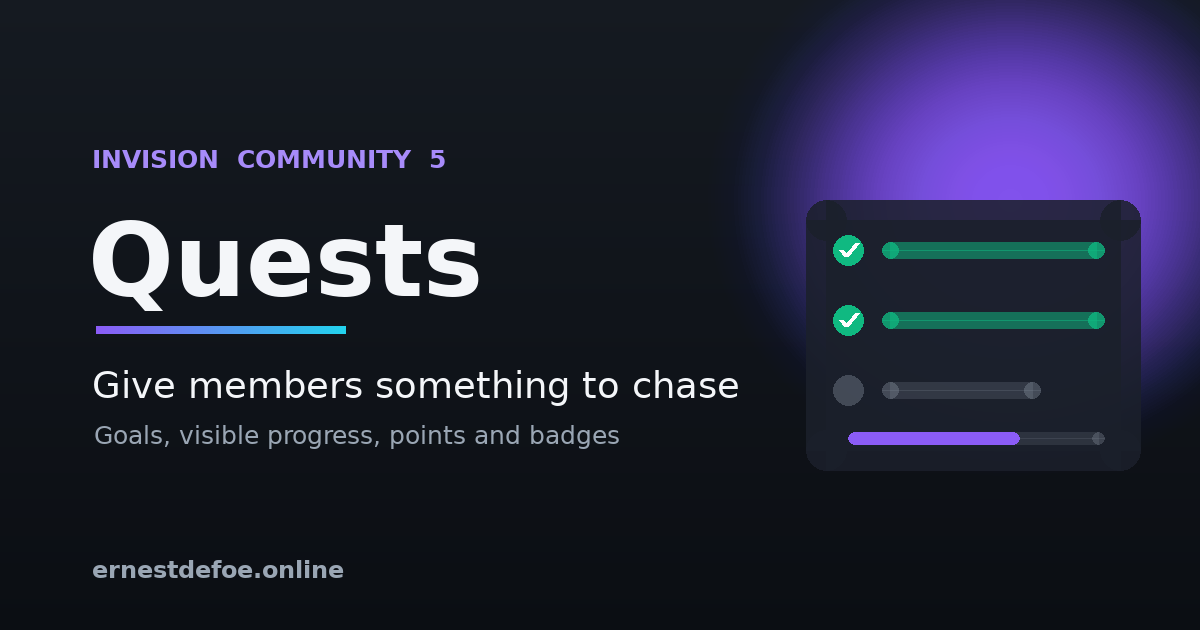
Quests — give your members something to chase
New members join, look around, and drift away because nothing tells them what to do next. Quests gives them a clear path: a set of goals, visible progress, and a reward when they finish.
Set up a quest once and it works retroactively — members who have been around for years see their real progress the moment you publish it.
How it works
Create a quest, then add the steps a member has to complete. A Getting Started quest might be: make 5 posts and upload a profile photo. A Community Regular quest might be: 100 posts, 5 topics started, 30 days as a member, and 10 reactions received.
Members see a board showing every quest, a progress bar, and a tick-list of the steps with their own numbers beside each one. There is nothing to claim and no button to press — progress updates as they take part, and rewards arrive on their own.
Eight goals to build from
Posts made
Topics started
Reactions received
Reactions given
Days as a member
Achievement points earned
Followers gained
Profile photo uploaded
Every one of these is read from activity your community already records. Nothing new is tracked, nothing needs backfilling, and switching the app on costs you no data.
Rewards that actually count
Finishing a quest awards your community's own achievement points and, if you like, an existing badge. Quest rewards flow straight into ranks, profiles and leaderboards — they are not a separate scoreboard sitting off to one side.
Each quest pays out exactly once. The completion is recorded before the reward is issued, so a member can never be paid twice.
What you control
Title, description and icon for each quest
Any number of steps, in the order you choose
How many achievement points completing it is worth
Which badge to award, if any
Whether the board is visible to signed-out visitors
Enable or disable a quest without deleting it
The admin screen shows how many members have finished each quest, so you can see which goals are landing and which are pitched too high.
Requirements
Invision Community 5.0 or newer (self-hosted), with the Forums application
Nothing else — no external service, no API key, no extra infrastructure
Built to stay out of the way
Progress is recalculated when a member posts, when they open the board, and by a nightly background task that catches time-based goals like "member for 30 days". Quest bookkeeping is wrapped so it can never interfere with someone posting.
It is upgrade-safe — it reads Invision Community's own data and never edits a single core file.
-
IPS5.0.0+
Bring the "live" experience of the big platforms to your self-hosted community — without paying for a cloud subscription. Realtime makes topics feel alive: new posts appear the instant they're written, members can see who's in the room, and a typing indicator lets conversations flow like chat. It all runs on your own server, with no third-party service in the loop.
Three features, one lightweight app
⚡ Live Topics — New replies and reactions arrive the moment they're posted. Instead of hammering refresh, members get a tasteful "3 new replies" bar that loads the latest with a tap.
👀 Real-Time Viewing — A live "…is also here" presence pill sits by the topic title, showing who else is reading this very second. It turns a quiet thread into a room.
⌨️ Real-Time Typing — When someone starts writing a reply, everyone else sees a subtle "…is typing" indicator. Fewer duplicate posts, and the natural rhythm people expect from modern chat.
Why members and admins love it
Instant, no refresh over a persistent WebSocket connection
Runs entirely on your infrastructure — no SaaS, no per-seat pricing, no data leaving your servers
Never gets in the way — if the service is down, the community keeps working; realtime just pauses
Upgrade-safe — listens to IPS content events, never edits core files
Light on resources — a tiny Node.js process handling thousands of concurrent readers
-
IPS5.0.0+
Typesense Search — instant results, typos forgiven
Community search should feel like the search bar on a modern app: results the moment you start typing, and the right answer even when the word is misspelled. Typesense Search brings that to Invision Community, powered by the open-source Typesense engine running on your own server.
Typical searches return in under 50 milliseconds — on a test community, 2ms.
What your members get
Typo tolerance. Search for "instalation" and still find every post about installation. Adjustable from forgiving to exact.
Instant results. Matching content appears as they type, before they press enter.
Filter by content type. Topics, posts, files, gallery images, blog entries — counted and filtered in a sidebar, so a busy result set narrows in one click.
Highlighted matches. Results show the phrase in context with the matched words marked, so members can see at a glance which result they want.
What you get
It indexes everything, automatically. Rather than hooking each application one by one, the app mirrors Invision Community's own search index — so every content type your community has installed is covered, including ones you add later.
Permissions are never guessed. Each document carries Invision Community's own permission tokens, and every search is filtered against the member's real access. Members see exactly what they are allowed to see and nothing more.
Keeps itself in sync. A background task pushes new and updated content every few minutes, removes content that has been deleted, and can rebuild the whole collection on demand.
A status panel that tells the truth. Connection state, Typesense version, documents indexed versus documents available, and time of last sync — all on one screen.
Your community keeps working
This app runs alongside your community's built-in search rather than replacing its internals. Switch on Use for the main search page and members who search are taken to the Typesense results page; switch it off and everything reverts to stock instantly. If the Typesense server is ever unavailable, your community carries on exactly as before.
That also means it is completely upgrade-safe: no core file is modified, so an Invision Community update can't break it and can't silently switch it off.
Requirements
Invision Community 5.0 or newer (self-hosted)
A Typesense server reachable from your community — it runs comfortably in a single small Docker container alongside your site, or on Typesense Cloud
An admin API key for that Typesense server
Setup is a few minutes: point the app at your server, save, and press Rebuild collection.
Why Typesense
Invision Community ships with MySQL search and supports Elasticsearch. Typesense sits between them — dramatically faster and more forgiving than MySQL, while being far lighter to run than Elasticsearch. It is open source, it is a single binary, and it will happily run in a few hundred megabytes of memory next to your community.
-
IPS5.0.0+
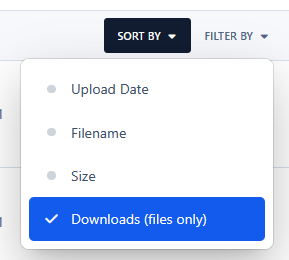
Sort Attachments by Downloads adds a new option to the Sort By menu on the Attachments page, allowing users to quickly sort attachments by the number of downloads in descending order. This option applies only to files, as images do not have download counts.
-
IPS5.0.0+
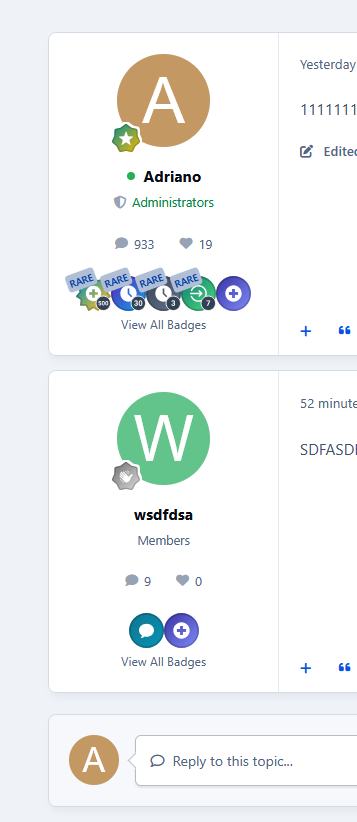
Display a member's most recent badges directly below their profile information in topic view.
The application includes settings to configure:
Number of badges to display
Badge size
Whether to show the "Rare" ribbon
Whether to enable badge tooltips
Members can also click View All Badges to view the complete list of badges on their profile.
Requirement:
Forums app.
-
IPS5.0.0+
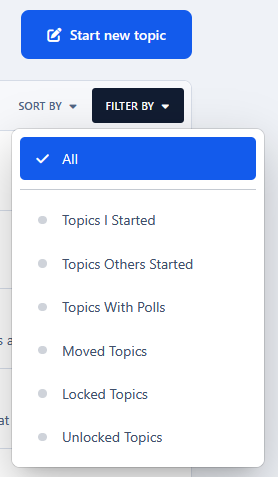
This application adds six quick filter links to the forum topic listing (FILTER BY menu):
Topics I Started
Topics Others Started
Topics Will Polls
Topics Moved
Locked Topics
Unlocked Topics
All options except Topics Others Started are already available under Sort By → Custom → popup → Filter. This application simply makes them quicker and easier to access.
-
IPS5.0.0+
Give your members a reason to show up every day.
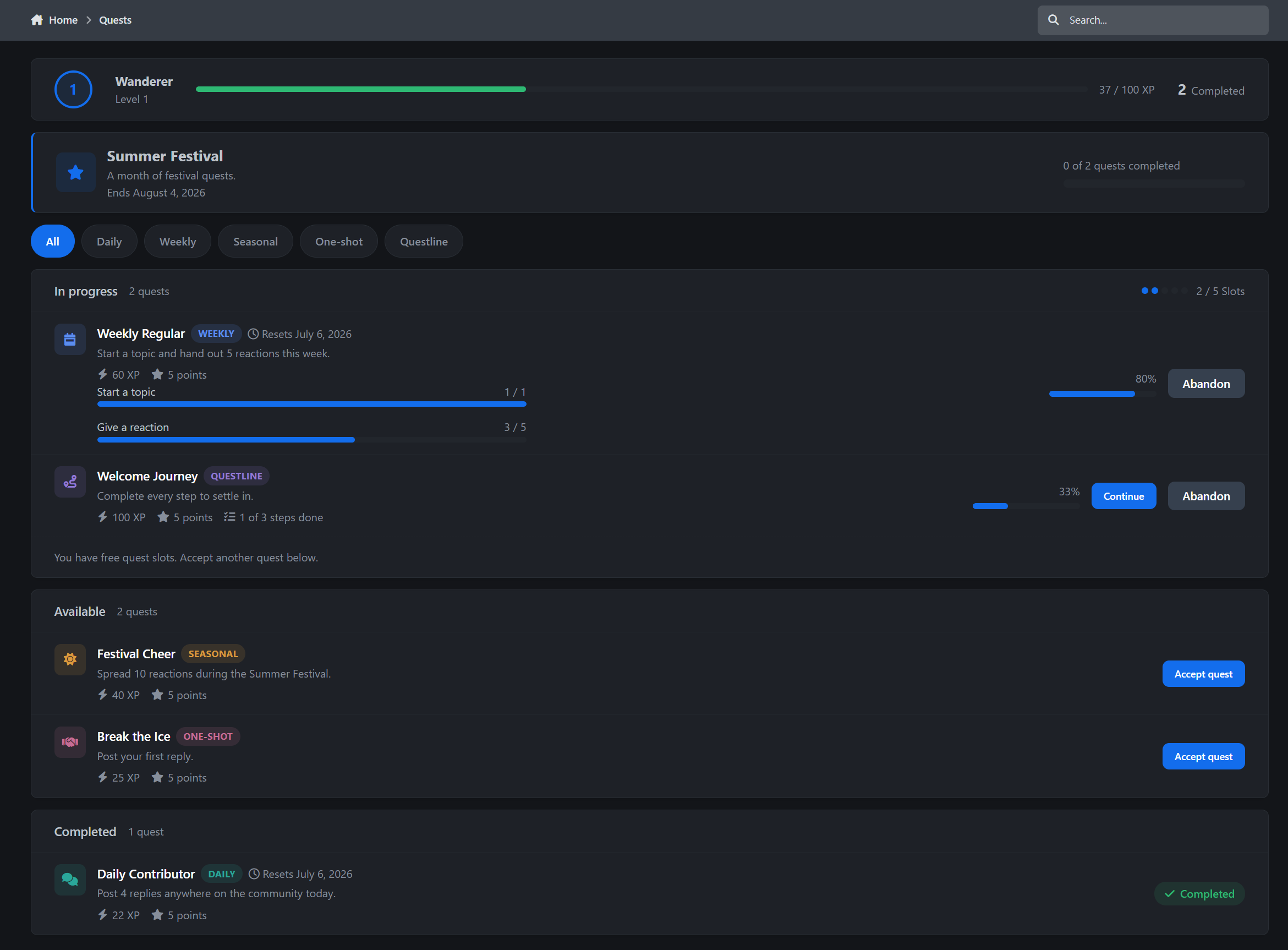
Questline is a quest engine for Invision Community v5. It turns the things your members already do, posting, replying, reacting, joining clubs, uploading files, and more, into quests with XP, levels, rewards, and leaderboards.
You decide what counts, where it counts, and what it pays. Members accept a quest, complete the required actions, and Questline tracks their progress automatically.
How it works
Quests are opt-in. A member picks a quest from the hub, it takes up one of their available quest slots, and from that moment their activity starts counting toward the objectives.
Complete the objectives and the rewards are paid out instantly, with a notification to match.
The slot limit is what makes it feel intentional. Members have to choose what they are working on, instead of passively collecting progress for everything at once. You decide how many active quest slots each group gets.
Quest types
Five quest types cover the full rhythm of a community:
Daily quests that reset every day and build habits
Weekly quests that reset every Monday for bigger goals
Seasonal quests that run during scheduled events
One-shot quests for permanent challenges and milestones
Questlines that chain multiple steps into a guided journey
Includes filter chips for every quest type, active quest cards, progress bars, rewards, availability windows.
Objectives that understand your community
Building a quest only takes a few minutes. Pick what the member needs to do, set how many times they need to do it, and optionally choose where it should count.
Questline includes a wide range of actions out of the box, including:
Starting topics
Posting replies
Replying in distinct topics
Giving and receiving reactions
Getting marked as a solution
Following forums or members
Completing a profile
Uploading a profile photo
Voting in polls
Starting conversations
Visiting on separate days
Joining clubs
Creating or RSVP’ing to calendar events
Publishing blog entries
Uploading Gallery images
Submitting Downloads files
Objectives can also be scoped to specific areas. For example, “post 5 replies in Introductions or Support” is just a dropdown away.
Supported integrations appear automatically when the matching app is installed, including Gallery, Downloads, Blogs, Calendar, Clubs, Contests, Academy, and Credits. Third-party developers can also register their own custom quest actions. See spoiler below.
Progress is tracked through IPS listeners in real time, with a nightly task pass as a safety net.
Rewards
Questline can reward members with:
XP, which feeds Questline’s own level ladder
Achievement points, paid into the core IPS system
Badges from your existing badge library
Credits, if you use the Credits economy
Levels are fully configurable. You control the XP thresholds, level names, and badge awards. Questline also ships with a ready-made level ladder, so it works from day one. But feel free to adjust as you prefer of course.
Questlines
Questlines are the onboarding tool your community has been missing.
Chain multiple steps together, each with its own objectives and rewards, and members move through a visual journey page with a connected timeline: completed, current, and locked.
The included Welcome Journey helps new members complete their profile, start their first topic, and post their first replies. A dismissible banner can suggest the journey to anyone who has not started it yet.
Seasonal events
Schedule an event, attach quests to it, and set a meta reward.
Members complete enough event quests before the deadline, and the bonus pays out automatically. The quest index shows a live event banner with each member’s personal progress, and every event also gets its own leaderboard scope.
Summer festival, launch week, holiday drive, anniversary event, whatever fits your community calendar or niche.
Leaderboards
Questline also includes a monthly season ladder.
Movement arrows show who climbed and who slipped since last week
NEW markers highlight fresh entries
Monthly XP is shown up front
All-time XP is shown alongside it
Event leaderboards and an all-time board are included
A member’s own row stays pinned, even when they are not on the current page
Seasons reset every month, so last year’s most active members do not permanently own the leaderboard.
Member profiles and widgets
Members can follow their progress across the community.
A Quests profile tab shows level, XP progress, completed quests, and recent rewards
Notifications are sent for quest completions, level-ups, and event rewards
Inline, email, and push notifications are supported
Widgets include My Active Quests, Top Questers, and Event Progress
The widgets can be placed on any page, including Pages layouts.
Admin Control Panel
Questline gives admins full control without making the setup feel technical.
Quest builder with FA icon picker, availability windows, and per-group eligibility
Objective editor with simple dropdown-based setup
Overview screen showing member levels, XP, completions, and participation
Full activity ledger showing who earned what, and when
Searchable member activity by name
Event management
Level management
Quest slot settings per group
Feature toggles for points, credits, leaderboards, and more
Demo content installs by default, including starter quests, a seasonal event, and the level ladder, so the quest index is never empty after installation.
Perfect for
Questline is ideal for:
Communities fighting the lurker problem
New member onboarding
Seasonal campaigns and launch events
Giving specific forums or clubs more activity
Credits-based communities that want XP and currency working together
Communities where “most active member” should actually mean something
Questline 1.0 is just the start. Have a feature you need? Let me know.
Adding your own quest actions from another app
Questline exposes a QuestAction extension type. Once Questline is installed, it appears in the Developer Center's extension list for your own app like any core extension type, and generates a ready-made stub.
1. Register the extension. Create applications/yourapp/extensions/questline/QuestAction/YourApp.php and list it in your app's data/extensions.json:
"questline": { "QuestAction": { "YourApp": "IPS\\yourapp\\extensions\\questline\\QuestAction\\YourApp" } }2. Describe your actions. The class returns Definition objects: a unique key, a language key for the label admins see, an optional container class (node or content item) if the action can be scoped to "where", a dedup mode, and an optional recount closure:
class YourApp { public function definitions() : array { if ( !\IPS\Application::appIsEnabled( 'yourapp' ) ) { return []; } return [ new \IPS\questline\Action\Definition( 'yourapp_thing_created', 'questline_action_yourapp_thing_created', 'IPS\yourapp\Category', \IPS\questline\Action\Definition::DEDUP_ITEM, function( \IPS\questline\Progress $progress, \IPS\questline\Objective $objective ) : int { $where = [ [ 'thing_author=? AND thing_date>=?', $progress->member, $progress->accepted ] ]; if ( count( $ids = $objective->containerIds() ) ) { $where[] = [ \IPS\Db::i()->in( 'thing_category', $ids ) ]; } return (int) \IPS\Db::i()->select( 'COUNT(*)', 'yourapp_things', $where )->first(); } ), ]; } }That alone is a working integration: the action shows up in the quest builder's "What must the member do?" dropdown, your categories appear by name in the "Where?" picker, and Questline's nightly reconciliation counts progress from your tables automatically.
3. Optional: fire in real time. For instant progress instead of nightly counting, call the fire method at the moment the thing happens, and the reverse method if it gets deleted or hidden:
if ( \IPS\Application::appIsEnabled( 'questline' ) ) { \IPS\questline\Action::fire( 'yourapp_thing_created', $member, [ 'itemClass' => 'IPS\yourapp\Thing', 'itemId' => $thing->id, 'containerClass' => 'IPS\yourapp\Category', 'containerId' => $thing->category_id, ] ); } \IPS\questline\Action::reverse( 'IPS\yourapp\Thing', $thing->id );The item class and id feed the dedup system, so one piece of content can't be farmed for the same objective twice. DEDUP_ITEM counts each item once, DEDUP_DAY counts once per day (for things like "visit the site"), DEDUP_NONE counts every occurrence.
Everything downstream is free: XP, points, badges and Credits payouts, notifications, the leaderboard, level-ups, and reversal handling all run through the engine. Your extension just says what counts.
-
IPS5.0.0+
Turn your community into a learning platform.
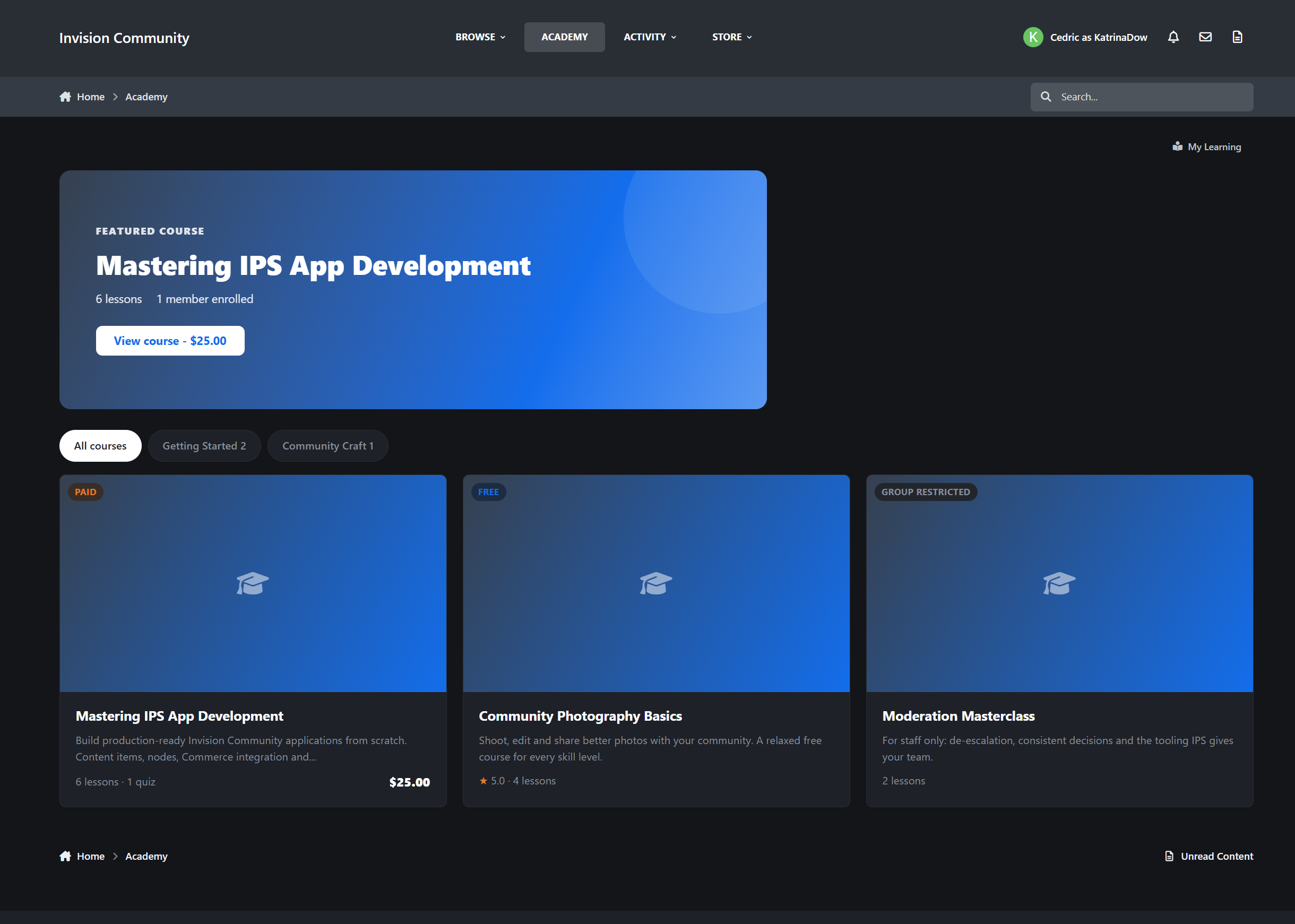
Academy is a full learning management system for Invision Community v5. Create, sell, and deliver online courses directly inside your community, complete with quizzes, certificates, progress tracking, Commerce integration, and a front-end course builder for trusted creators.
The Learning Hub
“Pick up where you left off” panel that takes members straight to their next lesson
Category navigation with course counts
Smart course cards: visitors see price and rating, enrolled members see progress and a Continue button, and graduates see their certificate badge
Configurable courses per page with full pagination
SEO-friendly URLs and IPS Search integration
Course Pages
Each course gets a proper landing page designed to inform, convert, and guide members.
Cover image with instructor info and enrolled member avatars
Full course outline with sections, lesson excerpts, and quiz indicators
Free preview lessons so visitors can try before they enroll
Completion ticks for enrolled members so they always know where they stand
Star ratings with a per-star review breakdown
Follow, share, and reactions built in
Selling Courses
Free, paid, or group-restricted. You decide per course.
Free courses enroll with one click
Paid courses run through IPS Commerce using the full invoice flow
Refunds automatically revoke enrollment
EU digital withdrawal waiver support for compliant checkout
Restrict courses to specific member groups when needed
The Learning Experience
Academy gives members a clean, focused way to move through a course from start to finish.
Clean lesson viewer with previous and next navigation
Optional sequential unlocking so members complete lessons in order
Progress tracked automatically per lesson
Quizzes with attempt limits and pass marks
Passing the final quiz can complete the course automatically
Certificates
Completed courses issues a certificate automatically. The moment a member finishes every lesson and passes every quiz, Academy stamps their enrollment and generates a certificate with its own unique verification code. No admin action needed.
Every certificate is verifiable. Members can share their certificate link anywhere, and anyone can check the code on a public verification page, no account required. An employer, a client, or another community can confirm in seconds that a certificate is real and was issued by you.
Because certificates are generated live from actual enrollment records, they can't be forged and never go out of date. If an enrollment is ever revoked, its certificate stops verifying with it.
This makes completions genuinely meaningful, especially for staff training, onboarding, professional communities, and certification programs.
My Learning Dashboard
Members get one place to see all their learning activity.
They can resume courses in progress, jump straight to the next uncompleted lesson, and view completed courses together with their certificates.
Creator Studio
Let trusted members build courses without touching the Admin Control Panel.
Front-end course builder for the groups you choose
Create courses, sections, lessons, and quizzes from the front end
Optional submit-for-review flow before publication
Creators can see the status of every course at a glance
Reviews & Notifications
Star reviews from enrolled members only, so ratings come from people who actually took the course
Helpful votes, author exclusion, and full moderation support
Notifications for course completions, new lessons, submissions, approvals, and published courses
Admin Control Panel
Academy gives administrators full control over courses, enrollments, permissions, and reviews.
Full course builder with up/down arrow section and lesson management
Quiz builder with per-question answers and pass marks
Enrollments manager to see who is enrolled where and manually enroll members
Category system with permissions per group
Approval settings, review toggles, and per-page controls
Widgets
Featured Courses: show featured, latest, or most popular courses with a configurable count
Continue Learning: shows each member their in-progress courses and lets them resume instantly
Perfect For
Communities selling premium courses
Staff and moderator training
Onboarding new members
Developer and creator ecosystems teaching their own tools
Certification programs
Membership perks that keep people coming back
Academy 1.0 is just the start. Have a feature you need? Let me know.
-
IPS5.0.x+
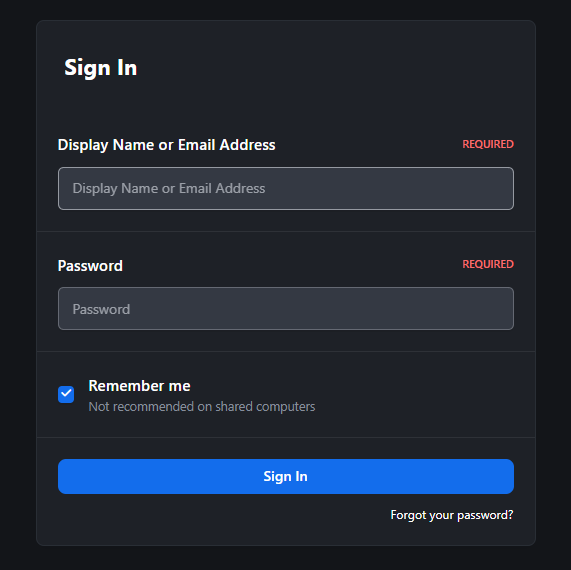
This application restores the ability to sign in using a display name in Invision Community 5, a feature that has been removed from the default login system.
It extends the default authentication flow by allowing users to log in using either their display name or email address, bringing back a more flexible and familiar sign-in experience for communities that relied on username-based authentication.
Within the application settings, administrators can configure whether display name login is also permitted for the Admin Control Panel, providing additional control over backend access security.
-
IPS5.0.0+
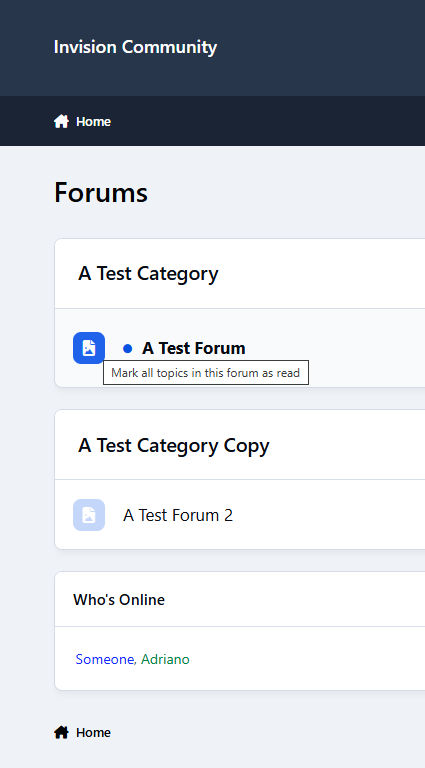
This application allows users to quickly mark forums as read directly from the forum icon, bringing back the familiar behavior from previous versions. It also adds a convenient option to mark individual topics as read directly from the topic list, without opening them.
Features:
Mark forums as read by clicking the forum icon
Mark topics as read from the forum view
AJAX-powered actions (no page reload)
Confirmation message after marking content as read
Available only to logged-in members
-
IPS5.0.10+
DEMO
Documentation
Using Libraries
Using the Book Manager
Using the Template System
Libraries
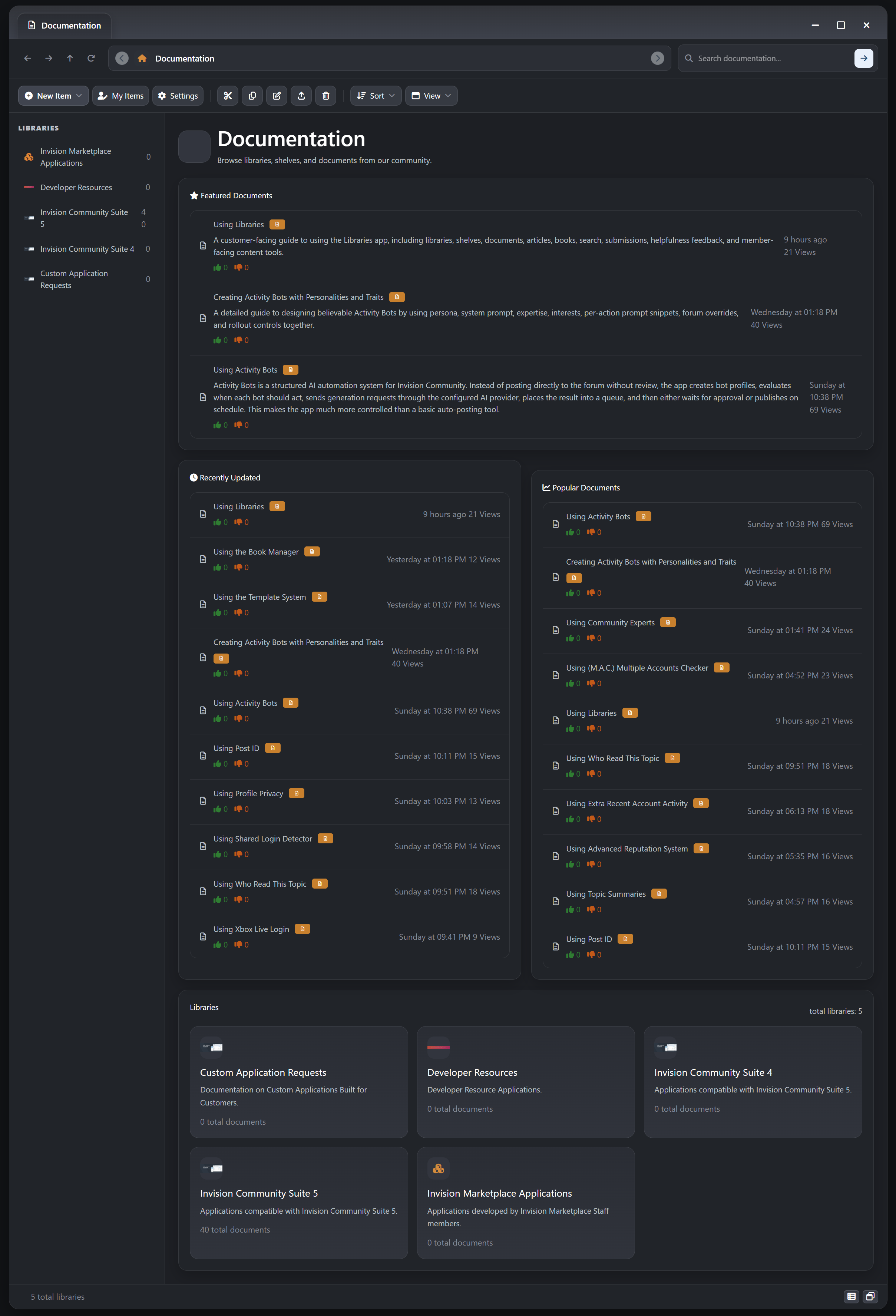
Build a richer publishing and knowledge experience for Invision Community with a native system for articles, books, and documents. Libraries is designed for communities that need more than a flat docs area. It gives you structured libraries, nested shelves, multi-format content, reader-friendly navigation, and IPS-native moderation and engagement tools in one app.
What It Does
Libraries lets administrators and approved members organize long-form knowledge content into a clear hierarchy:
Libraries group major knowledge areas, product collections, or publishing sections
Shelves organize topics inside each library, including nested shelf structures
Articles, Books, and Documents give you the right content format for editorial writing, multi-page manuals, and reference material
Instead of forcing every piece of content into the same shape, Libraries supports different reading experiences while still keeping everything inside IPS-native content workflows.
Key Features
Articles for Editorial and Guide Content
Dedicated Article Type: Publish articles as their own content type instead of treating everything like a plain document entry
Single-Page Reading Flow: Ideal for announcements, tutorials, opinion pieces, changelog explainers, release writeups, and in-depth guides
Rich Presentation: Articles support cover images, subtitles, overview text, tags, prefixes, and formatted editor content
Native IPS Engagement: Articles participate in follows, reactions, reporting, comments, reviews, ratings, and read tracking
Software Linking: Articles can be tied directly to Software Marketplace items when you want release or feature documentation attached to a product
Books for Multi-Page Manuals and Structured Reading
True Book Content Type: Create multi-page books instead of splitting manuals into disconnected posts or standalone documents
Book Page Manager: Add, edit, delete, reorder, enable, disable, and organize pages from a dedicated management workspace
Intro Page and Reading Paths: Books can open on a preferred intro page, then continue through a structured chapter flow
Nested Page Structure: Build parent and child page relationships for more advanced manuals, handbooks, and product guides
Reader-Friendly Navigation: Books can expose page outlines, current-page table of contents blocks, and clean page-specific URLs inside the parent book
Draft-First Workflow: New books start in draft so authors can build page structure before publishing
Publishing Safeguards: Books are protected from being published as empty shells without readable pages
Unified Discussions: Comments, reviews, follows, helpfulness, moderation state, and other IPS content behavior stay attached to the parent book item
Revision-Aware Authoring: Book pages and book changes fit into the app revision-oriented publishing workflow for ongoing maintenance
Documents for Straightforward Reference Content
Single-Page Reference Format: Use documents for FAQs, support notes, internal reference material, setup steps, quick answers, or short technical explanations
Cleaner Than Forum Posts: Documents keep knowledge content separate from discussion-first areas while still supporting IPS engagement where needed
Shared Feature Set: Documents also support editor content, overview text, cover images, tags, related software links, comments, reviews, and moderation controls
Structured Libraries and Shelf Navigation
Library and Shelf Hierarchy: Organize content in a way that feels closer to a real documentation center or digital publishing library
Nested Shelves: Use parent and child shelf structures to separate products, departments, categories, chapters, or knowledge domains
Finder-Style Browsing: Members can browse through index, library, shelf, and item views instead of relying on one flat listing
On-Page Navigation Aids: Heading-aware table of contents support helps readers move through long-form content more easily
Related Content Discovery: Surface more items from the same shelf to keep readers moving through connected material
Native IPS Publishing, Community, and Moderation Tools
Comments and Reviews: Let members discuss and review articles, books, and documents directly on the content item
Helpfulness Voting: Readers can mark content as helpful or not helpful for lightweight quality feedback
Private Negative Feedback Threads: Not-helpful responses can include private written feedback, with author or staff replies when needed
Drafts and Approval Workflows: Shelf-level controls can govern draft saving, approval requirements, and moderated publishing behavior
Silent Editing and Revision Tracking: Maintain content cleanly without losing control over edit visibility and history
Read Markers, Reporting, Embeds, and Follows: The app uses familiar IPS content behaviors instead of reinventing them in a parallel system
Marketplace and Commerce Integration
Software Marketplace Bridge: Link content directly to Marketplace software items and surface it in the software item Documentation tab
Related Software Panels: Show readers which Marketplace item a piece of content belongs to, with pricing and product context where relevant
Paid Content Support: Documents, articles, and books can participate in paid-access workflows when Commerce integration is enabled
Purchase Terms and Renewals: Support monetized documentation workflows with terms acceptance, renewals, and entitlement-aware access control
Template System and Visual Families
Multiple Shipped Design Families: The app includes distinct visual family foundations inspired by Basic, Apple Finder, GNOME Files, and Windows Explorer
Full Template Set Architecture: The front end is split into managed runtime targets for the frame, index, library, shelf, document, My Items, book manager, terms manager, submit flow, and Marketplace tab body
ACP Template System: Administrators can manage template sets directly from the AdminCP instead of editing one hard-coded front-end layout
Fork, Clone, Import, and Export: Start from a shipped family, create blank sets, clone existing sets, or move full template sets between installs as JSON packages
Per-Set CSS and JavaScript: Each template set can carry its own custom CSS and JavaScript for deeper visual and interaction customization
Baselines and Revisions: Save set-wide baselines for restore points and keep template-level revisions for safer iterative design work
Global Theme Switching for the App: Activate a template set to change the Documentation and Libraries experience across the app from a single managed system
Use Cases
Libraries is especially well suited for:
software product documentation
release notes and feature explainers
premium article publishing
multi-page manuals and handbooks
customer knowledge bases
internal team documentation
developer guides and API references
training materials and onboarding content
AdminCP Areas
The app includes dedicated AdminCP management areas for:
Libraries
Shelves
Documents and content items
Helpfulness Ratings
Statistics
Settings
Why It Stands Out
Most IPS knowledgebase-style solutions focus on a single document format. Libraries goes further by giving you a broader publishing model: articles for polished single-page reading, books for structured multi-page content, and documents for quick reference material, all inside one organized library and shelf system.
Developed by InvisionMarketplace.com - Professional Invision Community Applications
-
IPS5.0.0+
Stop scrolling endlessly through 60-page topics. Filter, sort, and zero in on what matters - in one click, with zero page reloads.
Topic Navigator is a per-topic toolbar for Invision Community Suite v5 that drops a fast, AJAX-powered sort/filter/search bar onto every topic page. Find the OP's posts, jump to your own contributions, pull only posts with images, hunt a username, or grep a keyword across the whole thread without ever leaving the page. Built on native IPS framework patterns - it looks like it shipped with the suite.
Live demo on Administrata
Topic Navigation, Reinvented
A compact toolbar sits beneath every topic header with four controls that work together and persist per-topic:
Sort - Newest first, oldest first, or default
Filter - Starter only, my posts, with links, with images, with quotes (admin-selectable defaults)
Member lookup - Native IPS autocomplete pill; type a username, see only their posts in this thread
Search this topic - Live-debounced keyword search with highlighted hits in the rendered post bodies
Every interaction swaps the post feed in place via AJAX - no full page reload, no scroll loss, no flicker.
Your members get a search engine for the topic they're already reading.
Smart Image Filter
The "with images" filter catches uploaded attachments, embedded media, and inline thumbnails using the same patterns IPS uses internally. Embed cards and link previews are correctly excluded so the filter actually returns what users expect.
Per-Topic Pause (Moderator Control)
Some topics don't want a navigator on top of them - announcements, polls, pinned welcome threads. Moderators get a one-click toggle to disable the toolbar on a per-topic basis.
You decide which topics get the power tools.
Search Term Highlighting
When the search filter is active, matching terms in the rendered post bodies are wrapped in themed <mark> tags using the primary colour at 35% opacity. Users see exactly why each post matched.
Admin Control Panel
Full IPS-native ACP experience:
Master enable/disable toggle
Enabled sort modes - check which sort options appear in the dropdown
Enabled filters - choose which filter chips members see (starter, me, with_links, with_images, with_quotes)
Per-feature toggles - independently enable/disable sort, filter, member lookup, and search
Default selections - set the filters that are pre-selected on first load for new visitors
Built for Active Communities
Threads with 50+ pages where finding the OP's latest update is a chore
Support topics where you need to filter to "with images" to find the screenshot
Long-running discussions where members want to re-read only one user's contributions
Megathreads where keyword search is faster than Ctrl+F (which only sees the current page)
Sticky FAQ topics where members need to jump straight to posts with links
Photo-share topics where you want to skip past the chatter and just see the uploads
Perfect For
High-volume support forums
Long-running discussion threads
Megathreads, AMAs, and Q&A topics
Build logs, project diaries, and ongoing show-and-tell threads
Tech support communities with image-heavy troubleshooting
Any community whose topics regularly cross 10+ pages
Stop making your members scroll. Give them the toolbar topics have always needed.
-
IPS5.0.0+
Country Consent
Give your Invision Community a privacy-first way to handle member country display. Country Consent detects a member's country privately, keeps it hidden by default, and only shows a public country flag after the member explicitly chooses what to do. It is built for communities that want country visibility without forcing automatic public disclosure.
🔒 What It Does
Country Consent introduces an approval-based country workflow for member accounts. Instead of auto-publishing a detected country or flag, the app prompts the member to confirm the detected country, choose a different one, or hide their country entirely. Nothing is displayed publicly until that decision is made.
✨ Key Features
Privacy-First Country Display
Private Detection: Detect a member's country without immediately exposing it on their profile or across the community
Consent Before Display: Require an explicit member decision before any public flag is shown
Default Hidden State: New and existing members remain non-public until they make a choice
Member-Controlled Visibility: Let members hide their country entirely if they do not want it displayed
Clear Member Choice Workflow
Confirm Detected Country: Members can approve the country detected for their account
Choose a Different Country: Members can override detection and pick a country manually
Hide Country: Members can opt out completely and keep their country private
Persistent Prompting: Pending members are reminded until they make a final choice
Public Display with Consent Only
Flag-Only Output: Public display focuses on the member's approved country flag
No Pending Leaks: Detected countries are never shown publicly while a member is still undecided
Approved Members Only: Public flags appear only for members who have explicitly approved visibility
Targeted Front-End Hooks: Display approved flags in selected community areas without relying on broad JS link injection
Directory and Account Controls
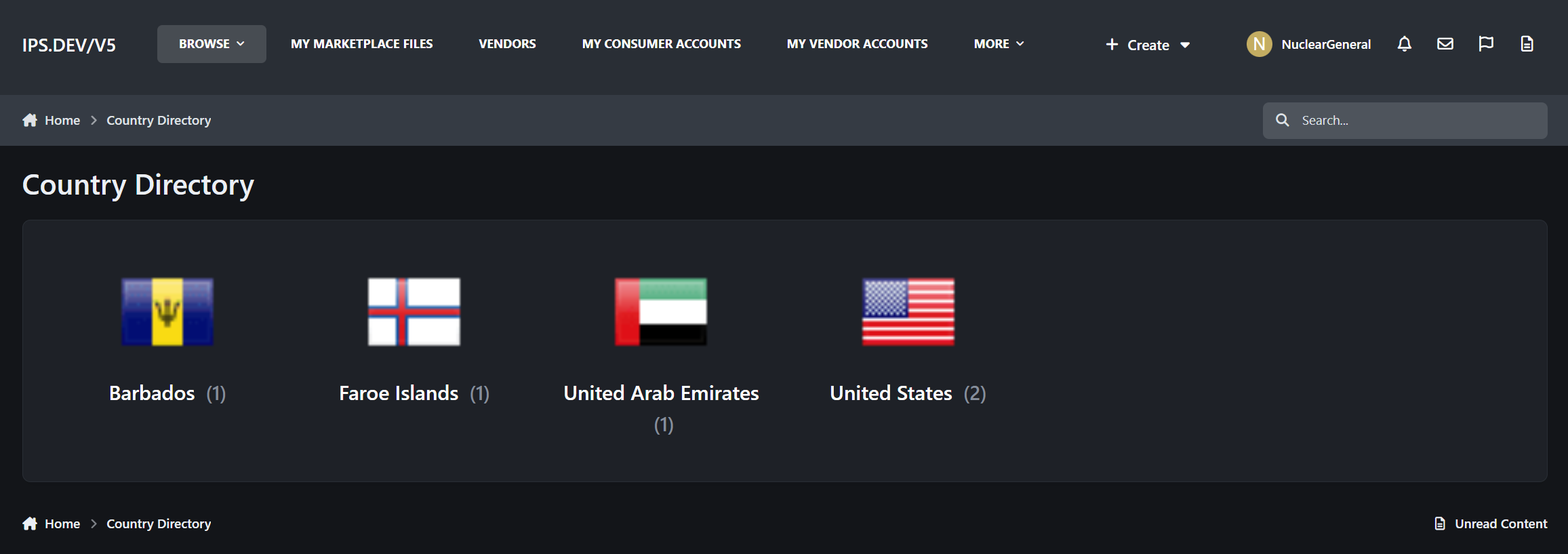
Public Country Directory: Browse countries and view only members who approved public visibility
Account Settings Integration: Members can revisit and change their country decision later
Privacy State Tracking: Separate private detection from public approval for cleaner data handling
Minimal ACP Settings: Keep administration simple while preserving the privacy-first model
🚀 Perfect For
Privacy-Conscious Communities: Give members control over whether location-related profile details are public
International Boards: Show country flags only when members actually want them shown
Communities in Sensitive Regions: Avoid exposing country information by default
Modern IPS Sites: Replace older auto-flag behavior with a consent-driven workflow
Administrators Who Want Simplicity: Use a straightforward member-choice flow instead of complex moderation rules
🎯 Technical Specifications
Platform: Invision Community 5
Detection Model: Private detection with separate approved visibility state
Member States: Pending, approved, or hidden
Public Output: Flag-only display for approved members
Member Controls: Confirm detected country, choose manually, or hide entirely
Directory: Public country listing limited to consented visible members
💡 Why Choose Country Consent?
Built Around Consent: Country display is treated as a member decision, not an automatic assumption
Better Privacy Defaults: Nothing is shown publicly until the member says yes
Cleaner Data Separation: Private detection and public approval are stored independently
More Respectful UX: Members are asked how they want their country handled instead of being silently assigned a visible flag
Designed for IPS: Integrates with account settings, profile output, directory views, and selected front-end hook areas
🔧 Easy Setup
Install the Application: Upload and install Country Consent in your Invision Community AdminCP
Enable the Prompt: Turn on the consent prompt and decide whether to enable the public directory
Let Members Choose: Members confirm, change, or hide their country the next time they are prompted
Display Approved Flags: Only approved members appear with public country flags and directory visibility
Adjust Later: Members can revisit their account settings whenever they want to change their choice
With Country Consent, your community gets a safer and more transparent way to handle country display. It preserves the usefulness of member country flags while putting the final decision where it belongs: with the member.
Developed by InvisionMarketplace.com - Professional Invision Community applications with privacy-aware member experience design.