Jump to content
View in the app

A better way to browse. Learn more.

Invision Marketplace

A full-screen app on your home screen with push notifications, badges and more.

To install this app on iOS and iPadOS
  1. Tap the Share icon in Safari
  2. Scroll the menu and tap Add to Home Screen.
  3. Tap Add in the top-right corner.
To install this app on Android
  1. Tap the 3-dot menu (⋮) in the top-right corner of the browser.
  2. Tap Add to Home screen or Install app.
  3. Confirm by tapping Install.

Everything you need for your community

We will be moving to a new server soon, some downtime is expected.

Everything you need for your community

 Loading...
 Loading...
 Loading...
This plugin displays the reputation level along with the title in the post view. The appearance of the level can be edited as desired. More features will be added in future updates.
IPS5.0.x
This plugin displays the reputation level along with the title in the post view. The appearance of the level can be edited as desired. More features will be added in future updates.
White & Blue
A new template for your forum straight from the author. It has many built-in functions. It will be enhanced with additional features in future updates.
( IPS version 4.7 )
White & Blue
A new template for your forum straight from the author. It has many built-in functions. It will be enhanced with additional features in future updates.
( IPS version 4.7 )
Astroside
A new template for your forum straight from the author. It has many built-in functions. It will be enhanced with additional features in future updates.
( IPS version 4.7 )

The template requires the Better Statistics plugin, I recommend installing this plugin before installing the template.
Astroside
A new template for your forum straight from the author. It has many built-in functions. It will be enhanced with additional features in future updates.
( IPS version 4.7 )

The template requires the Better Statistics plugin, I recommend installing this plugin before installing the template.
Venus
A new template for your forum straight from the author. It has many built-in functions. It will be enhanced with additional features in future updates.
( IPS version 4.7 ) 
----- DEMO -----
 The template requires the Better Statistics plugin, I recommend installing this plugin before installing the template.
Venus
A new template for your forum straight from the author. It has many built-in functions. It will be enhanced with additional features in future updates.
( IPS version 4.7 ) 
----- DEMO -----
 The template requires the Better Statistics plugin, I recommend installing this plugin before installing the template.
Flux is a modern and elegant theme designed for gaming forums, RP servers, and general community boards. Its dark, refined color palette, clean layout, and polished details give the site a professional look and a unique atmosphere. An ideal choice for communities that value both aesthetics and functionality.
If you’re interested in checking out a demo or learning more, you can explore further here.
IPS5.0.x
Flux is a modern and elegant theme designed for gaming forums, RP servers, and general community boards. Its dark, refined color palette, clean layout, and polished details give the site a professional look and a unique atmosphere. An ideal choice for communities that value both aesthetics and functionality.
If you’re interested in checking out a demo or learning more, you can explore further here.
Codey is a new template for forums based on Invision Community 5. Designed by the author with extended functionality in mind, it will be enhanced with additional features in future updates.
Main Features:
Built-in tools – numerous useful features for efficient forum management.
Regular updates – each new version introduces additional improvements.
Two color versions – available in both dark and light themes.
 If you’re interested in checking out a demo or learning more, you can explore further here.
IPS5.0.x
Codey is a new template for forums based on Invision Community 5. Designed by the author with extended functionality in mind, it will be enhanced with additional features in future updates.
Main Features:
Built-in tools – numerous useful features for efficient forum management.
Regular updates – each new version introduces additional improvements.
Two color versions – available in both dark and light themes.
 If you’re interested in checking out a demo or learning more, you can explore further here.
Popp Theme is a fresh template for forums running on Invision Community 5. Designed by the author with extended functionality in mind, it is continuously updated with new features.
Main Features:
Built-in tools – numerous useful features to enhance forum management.
Regular updates – each new version introduces additional improvements.
Dark Mode option – available in an alternative dark-themed version.
 If you’re interested in checking out a demo or learning more, you can explore further here.
IPS5.0.x
Popp Theme is a fresh template for forums running on Invision Community 5. Designed by the author with extended functionality in mind, it is continuously updated with new features.
Main Features:
Built-in tools – numerous useful features to enhance forum management.
Regular updates – each new version introduces additional improvements.
Dark Mode option – available in an alternative dark-themed version.
 If you’re interested in checking out a demo or learning more, you can explore further here.
This app allows your staff, with the appropriate permissions, to see topic viewers/readers as well as track your members topic viewing/reading behavior. 
Topic readers will be displayed on topic view. Only unique views are logged. This means that whenever someone visits a topic, their latest visit will be logged and displayed.
To track members topic reading history, go to their profiles where a new tab has been added called: Recent Viewed Topics.
And as last, but not least, topic view logs can be kept permanently or pruned after a certain amount of time.
 
IPS5.0.0
This app allows your staff, with the appropriate permissions, to see topic viewers/readers as well as track your members topic viewing/reading behavior. 
Topic readers will be displayed on topic view. Only unique views are logged. This means that whenever someone visits a topic, their latest visit will be logged and displayed.
To track members topic reading history, go to their profiles where a new tab has been added called: Recent Viewed Topics.
And as last, but not least, topic view logs can be kept permanently or pruned after a certain amount of time.
 
This app will limit the number of accounts that users can register from the same device and/or ip address. Devices and/or IP Addresses can be excluded from this restriction at the app's settings page.
IPS5.0.0
This app will limit the number of accounts that users can register from the same device and/or ip address. Devices and/or IP Addresses can be excluded from this restriction at the app's settings page.
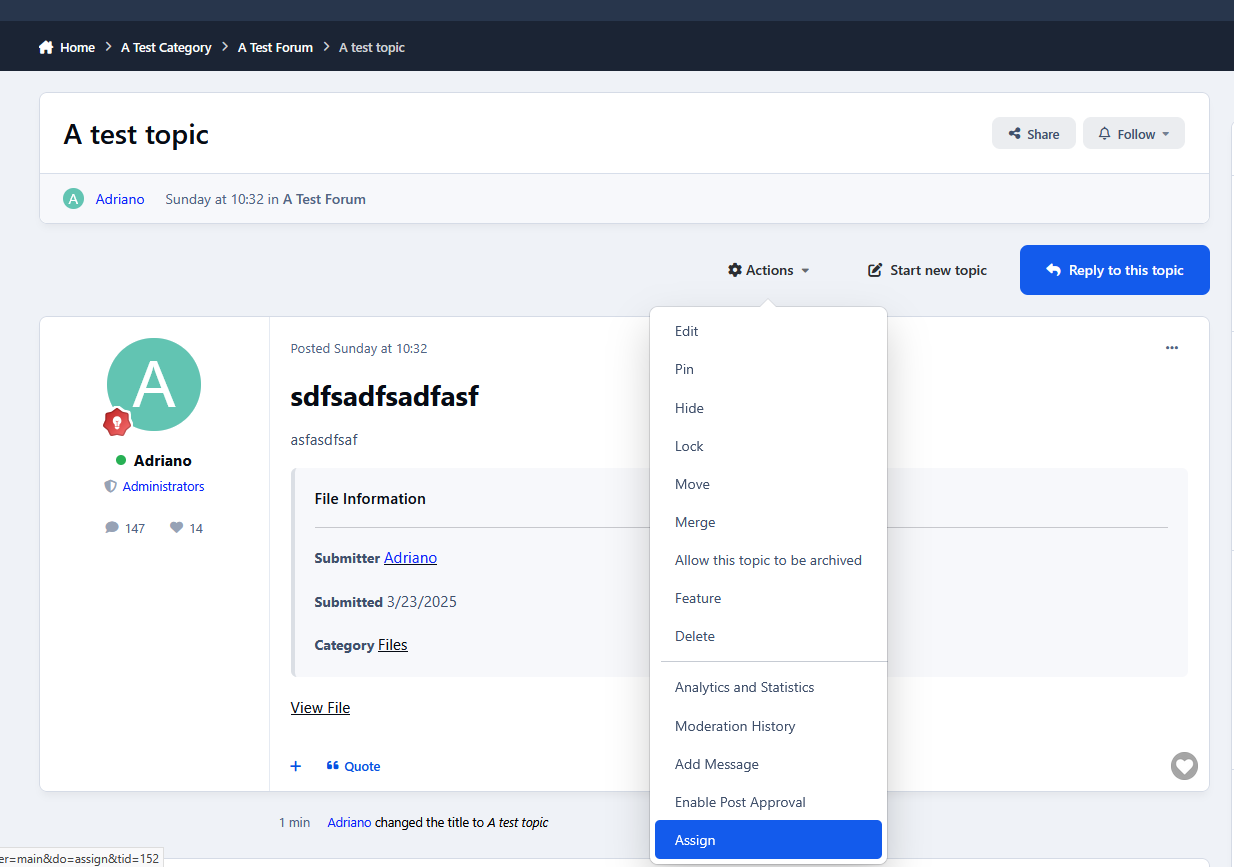
This app will allow the admins and your staff, with the appropriate permissions, to change several topic data such as views, author and start date.
Permissions:
You can set the permissions at the app 's settings page which can be found at your Admin Panel->Community->Manipulate Topic Data.
Members with the permissions to change topic data, will see 3 new links added inside the Moderation Actions drop down list. The are as follow:
1) Change Views:
When clicked upon it will display the current views for that topic with the option to add to them.
2) Change Author:
When clicked upon it will display the topic author with the option to select a new author. After the changes are saved, the topic info will be updated accordingly to reflect the new author. The new changes will be updated in the search and activity page as well.
You have the options to decrease old author 's post count and increase the post count of the new author.
3) Change Start Date: 
When clicked upon it will display the topic start date with the option to select a new date. After the changes are saved, the topic info will be updated accordingly to reflect the new start date. The new changes will be updated in the search and activity page as well.
Moderator Log:
All the aforementioned topic changes will be logged in the Moderator Log page in the admin panel.
IPS5.0.0
This app will allow the admins and your staff, with the appropriate permissions, to change several topic data such as views, author and start date.
Permissions:
You can set the permissions at the app 's settings page which can be found at your Admin Panel->Community->Manipulate Topic Data.
Members with the permissions to change topic data, will see 3 new links added inside the Moderation Actions drop down list. The are as follow:
1) Change Views:
When clicked upon it will display the current views for that topic with the option to add to them.
2) Change Author:
When clicked upon it will display the topic author with the option to select a new author. After the changes are saved, the topic info will be updated accordingly to reflect the new author. The new changes will be updated in the search and activity page as well.
You have the options to decrease old author 's post count and increase the post count of the new author.
3) Change Start Date: 
When clicked upon it will display the topic start date with the option to select a new date. After the changes are saved, the topic info will be updated accordingly to reflect the new start date. The new changes will be updated in the search and activity page as well.
Moderator Log:
All the aforementioned topic changes will be logged in the Moderator Log page in the admin panel.
Cute Halloween — A Playful Seasonal Theme for Invision Community v5
Cute Halloween is a warm, lighthearted take on the Halloween season — designed to bring a touch of charm and festivity to your community.
It blends cozy fall tones, subtle spooky accents, and clean readability to create a theme that feels both seasonal and inviting.
Live Demo (select Cute Halloween)
Highlights
A friendly take on Halloween
Cute Halloween keeps things approachable and fun, using cheerful ghosts, candy corn details, and soft shadows instead of dark, heavy horror styling.
Cozy dark layout
The purple and orange palette pairs beautifully with a dark background, giving your site a relaxed evening atmosphere that’s easy to read and navigate.
Custom seasonal touches
Decorative ghosts, spiderwebs, and themed forum icons help set the mood without overwhelming your content.
Built for Invision Community v5
Developed using v5’s updated template structure, ensuring modern design standards, improved responsiveness, and compatibility with all core apps.
Perfect for October events
If you’re a fan of Halloween, adding seasonal activities, or just decorating for the month, this theme fits right in.

What’s Included
Complete Invision Community v5 theme
Custom header, footer, and background artwork
Styled widgets and forum containers
Forum icons and accents
IPS5.0.0+
Cute Halloween — A Playful Seasonal Theme for Invision Community v5
Cute Halloween is a warm, lighthearted take on the Halloween season — designed to bring a touch of charm and festivity to your community.
It blends cozy fall tones, subtle spooky accents, and clean readability to create a theme that feels both seasonal and inviting.
Live Demo (select Cute Halloween)
Highlights
A friendly take on Halloween
Cute Halloween keeps things approachable and fun, using cheerful ghosts, candy corn details, and soft shadows instead of dark, heavy horror styling.
Cozy dark layout
The purple and orange palette pairs beautifully with a dark background, giving your site a relaxed evening atmosphere that’s easy to read and navigate.
Custom seasonal touches
Decorative ghosts, spiderwebs, and themed forum icons help set the mood without overwhelming your content.
Built for Invision Community v5
Developed using v5’s updated template structure, ensuring modern design standards, improved responsiveness, and compatibility with all core apps.
Perfect for October events
If you’re a fan of Halloween, adding seasonal activities, or just decorating for the month, this theme fits right in.

What’s Included
Complete Invision Community v5 theme
Custom header, footer, and background artwork
Styled widgets and forum containers
Forum icons and accents
Cherry Blossom — A Soft and Refreshing Theme for Invision Community v5
Cherry Blossom brings a light and welcoming aesthetic to your community, inspired by spring tones and gentle design.
The theme focuses on clarity, comfort, and a sense of calm — perfect for communities that value friendliness, warmth, and a touch of color.
Live Demo (select Cherry Blossom)

Highlights
Soft color palette
A blend of pink and green hues gives the theme a peaceful, natural look. It feels bright without being overwhelming, ideal for daytime browsing.
Elegant minimal design
Rounded corners, light textures, and balanced spacing help your content stand out while maintaining a clean, cohesive presentation.
Custom header and forum styling
Distinct category headers and widget panels keep navigation intuitive, with thoughtful visual consistency throughout.
Optimized for Invision Community v5
Built using the latest template system, ensuring smooth performance, mobile responsiveness, and compatibility with all core applications.
Comfortable to read and use
The contrast and layout are tuned for easy legibility, making it suitable for long-form discussions, lifestyle communities, or creative projects.

What’s Included
Full Invision Community v5 theme
Custom header, footer, and content styling
Pink and green base colors with soft gradients
Light textured background for subtle depth
Styled widgets, buttons, and containers
IPS5.0.0+
Cherry Blossom — A Soft and Refreshing Theme for Invision Community v5
Cherry Blossom brings a light and welcoming aesthetic to your community, inspired by spring tones and gentle design.
The theme focuses on clarity, comfort, and a sense of calm — perfect for communities that value friendliness, warmth, and a touch of color.
Live Demo (select Cherry Blossom)

Highlights
Soft color palette
A blend of pink and green hues gives the theme a peaceful, natural look. It feels bright without being overwhelming, ideal for daytime browsing.
Elegant minimal design
Rounded corners, light textures, and balanced spacing help your content stand out while maintaining a clean, cohesive presentation.
Custom header and forum styling
Distinct category headers and widget panels keep navigation intuitive, with thoughtful visual consistency throughout.
Optimized for Invision Community v5
Built using the latest template system, ensuring smooth performance, mobile responsiveness, and compatibility with all core applications.
Comfortable to read and use
The contrast and layout are tuned for easy legibility, making it suitable for long-form discussions, lifestyle communities, or creative projects.

What’s Included
Full Invision Community v5 theme
Custom header, footer, and content styling
Pink and green base colors with soft gradients
Light textured background for subtle depth
Styled widgets, buttons, and containers
Spooky Halloween — A Haunting Seasonal Theme for Invision Community v5
Spooky Halloween is a dark, classic take on the Halloween season — designed to evoke nostalgic creepy night time vibes.
Live Demo (select Spooky Halloween)
Highlights
A scary, classic take
Iconic Halloween symbols subtly displayed throughout dark backgrounds with pops of orange help maintain an eerie atmosphere while still making things easy to read and find.
Creepy and kooky, all around spooky
Distressed and grungy elements, bold ragged fonts and orange glows reminiscent of old horror movie posters.
Custom seasonal touches
Decorative webs, spiders, trees, and themed forum icons help set the mood without overwhelming your content.
Built for Invision Community v5
Developed using v5’s updated template structure, ensuring modern design standards, improved responsiveness, and compatibility with all core apps.
Perfect for October events
If you’re a fan of Halloween, horror movies, adding seasonal activities, or just decorating for the month, this theme fits right in.

What’s Included
Complete Invision Community v5 theme
Custom header, footer, and background artwork
Styled widgets and forum containers
Forum icons and accents
IPS5.0.0+
Spooky Halloween — A Haunting Seasonal Theme for Invision Community v5
Spooky Halloween is a dark, classic take on the Halloween season — designed to evoke nostalgic creepy night time vibes.
Live Demo (select Spooky Halloween)
Highlights
A scary, classic take
Iconic Halloween symbols subtly displayed throughout dark backgrounds with pops of orange help maintain an eerie atmosphere while still making things easy to read and find.
Creepy and kooky, all around spooky
Distressed and grungy elements, bold ragged fonts and orange glows reminiscent of old horror movie posters.
Custom seasonal touches
Decorative webs, spiders, trees, and themed forum icons help set the mood without overwhelming your content.
Built for Invision Community v5
Developed using v5’s updated template structure, ensuring modern design standards, improved responsiveness, and compatibility with all core apps.
Perfect for October events
If you’re a fan of Halloween, horror movies, adding seasonal activities, or just decorating for the month, this theme fits right in.

What’s Included
Complete Invision Community v5 theme
Custom header, footer, and background artwork
Styled widgets and forum containers
Forum icons and accents
Integrates Pusher or Ably real-time services to enable instant updates for:
Active Viewers
NowReplies
Chatbox PLUS
ChatPRO
IPS5.0.0+
Integrates Pusher or Ably real-time services to enable instant updates for:
Active Viewers
NowReplies
Chatbox PLUS
ChatPRO
Key Features
Instant Reply Updates – New replies are loaded automatically via AJAX without refreshing the page.
Edited Content – Keeps posts in sync when someone edits their reply.
Reaction Updates – Reactions and likes update automatically as they occur.
Typing Indicator – Displays who is currently typing in the editor for a more interactive experience.
RTHub Integration – install RTHub to use real-time services from Pusher or Ably.
Supported Applications
Forums
Pages
Downloads
Blogs
Gallery
Calendar
Videobox
SportsApp
Personal Messenger
Not supported on IPS Cloud
NowReplies.mp4
IPS5.0.0+
Key Features
Instant Reply Updates – New replies are loaded automatically via AJAX without refreshing the page.
Edited Content – Keeps posts in sync when someone edits their reply.
Reaction Updates – Reactions and likes update automatically as they occur.
Typing Indicator – Displays who is currently typing in the editor for a more interactive experience.
RTHub Integration – install RTHub to use real-time services from Pusher or Ably.
Supported Applications
Forums
Pages
Downloads
Blogs
Gallery
Calendar
Videobox
SportsApp
Personal Messenger
Not supported on IPS Cloud
NowReplies.mp4

Top Developers

Last reviews

Applications Directory

A complete and convenient directory of applications for Invision Community, with categorization and sorting options.

Ratings and feedback

Only verified and trusted reviews!

Add new Application

Any developer can add their application to this directory.

You need to create account

Configure browser push notifications

Chrome (Android)
  1. Tap the lock icon next to the address bar.
  2. Tap Permissions → Notifications.
  3. Adjust your preference.
Chrome (Desktop)
  1. Click the padlock icon in the address bar.
  2. Select Site settings.
  3. Find Notifications and adjust your preference.