Jump to content
View in the app

A better way to browse. Learn more.

Invision Marketplace

A full-screen app on your home screen with push notifications, badges and more.

To install this app on iOS and iPadOS
  1. Tap the Share icon in Safari
  2. Scroll the menu and tap Add to Home Screen.
  3. Tap Add in the top-right corner.
To install this app on Android
  1. Tap the 3-dot menu (⋮) in the top-right corner of the browser.
  2. Tap Add to Home screen or Install app.
  3. Confirm by tapping Install.

Everything you need for your community

We will be moving to a new server soon, some downtime is expected.

Everything you need for your community

 Loading...
 Loading...
 Loading...
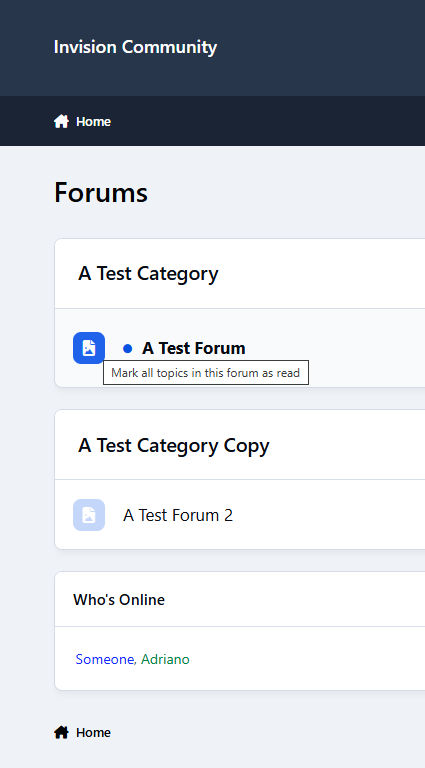
This app adds a simple line under every forum showing its moderators, including both groups and individual members. It also appears inside the forum view, keeping everything consistent and easy to find.
Clean, lightweight, and fully integrated with IPS5, and integrates seamlessly with your community’s design. It uses the core moderators cache, so it runs efficiently without adding extra database queries.
Display moderators on the Forums index:
Table view
Grid view
IPS5.0.11+
This app adds a simple line under every forum showing its moderators, including both groups and individual members. It also appears inside the forum view, keeping everything consistent and easy to find.
Clean, lightweight, and fully integrated with IPS5, and integrates seamlessly with your community’s design. It uses the core moderators cache, so it runs efficiently without adding extra database queries.
Display moderators on the Forums index:
Table view
Grid view
Turn your community into a powerful data collection tool with fully customizable forms for feedback, applications, bug reports, contact requests, and more.
This application introduces a completely custom-built field system, removing the limitations of the default CustomField model. Each field type is handled independently, allowing greater flexibility, better validation, and more control over how data is collected and displayed.
Types of forms:
You can create two types of forms:
Regular: users can fill them out at any time directly within the app.
Registration: users will fill them out only during account creation.
Types of fields:

Every submission is stored in your database, giving you full control and a complete history inside the ACP.
Take it further with automation:
Instantly create topics in your forums
Send private messages to members
Trigger email notifications to one or multiple recipients
Redirect users or display custom success messages
Built-in protections keep everything under control:
Flood protection to prevent spam
Limit members to a single submission per form
Fast, flexible, and built for IPS5, this system gives you complete control over data collection, validation, and presentation. All without relying on core field limitations.
IPS5.0.0+
Turn your community into a powerful data collection tool with fully customizable forms for feedback, applications, bug reports, contact requests, and more.
This application introduces a completely custom-built field system, removing the limitations of the default CustomField model. Each field type is handled independently, allowing greater flexibility, better validation, and more control over how data is collected and displayed.
Types of forms:
You can create two types of forms:
Regular: users can fill them out at any time directly within the app.
Registration: users will fill them out only during account creation.
Types of fields:

Every submission is stored in your database, giving you full control and a complete history inside the ACP.
Take it further with automation:
Instantly create topics in your forums
Send private messages to members
Trigger email notifications to one or multiple recipients
Redirect users or display custom success messages
Built-in protections keep everything under control:
Flood protection to prevent spam
Limit members to a single submission per form
Fast, flexible, and built for IPS5, this system gives you complete control over data collection, validation, and presentation. All without relying on core field limitations.
This application allows administrators to choose which tabs are displayed in member profiles and define their order.
Notes:
Tabs may vary depending on the applications installed in your community.
Profile field tabs (e.g., "About Me") are automatically included when applicable.
If a member has no available content, the Activity tab may still be shown by the system.
Important (IPS 5 limitation):
Due to the removal of hooks in IPS 5, tab handling must be adjusted on the client side. If the first tab defined in the settings is not Activity, users will be automatically redirected to the corresponding tab (e.g. /tab-clubs/). This ensures the correct tab is active on page load, but causes a URL change.
Example: first tab: Clubs. The profile will go from ...index.php?/profile/1-adriano to ...index.php?/profile/1-adriano/tab-clubs/ automatically.
IPS5.0.0+
This application allows administrators to choose which tabs are displayed in member profiles and define their order.
Notes:
Tabs may vary depending on the applications installed in your community.
Profile field tabs (e.g., "About Me") are automatically included when applicable.
If a member has no available content, the Activity tab may still be shown by the system.
Important (IPS 5 limitation):
Due to the removal of hooks in IPS 5, tab handling must be adjusted on the client side. If the first tab defined in the settings is not Activity, users will be automatically redirected to the corresponding tab (e.g. /tab-clubs/). This ensures the correct tab is active on page load, but causes a URL change.
Example: first tab: Clubs. The profile will go from ...index.php?/profile/1-adriano to ...index.php?/profile/1-adriano/tab-clubs/ automatically.
See how popular each theme is, right inside the theme selector.
This app adds a small counter next to each theme, showing how many members are using it — or what percentage of your community prefers it.
Setting:
Display mode
Count – 96 members
Percent – 4% of all users
Both – 96 members / 4% of all users
Note:
Uses caching and background tasks for performance
IPS5.0.0+
See how popular each theme is, right inside the theme selector.
This app adds a small counter next to each theme, showing how many members are using it — or what percentage of your community prefers it.
Setting:
Display mode
Count – 96 members
Percent – 4% of all users
Both – 96 members / 4% of all users
Note:
Uses caching and background tasks for performance
Upload images instantly and insert them directly into the editor using external hosting (imgBB). This application adds a seamless image upload option to the IPS editor, allowing users to upload images to an external service and insert them into content with a single click. No attachments. No clutter. Just fast and efficient image insertion.
Settings:
imgBB API Key
Groups allowed to use it
IPS5.0.0+
Upload images instantly and insert them directly into the editor using external hosting (imgBB). This application adds a seamless image upload option to the IPS editor, allowing users to upload images to an external service and insert them into content with a single click. No attachments. No clutter. Just fast and efficient image insertion.
Settings:
imgBB API Key
Groups allowed to use it
Community Pulse delivers a real-time activity dashboard showing what’s happening across your site right now — from new topics and trending discussions to live activity and the current locations of online members.
It updates instantly via AJAX and highlights changes as they happen, creating a truly "alive" feeling for your community.
Includes:
Real-time activity updates
Trending & newest topics
Live activity feed
Online users with a location
Top contributors & new members
Configurable limits and exclusions
Make your community feel active. Make it feel alive.
IPS5.0.0+
Community Pulse delivers a real-time activity dashboard showing what’s happening across your site right now — from new topics and trending discussions to live activity and the current locations of online members.
It updates instantly via AJAX and highlights changes as they happen, creating a truly "alive" feeling for your community.
Includes:
Real-time activity updates
Trending & newest topics
Live activity feed
Online users with a location
Top contributors & new members
Configurable limits and exclusions
Make your community feel active. Make it feel alive.
Show member activity in a simple, visual way with a monthly calendar on the profile. Quickly see when a user was active, their busiest days, and their current streak. Activity includes content items, comments/replies, and reviews across the community. Admins can choose which groups can view the tab, and it won’t appear for banned members.
Setting:
Groups that can view the profile tab
IPS5.0.0+
Show member activity in a simple, visual way with a monthly calendar on the profile. Quickly see when a user was active, their busiest days, and their current streak. Activity includes content items, comments/replies, and reviews across the community. Admins can choose which groups can view the tab, and it won’t appear for banned members.
Setting:
Groups that can view the profile tab
This application displays birthdays in a clean and organized layout, making it simple to see who’s celebrating each day. Members can quickly jump to any month and year for faster navigation, and those who have not yet filled in their date of birth can add it directly from within the app.
Add a more personal touch to your community by highlighting what matters most — your members.
IPS5.0.0+
This application displays birthdays in a clean and organized layout, making it simple to see who’s celebrating each day. Members can quickly jump to any month and year for faster navigation, and those who have not yet filled in their date of birth can add it directly from within the app.
Add a more personal touch to your community by highlighting what matters most — your members.
Quick Forum Name Edit lets administrators rename forums/subforums directly from the front-end (Forums index only), right where they’re already working. No need to jump into the Admin CP just to make a small change — simply edit the name in place and move on.
It’s a small feature that can save you a surprising amount of time, especially when you’re organizing or refining your forum structure. For peace of mind, all changes are restricted to administrators and are automatically recorded in the Admin Logs, so you always have a clear history of what was updated.
IPS5.0.11+
Quick Forum Name Edit lets administrators rename forums/subforums directly from the front-end (Forums index only), right where they’re already working. No need to jump into the Admin CP just to make a small change — simply edit the name in place and move on.
It’s a small feature that can save you a surprising amount of time, especially when you’re organizing or refining your forum structure. For peace of mind, all changes are restricted to administrators and are automatically recorded in the Admin Logs, so you always have a clear history of what was updated.
Adds a “Discard Reply” button to reply editors, allowing users to quickly discard the editor content, remove attachments, and return the editor to its minimized state. Perfect for avoiding accidental posts or clearing unfinished replies.
It will appear on all content pages in the reply editor.
Setting:
Can discard replies in (specific contents, like Messenger, Posts, Downloads file comments, etc).
IPS5.0.0+
Adds a “Discard Reply” button to reply editors, allowing users to quickly discard the editor content, remove attachments, and return the editor to its minimized state. Perfect for avoiding accidental posts or clearing unfinished replies.
It will appear on all content pages in the reply editor.
Setting:
Can discard replies in (specific contents, like Messenger, Posts, Downloads file comments, etc).
Canned Replies enhances your community workflow by allowing both members and staff to quickly respond to frequently asked questions using reusable responses. With support for public and private replies, users can create and manage their own library of replies, improving consistency and saving time across discussions.
Key Features
Private & Public Replies
Create personal (private) replies for individual use
Share public replies accessible to other eligible members
Public replies can only be edited by their original authors
Broad Content Support
Works seamlessly across all content areas that support comments
Includes Forums, Downloads, Blogs, Gallery, Pages, Calendar, and compatible third-party applications
Automatically adapts based on installed applications
Flexible Permissions
Control which member groups can use the feature
Define where canned replies are available across your community
Efficient Usage
Quickly insert replies directly into the editor
Reduce repetitive typing and improve response consistency
Pagination Control
Configure how many replies are displayed per page
Settings
Allowed member groups
Supported content areas
Replies per page
Notes
The Canned Replies navigation tab is only visible to members with permission to use the feature
Compatible with Create Content Menu: https://www.sosinvision.com.br/index.php?/file/520-create-content-menu/
IPS5.0.0+
Canned Replies enhances your community workflow by allowing both members and staff to quickly respond to frequently asked questions using reusable responses. With support for public and private replies, users can create and manage their own library of replies, improving consistency and saving time across discussions.
Key Features
Private & Public Replies
Create personal (private) replies for individual use
Share public replies accessible to other eligible members
Public replies can only be edited by their original authors
Broad Content Support
Works seamlessly across all content areas that support comments
Includes Forums, Downloads, Blogs, Gallery, Pages, Calendar, and compatible third-party applications
Automatically adapts based on installed applications
Flexible Permissions
Control which member groups can use the feature
Define where canned replies are available across your community
Efficient Usage
Quickly insert replies directly into the editor
Reduce repetitive typing and improve response consistency
Pagination Control
Configure how many replies are displayed per page
Settings
Allowed member groups
Supported content areas
Replies per page
Notes
The Canned Replies navigation tab is only visible to members with permission to use the feature
Compatible with Create Content Menu: https://www.sosinvision.com.br/index.php?/file/520-create-content-menu/
Keyword Tooltips allow you to define keywords or phrases that, when used across supported applications, display a rich pop-up with additional information when hovered or clicked. These popups can contain any content you choose, such as definitions, explanations, or contextual details, helping enhance engagement and usability across your community.
Fully rebuilt to integrate seamlessly with the IPS framework, Keywords now behaves like a native content type. It supports core features such as:
Search integration
Follow system
Reactions
Notifications
Comments
Full moderation workflows.
Administrators can require approval for new keywords and comments, ensuring quality control and consistency.
With improved permissions, group-based controls, and tighter integration across applications, Keywords delivers a powerful and flexible way to enrich content while maintaining full compatibility with IPS standards.

Compatible with Create Content Menu: https://www.sosinvision.com.br/index.php?/file/520-create-content-menu/
IPS5.0.0+
Keyword Tooltips allow you to define keywords or phrases that, when used across supported applications, display a rich pop-up with additional information when hovered or clicked. These popups can contain any content you choose, such as definitions, explanations, or contextual details, helping enhance engagement and usability across your community.
Fully rebuilt to integrate seamlessly with the IPS framework, Keywords now behaves like a native content type. It supports core features such as:
Search integration
Follow system
Reactions
Notifications
Comments
Full moderation workflows.
Administrators can require approval for new keywords and comments, ensuring quality control and consistency.
With improved permissions, group-based controls, and tighter integration across applications, Keywords delivers a powerful and flexible way to enrich content while maintaining full compatibility with IPS standards.

Compatible with Create Content Menu: https://www.sosinvision.com.br/index.php?/file/520-create-content-menu/
Advanced Countdowns provides a flexible, visually appealing way to display countdowns across your community. Create and manage countdowns with four distinct display styles to match your design and use case:
Circular – a modern, animated radial layout
Inline – a compact, text-based format ideal for tight spaces
Square – a clean, block-style presentation
Outline – a minimal, lightweight variant with subtle styling
Each countdown is driven by a target date and time, allowing you to count down to any event—launches, deadlines, announcements, or special occasions. Full timezone support ensures accuracy regardless of where your members are located.
You can also create private countdowns, visible only to the member who created them. Administrators retain full visibility of all countdowns through the AdminCP, where they can also manage existing countdowns and configure application settings with ease. On the front end, countdowns can be edited or deleted by their owners, as well as by moderators with the appropriate permissions (this application adds two new permissions).
Whether you need a simple inline timer or a bold visual centerpiece, Advanced Countdowns provides the flexibility to fit seamlessly into your community.
IPS5.0.0+
Advanced Countdowns provides a flexible, visually appealing way to display countdowns across your community. Create and manage countdowns with four distinct display styles to match your design and use case:
Circular – a modern, animated radial layout
Inline – a compact, text-based format ideal for tight spaces
Square – a clean, block-style presentation
Outline – a minimal, lightweight variant with subtle styling
Each countdown is driven by a target date and time, allowing you to count down to any event—launches, deadlines, announcements, or special occasions. Full timezone support ensures accuracy regardless of where your members are located.
You can also create private countdowns, visible only to the member who created them. Administrators retain full visibility of all countdowns through the AdminCP, where they can also manage existing countdowns and configure application settings with ease. On the front end, countdowns can be edited or deleted by their owners, as well as by moderators with the appropriate permissions (this application adds two new permissions).
Whether you need a simple inline timer or a bold visual centerpiece, Advanced Countdowns provides the flexibility to fit seamlessly into your community.

Top Developers

Last reviews

Applications Directory

A complete and convenient directory of applications for Invision Community, with categorization and sorting options.

Ratings and feedback

Only verified and trusted reviews!

Add new Application

Any developer can add their application to this directory.

You need to create account

Configure browser push notifications

Chrome (Android)
  1. Tap the lock icon next to the address bar.
  2. Tap Permissions → Notifications.
  3. Adjust your preference.
Chrome (Desktop)
  1. Click the padlock icon in the address bar.
  2. Select Site settings.
  3. Find Notifications and adjust your preference.