Jump to content
View in the app

A better way to browse. Learn more.

Invision Marketplace

A full-screen app on your home screen with push notifications, badges and more.

To install this app on iOS and iPadOS
  1. Tap the Share icon in Safari
  2. Scroll the menu and tap Add to Home Screen.
  3. Tap Add in the top-right corner.
To install this app on Android
  1. Tap the 3-dot menu (⋮) in the top-right corner of the browser.
  2. Tap Add to Home screen or Install app.
  3. Confirm by tapping Install.

Everything you need for your community

We will be moving to a new server soon, some downtime is expected.

Everything you need for your community

 Loading...
 Loading...
 Loading...
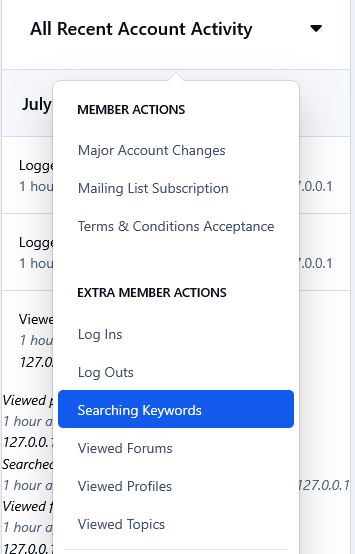
This app will log 6 extra actions of your members and it will display them in their All Recent Account Activity block when viewing a member at the Admin Panel. The extra actions are as follow.
1. Searching Keywords
Whenever a member will search for something in your forum, the keyword/phrase will be logged and displayed on their recent account activity. This can come in handy imo, as it will show you what your members are looking for, so you can make adjustments/changes accordingly to attract more members and get better results.
2) Profile Viewing
Whenever a member will view someone 's profile.
3) Forum Viewing
Whenever a member will visit a forum.
4) Topic Viewing
Whenever a member will visit a topic.
5) Log In
Whenever a member logs in the forum.
6) Log Out
Whenever a member logs out of the forum.
Note:
All these extra actions mentioned above, will be logged and displayed on members history from the time that the app is installed. 
IPS5.0.0
This app will log 6 extra actions of your members and it will display them in their All Recent Account Activity block when viewing a member at the Admin Panel. The extra actions are as follow.
1. Searching Keywords
Whenever a member will search for something in your forum, the keyword/phrase will be logged and displayed on their recent account activity. This can come in handy imo, as it will show you what your members are looking for, so you can make adjustments/changes accordingly to attract more members and get better results.
2) Profile Viewing
Whenever a member will view someone 's profile.
3) Forum Viewing
Whenever a member will visit a forum.
4) Topic Viewing
Whenever a member will visit a topic.
5) Log In
Whenever a member logs in the forum.
6) Log Out
Whenever a member logs out of the forum.
Note:
All these extra actions mentioned above, will be logged and displayed on members history from the time that the app is installed. 
This app adds a new tab at the Member Management section in the Moderator CP of all the validating members at your forum. It might come in handy especially if you have a large number of validating members, as it allows the admins to get some help in managing them from their staff members without giving them access to the Admin Panel.
Permissions:
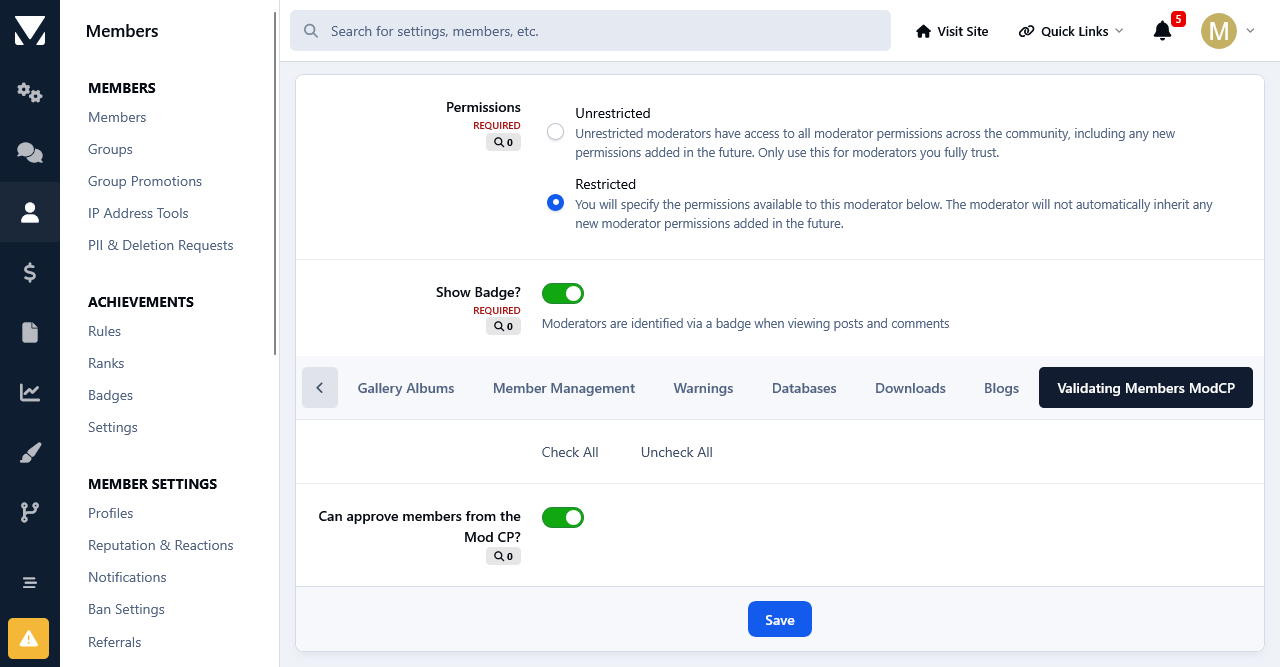
This app adds a new permission tab to the Moderator Permissions. To select the staff members that you want to manage the validating members at the Moderator CP, set the permission: Can the approve members from the Mod CP? to Yes and save the changes. 
Options:
Moderators have 2 options when managing the validating members. Those who are allowed to edit members will be able to edit them, those with permissions to view the ip addresses can check the ips of the validating members.
Multiple Approval& Deletion Selection:
There is also a quick multiple approval selection checkbox that will allow for a quick approval and/or deletion of all selected validating members. 
Moderator Log:
Whenever a member is approved and/or deleted from the ModCP the action will be logged in the Moderator Log page.
IPS5.0.0
This app adds a new tab at the Member Management section in the Moderator CP of all the validating members at your forum. It might come in handy especially if you have a large number of validating members, as it allows the admins to get some help in managing them from their staff members without giving them access to the Admin Panel.
Permissions:
This app adds a new permission tab to the Moderator Permissions. To select the staff members that you want to manage the validating members at the Moderator CP, set the permission: Can the approve members from the Mod CP? to Yes and save the changes. 
Options:
Moderators have 2 options when managing the validating members. Those who are allowed to edit members will be able to edit them, those with permissions to view the ip addresses can check the ips of the validating members.
Multiple Approval& Deletion Selection:
There is also a quick multiple approval selection checkbox that will allow for a quick approval and/or deletion of all selected validating members. 
Moderator Log:
Whenever a member is approved and/or deleted from the ModCP the action will be logged in the Moderator Log page.
This app adds a new table to the database that will log all future log ins to your forum. Each time an user will log in to your forum, a unique cookie will be added to members devices and then it will be stored in the app 's table. The cookie expiration date is set to one year and its unique string is associated with the users device used to log in. 
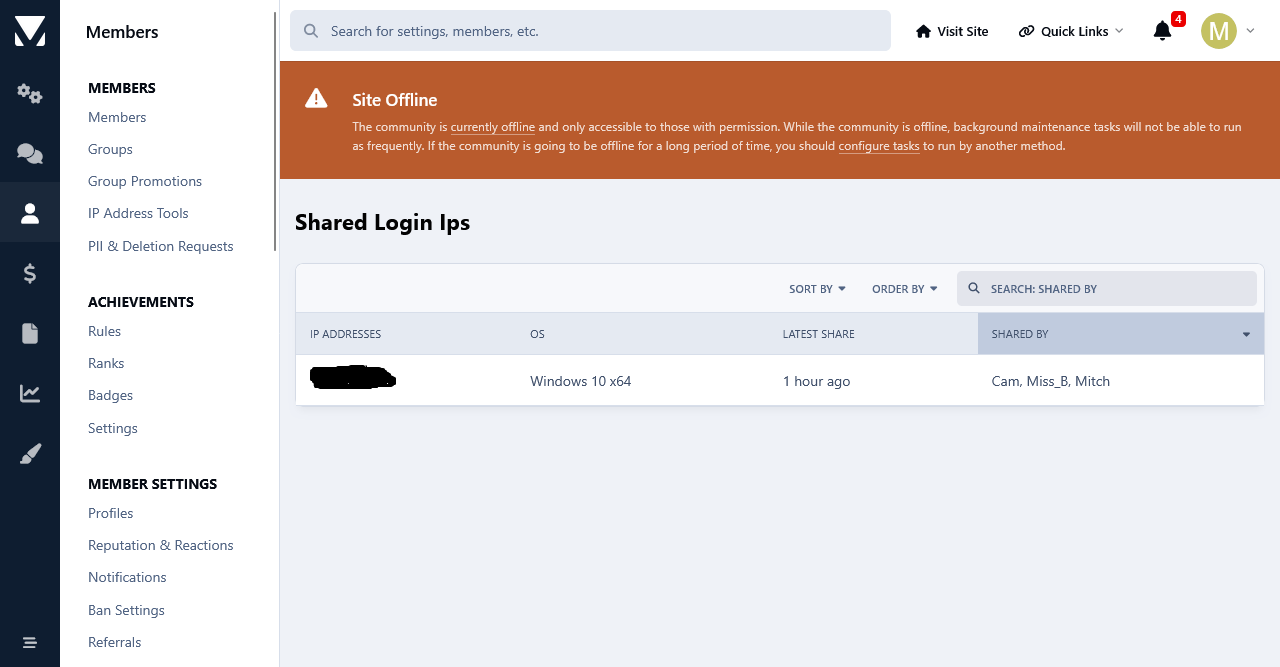
Their ip address will be stored as well.  The app will scan its database table and list all users who have logged in multiple times from the same device and ip. Like that you can see who has shared their login details with other users. The cookie detection method is the most accurate method.
Both shared login detection methods have a quick search option where you can search the results based on members names.
Important: 
The detection starts from the moment that the app is installed. Past detection is not logged due to the fact that the app uses its own database table to store shared logins.
IPS5.0.0
This app adds a new table to the database that will log all future log ins to your forum. Each time an user will log in to your forum, a unique cookie will be added to members devices and then it will be stored in the app 's table. The cookie expiration date is set to one year and its unique string is associated with the users device used to log in. 
Their ip address will be stored as well.  The app will scan its database table and list all users who have logged in multiple times from the same device and ip. Like that you can see who has shared their login details with other users. The cookie detection method is the most accurate method.
Both shared login detection methods have a quick search option where you can search the results based on members names.
Important: 
The detection starts from the moment that the app is installed. Past detection is not logged due to the fact that the app uses its own database table to store shared logins.
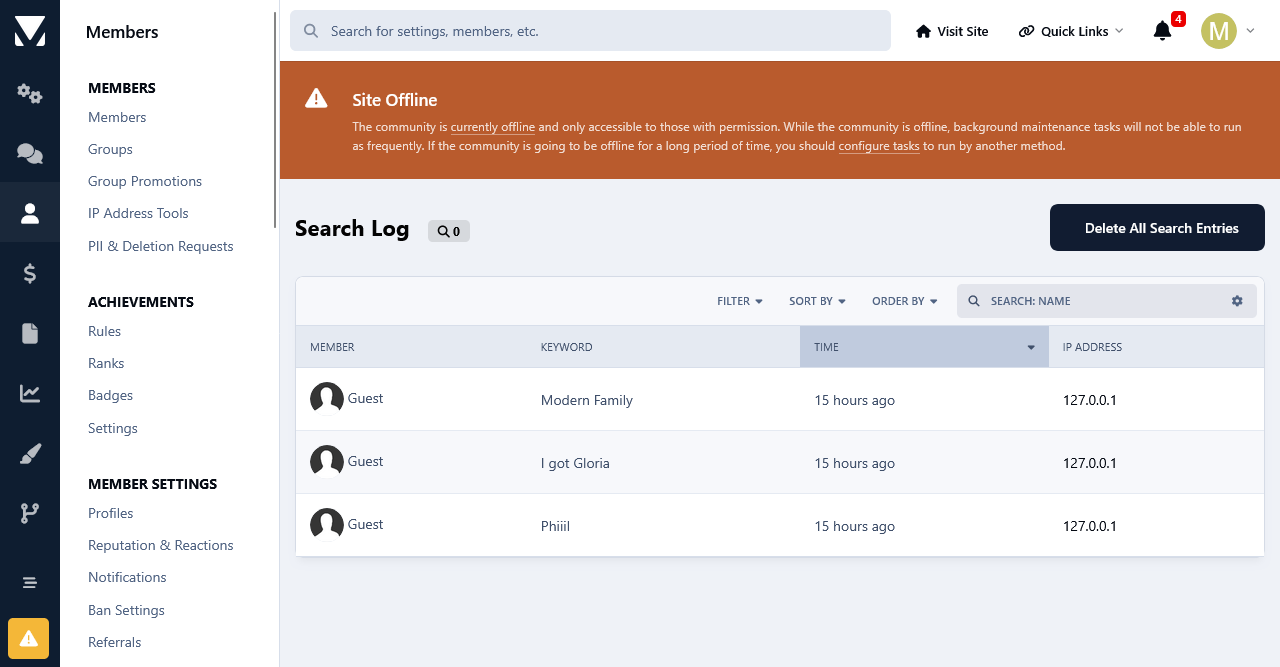
This app will will log all the keywords used by your members and guests alike to search at your forum. 
You can filter the search keywords for members and guests.
You can search for all the keywords that were used used by members, search terms. ip addresses and a time frame.
Important: 
The logging of the search keywords will start from the moment that the app is installed. Past search keywords not logged due to the fact that the app uses its own database table to store the search data.
Price: 17 Euro.
Payment Method: Paypal Only.


IPS5.0.0
This app will will log all the keywords used by your members and guests alike to search at your forum. 
You can filter the search keywords for members and guests.
You can search for all the keywords that were used used by members, search terms. ip addresses and a time frame.
Important: 
The logging of the search keywords will start from the moment that the app is installed. Past search keywords not logged due to the fact that the app uses its own database table to store the search data.
Price: 17 Euro.
Payment Method: Paypal Only.


This app scans the database to detect members who have multiple accounts at your forum, and it will list the results. You can also auto ban new multiple registrations of members who have previously registered an account and/or accounts at your forum. The auto banning is done on basis of ip addresses and devices. You can also exclude ip addresses and devices from being auto banned when registering multiple accounts.
Detection Methods:
The detection method is being done in 4 ways.
1) Registration Method:
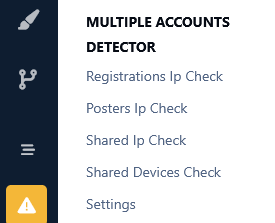
This method is based on scanning the members table for members who have registered more than one account at your forum from the same ip. The ip address in question will be displayed with the latest multiple account. When the ip address is clicked upon, it will display all the other aliases of that member.
2) Posting Method:
This method is based on scanning the posts table for members who have posted from more than one account at your forum from the same ip. The ip address in question will be displayed with the latest multiple account. When the ip address is clicked upon, it will display all the other aliases of that member as well as the posts and topics that they have posted.
3) Ip Login Method:
This method is based on scanning members known ip addresses, i.e. their last used ips, during the login and if a member has logged in to different accounts from the same ip, the action will be logged and displayed.
4) Device Detection Method:
This is the most accurate method imo. Ipb adds a unique cookie to members devices when they log in to the forum. The cookie expiration date is set to one year and its unique string is associated with the users device and stored in the device table.  This means if someone logs in to your forum, logs out and then logs in using another account and a different ip address, then it can tell that it was the same person. It means that person has to use same machine, same browser irrespective of the ip address he/she is using. 
Search:
All 4 multiple accounts detection methods have a quick search option where you can search the results based on members names.
Auto Banning:
All users who will try to register multiple accounts using the same ip address or device can be banned automatically upon registrations. Admins can exclude ip address(es) and device(s) from being banned. 
Compatibility:
This app is compatible with Ipb 5 only. If you are using the Ipb 4.7. version of the app you will have to uninstall it first. Then you can install this one. No data will be lost as the app doesn't add a table of its own to the database, but queries the relevant Ipb tables.
Payment Method:
Paypal Only. If you are interested in purchasing this app please contact me in private.
IPS5.0.0+
This app scans the database to detect members who have multiple accounts at your forum, and it will list the results. You can also auto ban new multiple registrations of members who have previously registered an account and/or accounts at your forum. The auto banning is done on basis of ip addresses and devices. You can also exclude ip addresses and devices from being auto banned when registering multiple accounts.
Detection Methods:
The detection method is being done in 4 ways.
1) Registration Method:
This method is based on scanning the members table for members who have registered more than one account at your forum from the same ip. The ip address in question will be displayed with the latest multiple account. When the ip address is clicked upon, it will display all the other aliases of that member.
2) Posting Method:
This method is based on scanning the posts table for members who have posted from more than one account at your forum from the same ip. The ip address in question will be displayed with the latest multiple account. When the ip address is clicked upon, it will display all the other aliases of that member as well as the posts and topics that they have posted.
3) Ip Login Method:
This method is based on scanning members known ip addresses, i.e. their last used ips, during the login and if a member has logged in to different accounts from the same ip, the action will be logged and displayed.
4) Device Detection Method:
This is the most accurate method imo. Ipb adds a unique cookie to members devices when they log in to the forum. The cookie expiration date is set to one year and its unique string is associated with the users device and stored in the device table.  This means if someone logs in to your forum, logs out and then logs in using another account and a different ip address, then it can tell that it was the same person. It means that person has to use same machine, same browser irrespective of the ip address he/she is using. 
Search:
All 4 multiple accounts detection methods have a quick search option where you can search the results based on members names.
Auto Banning:
All users who will try to register multiple accounts using the same ip address or device can be banned automatically upon registrations. Admins can exclude ip address(es) and device(s) from being banned. 
Compatibility:
This app is compatible with Ipb 5 only. If you are using the Ipb 4.7. version of the app you will have to uninstall it first. Then you can install this one. No data will be lost as the app doesn't add a table of its own to the database, but queries the relevant Ipb tables.
Payment Method:
Paypal Only. If you are interested in purchasing this app please contact me in private.
Description:
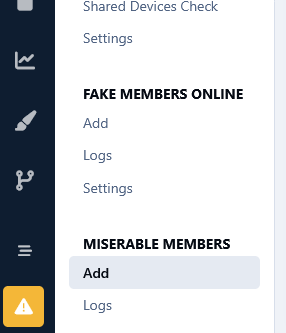
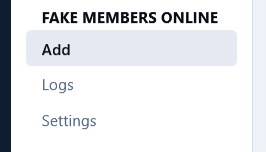
This app will allow the admins to add fake members in the online list. This can be very useful for start up forums as well as for those forums where there is not much activity. It will make the forum look busy so it might attract new users and hopefully boost the forum activity. You can add fake members in the online list using 2 different methods.
       1) Individual Members Method!
You can add individual members online for the session duration. i.e. one member at a time. You can view all fake members that have been added to the online list at the app 's log page. A task will run every half hour to remove the expired fake sessions for individual members from the online list.
      2) Random Multiple Members Method!
Another method to add fake members in the online list is to add multiple random members in one fell swoop. You can set the number of how many members you want to add to the online list at the app's Settings page. There you can select the group(s) from which you want to pull the members from. There is also an option to exclude members who have not visited your forum since a certain amount of time.  After the online session expires the online list will be refreshed with the next batch of fake members. If you don't want this behavior you can disable this option after the first batch and enable it periodically whenever you want to add random fake members.
         Online List Behavior!
To keep things real, all fake members that are added to the online list, be that through the individual method or randomly, they will appear to read random topics, which they are allowed to view permission wise. In other words they won't be appearing as reading topics that they are not allowed to. You can select a certain forum or forums, whose topics you do not want to be showed up as being read from the fake members in the online list.
        Price&Payment Method!
        This app costs 20 Euro payable by Paypal only. If you are interested in purchasing it please contact me in private either here or at the Invisioncommunity Forum.
 
        Thank you for reading this topic. If you have any questions at all please don't hesitate to ask.
IPS5.0.0+
Description:
This app will allow the admins to add fake members in the online list. This can be very useful for start up forums as well as for those forums where there is not much activity. It will make the forum look busy so it might attract new users and hopefully boost the forum activity. You can add fake members in the online list using 2 different methods.
       1) Individual Members Method!
You can add individual members online for the session duration. i.e. one member at a time. You can view all fake members that have been added to the online list at the app 's log page. A task will run every half hour to remove the expired fake sessions for individual members from the online list.
      2) Random Multiple Members Method!
Another method to add fake members in the online list is to add multiple random members in one fell swoop. You can set the number of how many members you want to add to the online list at the app's Settings page. There you can select the group(s) from which you want to pull the members from. There is also an option to exclude members who have not visited your forum since a certain amount of time.  After the online session expires the online list will be refreshed with the next batch of fake members. If you don't want this behavior you can disable this option after the first batch and enable it periodically whenever you want to add random fake members.
         Online List Behavior!
To keep things real, all fake members that are added to the online list, be that through the individual method or randomly, they will appear to read random topics, which they are allowed to view permission wise. In other words they won't be appearing as reading topics that they are not allowed to. You can select a certain forum or forums, whose topics you do not want to be showed up as being read from the fake members in the online list.
        Price&Payment Method!
        This app costs 20 Euro payable by Paypal only. If you are interested in purchasing it please contact me in private either here or at the Invisioncommunity Forum.
 
        Thank you for reading this topic. If you have any questions at all please don't hesitate to ask.

Top Developers

Last reviews

Applications Directory

A complete and convenient directory of applications for Invision Community, with categorization and sorting options.

Ratings and feedback

Only verified and trusted reviews!

Add new Application

Any developer can add their application to this directory.

You need to create account

Configure browser push notifications

Chrome (Android)
  1. Tap the lock icon next to the address bar.
  2. Tap Permissions → Notifications.
  3. Adjust your preference.
Chrome (Desktop)
  1. Click the padlock icon in the address bar.
  2. Select Site settings.
  3. Find Notifications and adjust your preference.