Jump to content
View in the app

A better way to browse. Learn more.

Invision Marketplace

A full-screen app on your home screen with push notifications, badges and more.

To install this app on iOS and iPadOS
  1. Tap the Share icon in Safari
  2. Scroll the menu and tap Add to Home Screen.
  3. Tap Add in the top-right corner.
To install this app on Android
  1. Tap the 3-dot menu (⋮) in the top-right corner of the browser.
  2. Tap Add to Home screen or Install app.
  3. Confirm by tapping Install.

Everything you need for your community

We will be moving to a new server soon, some downtime is expected.

Everything you need for your community

 Loading...
 Loading...
 Loading...
Most communities are full of valuable information.
The problem isn’t content - it’s organization.
Great resources get buried in old threads.
Recommendations repeat.
Questions get asked again and again.
Community Items fixes that.
Community Items is a structured, community-driven Item Management System for Invision Community that lets members create, review, and discuss items in one clean, searchable place - without turning your forum into a database admin panel.
It feels native.
It feels familiar.
And it finally gives your best content a proper home.

Introducing: Community Items
Community Items allows your members to submit and manage items - tools, resources, projects, services, guides, or anything your community cares about - inside a dedicated item directory.
Each item becomes its own hub:
Description
Images
Reviews
Questions & answers
Discussion topics
Everything connected.
Everything easy to find.
No more “Which tool should I use?” threads every week.
No more lost recommendations.
Just structured knowledge that grows with your community.

What Can You Use Community Items For?
Honestly? A lot more than you might expect.
Here are some of the most effective (and popular) use cases.

Resource Libraries (Without the Mess)
Perfect for communities that share tools, websites, or downloads.
Examples:
“Recommended hosting providers”
“Best productivity apps”
“Community-approved plugins”
Each item has:
A clear description
Screenshots or galleries
Reviews from real members
Questions answered once - and reused forever
Instead of long recommendation threads, you get a curated library the community can actually maintain.

Project & Portfolio Showcases
Community Items isn’t just for tools - it’s great for projects.
Use it to showcase:
Member projects
Open-source tools
Community creations
Case studies
Each project becomes an item with:
A featured image
Full description
Update history
Q&A from interested members
A discussion topic that grows naturally
It’s a portfolio system without needing a custom app.

Reviews That Actually Matter
Most forums have reviews… scattered across threads.
Community Items brings them together.
Members can:
Leave 1–5 star ratings
Write full reviews
Vote reviews as helpful
Highlight or pin the best feedback
Admins can:
Moderate reviews
Highlight standout reviews
Keep low-quality noise out
The result?
Reviews that feel credible, useful, and worth reading.

Questions & Answers (Done Right)
Instead of repeating the same questions in multiple threads, each item gets its own Q&A section.
Members can:
Ask questions directly on an item
Reply with threaded answers
Mark the best answer
Item owners stay informed.
New visitors see answers instantly.
And knowledge stops being fragmented.

Automated Discussions (Without Forum Clutter)
Community Items integrates directly with your forums.
When an item is published:
A discussion topic can be created automatically
The topic is linked back to the item
Prefixes and target forums are configurable per category
This keeps conversation flowing without flooding your forums with duplicate or messy threads.
Items stay structured.
Discussions stay social.

Category-Based Organization That Makes Sense
Not everything belongs in one big list.
Community Items supports:
Hierarchical categories
Category-specific custom fields
Per-category forums for discussion
Category-based widgets and listings
Each category can be tailored to the type of items it contains - whether that’s software, services, tutorials, or projects.

Designed to Feel Native (Because It Is)
Community Items isn’t bolted on.
It:
Uses IPS permissions
Integrates with reactions and notifications
Supports widgets across your community
Feels at home in list or grid layouts
Members don’t have to learn a new system.
They just start using it.

Widgets That Surface the Good Stuff
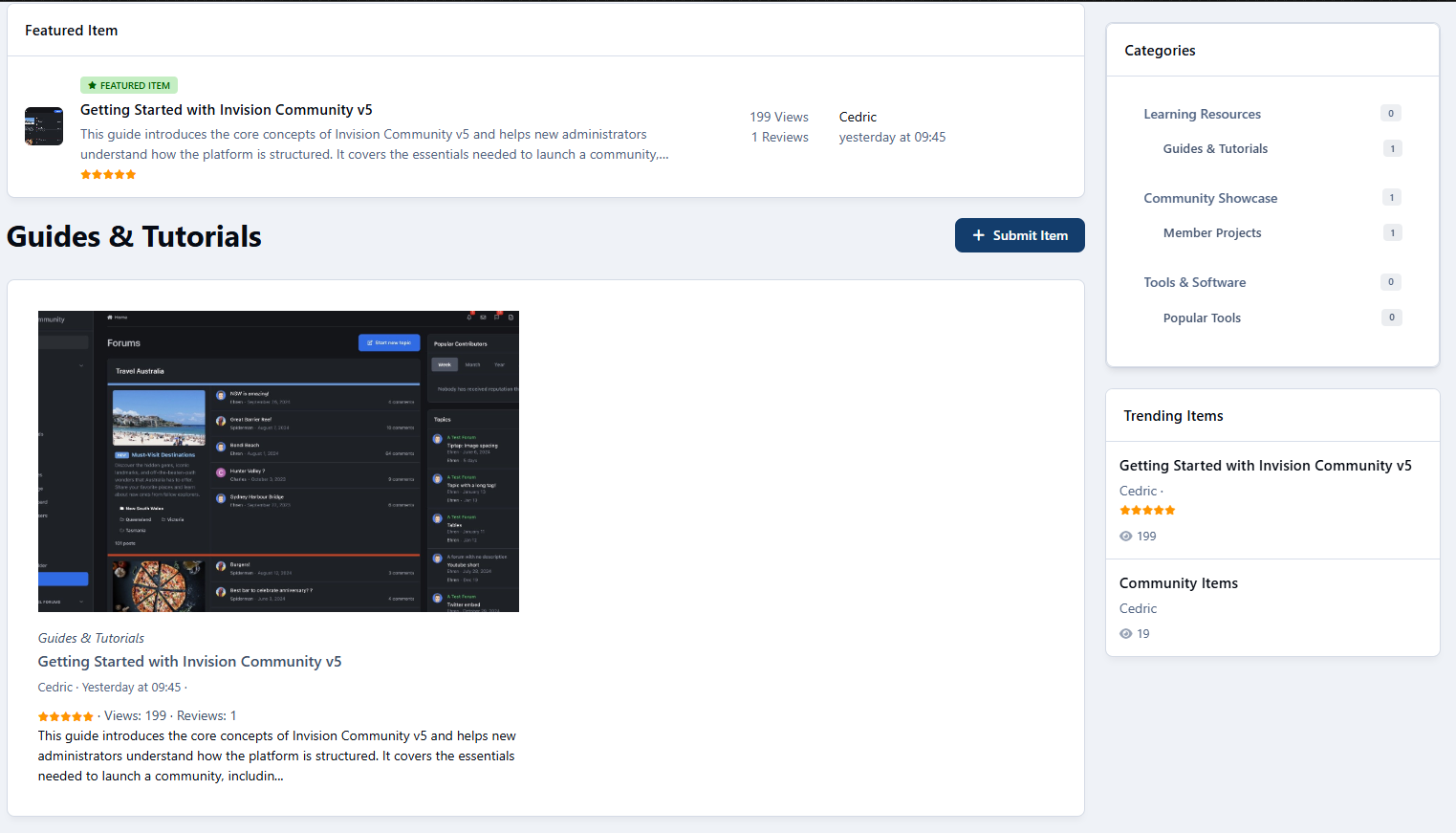
Community Items includes widgets to keep items visible and relevant:
Category navigation
Trending items
Featured items
Statistics
Configurable item lists (grid or list)
Your best content stays in front of your members - not buried three pages deep.

Built for Growth (And What’s Coming Next)
Community Items already handles:
Items
Reviews
Ratings
Q&A
Galleries
Notifications
Auto-topics
And the roadmap goes even further:
Per-category permissions
File downloads
Achievements & badges
Item recommendations
Multi-author items
With more features coming soon, it’s designed to scale as your community does.


IPS5.0.0+
Most communities are full of valuable information.
The problem isn’t content - it’s organization.
Great resources get buried in old threads.
Recommendations repeat.
Questions get asked again and again.
Community Items fixes that.
Community Items is a structured, community-driven Item Management System for Invision Community that lets members create, review, and discuss items in one clean, searchable place - without turning your forum into a database admin panel.
It feels native.
It feels familiar.
And it finally gives your best content a proper home.

Introducing: Community Items
Community Items allows your members to submit and manage items - tools, resources, projects, services, guides, or anything your community cares about - inside a dedicated item directory.
Each item becomes its own hub:
Description
Images
Reviews
Questions & answers
Discussion topics
Everything connected.
Everything easy to find.
No more “Which tool should I use?” threads every week.
No more lost recommendations.
Just structured knowledge that grows with your community.

What Can You Use Community Items For?
Honestly? A lot more than you might expect.
Here are some of the most effective (and popular) use cases.

Resource Libraries (Without the Mess)
Perfect for communities that share tools, websites, or downloads.
Examples:
“Recommended hosting providers”
“Best productivity apps”
“Community-approved plugins”
Each item has:
A clear description
Screenshots or galleries
Reviews from real members
Questions answered once - and reused forever
Instead of long recommendation threads, you get a curated library the community can actually maintain.

Project & Portfolio Showcases
Community Items isn’t just for tools - it’s great for projects.
Use it to showcase:
Member projects
Open-source tools
Community creations
Case studies
Each project becomes an item with:
A featured image
Full description
Update history
Q&A from interested members
A discussion topic that grows naturally
It’s a portfolio system without needing a custom app.

Reviews That Actually Matter
Most forums have reviews… scattered across threads.
Community Items brings them together.
Members can:
Leave 1–5 star ratings
Write full reviews
Vote reviews as helpful
Highlight or pin the best feedback
Admins can:
Moderate reviews
Highlight standout reviews
Keep low-quality noise out
The result?
Reviews that feel credible, useful, and worth reading.

Questions & Answers (Done Right)
Instead of repeating the same questions in multiple threads, each item gets its own Q&A section.
Members can:
Ask questions directly on an item
Reply with threaded answers
Mark the best answer
Item owners stay informed.
New visitors see answers instantly.
And knowledge stops being fragmented.

Automated Discussions (Without Forum Clutter)
Community Items integrates directly with your forums.
When an item is published:
A discussion topic can be created automatically
The topic is linked back to the item
Prefixes and target forums are configurable per category
This keeps conversation flowing without flooding your forums with duplicate or messy threads.
Items stay structured.
Discussions stay social.

Category-Based Organization That Makes Sense
Not everything belongs in one big list.
Community Items supports:
Hierarchical categories
Category-specific custom fields
Per-category forums for discussion
Category-based widgets and listings
Each category can be tailored to the type of items it contains - whether that’s software, services, tutorials, or projects.

Designed to Feel Native (Because It Is)
Community Items isn’t bolted on.
It:
Uses IPS permissions
Integrates with reactions and notifications
Supports widgets across your community
Feels at home in list or grid layouts
Members don’t have to learn a new system.
They just start using it.

Widgets That Surface the Good Stuff
Community Items includes widgets to keep items visible and relevant:
Category navigation
Trending items
Featured items
Statistics
Configurable item lists (grid or list)
Your best content stays in front of your members - not buried three pages deep.

Built for Growth (And What’s Coming Next)
Community Items already handles:
Items
Reviews
Ratings
Q&A
Galleries
Notifications
Auto-topics
And the roadmap goes even further:
Per-category permissions
File downloads
Achievements & badges
Item recommendations
Multi-author items
With more features coming soon, it’s designed to scale as your community does.


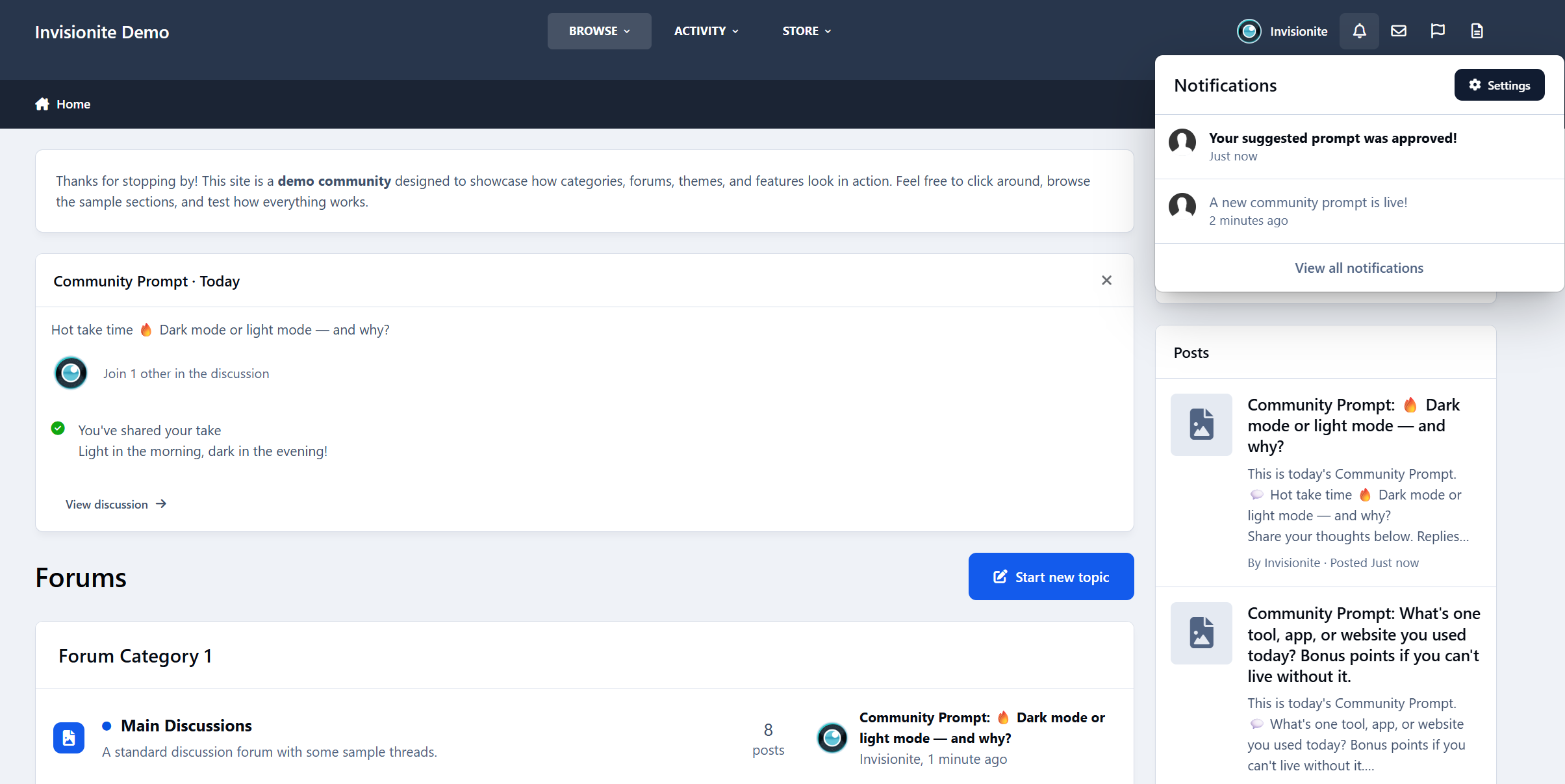
Community Prompts — Better Conversations, Every Day
Keeping a community active isn’t always about big features.
Sometimes it’s just about giving people something easy to respond to.
Introducing: Community Prompts
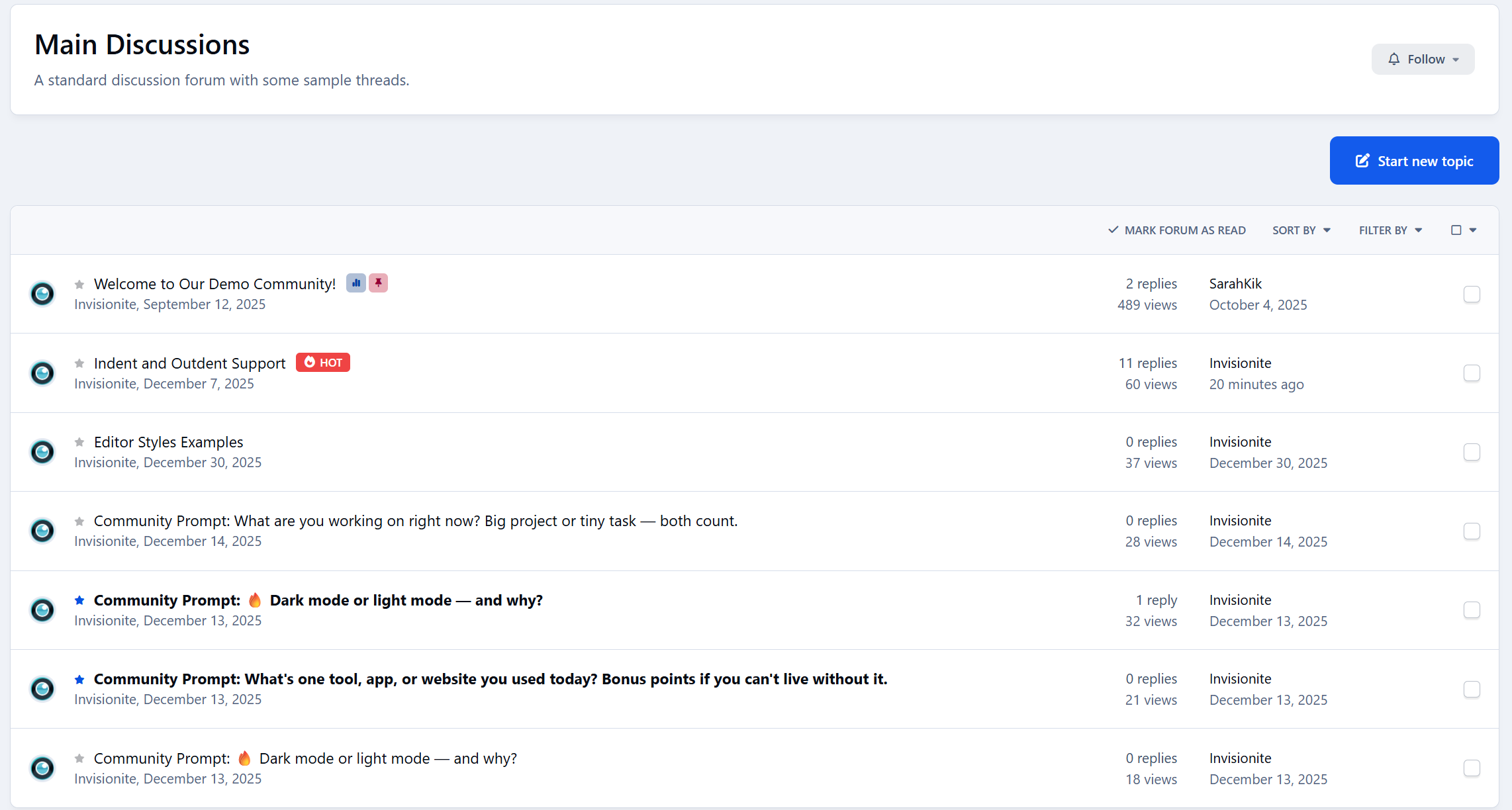
Community Prompts lets you post short, low-effort questions to your community - daily, weekly, or whenever you choose - and gives members an easy way to jump in without overthinking it.
No pressure. No long posts required. Just a simple prompt and a conversation that grows naturally.

Features:
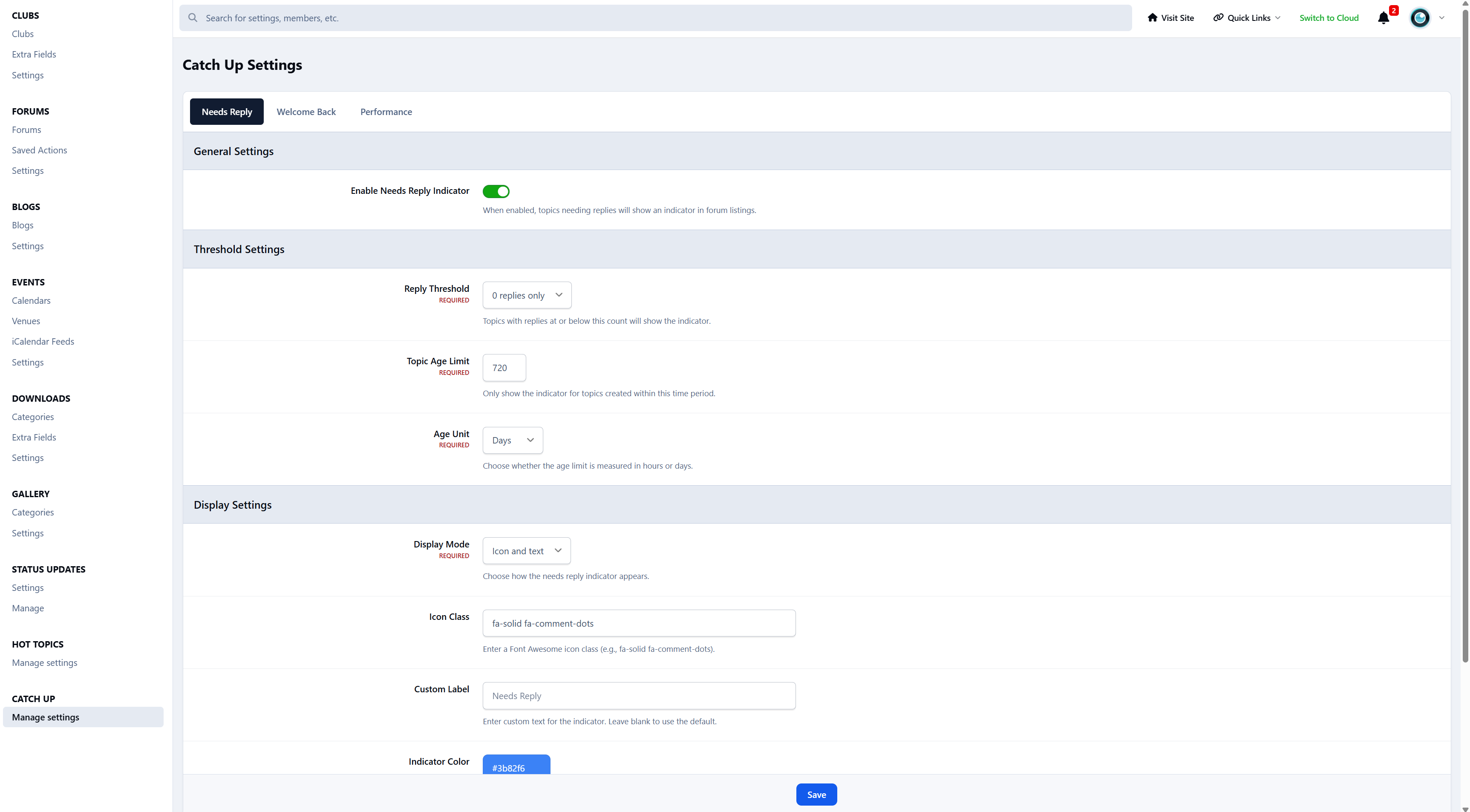
Daily/Weekly rotating community prompts to engage members
Optional automatic topic creation.
10 premade prompts to get started
Prompt approval queue for administrators
Notification system:
Notifies members when a new community prompt is live
Notifies members when their suggested prompt is approved/denied
ACP setting to enable/disable new prompt notifications
Batch notification delivery for performance (with notification count updates)
ACP management:
Add, edit, delete, and activate prompts
View and manage prompt responses
Settings section for notification preferences
Widget for displaying today’s prompt and recent responses
Current prompt page
Responses page
History page
Clean integration with IPS navigation

So… what can you actually use it for?
A lot, as it turns out. It's exceptionally powerful.
Here are some of the most common (and effective) ways your community could use it for.

Community Icebreakers
For new or quiet communities, starting a conversation can feel awkward.
Prompts work as soft icebreakers:
“How did you find this community?”
“Where are you posting from today?”
“What’s one thing you’re hoping to learn here?”
New members don’t have to create a full thread or introduction.
They just reply - and suddenly they’re part of the conversation.

Micro-Surveys (Without Survey Fatigue)
Instead of formal polls or surveys, prompts let you ask questions casually.
Examples:
“Do you prefer shorter or longer tutorials?”
“What feature should we improve next?”
“Dark mode or light mode?”
You get real feedback, but it feels like a conversation - not a questionnaire.
When auto-topics are enabled, replies are automatically collected into a discussion thread you can review later.

Content Seeding Tool
Every community has days where things feel… quiet.
Community Prompts helps you seed discussion without forcing it:
“What’s one challenge you’re facing right now?”
“Share one tip you wish you knew earlier.”
“What are you working on this week?”
Members don’t have to think of something to post — the prompt does the work for them.

Culture Steering (Without Rules or Lectures)
You can subtly shape the tone of your community just by asking the right questions.
For example:
“Help someone today with advice you wish you had.”
“What’s one positive thing you’ve seen in the community recently?”
“What’s a beginner mistake we can help people avoid?”
No enforcement. No announcements.
Just gentle direction that encourages the kind of replies you want to see more of.

Events & Announcements Companion
Prompts work beautifully alongside announcements and launches.
Instead of one-way posts:
“We just launched a new feature - what do you think so far?”
“How are you using the update?”
“What should we focus on next?”
The announcement goes out as usual, and the prompt gives people a place to respond naturally.

Education & Learning Reinforcement
For learning communities, prompts act as lightweight reflection tools:
“What’s one thing you learned today?”
“Which part of the lesson was confusing?”
“What would you explain differently to a beginner?”
This encourages active thinking and peer-to-peer help - without turning learning into homework.

Creator & Expert Visibility
Prompts are a great way to surface experienced members without putting them on the spot.
Examples:
“What’s one mistake beginners should avoid?”
“What would you do differently if you started today?”
Experts reply naturally, newer members learn, and knowledge gets shared without formal roles or titles.

A Lightweight Social Feed (Forum-Friendly)
Some communities want short-form interaction without turning into a chat app.
Community Prompts creates a controlled, low-noise feed:
One prompt at a time
Focused discussion
No endless scrolling
It feels modern, but still fits naturally into a forum environment.

A Living Community Archive
Over time, prompts become a snapshot of your community:
Opinions changing
Tools evolving
Trends appearing
Ask the same prompt once a year and you’ll literally see growth and change - all stored neatly in auto-created discussion topics.

How It Works (At a Glance)
Prompts appear via widgets on the forum index
Members reply directly from the prompt
Optional automatic discussion topics collect replies
Admins can manually or let the time automatically rotate prompts
Members can suggest and vote on future prompts
Everything stays lightweight and easy to manage.

Smart Topic Creation
Community Prompts handles discussion topics intelligently to avoid clutter and keep conversations relevant:
If a discussion topic already exists for a prompt and is still recent, it will be reused, with a short notice added to let members know the prompt is live again.
If a topic exists but hasn’t been active for over six months, a new discussion topic will be created.
If no topic exists for the prompt, a new topic will be created automatically.
This keeps your forums tidy, avoids duplicate threads, and ensures recurring prompts always feel fresh and relevant.

Final Thought
Community Prompts isn’t about forcing activity.
It’s about lowering the barrier so conversations happen naturally.
A simple question.
A few replies.
A community that feels alive again.
If you’ve ever thought “people just need a reason to post” - this is that reason.
IPS5.0.0+
Community Prompts — Better Conversations, Every Day
Keeping a community active isn’t always about big features.
Sometimes it’s just about giving people something easy to respond to.
Introducing: Community Prompts
Community Prompts lets you post short, low-effort questions to your community - daily, weekly, or whenever you choose - and gives members an easy way to jump in without overthinking it.
No pressure. No long posts required. Just a simple prompt and a conversation that grows naturally.

Features:
Daily/Weekly rotating community prompts to engage members
Optional automatic topic creation.
10 premade prompts to get started
Prompt approval queue for administrators
Notification system:
Notifies members when a new community prompt is live
Notifies members when their suggested prompt is approved/denied
ACP setting to enable/disable new prompt notifications
Batch notification delivery for performance (with notification count updates)
ACP management:
Add, edit, delete, and activate prompts
View and manage prompt responses
Settings section for notification preferences
Widget for displaying today’s prompt and recent responses
Current prompt page
Responses page
History page
Clean integration with IPS navigation

So… what can you actually use it for?
A lot, as it turns out. It's exceptionally powerful.
Here are some of the most common (and effective) ways your community could use it for.

Community Icebreakers
For new or quiet communities, starting a conversation can feel awkward.
Prompts work as soft icebreakers:
“How did you find this community?”
“Where are you posting from today?”
“What’s one thing you’re hoping to learn here?”
New members don’t have to create a full thread or introduction.
They just reply - and suddenly they’re part of the conversation.

Micro-Surveys (Without Survey Fatigue)
Instead of formal polls or surveys, prompts let you ask questions casually.
Examples:
“Do you prefer shorter or longer tutorials?”
“What feature should we improve next?”
“Dark mode or light mode?”
You get real feedback, but it feels like a conversation - not a questionnaire.
When auto-topics are enabled, replies are automatically collected into a discussion thread you can review later.

Content Seeding Tool
Every community has days where things feel… quiet.
Community Prompts helps you seed discussion without forcing it:
“What’s one challenge you’re facing right now?”
“Share one tip you wish you knew earlier.”
“What are you working on this week?”
Members don’t have to think of something to post — the prompt does the work for them.

Culture Steering (Without Rules or Lectures)
You can subtly shape the tone of your community just by asking the right questions.
For example:
“Help someone today with advice you wish you had.”
“What’s one positive thing you’ve seen in the community recently?”
“What’s a beginner mistake we can help people avoid?”
No enforcement. No announcements.
Just gentle direction that encourages the kind of replies you want to see more of.

Events & Announcements Companion
Prompts work beautifully alongside announcements and launches.
Instead of one-way posts:
“We just launched a new feature - what do you think so far?”
“How are you using the update?”
“What should we focus on next?”
The announcement goes out as usual, and the prompt gives people a place to respond naturally.

Education & Learning Reinforcement
For learning communities, prompts act as lightweight reflection tools:
“What’s one thing you learned today?”
“Which part of the lesson was confusing?”
“What would you explain differently to a beginner?”
This encourages active thinking and peer-to-peer help - without turning learning into homework.

Creator & Expert Visibility
Prompts are a great way to surface experienced members without putting them on the spot.
Examples:
“What’s one mistake beginners should avoid?”
“What would you do differently if you started today?”
Experts reply naturally, newer members learn, and knowledge gets shared without formal roles or titles.

A Lightweight Social Feed (Forum-Friendly)
Some communities want short-form interaction without turning into a chat app.
Community Prompts creates a controlled, low-noise feed:
One prompt at a time
Focused discussion
No endless scrolling
It feels modern, but still fits naturally into a forum environment.

A Living Community Archive
Over time, prompts become a snapshot of your community:
Opinions changing
Tools evolving
Trends appearing
Ask the same prompt once a year and you’ll literally see growth and change - all stored neatly in auto-created discussion topics.

How It Works (At a Glance)
Prompts appear via widgets on the forum index
Members reply directly from the prompt
Optional automatic discussion topics collect replies
Admins can manually or let the time automatically rotate prompts
Members can suggest and vote on future prompts
Everything stays lightweight and easy to manage.

Smart Topic Creation
Community Prompts handles discussion topics intelligently to avoid clutter and keep conversations relevant:
If a discussion topic already exists for a prompt and is still recent, it will be reused, with a short notice added to let members know the prompt is live again.
If a topic exists but hasn’t been active for over six months, a new discussion topic will be created.
If no topic exists for the prompt, a new topic will be created automatically.
This keeps your forums tidy, avoids duplicate threads, and ensures recurring prompts always feel fresh and relevant.

Final Thought
Community Prompts isn’t about forcing activity.
It’s about lowering the barrier so conversations happen naturally.
A simple question.
A few replies.
A community that feels alive again.
If you’ve ever thought “people just need a reason to post” - this is that reason.
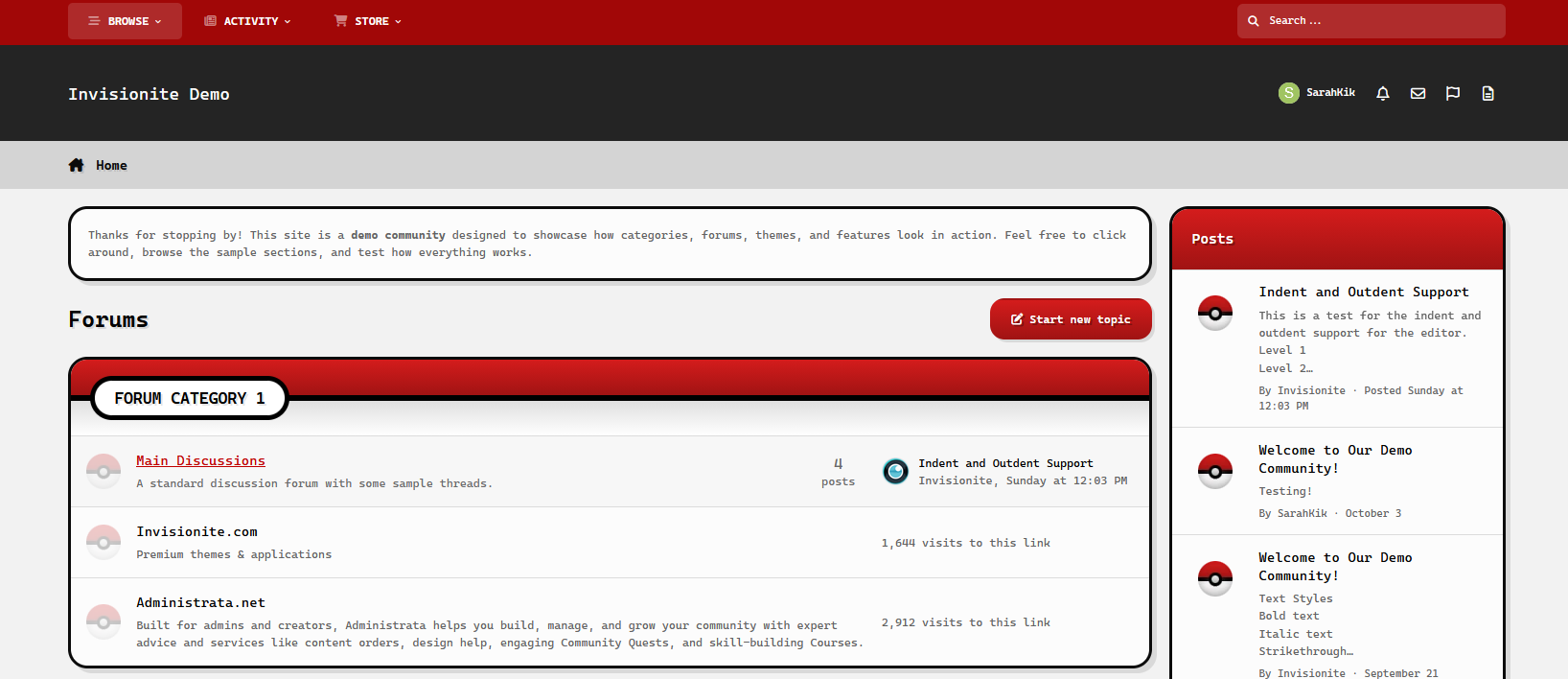
Retro Pokéball — A Pokémon Theme for Invision Community v5
Retro Pokéball is a simple theme inspired by the well loved Pokémon franchise.
Live Demo (select Retro Pokéball)
Highlights
Sleek and clean
Simple, sleek and easy to navigate while clearly paying homage to the series without being overwhelmed.
Nostalgic vibes
The colour scheme, blocky texts and accents are reminiscent of classic video games.
Built for Invision Community v5
Developed using v5’s updated template structure, ensuring modern design standards, improved responsiveness, and compatibility with all core apps.
What’s Included
Complete Invision Community v5 theme
Styled widgets and forum containers
Forum icons and accents
IPS5.0.0+
Retro Pokéball — A Pokémon Theme for Invision Community v5
Retro Pokéball is a simple theme inspired by the well loved Pokémon franchise.
Live Demo (select Retro Pokéball)
Highlights
Sleek and clean
Simple, sleek and easy to navigate while clearly paying homage to the series without being overwhelmed.
Nostalgic vibes
The colour scheme, blocky texts and accents are reminiscent of classic video games.
Built for Invision Community v5
Developed using v5’s updated template structure, ensuring modern design standards, improved responsiveness, and compatibility with all core apps.
What’s Included
Complete Invision Community v5 theme
Styled widgets and forum containers
Forum icons and accents
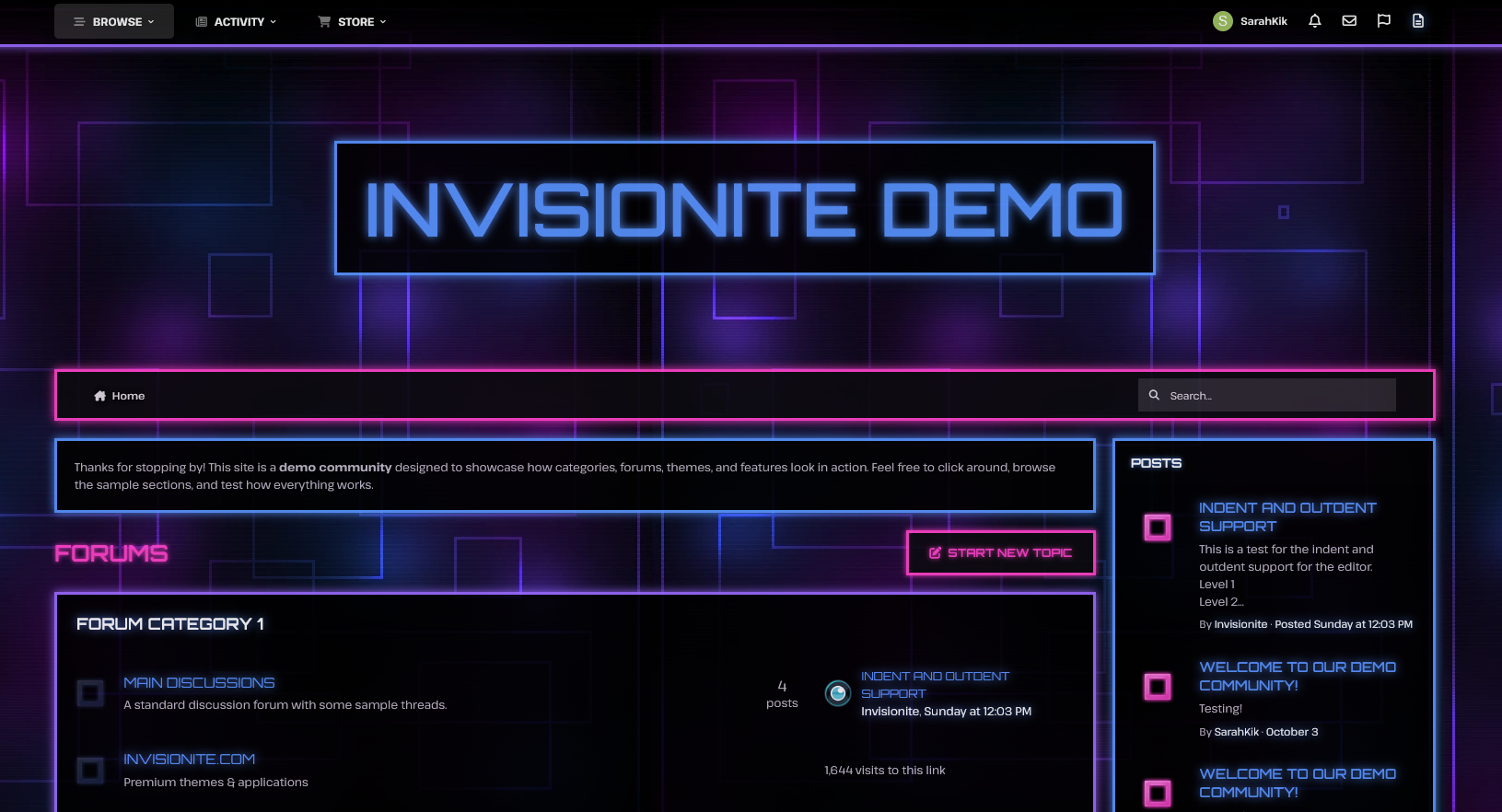
Neon Glow — A Techy Theme for Invision Community v5
Neon Glow is a dramatic, high energy theme with Tron-esque vibes- perfect for communities focused on futuristic sci fi genres, technology, gaming, cyberpunk rpgs and more!
Live Demo (select Neon Glow)
Highlights
Glows & animation
Vibrant glows of blue, pink and purple highlights important content and the animation back and forth blends all three colours.
Energetic and edgy
Neon colours dominate the theme against a dark, grid interface like background for a bold, contrasting aesthetic.
Built for Invision Community v5
Developed using v5’s updated template structure, ensuring modern design standards, improved responsiveness, and compatibility with all core apps.
What’s Included
Complete Invision Community v5 theme
Custom background artwork, forum icons and accents
Styled widgets and forum containers
IPS5.0.0+
Neon Glow — A Techy Theme for Invision Community v5
Neon Glow is a dramatic, high energy theme with Tron-esque vibes- perfect for communities focused on futuristic sci fi genres, technology, gaming, cyberpunk rpgs and more!
Live Demo (select Neon Glow)
Highlights
Glows & animation
Vibrant glows of blue, pink and purple highlights important content and the animation back and forth blends all three colours.
Energetic and edgy
Neon colours dominate the theme against a dark, grid interface like background for a bold, contrasting aesthetic.
Built for Invision Community v5
Developed using v5’s updated template structure, ensuring modern design standards, improved responsiveness, and compatibility with all core apps.
What’s Included
Complete Invision Community v5 theme
Custom background artwork, forum icons and accents
Styled widgets and forum containers
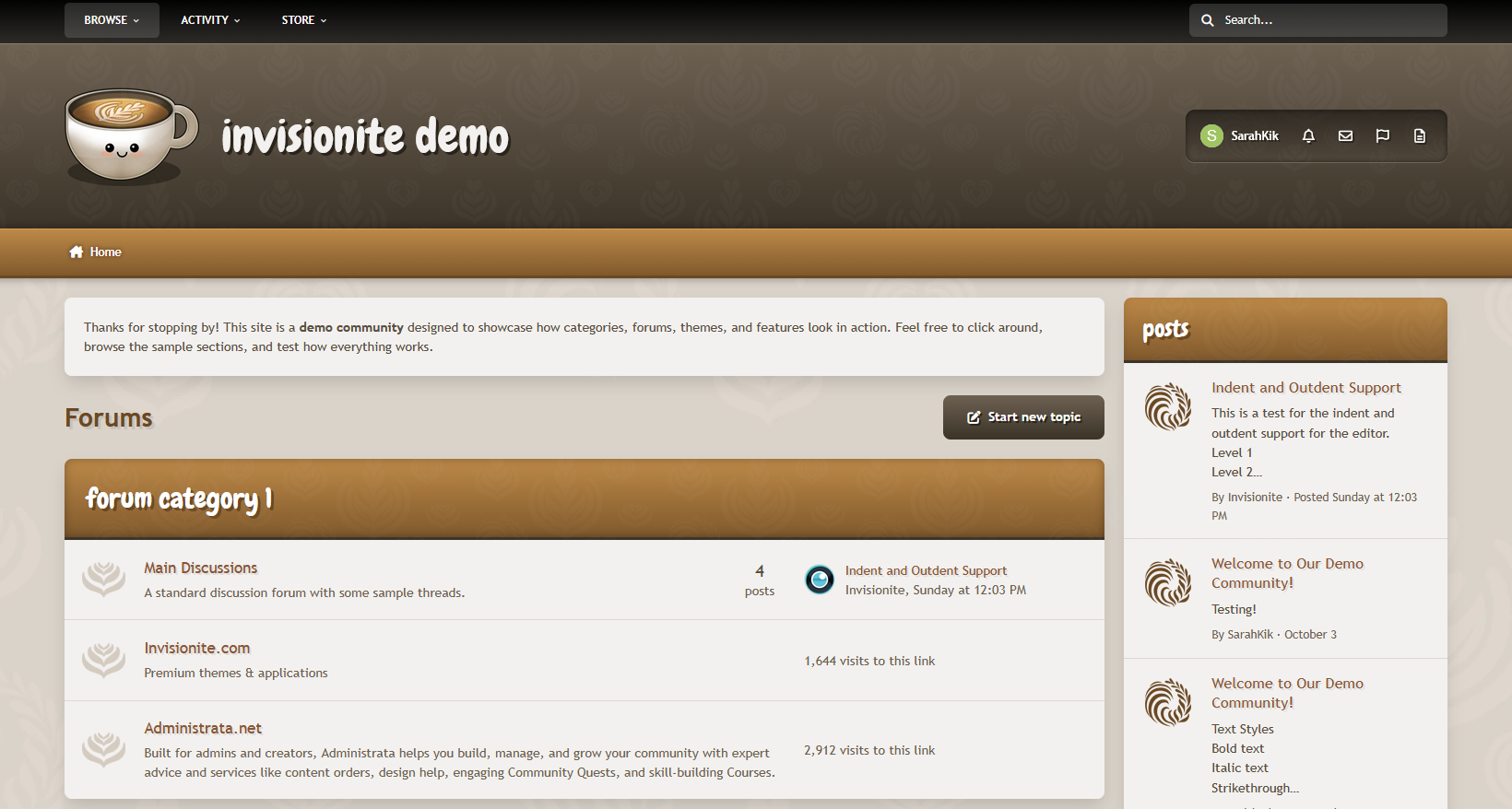
Oh-la-latte — A Cozy Theme for Invision Community v5
Oh-la-latte is a warm coffee inspired theme that uses neutral, soft colours for an inviting feel.
Live Demo (select Oh-la-latte)
Highlights
Friendly, playful and relaxed
Decorative icons and a cute, smiley logo to help communities feel more inviting and warm, like a nice hot cup of coffee!
Cozy layout
The warm browns, caramel hues, and creamy beige colours blend together smoothly for a comfortable mood.
Easy to navigate, clean and readable
Elements are easy on the eyes while remaining content focused, and subtle background patterns add texture without being too distracting.
Built for Invision Community v5
Developed using v5’s updated template structure, ensuring modern design standards, improved responsiveness, and compatibility with all core apps.
What’s Included
Complete Invision Community v5 theme
Custom header, footer, and background artwork
Styled widgets and forum containers
Forum icons and accents
IPS5.0.0+
Oh-la-latte — A Cozy Theme for Invision Community v5
Oh-la-latte is a warm coffee inspired theme that uses neutral, soft colours for an inviting feel.
Live Demo (select Oh-la-latte)
Highlights
Friendly, playful and relaxed
Decorative icons and a cute, smiley logo to help communities feel more inviting and warm, like a nice hot cup of coffee!
Cozy layout
The warm browns, caramel hues, and creamy beige colours blend together smoothly for a comfortable mood.
Easy to navigate, clean and readable
Elements are easy on the eyes while remaining content focused, and subtle background patterns add texture without being too distracting.
Built for Invision Community v5
Developed using v5’s updated template structure, ensuring modern design standards, improved responsiveness, and compatibility with all core apps.
What’s Included
Complete Invision Community v5 theme
Custom header, footer, and background artwork
Styled widgets and forum containers
Forum icons and accents
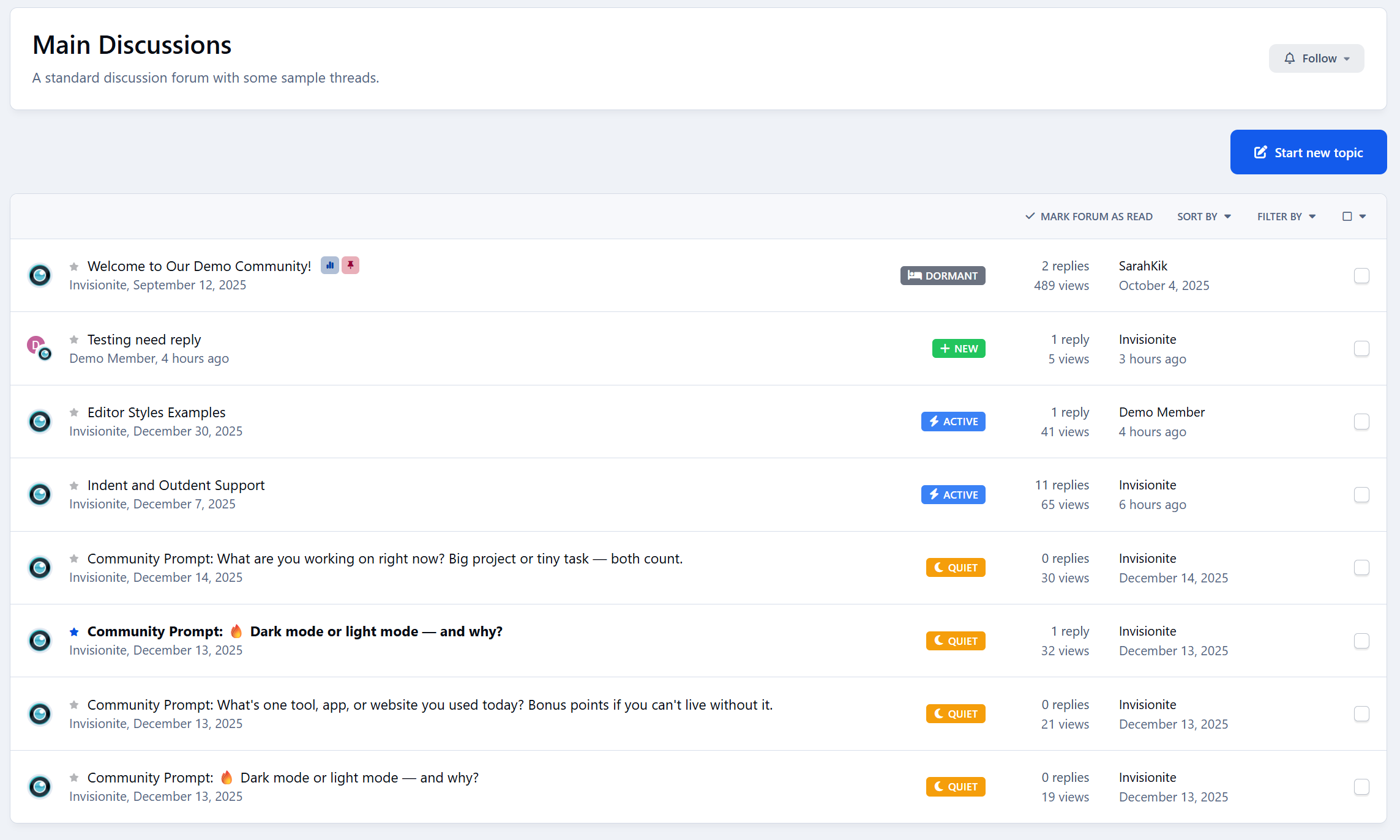
This application adds indent and outdent functionality to the Invision Community V5 editor, a feature that was previously missing from the native editor.


IPS5.0.0+
This application adds indent and outdent functionality to the Invision Community V5 editor, a feature that was previously missing from the native editor.


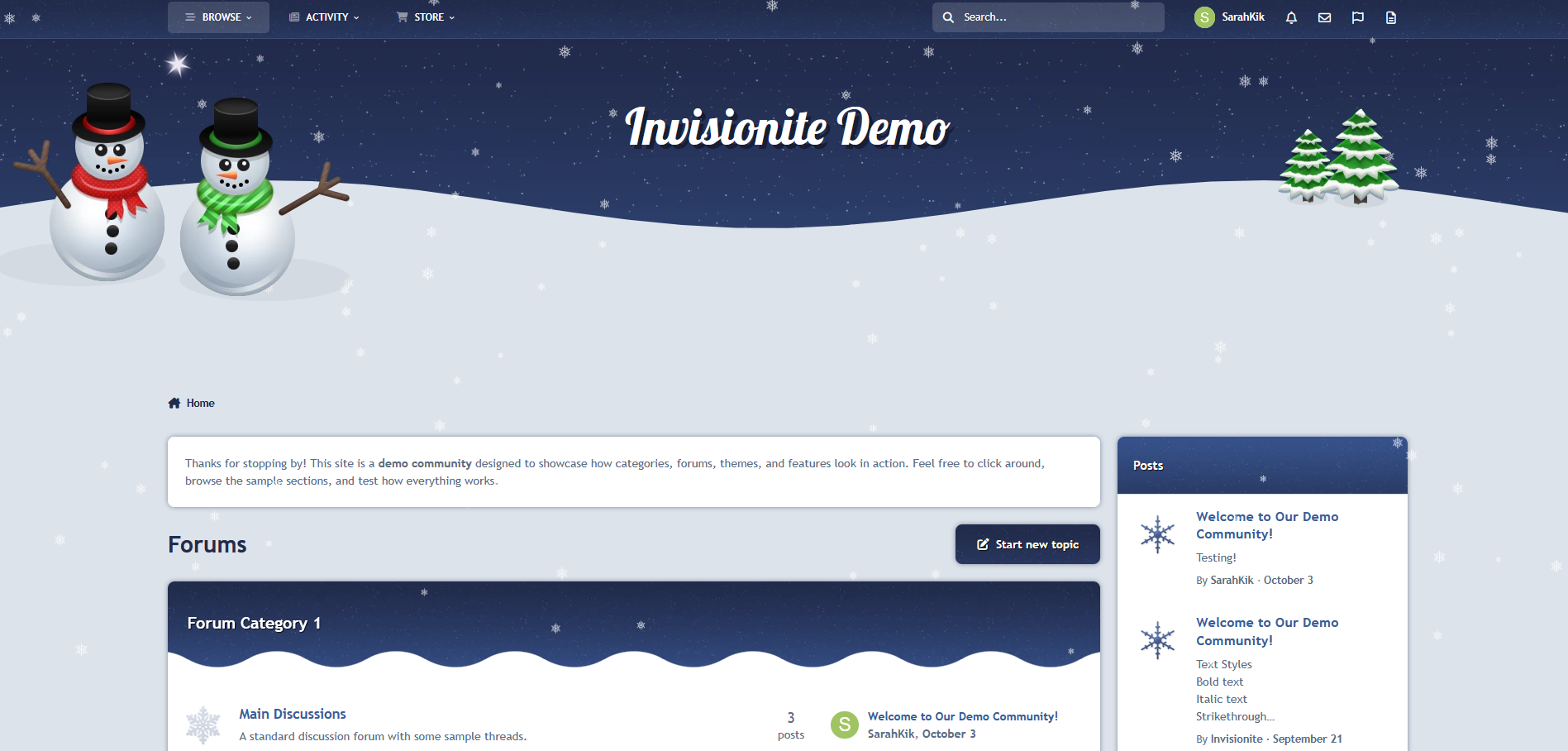
Winter Wonderland — A Wonderful Seasonal Theme for Invision Community v5
Winter Wonderland is a charming take on a classical winter scene with rolling hills of soft snow and a star covered night sky!
Live Demo (select Winter Wonderland)
Highlights
A calm theme
Inspired by a crisp winter night, Winter Wonderland uses a mixture of navy blues and whites to keep things cool.
Falling snow effect
Falling snowflakes immerses users in a winter atmosphere, but this fun feature can still be toggled on and off via the button on the bottom of the page!
Custom seasonal touches
Decorative snowflakes, cheerful friendly snowmen and snow covered trees add pops of colour while still fitting into the theme.
Built for Invision Community v5
Developed using v5’s updated template structure, ensuring modern design standards, improved responsiveness, and compatibility with all core apps.
What’s Included
Complete Invision Community v5 theme
Custom artwork, forum icons and accents
Styled widgets and forum containers
Falling snowflakes by Cedric
IPS5.0.0+
Winter Wonderland — A Wonderful Seasonal Theme for Invision Community v5
Winter Wonderland is a charming take on a classical winter scene with rolling hills of soft snow and a star covered night sky!
Live Demo (select Winter Wonderland)
Highlights
A calm theme
Inspired by a crisp winter night, Winter Wonderland uses a mixture of navy blues and whites to keep things cool.
Falling snow effect
Falling snowflakes immerses users in a winter atmosphere, but this fun feature can still be toggled on and off via the button on the bottom of the page!
Custom seasonal touches
Decorative snowflakes, cheerful friendly snowmen and snow covered trees add pops of colour while still fitting into the theme.
Built for Invision Community v5
Developed using v5’s updated template structure, ensuring modern design standards, improved responsiveness, and compatibility with all core apps.
What’s Included
Complete Invision Community v5 theme
Custom artwork, forum icons and accents
Styled widgets and forum containers
Falling snowflakes by Cedric
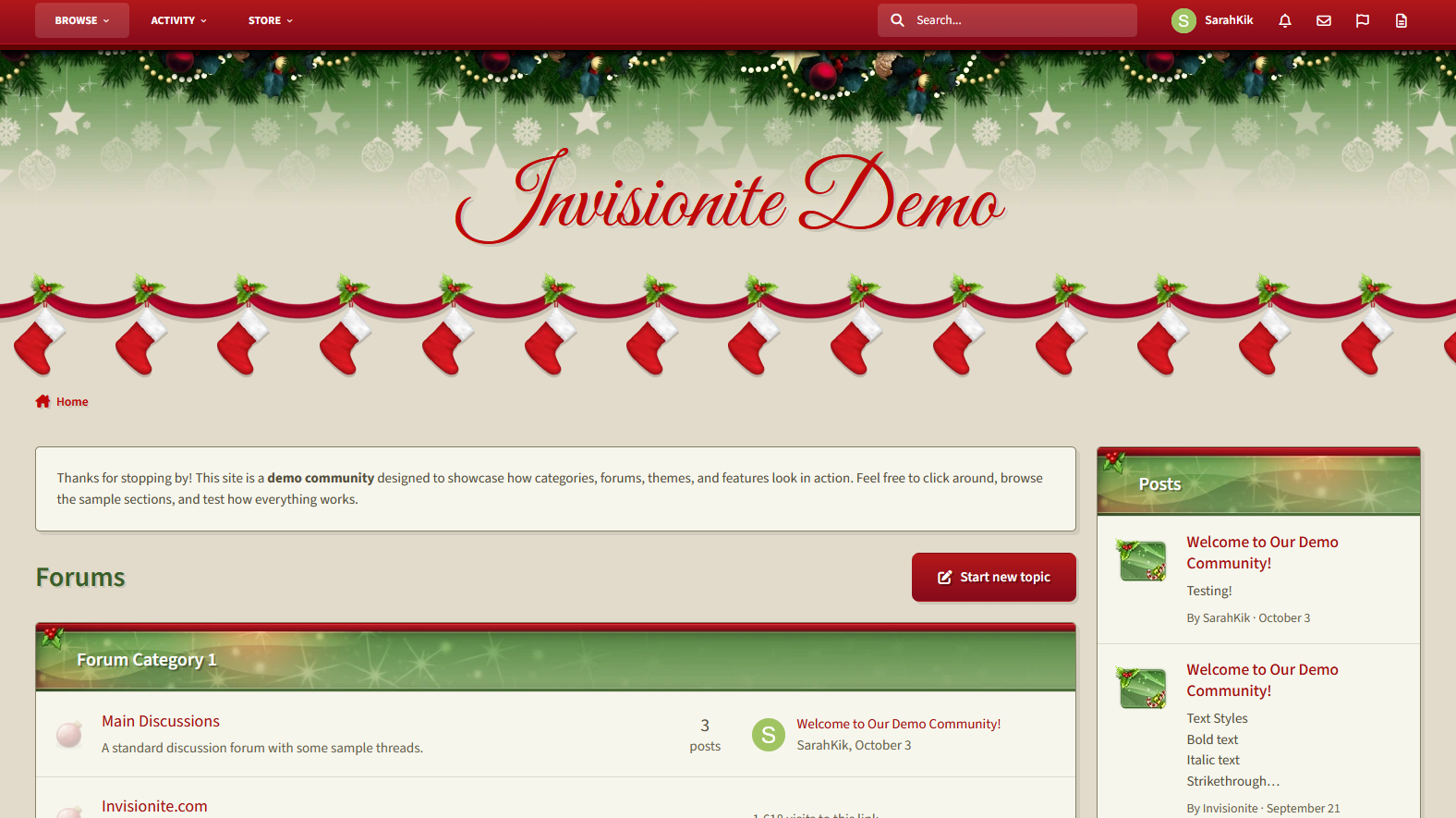
Merry Christmas — A Cheery Seasonal Theme for Invision Community v5
Merry Christmas is a warm, inviting theme for the holiday season!
Live Demo (select Merry Christmas)
Highlights
Cozy layout
The pale soft green is easy on the eyes while the pops of red and green are distinct, cheery and vibrant.
Custom seasonal touches
Stockings are hung with care, and decorations of holly, bulbs and subtle stars make this theme magical like the season!
Built for Invision Community v5
Developed using v5’s updated template structure, ensuring modern design standards, improved responsiveness, and compatibility with all core apps.
What’s Included
Complete Invision Community v5 theme
Styled widgets and forum containers
Custom header, forum icons and accents
IPS5.0.0+
Merry Christmas — A Cheery Seasonal Theme for Invision Community v5
Merry Christmas is a warm, inviting theme for the holiday season!
Live Demo (select Merry Christmas)
Highlights
Cozy layout
The pale soft green is easy on the eyes while the pops of red and green are distinct, cheery and vibrant.
Custom seasonal touches
Stockings are hung with care, and decorations of holly, bulbs and subtle stars make this theme magical like the season!
Built for Invision Community v5
Developed using v5’s updated template structure, ensuring modern design standards, improved responsiveness, and compatibility with all core apps.
What’s Included
Complete Invision Community v5 theme
Styled widgets and forum containers
Custom header, forum icons and accents
Animal Crossing — A Cozy Theme for Invision Community v5
Animal Crossing is inspired by the friendly neighbourhood series of the same name, and could pair well with town roleplays or other farming/village games!
Live Demo (select Animal Crossing)
Highlights
Nice Mediums
This theme offers a "day" and "night" version that are both simple and easy on the eyes, neither are too bright nor too dark, for a relaxing feel.
Inspired without overwhelm
Even if you're unfamiliar with the series, this theme can be used to provide a comfy homey aesthetic that's easy to navigate.
Built for Invision Community v5
Developed using v5’s updated template structure, ensuring modern design standards, improved responsiveness, and compatibility with all core apps.
What’s Included
Complete Invision Community v5 theme
Styled widgets and forum containers
Custom backgrounds, forum icons and accents
IPS5.0.0+
Animal Crossing — A Cozy Theme for Invision Community v5
Animal Crossing is inspired by the friendly neighbourhood series of the same name, and could pair well with town roleplays or other farming/village games!
Live Demo (select Animal Crossing)
Highlights
Nice Mediums
This theme offers a "day" and "night" version that are both simple and easy on the eyes, neither are too bright nor too dark, for a relaxing feel.
Inspired without overwhelm
Even if you're unfamiliar with the series, this theme can be used to provide a comfy homey aesthetic that's easy to navigate.
Built for Invision Community v5
Developed using v5’s updated template structure, ensuring modern design standards, improved responsiveness, and compatibility with all core apps.
What’s Included
Complete Invision Community v5 theme
Styled widgets and forum containers
Custom backgrounds, forum icons and accents
Frostee — A Chilly Theme for Invision Community v5
Frostee is a light, fresh and airy theme that's perfect for welcoming the cold seasons with icy blue tones and fun snowflakes!
Live Demo (select Frostee)
Highlights
Fun winter aesthetic
Cool icy blues, frosty whites, smooth cool gradients and snowflakes make a perfect theme for the chilly season.
Clean and crisp
Like the cold winter air, this theme is clean and fresh with easy readable blues that contrast against the snowy white backgrounds.
Built for Invision Community v5
Developed using v5’s updated template structure, ensuring modern design standards, improved responsiveness, and compatibility with all core apps.
What’s Included
Complete Invision Community v5 theme
Styled widgets and forum containers
Forum icons and accents
IPS5.0.0+
Frostee — A Chilly Theme for Invision Community v5
Frostee is a light, fresh and airy theme that's perfect for welcoming the cold seasons with icy blue tones and fun snowflakes!
Live Demo (select Frostee)
Highlights
Fun winter aesthetic
Cool icy blues, frosty whites, smooth cool gradients and snowflakes make a perfect theme for the chilly season.
Clean and crisp
Like the cold winter air, this theme is clean and fresh with easy readable blues that contrast against the snowy white backgrounds.
Built for Invision Community v5
Developed using v5’s updated template structure, ensuring modern design standards, improved responsiveness, and compatibility with all core apps.
What’s Included
Complete Invision Community v5 theme
Styled widgets and forum containers
Forum icons and accents
Acid — A Radioactive Theme for Invision Community v5
Acid is a dark theme with toxic green glows, perfect for a gaming clans, tech communities, sci-fi fan forums and more!
Live Demo (select Acid)
Highlights
Neon cyber aesthetic
The dark theme and green glow feel mysterious, edgy, and slightly ominous, but also energetic and immersive.
Sleek meets biohazard
Content remains easy to read and navigate while still providing a radioactive, tech hub vibe.
Built for Invision Community v5
Developed using v5’s updated template structure, ensuring modern design standards, improved responsiveness, and compatibility with all core apps.
What’s Included
Complete Invision Community v5 theme
Styled widgets and forum containers
Custom background, forum icons and accents
IPS5.0.0+
Acid — A Radioactive Theme for Invision Community v5
Acid is a dark theme with toxic green glows, perfect for a gaming clans, tech communities, sci-fi fan forums and more!
Live Demo (select Acid)
Highlights
Neon cyber aesthetic
The dark theme and green glow feel mysterious, edgy, and slightly ominous, but also energetic and immersive.
Sleek meets biohazard
Content remains easy to read and navigate while still providing a radioactive, tech hub vibe.
Built for Invision Community v5
Developed using v5’s updated template structure, ensuring modern design standards, improved responsiveness, and compatibility with all core apps.
What’s Included
Complete Invision Community v5 theme
Styled widgets and forum containers
Custom background, forum icons and accents
Blood Red — A Vampiric Theme for Invision Community v5
Blood Red is a red counterpart to Acid, this time decked out with a creepy dark background and pops of vibrant crimson; perfect for communities dedicated to vampire related franchises or horror forums!
Live Demo (select Blood Red)
Highlights
Gothic fantasy
The dark textured background with glows of blood red provides a moody, broody atmosphere.
Vampire vibes
Blood drops and a medieval, bold header font with a sinister red glow embraces a look you might find in vampire coven interiors.
Moody and stylish
The visual tone feels both elegant and menacing, finding balance between gothic luxury and supernatural dread.
Built for Invision Community v5
Developed using v5’s updated template structure, ensuring modern design standards, improved responsiveness, and compatibility with all core apps.
What’s Included
Complete Invision Community v5 theme
Styled widgets and forum containers
Custom background, forum icons and accents
IPS5.0.0+
Blood Red — A Vampiric Theme for Invision Community v5
Blood Red is a red counterpart to Acid, this time decked out with a creepy dark background and pops of vibrant crimson; perfect for communities dedicated to vampire related franchises or horror forums!
Live Demo (select Blood Red)
Highlights
Gothic fantasy
The dark textured background with glows of blood red provides a moody, broody atmosphere.
Vampire vibes
Blood drops and a medieval, bold header font with a sinister red glow embraces a look you might find in vampire coven interiors.
Moody and stylish
The visual tone feels both elegant and menacing, finding balance between gothic luxury and supernatural dread.
Built for Invision Community v5
Developed using v5’s updated template structure, ensuring modern design standards, improved responsiveness, and compatibility with all core apps.
What’s Included
Complete Invision Community v5 theme
Styled widgets and forum containers
Custom background, forum icons and accents
Just Beachy — A Summer Theme for Invision Community v5
Just Beachy is a playful theme with colours and images reminiscent of good, warm days lounging on the beach!
Live Demo (select Just Beachy)

Highlights
Light and inviting
Just Beachy uses a soft light base paired with fun summer colours to make it pleasant to read but still eye catching.
Fun and Playful
A sailboat, beach ball and lawn chair with an umbrella are used to decorate the theme and some drawn artwork in the sand gives it a wholesome touch!
Built for Invision Community v5
Developed using v5’s updated template structure, ensuring modern design standards, improved responsiveness, and compatibility with all core apps.
Perfect for Summer or off season events
It's a great theme if you have the winter blues or want to celebrate the summer season!

What’s Included
Complete Invision Community v5 theme
Styled widgets and forum containers
Custom forum icons and accents
IPS5.0.0+
Just Beachy — A Summer Theme for Invision Community v5
Just Beachy is a playful theme with colours and images reminiscent of good, warm days lounging on the beach!
Live Demo (select Just Beachy)

Highlights
Light and inviting
Just Beachy uses a soft light base paired with fun summer colours to make it pleasant to read but still eye catching.
Fun and Playful
A sailboat, beach ball and lawn chair with an umbrella are used to decorate the theme and some drawn artwork in the sand gives it a wholesome touch!
Built for Invision Community v5
Developed using v5’s updated template structure, ensuring modern design standards, improved responsiveness, and compatibility with all core apps.
Perfect for Summer or off season events
It's a great theme if you have the winter blues or want to celebrate the summer season!

What’s Included
Complete Invision Community v5 theme
Styled widgets and forum containers
Custom forum icons and accents
JuicyFruit — A Vibrant Theme for Invision Community v5
JuicyFruit is a theme that highlights vibrant colours while having the option of a light mode that's soft and inviting and a dark mode that's sleek and high contrast.
Live Demo (select JuicyFruit)

Highlights
Clean and fresh
JuicyFruit minimal and professional but visually structured for colours to pop and draw the eye in.
Built for Invision Community v5
Developed using v5’s updated template structure, ensuring modern design standards, improved responsiveness, and compatibility with all core apps.

What’s Included
Complete Invision Community v5 theme
Styled widgets and forum containers
Forum icons and accents
IPS5.0.0+
JuicyFruit — A Vibrant Theme for Invision Community v5
JuicyFruit is a theme that highlights vibrant colours while having the option of a light mode that's soft and inviting and a dark mode that's sleek and high contrast.
Live Demo (select JuicyFruit)

Highlights
Clean and fresh
JuicyFruit minimal and professional but visually structured for colours to pop and draw the eye in.
Built for Invision Community v5
Developed using v5’s updated template structure, ensuring modern design standards, improved responsiveness, and compatibility with all core apps.

What’s Included
Complete Invision Community v5 theme
Styled widgets and forum containers
Forum icons and accents
Cute Halloween — A Playful Seasonal Theme for Invision Community v5
Cute Halloween is a warm, lighthearted take on the Halloween season — designed to bring a touch of charm and festivity to your community.
It blends cozy fall tones, subtle spooky accents, and clean readability to create a theme that feels both seasonal and inviting.
Live Demo (select Cute Halloween)
Highlights
A friendly take on Halloween
Cute Halloween keeps things approachable and fun, using cheerful ghosts, candy corn details, and soft shadows instead of dark, heavy horror styling.
Cozy dark layout
The purple and orange palette pairs beautifully with a dark background, giving your site a relaxed evening atmosphere that’s easy to read and navigate.
Custom seasonal touches
Decorative ghosts, spiderwebs, and themed forum icons help set the mood without overwhelming your content.
Built for Invision Community v5
Developed using v5’s updated template structure, ensuring modern design standards, improved responsiveness, and compatibility with all core apps.
Perfect for October events
If you’re a fan of Halloween, adding seasonal activities, or just decorating for the month, this theme fits right in.

What’s Included
Complete Invision Community v5 theme
Custom header, footer, and background artwork
Styled widgets and forum containers
Forum icons and accents
IPS5.0.0+
Cute Halloween — A Playful Seasonal Theme for Invision Community v5
Cute Halloween is a warm, lighthearted take on the Halloween season — designed to bring a touch of charm and festivity to your community.
It blends cozy fall tones, subtle spooky accents, and clean readability to create a theme that feels both seasonal and inviting.
Live Demo (select Cute Halloween)
Highlights
A friendly take on Halloween
Cute Halloween keeps things approachable and fun, using cheerful ghosts, candy corn details, and soft shadows instead of dark, heavy horror styling.
Cozy dark layout
The purple and orange palette pairs beautifully with a dark background, giving your site a relaxed evening atmosphere that’s easy to read and navigate.
Custom seasonal touches
Decorative ghosts, spiderwebs, and themed forum icons help set the mood without overwhelming your content.
Built for Invision Community v5
Developed using v5’s updated template structure, ensuring modern design standards, improved responsiveness, and compatibility with all core apps.
Perfect for October events
If you’re a fan of Halloween, adding seasonal activities, or just decorating for the month, this theme fits right in.

What’s Included
Complete Invision Community v5 theme
Custom header, footer, and background artwork
Styled widgets and forum containers
Forum icons and accents

Top Developers

Last reviews

Applications Directory

A complete and convenient directory of applications for Invision Community, with categorization and sorting options.

Ratings and feedback

Only verified and trusted reviews!

Add new Application

Any developer can add their application to this directory.

You need to create account

Configure browser push notifications

Chrome (Android)
  1. Tap the lock icon next to the address bar.
  2. Tap Permissions → Notifications.
  3. Adjust your preference.
Chrome (Desktop)
  1. Click the padlock icon in the address bar.
  2. Select Site settings.
  3. Find Notifications and adjust your preference.