Jump to content
View in the app

A better way to browse. Learn more.

Invision Marketplace

A full-screen app on your home screen with push notifications, badges and more.

To install this app on iOS and iPadOS
  1. Tap the Share icon in Safari
  2. Scroll the menu and tap Add to Home Screen.
  3. Tap Add in the top-right corner.
To install this app on Android
  1. Tap the 3-dot menu (⋮) in the top-right corner of the browser.
  2. Tap Add to Home screen or Install app.
  3. Confirm by tapping Install.

Everything you need for your community

We will be moving to a new server soon, some downtime is expected.

Everything you need for your community

 Loading...
 Loading...
 Loading...
Invision Community has tags. They’re great for discovery, but they’re not built for structure.
Topic Prefixes brings a classification layer to IPS v5: one clear label per topic, admin-defined, forum-scoped, and optionally required.

Admin Features (ACP)
Prefix Management
Create, edit, and delete prefixes
Set title, and display order
Define background and text colors
Add custom CSS per prefix
Enable or disable prefixes at any time
Live visual preview of each prefix directly in the ACP list
Forum Assignment
Assign prefixes to specific forums
Optional “All Forums” behavior (no assignment = available everywhere)
Per-forum “prefix required” toggle
Visual forum tree showing assigned prefixes at a glance
Display
Prefix Selector on Topic Create / Edit
Prefix Display in Topic Lists
Prefix Display in Topic View
Prefix Display on Forum Index

Prefix Filter Bar
Appears above the topic list within forums
Shows only prefixes used in that forum
Displays topic counts per prefix
One-click filtering
“Show All” button to reset the view
Styling System
Two-Tier CSS Architecture
Base styling via ipsBadge and ipsTopicPrefix
Per-prefix styling via ipsTopicPrefix--{id}
Inline colors for simple setups
Full custom CSS support for advanced designs
Final Notes
This app is intentionally not a tag replacement.
It’s a classification tool - for signaling intent, state, or type at a glance.
If you’ve ever wanted prefixes like:
Question / Guide / Tutorial
Solved / Open / WIP
Announcement / Feedback / Discussion
…this does exactly that.
Feedback, suggestions, and edge cases welcome 👍
IPS5.0.0+
Invision Community has tags. They’re great for discovery, but they’re not built for structure.
Topic Prefixes brings a classification layer to IPS v5: one clear label per topic, admin-defined, forum-scoped, and optionally required.

Admin Features (ACP)
Prefix Management
Create, edit, and delete prefixes
Set title, and display order
Define background and text colors
Add custom CSS per prefix
Enable or disable prefixes at any time
Live visual preview of each prefix directly in the ACP list
Forum Assignment
Assign prefixes to specific forums
Optional “All Forums” behavior (no assignment = available everywhere)
Per-forum “prefix required” toggle
Visual forum tree showing assigned prefixes at a glance
Display
Prefix Selector on Topic Create / Edit
Prefix Display in Topic Lists
Prefix Display in Topic View
Prefix Display on Forum Index

Prefix Filter Bar
Appears above the topic list within forums
Shows only prefixes used in that forum
Displays topic counts per prefix
One-click filtering
“Show All” button to reset the view
Styling System
Two-Tier CSS Architecture
Base styling via ipsBadge and ipsTopicPrefix
Per-prefix styling via ipsTopicPrefix--{id}
Inline colors for simple setups
Full custom CSS support for advanced designs
Final Notes
This app is intentionally not a tag replacement.
It’s a classification tool - for signaling intent, state, or type at a glance.
If you’ve ever wanted prefixes like:
Question / Guide / Tutorial
Solved / Open / WIP
Announcement / Feedback / Discussion
…this does exactly that.
Feedback, suggestions, and edge cases welcome 👍
AI-Assisted Moderator for Invision Community 5
Most moderation problems don’t come from bad intent.
They happen because members don’t read rules.
Someone posts, crosses a line without realising it, a moderator steps in, a warning is issued, and what could have been avoided turns into frustration or conflict. Often leading into members leaving your community.
AI-Assisted Moderator fixes that moment.
Instead of reacting after a rule is broken, AIAM gives members a friendly heads-up when they want to post. If a post may go against a rule, the member sees a short notice explaining which rule it relates to and why. They can edit their post or continue anyway.
No blocking. No punishment. No forced changes.
Just awareness before problems happen.
Why this works
Warnings create friction.
Guidance creates understanding.
When members are told before posting, most fix the issue themselves. That means fewer warnings, fewer reports, and a calmer moderation flow overall.
Moderators stay in control.
Members feel respected.
The community benefits.
What AIAM does
Proactively warns members before posting when content may violate a rule
Uses AI-powered analysis (OpenAI supported now, others planned)
Works in any language your community uses
Shows confidence levels (low / medium / high) to avoid unnecessary warnings
Displays friendly warnings inline
Links directly to the relevant rule
Lets members edit their post or dismiss the notice and continue
Optionally use keyword pre-filtering to reduce AI usage and cost
Supports custom rules with titles, descriptions, keywords, scope, and custom messages
Tracks usage, effectiveness, and rule triggers
Flags members who repeatedly ignore warnings, which you can then PM personally
Gives admins full visibility and control at all times
Limits to certain forums or user groups.
AIAM never enforces rules automatically. It assists - nothing more.
Analysis Method
Choose how posts are analysed. You can change this at any time.
Keyword Only (Free)
Uses rule keywords to detect possible issues. No AI involved and no cost.
AI Only (Best accuracy, highest cost)
Every post is checked using AI for maximum accuracy and better understanding of context.
Hybrid (Recommended)
Keywords filter posts first, then AI is used only when needed.
This keeps accuracy high while dramatically reducing AI usage.
In most communities, Hybrid mode cuts AI usage by up to 90%.
Confidence Threshold
Controls how strict AI-Assisted Moderator should be when deciding to show a warning.
This allows you to tune how cautious or relaxed the system should be.
Low - Very strict, catches subtle and borderline cases
Medium - Balanced and recommended for most communities
High - Lenient, only obvious rule issues are flagged
You can adjust this at any time to match your community’s culture.
Admin control
AIAM includes dedicated admin areas for full oversight:
Statistics: usage, costs, effectiveness, charts, and top triggered rules
Rules: create and manage community rules, keywords, scope, and messages
Logs: history with AI responses, confidence, cost, and user actions
Flagged Members: review members who repeatedly dismiss warnings, ability to send PM's.
Settings: all configuration options in one place
Cost & requirements
Costs apply only when AI is used.
Keyword-only checks are completely free.
With ChatGPT (GPT-4o-mini):
FULL AI mode: Around $0.03 per 1,000 offensive triggered posts
Small and medium communities usually spend a few cents per month
Hybrid mode makes this even cheaper by skipping AI when it’s not needed
You can set daily limits, cost limits, and alerts at any time.
Requirements:
An OpenAI (ChatGPT) API key

More features coming soon!
IPS5.0.0+
AI-Assisted Moderator for Invision Community 5
Most moderation problems don’t come from bad intent.
They happen because members don’t read rules.
Someone posts, crosses a line without realising it, a moderator steps in, a warning is issued, and what could have been avoided turns into frustration or conflict. Often leading into members leaving your community.
AI-Assisted Moderator fixes that moment.
Instead of reacting after a rule is broken, AIAM gives members a friendly heads-up when they want to post. If a post may go against a rule, the member sees a short notice explaining which rule it relates to and why. They can edit their post or continue anyway.
No blocking. No punishment. No forced changes.
Just awareness before problems happen.
Why this works
Warnings create friction.
Guidance creates understanding.
When members are told before posting, most fix the issue themselves. That means fewer warnings, fewer reports, and a calmer moderation flow overall.
Moderators stay in control.
Members feel respected.
The community benefits.
What AIAM does
Proactively warns members before posting when content may violate a rule
Uses AI-powered analysis (OpenAI supported now, others planned)
Works in any language your community uses
Shows confidence levels (low / medium / high) to avoid unnecessary warnings
Displays friendly warnings inline
Links directly to the relevant rule
Lets members edit their post or dismiss the notice and continue
Optionally use keyword pre-filtering to reduce AI usage and cost
Supports custom rules with titles, descriptions, keywords, scope, and custom messages
Tracks usage, effectiveness, and rule triggers
Flags members who repeatedly ignore warnings, which you can then PM personally
Gives admins full visibility and control at all times
Limits to certain forums or user groups.
AIAM never enforces rules automatically. It assists - nothing more.
Analysis Method
Choose how posts are analysed. You can change this at any time.
Keyword Only (Free)
Uses rule keywords to detect possible issues. No AI involved and no cost.
AI Only (Best accuracy, highest cost)
Every post is checked using AI for maximum accuracy and better understanding of context.
Hybrid (Recommended)
Keywords filter posts first, then AI is used only when needed.
This keeps accuracy high while dramatically reducing AI usage.
In most communities, Hybrid mode cuts AI usage by up to 90%.
Confidence Threshold
Controls how strict AI-Assisted Moderator should be when deciding to show a warning.
This allows you to tune how cautious or relaxed the system should be.
Low - Very strict, catches subtle and borderline cases
Medium - Balanced and recommended for most communities
High - Lenient, only obvious rule issues are flagged
You can adjust this at any time to match your community’s culture.
Admin control
AIAM includes dedicated admin areas for full oversight:
Statistics: usage, costs, effectiveness, charts, and top triggered rules
Rules: create and manage community rules, keywords, scope, and messages
Logs: history with AI responses, confidence, cost, and user actions
Flagged Members: review members who repeatedly dismiss warnings, ability to send PM's.
Settings: all configuration options in one place
Cost & requirements
Costs apply only when AI is used.
Keyword-only checks are completely free.
With ChatGPT (GPT-4o-mini):
FULL AI mode: Around $0.03 per 1,000 offensive triggered posts
Small and medium communities usually spend a few cents per month
Hybrid mode makes this even cheaper by skipping AI when it’s not needed
You can set daily limits, cost limits, and alerts at any time.
Requirements:
An OpenAI (ChatGPT) API key

More features coming soon!
Ignore Preferences gives your members full control over their browsing experience. This app lets each user decide what content they personally want to hide.
No drama. No clutter. Just a cleaner, more enjoyable community.

What It Does
Members can:
Hide entire forums
Ignore specific topics
Filter out posts using keywords or phrases
Everything is 100% personal and fully reversible.
Forum Filtering
Don’t care about certain sections anymore?
Members can hide whole forums with one click.
Features:
Ignore any forum or category
Button appears directly on forum pages
Easy “Stop Ignoring” option
Perfect for keeping feeds relevant and clutter-free.
Topic Filtering
Seen enough of a certain topic?
Users can ignore individual topics too.
Features:
Ignore button in topic header
Hidden from forum listings
Removed from activity feeds
Reversible anytime
Great for avoiding repetitive or unwanted discussions.
Keyword Filtering
This is where personalization really shines.
Members can block posts containing specific words or phrases.
Features:
Add custom keywords or phrases
Case-insensitive matching
Hidden posts show a clear notice
“Show this post” option if they change their mind
Ideal for avoiding spoilers, drama, politics, or any unwanted topics.
Where Filtering Works
Ignore Preferences works across your entire community:
Forum index
Topic listings
Activity / Discover feed
Widgets
Topic posts (for keywords)
Content is still accessible via direct links - because this is about personal choice, not censorship.
Member-Friendly Interface
Members get a dedicated Preferences Page with:
Tabs for Forums, Topics, and Keywords
Easy removal buttons
Keyword manager
Clear item lists with links
Bonus: Easy access for ignoring members
Everything is simple and intuitive.
Admin Control
You stay in control with:
Enable/disable each filter type
Set limits per user
Optional filtering for notifications & search
Full flexibility for your community’s needs
Why Use Ignore Preferences?
Because not every member wants to see everything.
This app:
Improves user experience
Reduces frustration
Encourages longer visits
Keeps feeds relevant
Respects personal choice

Smarter personalization.
IPS5.0.0+
Ignore Preferences gives your members full control over their browsing experience. This app lets each user decide what content they personally want to hide.
No drama. No clutter. Just a cleaner, more enjoyable community.

What It Does
Members can:
Hide entire forums
Ignore specific topics
Filter out posts using keywords or phrases
Everything is 100% personal and fully reversible.
Forum Filtering
Don’t care about certain sections anymore?
Members can hide whole forums with one click.
Features:
Ignore any forum or category
Button appears directly on forum pages
Easy “Stop Ignoring” option
Perfect for keeping feeds relevant and clutter-free.
Topic Filtering
Seen enough of a certain topic?
Users can ignore individual topics too.
Features:
Ignore button in topic header
Hidden from forum listings
Removed from activity feeds
Reversible anytime
Great for avoiding repetitive or unwanted discussions.
Keyword Filtering
This is where personalization really shines.
Members can block posts containing specific words or phrases.
Features:
Add custom keywords or phrases
Case-insensitive matching
Hidden posts show a clear notice
“Show this post” option if they change their mind
Ideal for avoiding spoilers, drama, politics, or any unwanted topics.
Where Filtering Works
Ignore Preferences works across your entire community:
Forum index
Topic listings
Activity / Discover feed
Widgets
Topic posts (for keywords)
Content is still accessible via direct links - because this is about personal choice, not censorship.
Member-Friendly Interface
Members get a dedicated Preferences Page with:
Tabs for Forums, Topics, and Keywords
Easy removal buttons
Keyword manager
Clear item lists with links
Bonus: Easy access for ignoring members
Everything is simple and intuitive.
Admin Control
You stay in control with:
Enable/disable each filter type
Set limits per user
Optional filtering for notifications & search
Full flexibility for your community’s needs
Why Use Ignore Preferences?
Because not every member wants to see everything.
This app:
Improves user experience
Reduces frustration
Encourages longer visits
Keeps feeds relevant
Respects personal choice

Smarter personalization.
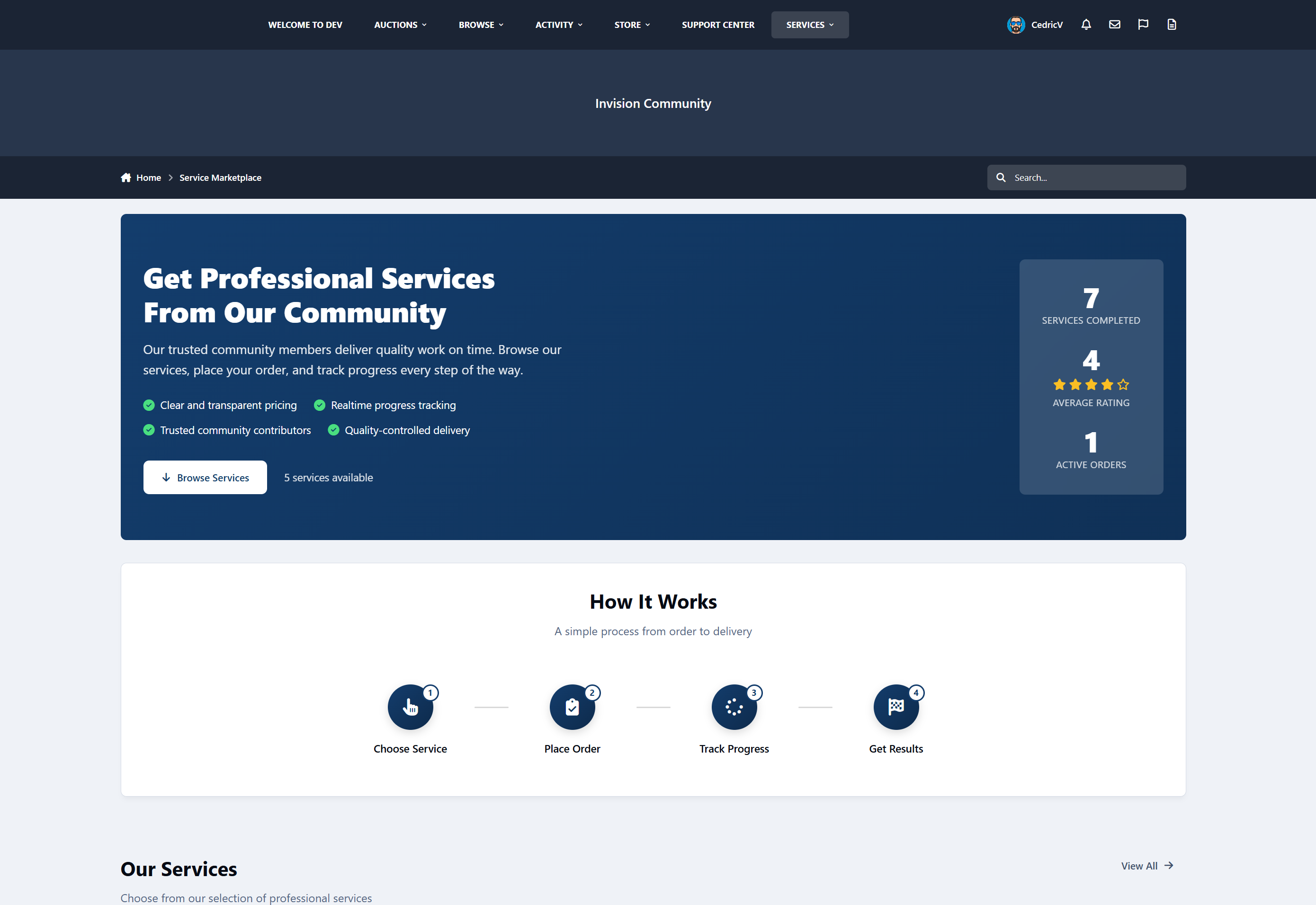
Service Manager is a complete service-order and task-fulfilment system for Invision Community v5.
It allows communities to sell structured services, assign work to staff or providers, track progress, manage commissions, and collect public feedback - all inside the IPS ecosystem.
You can offer things like:
Content services
Moderation teams
Design or development services
Consulting
Community management
Coaching
Support services
etc
Service Manager provides a professional, automated workflow to monetize your community’s expertise.
What Service Manager Does
For Customers
Browse service packages
Place structured orders
Track progress in real time
Communicate with staff
Leave public feedback
For Workers
View available task units
Claim and complete work
Track earnings
View performance statistics
Receive secure account credit payouts
For Admins
Create and manage service packages
Control commission and system rules
View all orders
Monitor staff performance
Access financial reports
Configure the entire system
Service Packages
Admins can create fully configurable service packages with:
Categories
Pricing
Images
Rich text descriptions
Estimated completion time
Task unit quantities
Custom fields (13 types)
Enable/disable controls
Per-package rules
Each purchase automatically creates a Service Order and splits it into Task Units for workers to claim.
Automated Workflow
Customer purchases a service
Payment is confirmed via Nexus
A service order is created
Task units are generated
Workers claim units
Work is completed
Earnings are credited
Customer leaves feedback
All activity is logged, tracked, and secure.
Built-In Communication
Customer to staff messaging
Internal staff notes
Message editing (15-minute window)
Order activity timeline
Notification system
Financial System
Configurable commission system
Earnings ledger
Automatic credit to Nexus accounts
Financial overview in the ACP
Worker performance statistics
Date range filtering
Feedback System
One review per completed order
Publicly visible feedback
Marketplace integration
Automated 3-day reminder
Dashboards
Customer Dashboard
Order history
Status tracking
Feedback submission
Worker Dashboard
Available work
Active work
Earnings overview
Performance statistics
Admin Control Panel
Order management
Financial reports
Staff performance
System settings
Widgets
Open Orders Counter
Recent Feedback Display
No private data is exposed.
Fully Customizable Marketplace Landing Page
Service Manager includes a fully configurable marketplace landing page that lets you control how your services are presented to visitors.
From the Admin Control Panel, you can customize:
Hero section (title, subtitle, benefits)
“How it works” steps
Trust and transparency content
Social proof (stats and testimonials)
Final call-to-action section
Each section can be enabled, disabled, and edited without touching any code, making it easy to adapt the marketplace to any service type or community style.
32+ Configurable Settings
Commission percentage
Worker group eligibility
Maximum claims per worker
Auto-splitting rules
Auto-credit behavior
Feedback reminder delay
Marketplace visibility
Terminology customization
All system terminology can be renamed, for example:
Package => Job
Worker => Staff
Task Unit => Task
Order => Project
Feedback => Review
No logic changes required.
Nexus Commerce Integration
Custom invoice item type
Supports all Nexus payment methods
Free packages supported
Invoice cancellation handling
Automatic order creation

Coming Soon
Front-end service creation: Allow members to create and sell their own services
Worker ratings and reviews: Customers can rate individual workers.
Dispute and refund system: Handle service issues and payment disputes
Worker / Provider Directory
Public profiles showing:
Services offered
Ratings
Reviews
Performance history

IPS5.0.0+
Service Manager is a complete service-order and task-fulfilment system for Invision Community v5.
It allows communities to sell structured services, assign work to staff or providers, track progress, manage commissions, and collect public feedback - all inside the IPS ecosystem.
You can offer things like:
Content services
Moderation teams
Design or development services
Consulting
Community management
Coaching
Support services
etc
Service Manager provides a professional, automated workflow to monetize your community’s expertise.
What Service Manager Does
For Customers
Browse service packages
Place structured orders
Track progress in real time
Communicate with staff
Leave public feedback
For Workers
View available task units
Claim and complete work
Track earnings
View performance statistics
Receive secure account credit payouts
For Admins
Create and manage service packages
Control commission and system rules
View all orders
Monitor staff performance
Access financial reports
Configure the entire system
Service Packages
Admins can create fully configurable service packages with:
Categories
Pricing
Images
Rich text descriptions
Estimated completion time
Task unit quantities
Custom fields (13 types)
Enable/disable controls
Per-package rules
Each purchase automatically creates a Service Order and splits it into Task Units for workers to claim.
Automated Workflow
Customer purchases a service
Payment is confirmed via Nexus
A service order is created
Task units are generated
Workers claim units
Work is completed
Earnings are credited
Customer leaves feedback
All activity is logged, tracked, and secure.
Built-In Communication
Customer to staff messaging
Internal staff notes
Message editing (15-minute window)
Order activity timeline
Notification system
Financial System
Configurable commission system
Earnings ledger
Automatic credit to Nexus accounts
Financial overview in the ACP
Worker performance statistics
Date range filtering
Feedback System
One review per completed order
Publicly visible feedback
Marketplace integration
Automated 3-day reminder
Dashboards
Customer Dashboard
Order history
Status tracking
Feedback submission
Worker Dashboard
Available work
Active work
Earnings overview
Performance statistics
Admin Control Panel
Order management
Financial reports
Staff performance
System settings
Widgets
Open Orders Counter
Recent Feedback Display
No private data is exposed.
Fully Customizable Marketplace Landing Page
Service Manager includes a fully configurable marketplace landing page that lets you control how your services are presented to visitors.
From the Admin Control Panel, you can customize:
Hero section (title, subtitle, benefits)
“How it works” steps
Trust and transparency content
Social proof (stats and testimonials)
Final call-to-action section
Each section can be enabled, disabled, and edited without touching any code, making it easy to adapt the marketplace to any service type or community style.
32+ Configurable Settings
Commission percentage
Worker group eligibility
Maximum claims per worker
Auto-splitting rules
Auto-credit behavior
Feedback reminder delay
Marketplace visibility
Terminology customization
All system terminology can be renamed, for example:
Package => Job
Worker => Staff
Task Unit => Task
Order => Project
Feedback => Review
No logic changes required.
Nexus Commerce Integration
Custom invoice item type
Supports all Nexus payment methods
Free packages supported
Invoice cancellation handling
Automatic order creation

Coming Soon
Front-end service creation: Allow members to create and sell their own services
Worker ratings and reviews: Customers can rate individual workers.
Dispute and refund system: Handle service issues and payment disputes
Worker / Provider Directory
Public profiles showing:
Services offered
Ratings
Reviews
Performance history

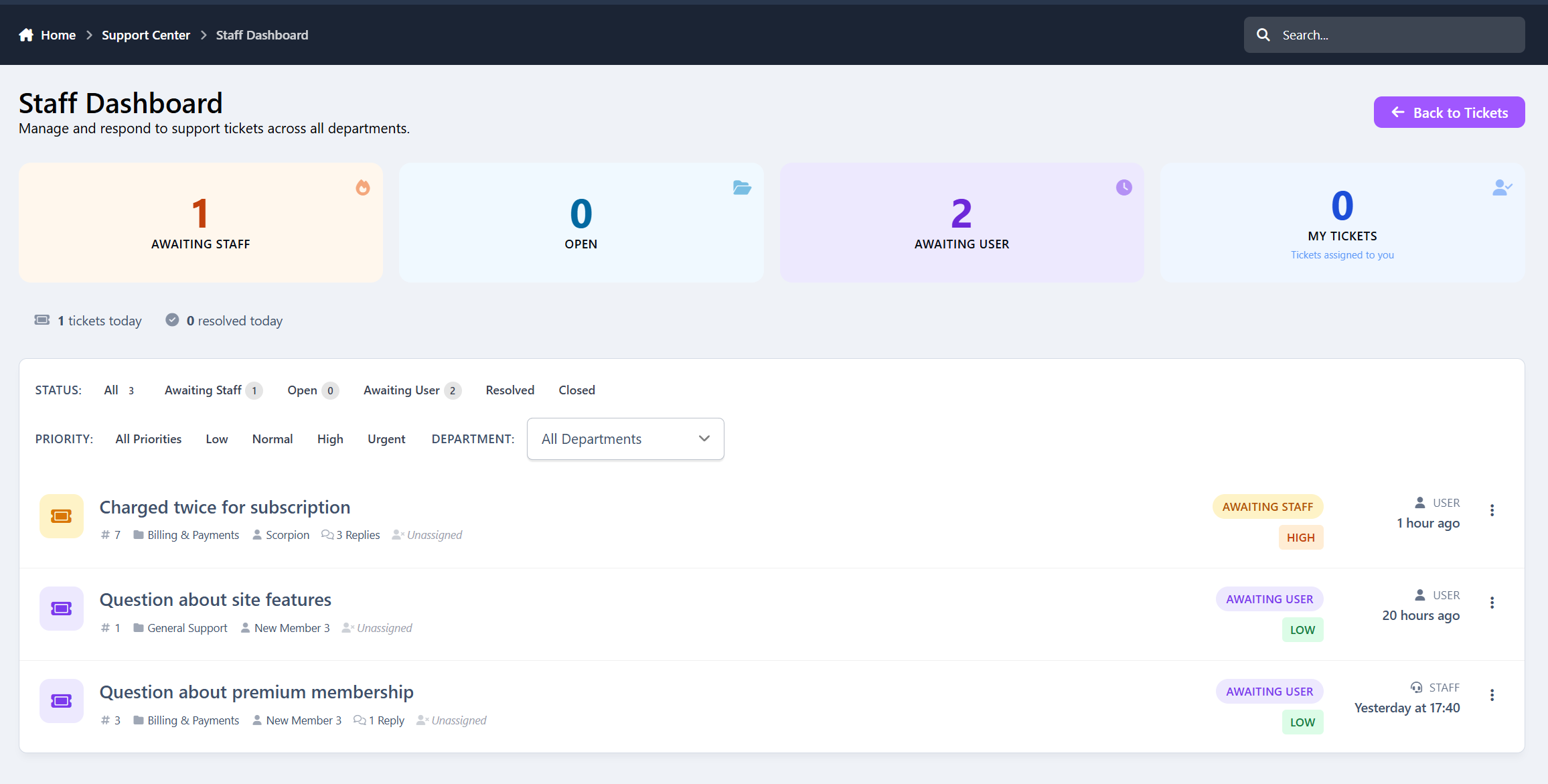
Support Tickets is a full-featured helpdesk and ticket management application built specifically for Invision Community 5.
It gives communities, SaaS platforms, and marketplaces a clean, structured way to handle user support, billing issues, reports, and internal requests - all inside their existing IPS ecosystem.
From simple support questions to urgent billing problems, everything is organized, trackable, and easy to manage.
Support Tickets is perfect for:
Communities & Forums
Handle member support, reports, and account issues professionally.
SaaS Platforms
Manage customer support, bug reports, and feature requests.
Marketplaces
Resolve disputes, billing problems, and seller/buyer questions.
Membership Sites
Support premium users with structured ticket workflows.
If you run anything that involves users, payments, or support, this app fits right in.
Core Features
Ticket - Main support request with 5 statuses
Department - Organize tickets by support category
Reply - Threaded staff & user responses
Priority - Low / Normal / High / Urgent
Canned Responses - Quick staff replies
Notes - Internal staff-only comments
Logs - Full activity tracking
Admin & Staff Tools
Full ticket management (view, reply, assign, delete, close)
Department management with staff group assignments
Priority system with color-coded levels
Canned response management
Statistics dashboard with date filtering
Configurable settings for fine-tuning
Staff dashboard with filters (status, priority, department, assigned)
User Features
Submit support tickets from the front-end
Track ticket status and replies
Reply to staff responses
View ticket history
Upload attachments
Staff Workflow
Assign tickets to yourself
Change status, priority, and department
Add internal notes
View full activity history
Use canned responses
Staff-only dashboard
Automation & Notifications
Auto-close inactive tickets
4 notification types
Custom email templates
Navigation menu integration
Clean, Modern Interface
Support Tickets is designed to feel:
Professional
Clean
Easy to scan
Optimized for staff workflows
Friendly for users
No clutter, no confusion - just efficient support management.
IPS5.0.0+
Support Tickets is a full-featured helpdesk and ticket management application built specifically for Invision Community 5.
It gives communities, SaaS platforms, and marketplaces a clean, structured way to handle user support, billing issues, reports, and internal requests - all inside their existing IPS ecosystem.
From simple support questions to urgent billing problems, everything is organized, trackable, and easy to manage.
Support Tickets is perfect for:
Communities & Forums
Handle member support, reports, and account issues professionally.
SaaS Platforms
Manage customer support, bug reports, and feature requests.
Marketplaces
Resolve disputes, billing problems, and seller/buyer questions.
Membership Sites
Support premium users with structured ticket workflows.
If you run anything that involves users, payments, or support, this app fits right in.
Core Features
Ticket - Main support request with 5 statuses
Department - Organize tickets by support category
Reply - Threaded staff & user responses
Priority - Low / Normal / High / Urgent
Canned Responses - Quick staff replies
Notes - Internal staff-only comments
Logs - Full activity tracking
Admin & Staff Tools
Full ticket management (view, reply, assign, delete, close)
Department management with staff group assignments
Priority system with color-coded levels
Canned response management
Statistics dashboard with date filtering
Configurable settings for fine-tuning
Staff dashboard with filters (status, priority, department, assigned)
User Features
Submit support tickets from the front-end
Track ticket status and replies
Reply to staff responses
View ticket history
Upload attachments
Staff Workflow
Assign tickets to yourself
Change status, priority, and department
Add internal notes
View full activity history
Use canned responses
Staff-only dashboard
Automation & Notifications
Auto-close inactive tickets
4 notification types
Custom email templates
Navigation menu integration
Clean, Modern Interface
Support Tickets is designed to feel:
Professional
Clean
Easy to scan
Optimized for staff workflows
Friendly for users
No clutter, no confusion - just efficient support management.
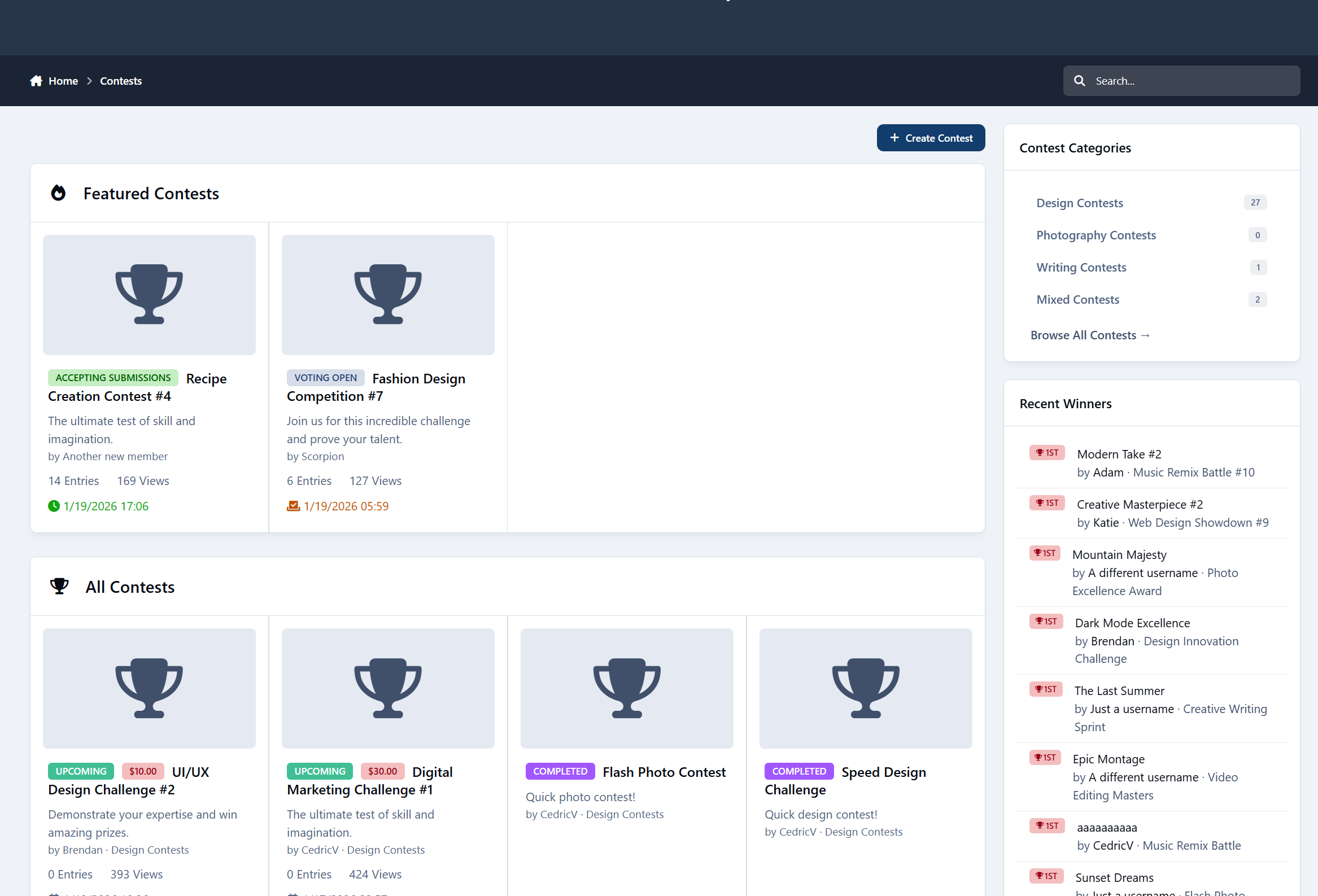
Turn your community into an active, competitive, and creative space with Community Contests - a full-featured contest management application for Invision Community v5.
Run photography contests, writing challenges, video competitions, design battles, and more - all with automated phases, voting, judges, prizes, and leaderboards.
Reward creativity, boost engagement, or run paid competitions, this app has you covered.

What Is Community Contests?
Community Contests is a complete contest system that lets you:
Create structured competitions
Accept member submissions
Enable voting or judging
Pick winners automatically
Award prizes
Track stats and achievements

Everything is fully integrated into Invision Community’s content system.
Contest Types
Create contests for:
Photo submissions
Video entries
Writing / essays
File uploads
External links
Or any mixed format
Each contest can have its own rules, images, categories, and settings.
Automated Contest Phases
No manual switching required.
Contests automatically move through:
Pending
Accepting Submissions
Voting
Completed
You control the dates, and the system handles the rest.
Flexible Voting System
Choose how winners are decided:
Public Voting
Members rate entries (1–5 stars)
Judge Scoring
Assigned judges have a dedicated dashboard to score entries (1–10) with optional feedback
Hybrid Mode
Combine public votes + judge scores
Features include:
Vote change options
Anonymous voting
Live leaderboards
Automatic score calculation
Built-In Judge System
Assign multiple judges per contest with:
A dedicated judging dashboard
Progress tracking
Visual status indicators
Score + feedback per entry
Perfect for serious competitions or staff-run events.
Winners & Prizes
Support for:
1st, 2nd, and 3rd place
Automatic or manual winner selection
Winner announcements & notifications
Prize options:
Cash
Store credit (Nexus), Invoices included
Or just recognition
Paid contests are supported with:
Entry fees
Invoice-based prize funding
Automatic payouts
Multi-currency support
Submission System
Members can submit:
Rich text entries
Images & files
External links
With features like:
View counters
Comment system
Edit permissions
Approval queues
Admin moderation tools
Smart Notifications
Members are notified when:
Contests start
Voting opens
Contests end
They win
Prizes are paid
Submissions are approved
New comments arrive
Keeps everyone engaged without manual announcements.
Achievements Integration
Automatically unlock achievements for:
Entering contests
Voting
Winning
Great for gamification and motivation.
Stats & Leaderboards
Track everything:
Total contests
Submissions
Votes
Prize money
Top winners
Earnings leaderboard
Hall of Fame
Recent winners
Includes live leaderboards during voting.
Widgets Included
Display contests across your community with:
Active Contests
Featured Contests
Countdown Timers
Categories
Recent Winners
Perfect for the homepage or sidebars.
Frontend Experience
Mobile-friendly
SEO URLs
Category filtering
Contest search
Image lightbox
Tabbed contest layout
Clean, theme-aware design
Looks great on any device.
Admin Control Panel
Full admin control:
Create & manage contests
Moderate submissions
Assign judges
Manage winners
Track payouts
Configure global settings
View statistics
Permissions System
Control who can:
View contests
Create contests
Submit entries
Vote
Moderate
Manage contests
Works with Invision’s permission system.
Perfect For
Photography communities
Writers & bloggers
Designers
YouTubers
Gaming events
Recipe contests
Music challenges
Creative communities
If your members create content – this app makes it competitive and fun.
IPS5.0.0+
Turn your community into an active, competitive, and creative space with Community Contests - a full-featured contest management application for Invision Community v5.
Run photography contests, writing challenges, video competitions, design battles, and more - all with automated phases, voting, judges, prizes, and leaderboards.
Reward creativity, boost engagement, or run paid competitions, this app has you covered.

What Is Community Contests?
Community Contests is a complete contest system that lets you:
Create structured competitions
Accept member submissions
Enable voting or judging
Pick winners automatically
Award prizes
Track stats and achievements

Everything is fully integrated into Invision Community’s content system.
Contest Types
Create contests for:
Photo submissions
Video entries
Writing / essays
File uploads
External links
Or any mixed format
Each contest can have its own rules, images, categories, and settings.
Automated Contest Phases
No manual switching required.
Contests automatically move through:
Pending
Accepting Submissions
Voting
Completed
You control the dates, and the system handles the rest.
Flexible Voting System
Choose how winners are decided:
Public Voting
Members rate entries (1–5 stars)
Judge Scoring
Assigned judges have a dedicated dashboard to score entries (1–10) with optional feedback
Hybrid Mode
Combine public votes + judge scores
Features include:
Vote change options
Anonymous voting
Live leaderboards
Automatic score calculation
Built-In Judge System
Assign multiple judges per contest with:
A dedicated judging dashboard
Progress tracking
Visual status indicators
Score + feedback per entry
Perfect for serious competitions or staff-run events.
Winners & Prizes
Support for:
1st, 2nd, and 3rd place
Automatic or manual winner selection
Winner announcements & notifications
Prize options:
Cash
Store credit (Nexus), Invoices included
Or just recognition
Paid contests are supported with:
Entry fees
Invoice-based prize funding
Automatic payouts
Multi-currency support
Submission System
Members can submit:
Rich text entries
Images & files
External links
With features like:
View counters
Comment system
Edit permissions
Approval queues
Admin moderation tools
Smart Notifications
Members are notified when:
Contests start
Voting opens
Contests end
They win
Prizes are paid
Submissions are approved
New comments arrive
Keeps everyone engaged without manual announcements.
Achievements Integration
Automatically unlock achievements for:
Entering contests
Voting
Winning
Great for gamification and motivation.
Stats & Leaderboards
Track everything:
Total contests
Submissions
Votes
Prize money
Top winners
Earnings leaderboard
Hall of Fame
Recent winners
Includes live leaderboards during voting.
Widgets Included
Display contests across your community with:
Active Contests
Featured Contests
Countdown Timers
Categories
Recent Winners
Perfect for the homepage or sidebars.
Frontend Experience
Mobile-friendly
SEO URLs
Category filtering
Contest search
Image lightbox
Tabbed contest layout
Clean, theme-aware design
Looks great on any device.
Admin Control Panel
Full admin control:
Create & manage contests
Moderate submissions
Assign judges
Manage winners
Track payouts
Configure global settings
View statistics
Permissions System
Control who can:
View contests
Create contests
Submit entries
Vote
Moderate
Manage contests
Works with Invision’s permission system.
Perfect For
Photography communities
Writers & bloggers
Designers
YouTubers
Gaming events
Recipe contests
Music challenges
Creative communities
If your members create content – this app makes it competitive and fun.
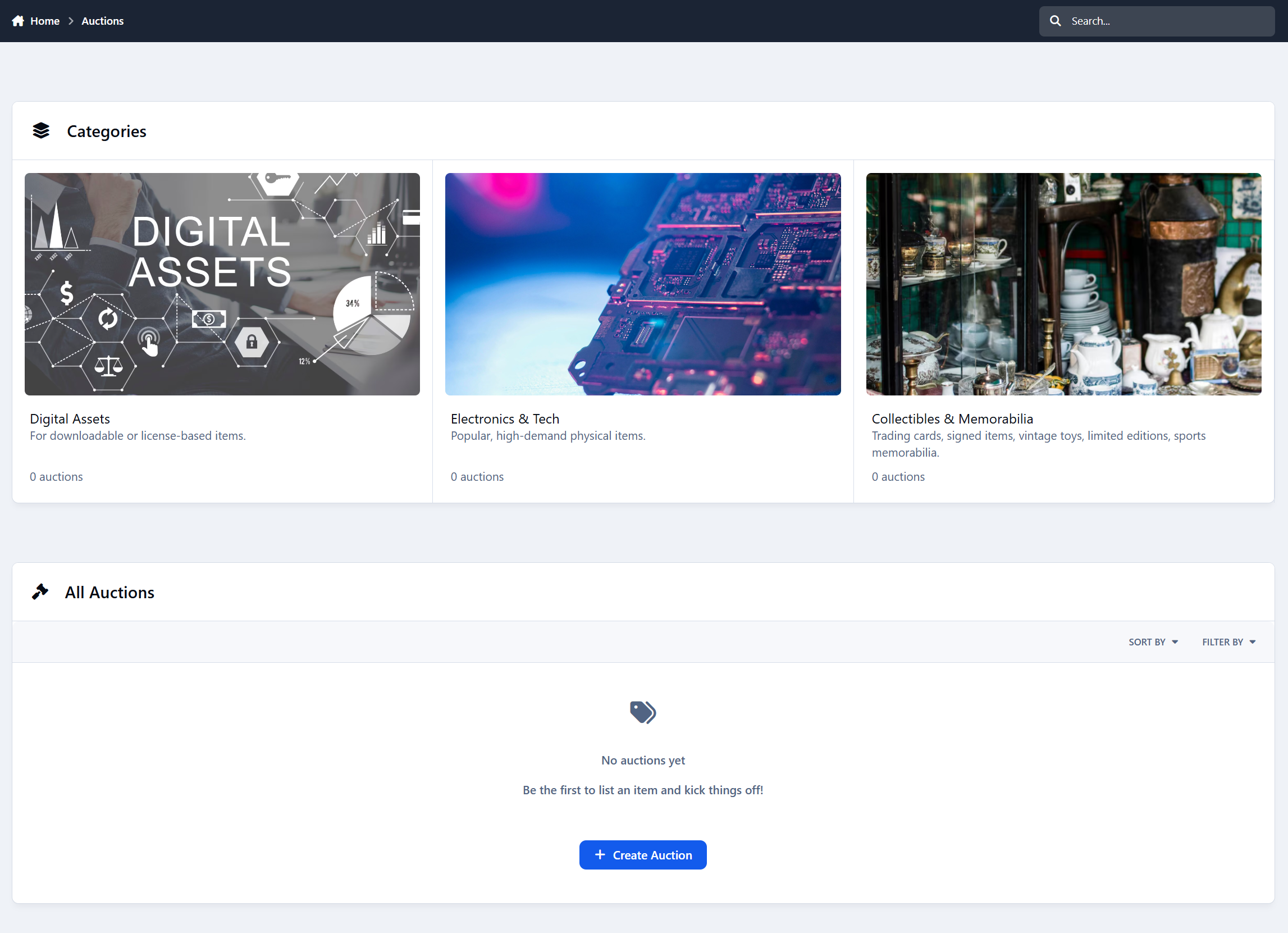
Auctions turns your community into a complete buying and selling platform. Members can list items, place bids, sell digital or physical products, and manage everything through simple dashboards. It feels like a proper marketplace, not just a forum add-on.

Built-In Commission for Admins
Every completed auction automatically applies a platform commission. You set the percentage, and the system handles the rest.
When a buyer pays, the commission is deducted instantly and the seller receives the remaining balance. No manual math, no extra steps, and no chasing payments.
Your marketplace doesn’t just run itself - it can generate revenue for you at the same time.

Key Features at a Glance
Members can create auctions with images, pricing options, durations, and categories
Manual bidding, auto-bidding, and Buy Now purchases
Automatic winner selection and Nexus invoice creation
Seller and buyer dashboards with earnings, bids, and history
Built-in rating system with public trust scores, integrated in profile once rated is given.
Commission system
Full moderation tools and approval queues
Integrated profile rating tabs
Payments handled through Nexus (PayPal, Stripe, Account Credit, etc.)
Admin control over permissions, pricing rules, and marketplace settings

Smart, Fair Bidding
Bidding is simple and transparent. Users can place manual bids, use auto-bidding, or buy instantly if Buy Now is enabled.
The system enforces bid increments, and sends notifications when users are outbid. Anti-snipe protection keeps things fair by extending the timer if last-minute bids come in.

Clean Dashboards for Buyers & Sellers
Sellers get a clear overview of their auctions, sales, earnings, and ratings.
Buyers can track their bids, wins, watchlisted auctions, and payment status.
Everything is organized, easy to understand, and designed to save time.
Sellers can withdraw funds on the dashboard

Ratings & Trust
After each sale, both buyers and sellers can leave ratings. Over time, this builds a public trust score that helps users know who they’re dealing with.
Seller profiles show ratings, sales history, and overall reputation.

Payments Through Nexus
When an auction ends, a Nexus invoice is created automatically. Buyers can pay using any payment method you already support.
The platform takes its commission, and the seller receives their earnings as Account Credit. Withdrawals are handled through Nexus, keeping everything clean and controlled.

Full Moderation Control
Staff can approve listings, hide or lock auctions, feature selected items.
There’s a dedicated approval queue and full moderation support, just like any other IPS content.

Full Admin Control
The ACP gives you control over everything:
Pricing rules, durations, bidding options, commissions, approvals, reputation requirements, category permissions, and more.
You decide how strict or open your marketplace should be.

Coming Soon
Featured monetization tools
Listing Fees
Digital file delivery for downloads
Built-in dispute system for buyer/seller issues
Relist unsold items
IPS5.0.0+
Auctions turns your community into a complete buying and selling platform. Members can list items, place bids, sell digital or physical products, and manage everything through simple dashboards. It feels like a proper marketplace, not just a forum add-on.

Built-In Commission for Admins
Every completed auction automatically applies a platform commission. You set the percentage, and the system handles the rest.
When a buyer pays, the commission is deducted instantly and the seller receives the remaining balance. No manual math, no extra steps, and no chasing payments.
Your marketplace doesn’t just run itself - it can generate revenue for you at the same time.

Key Features at a Glance
Members can create auctions with images, pricing options, durations, and categories
Manual bidding, auto-bidding, and Buy Now purchases
Automatic winner selection and Nexus invoice creation
Seller and buyer dashboards with earnings, bids, and history
Built-in rating system with public trust scores, integrated in profile once rated is given.
Commission system
Full moderation tools and approval queues
Integrated profile rating tabs
Payments handled through Nexus (PayPal, Stripe, Account Credit, etc.)
Admin control over permissions, pricing rules, and marketplace settings

Smart, Fair Bidding
Bidding is simple and transparent. Users can place manual bids, use auto-bidding, or buy instantly if Buy Now is enabled.
The system enforces bid increments, and sends notifications when users are outbid. Anti-snipe protection keeps things fair by extending the timer if last-minute bids come in.

Clean Dashboards for Buyers & Sellers
Sellers get a clear overview of their auctions, sales, earnings, and ratings.
Buyers can track their bids, wins, watchlisted auctions, and payment status.
Everything is organized, easy to understand, and designed to save time.
Sellers can withdraw funds on the dashboard

Ratings & Trust
After each sale, both buyers and sellers can leave ratings. Over time, this builds a public trust score that helps users know who they’re dealing with.
Seller profiles show ratings, sales history, and overall reputation.

Payments Through Nexus
When an auction ends, a Nexus invoice is created automatically. Buyers can pay using any payment method you already support.
The platform takes its commission, and the seller receives their earnings as Account Credit. Withdrawals are handled through Nexus, keeping everything clean and controlled.

Full Moderation Control
Staff can approve listings, hide or lock auctions, feature selected items.
There’s a dedicated approval queue and full moderation support, just like any other IPS content.

Full Admin Control
The ACP gives you control over everything:
Pricing rules, durations, bidding options, commissions, approvals, reputation requirements, category permissions, and more.
You decide how strict or open your marketplace should be.

Coming Soon
Featured monetization tools
Listing Fees
Digital file delivery for downloads
Built-in dispute system for buyer/seller issues
Relist unsold items
A lot of communities are more active than they look.
Members visit.
They browse.
They read.
They come back.
But unless someone is posting right now, that presence is invisible.
Active Members makes that activity visible - quietly and visually.
It adds a simple Active Members widget that shows real members who’ve been around recently, helping your forum feel alive without turning it into a status board.
Presence That Matches the Page
Active Members adapts to where it’s shown.
On a topic, it shows members who’ve been active in that discussion
On a forum, it shows members who’ve been active in that forum
On pages that don’t track individual activity, it gracefully falls back to a global community view
Every placement feels relevant, not recycled.
This makes the widget feel contextual and intentional - not like the same block repeated everywhere.
Clean, Adaptive Layout
The avatar display automatically adjusts to available space:
Shows as many avatars as fit
Neatly collapses extras into a “+X” indicator
Looks good on desktop, tablet, and mobile
You don’t need to design around it.
It adapts on its own.
Presence
Controls who counts as “active”.
Presence time window
Numeric value (e.g. 24)
Time unit
Minutes, hours, days, weeks, or year
Together, these define which members are considered active and eligible to appear in the widget.
Example:
“Members who visited in the past 24 hours” or “past year”.
Display
Controls how the widget looks and behaves.
Avatar Display
Default avatar size
Maximum avatars
Adaptive avatar count
Visual Indicators
Online indicator
Online indicator color
Text Display
Summary text
Time period text
Widget-Level Overrides
Each widget instance can override global settings, including:
Custom title
Presence window & unit
Context mode (auto / global / forum / topic)
Avatar size
Maximum avatars
Online indicator and color
Tooltips
Summary text options
This allows the same app to behave differently depending on where it’s placed.
IPS5.0.0+
A lot of communities are more active than they look.
Members visit.
They browse.
They read.
They come back.
But unless someone is posting right now, that presence is invisible.
Active Members makes that activity visible - quietly and visually.
It adds a simple Active Members widget that shows real members who’ve been around recently, helping your forum feel alive without turning it into a status board.
Presence That Matches the Page
Active Members adapts to where it’s shown.
On a topic, it shows members who’ve been active in that discussion
On a forum, it shows members who’ve been active in that forum
On pages that don’t track individual activity, it gracefully falls back to a global community view
Every placement feels relevant, not recycled.
This makes the widget feel contextual and intentional - not like the same block repeated everywhere.
Clean, Adaptive Layout
The avatar display automatically adjusts to available space:
Shows as many avatars as fit
Neatly collapses extras into a “+X” indicator
Looks good on desktop, tablet, and mobile
You don’t need to design around it.
It adapts on its own.
Presence
Controls who counts as “active”.
Presence time window
Numeric value (e.g. 24)
Time unit
Minutes, hours, days, weeks, or year
Together, these define which members are considered active and eligible to appear in the widget.
Example:
“Members who visited in the past 24 hours” or “past year”.
Display
Controls how the widget looks and behaves.
Avatar Display
Default avatar size
Maximum avatars
Adaptive avatar count
Visual Indicators
Online indicator
Online indicator color
Text Display
Summary text
Time period text
Widget-Level Overrides
Each widget instance can override global settings, including:
Custom title
Presence window & unit
Context mode (auto / global / forum / topic)
Avatar size
Maximum avatars
Online indicator and color
Tooltips
Summary text options
This allows the same app to behave differently depending on where it’s placed.
Every forum has this moment.
You open a topic list.
You see dozens of discussions.
And you pause.
Is this topic new?
Is it still active?
Has it gone quiet?
Is it already dead?
Dates and reply counts don’t really answer that.
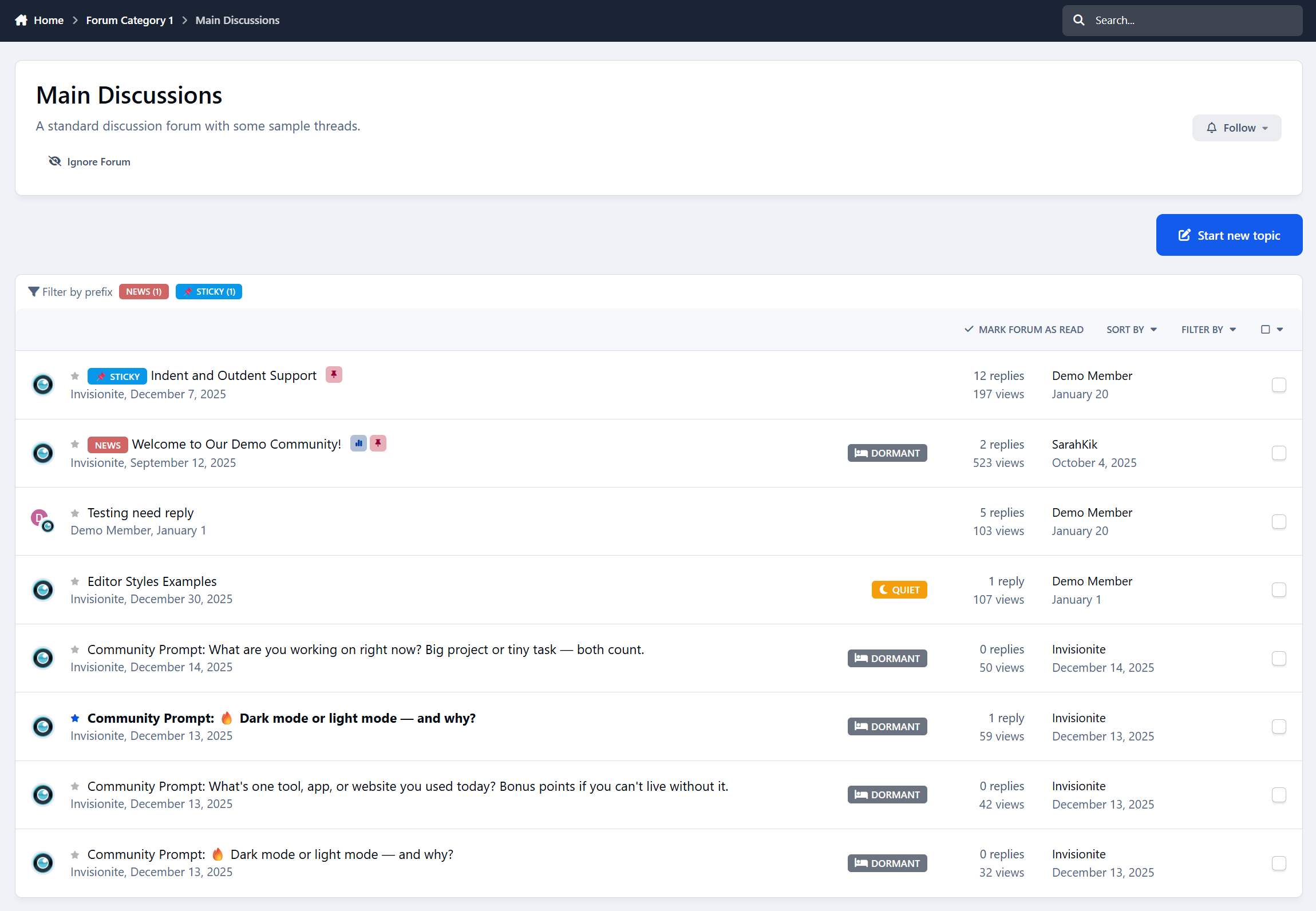
Topic Status Tags does.
It adds simple, automatic labels to topics so members instantly understand the state of a conversation - without digging into timestamps or guessing from numbers.
Small change.
Much clearer browsing.

Introducing: Topic Status Tags
Topic Status Tags helps your community understand discussions at a glance by automatically labeling topics based on activity.
Each topic is given a clear status:
New - recently created
Active - still receiving replies
Quiet - slowed down
Dormant - long inactive
The status updates automatically as activity changes, so discussions naturally move through different states over time.
No manual tagging.
No moderation work.
It just stays accurate.

No More Guessing From Dates
Right now, members have to interpret:
“Posted 3 days ago”
“Last reply 2 weeks ago”
“12 replies”
Topic Status Tags turns that into something instantly readable.
A quick glance tells members:
Which discussions are worth jumping into
Which ones are slowing down
Which ones are probably finished
Browsing feels easier.
Forums feel more alive.

Clear Signals, Not Clutter
Topic Status Tags is designed to stay out of the way.
You get:
One status per topic
Subtle badges that don’t overwhelm the list
Clear priority so labels never conflict
Admins stay in control:
Enable or disable individual statuses
Adjust how long topics stay New or Active
Decide when discussions become Quiet or Dormant
Customize the wording and appearance
The result is clarity - not noise.

Why Your Community Should Use Topic Status Tags
Members scan forums faster
Discussions feel easier to understand
Active topics stand out naturally
Quiet forums feel less “dead”
You’re not pushing people to engage.
You’re simply making activity easier to read.

Designed to Feel Native
Topic Status Tags blends seamlessly into your community.
It:
Fits naturally into topic lists
Uses familiar, clean styling
Works on desktop and mobile
Doesn’t change how discussions work
Members don’t notice a new feature.
They just feel more confident choosing what to read and reply to.

Who Is Topic Status Tags For?
Topic Status Tags is ideal for:
Discussion communities
Support forums
Knowledge-sharing boards
Any forum with conversations at different activity levels
If your members browse topic lists often, this improves their experience immediately.
IPS5.0.0+
Every forum has this moment.
You open a topic list.
You see dozens of discussions.
And you pause.
Is this topic new?
Is it still active?
Has it gone quiet?
Is it already dead?
Dates and reply counts don’t really answer that.
Topic Status Tags does.
It adds simple, automatic labels to topics so members instantly understand the state of a conversation - without digging into timestamps or guessing from numbers.
Small change.
Much clearer browsing.

Introducing: Topic Status Tags
Topic Status Tags helps your community understand discussions at a glance by automatically labeling topics based on activity.
Each topic is given a clear status:
New - recently created
Active - still receiving replies
Quiet - slowed down
Dormant - long inactive
The status updates automatically as activity changes, so discussions naturally move through different states over time.
No manual tagging.
No moderation work.
It just stays accurate.

No More Guessing From Dates
Right now, members have to interpret:
“Posted 3 days ago”
“Last reply 2 weeks ago”
“12 replies”
Topic Status Tags turns that into something instantly readable.
A quick glance tells members:
Which discussions are worth jumping into
Which ones are slowing down
Which ones are probably finished
Browsing feels easier.
Forums feel more alive.

Clear Signals, Not Clutter
Topic Status Tags is designed to stay out of the way.
You get:
One status per topic
Subtle badges that don’t overwhelm the list
Clear priority so labels never conflict
Admins stay in control:
Enable or disable individual statuses
Adjust how long topics stay New or Active
Decide when discussions become Quiet or Dormant
Customize the wording and appearance
The result is clarity - not noise.

Why Your Community Should Use Topic Status Tags
Members scan forums faster
Discussions feel easier to understand
Active topics stand out naturally
Quiet forums feel less “dead”
You’re not pushing people to engage.
You’re simply making activity easier to read.

Designed to Feel Native
Topic Status Tags blends seamlessly into your community.
It:
Fits naturally into topic lists
Uses familiar, clean styling
Works on desktop and mobile
Doesn’t change how discussions work
Members don’t notice a new feature.
They just feel more confident choosing what to read and reply to.

Who Is Topic Status Tags For?
Topic Status Tags is ideal for:
Discussion communities
Support forums
Knowledge-sharing boards
Any forum with conversations at different activity levels
If your members browse topic lists often, this improves their experience immediately.
Every community remembers this moment.
A new member signs up.
They post for the first time.
And then… nothing happens.
No replies.
No acknowledgement.
No reason to come back.
First Post Spotlight fixes that.
It gently highlights new members’ first-ever topics so they don’t go unnoticed - encouraging regular members to jump in, reply, and make newcomers feel welcome from day one.
Simple idea.
Big impact.

Introducing: First Post Spotlight
First Post Spotlight helps your community give new members a better first experience by drawing attention to their very first topics.
When a new member posts for the first time, their topic is clearly marked in forum listings - making it easy for others to spot and respond.
The indicator quietly disappears when the Maximum Topic Age setting is met.

First Posts That Don’t Get Lost
New topics can easily get buried - especially in busy forums.
First Post Spotlight makes sure first-time posts stand out by adding a subtle First Post indicator on the topic title.
You stay in control:
Show the indicator only for recent topics
Enable or disable it per forum
Choose how it looks - badge only or a gentle background highlight
And importantly:
New members don’t see the indicator on their own topics
(so it never feels awkward or self-focused)

New Member Topics Widget
First Post Spotlight also includes an optional widget that highlights topics created by new members.
The widget:
Shows only first-ever topics
Respects forum permissions
Automatically hides topics that no longer qualify
Stays out of the way when there’s nothing to show
It’s a simple way to encourage replies where they matter most.

Why Your Community Should Use First Topic Spotlight
New members get replies faster
Fewer first posts go unanswered
Communities feel more welcoming
Better chances new members stick around
You don’t need more rules or reminders - just better visibility at the right moment.

Designed to Feel Native
First Post Spotlight blends naturally into your community.
It:
Fits seamlessly into topic listings
Uses clean, familiar styling
Works with widgets and page layouts
Doesn’t change how your forum works
Members don’t notice a “feature”.
They just notice people replying more.

Who Is First Post Spotlight For?
First Post Spotlight is ideal for:
Growing communities
Support forums
Niche discussion boards
Any forum that values new members
If you care about first impressions, this app earns its place quickly.
IPS5.0.0+
Every community remembers this moment.
A new member signs up.
They post for the first time.
And then… nothing happens.
No replies.
No acknowledgement.
No reason to come back.
First Post Spotlight fixes that.
It gently highlights new members’ first-ever topics so they don’t go unnoticed - encouraging regular members to jump in, reply, and make newcomers feel welcome from day one.
Simple idea.
Big impact.

Introducing: First Post Spotlight
First Post Spotlight helps your community give new members a better first experience by drawing attention to their very first topics.
When a new member posts for the first time, their topic is clearly marked in forum listings - making it easy for others to spot and respond.
The indicator quietly disappears when the Maximum Topic Age setting is met.

First Posts That Don’t Get Lost
New topics can easily get buried - especially in busy forums.
First Post Spotlight makes sure first-time posts stand out by adding a subtle First Post indicator on the topic title.
You stay in control:
Show the indicator only for recent topics
Enable or disable it per forum
Choose how it looks - badge only or a gentle background highlight
And importantly:
New members don’t see the indicator on their own topics
(so it never feels awkward or self-focused)

New Member Topics Widget
First Post Spotlight also includes an optional widget that highlights topics created by new members.
The widget:
Shows only first-ever topics
Respects forum permissions
Automatically hides topics that no longer qualify
Stays out of the way when there’s nothing to show
It’s a simple way to encourage replies where they matter most.

Why Your Community Should Use First Topic Spotlight
New members get replies faster
Fewer first posts go unanswered
Communities feel more welcoming
Better chances new members stick around
You don’t need more rules or reminders - just better visibility at the right moment.

Designed to Feel Native
First Post Spotlight blends naturally into your community.
It:
Fits seamlessly into topic listings
Uses clean, familiar styling
Works with widgets and page layouts
Doesn’t change how your forum works
Members don’t notice a “feature”.
They just notice people replying more.

Who Is First Post Spotlight For?
First Post Spotlight is ideal for:
Growing communities
Support forums
Niche discussion boards
Any forum that values new members
If you care about first impressions, this app earns its place quickly.
Every community has the same quiet problem.
Good topics don’t get replies.
Members come back after a break… and don’t know where to start.
Conversations stall, not because people don’t care - but because nothing guides them.
Catch Up fixes that.
Catch Up helps your community focus on the conversations that actually need attention - and helps returning members quickly see what they missed, without dumping them into a wall of activity.
It’s subtle.
It’s helpful.
And it makes your forum feel more alive.

Introducing: Catch Up
Catch Up is an engagement-focused app for Invision Community that highlights unanswered topics and gently guides members back into active discussions.
Instead of relying on members to hunt for things to reply to, Catch Up brings those conversations to them - at the right time, in the right place.

Unanswered Topics, Finally Visible
Ever notice how topics with no replies quietly disappear?
Catch Up fixes that by highlighting topics that need replies directly in topic listings.
Topics that:
Have no replies (or only one, if you choose)
Are still recent
Haven’t been forgotten yet
They get a clear “Needs Reply” indicator - and once someone replies, the indicator disappears automatically.
This works especially well for:
Support communities
Small or growing forums
Any community where unanswered topics hurt engagement

Unanswered Topics Widget
Catch Up also includes an optional widget that lists topics still waiting for replies.
It shows:
Topics that genuinely need attention
Only forums members can access
Only topics that still qualify
When there’s nothing to show, it stays out of the way.

Welcome Back (That Actually Feels Personal)
This is where Catch Up really shines.
When members return after being away, Catch Up can show them a Welcome Back widget that answers one simple question:
Instead of a generic activity feed, members see:
Replies to their topics
New activity in topics they follow
Recent discussions they haven’t read yet
Each item includes clear context like:
Your topic
Following
+X new replies

Why Your Community Should Use Catch Up
Fewer unanswered topics
Faster replies
More return engagement
Less “dead” content
Members feel guided, not lost
Catch Up doesn’t try to change how your community works.
It just helps conversations keep moving.

Designed to Feel Native
Catch Up is built to blend in, not stand out.
It:
Fits naturally into forum listings
Uses clean, familiar layouts
Works with widgets and page builders
Respects permissions and visibility
Members don’t need to learn anything new.
They just start replying more.

Who Is Catch Up For?
Catch Up works best for:
Support communities
Niche forums
Growing communities
Any forum where replies matter
If unanswered topics bother you - even a little - Catch Up is for you.

Would you like to see it in action? Visit Administrata.
IPS5.0.0+
Every community has the same quiet problem.
Good topics don’t get replies.
Members come back after a break… and don’t know where to start.
Conversations stall, not because people don’t care - but because nothing guides them.
Catch Up fixes that.
Catch Up helps your community focus on the conversations that actually need attention - and helps returning members quickly see what they missed, without dumping them into a wall of activity.
It’s subtle.
It’s helpful.
And it makes your forum feel more alive.

Introducing: Catch Up
Catch Up is an engagement-focused app for Invision Community that highlights unanswered topics and gently guides members back into active discussions.
Instead of relying on members to hunt for things to reply to, Catch Up brings those conversations to them - at the right time, in the right place.

Unanswered Topics, Finally Visible
Ever notice how topics with no replies quietly disappear?
Catch Up fixes that by highlighting topics that need replies directly in topic listings.
Topics that:
Have no replies (or only one, if you choose)
Are still recent
Haven’t been forgotten yet
They get a clear “Needs Reply” indicator - and once someone replies, the indicator disappears automatically.
This works especially well for:
Support communities
Small or growing forums
Any community where unanswered topics hurt engagement

Unanswered Topics Widget
Catch Up also includes an optional widget that lists topics still waiting for replies.
It shows:
Topics that genuinely need attention
Only forums members can access
Only topics that still qualify
When there’s nothing to show, it stays out of the way.

Welcome Back (That Actually Feels Personal)
This is where Catch Up really shines.
When members return after being away, Catch Up can show them a Welcome Back widget that answers one simple question:
Instead of a generic activity feed, members see:
Replies to their topics
New activity in topics they follow
Recent discussions they haven’t read yet
Each item includes clear context like:
Your topic
Following
+X new replies

Why Your Community Should Use Catch Up
Fewer unanswered topics
Faster replies
More return engagement
Less “dead” content
Members feel guided, not lost
Catch Up doesn’t try to change how your community works.
It just helps conversations keep moving.

Designed to Feel Native
Catch Up is built to blend in, not stand out.
It:
Fits naturally into forum listings
Uses clean, familiar layouts
Works with widgets and page builders
Respects permissions and visibility
Members don’t need to learn anything new.
They just start replying more.

Who Is Catch Up For?
Catch Up works best for:
Support communities
Niche forums
Growing communities
Any forum where replies matter
If unanswered topics bother you - even a little - Catch Up is for you.

Would you like to see it in action? Visit Administrata.
Hot Topics helps bring attention to the discussions that matter most on your community. By highlighting active topics and showing what’s currently popular, members can quickly spot conversations worth jumping into instead of scrolling past pages of quiet threads.
Using a smart activity-based scoring system and a configurable Popular Now widget, Hot Topics makes it easier to discover ongoing discussions, encourages more clicks and replies, and helps your forum feel active and alive - even during quieter periods. It adds modern engagement cues without getting in the way or adding unnecessary complexity.
Features
Hot Topic Indicator
Displays a hot indicator after the topic title in forum listings
Automatically detects active discussions based on replies, views, and recent activity
Fully configurable thresholds and time windows
Choose between an icon, text label, or icon + text and change the color to your preference.
Enable or disable per forum

Popular Now Widget
Shows trending topics based on recent activity
Works in sidebar areas
Configurable time ranges (1h, 6h, 24h, or custom)
Adjustable topic limits and forum filtering
Focuses on current conversations, not old popular threads

Smart Activity Scoring
Weighted scoring using replies, views, and recency
Uses exponential decay to prevent older topics from staying “hot” forever
Designed to prioritise momentum and recent engagement

Admin Control
Dedicated ACP settings panel with clearly organised tabs
Global and per-forum configuration options
Sensible defaults, with full control when you want to fine-tune
Would you like to see it in action? Visit Administrata.
IPS5.0.0+
Hot Topics helps bring attention to the discussions that matter most on your community. By highlighting active topics and showing what’s currently popular, members can quickly spot conversations worth jumping into instead of scrolling past pages of quiet threads.
Using a smart activity-based scoring system and a configurable Popular Now widget, Hot Topics makes it easier to discover ongoing discussions, encourages more clicks and replies, and helps your forum feel active and alive - even during quieter periods. It adds modern engagement cues without getting in the way or adding unnecessary complexity.
Features
Hot Topic Indicator
Displays a hot indicator after the topic title in forum listings
Automatically detects active discussions based on replies, views, and recent activity
Fully configurable thresholds and time windows
Choose between an icon, text label, or icon + text and change the color to your preference.
Enable or disable per forum

Popular Now Widget
Shows trending topics based on recent activity
Works in sidebar areas
Configurable time ranges (1h, 6h, 24h, or custom)
Adjustable topic limits and forum filtering
Focuses on current conversations, not old popular threads

Smart Activity Scoring
Weighted scoring using replies, views, and recency
Uses exponential decay to prevent older topics from staying “hot” forever
Designed to prioritise momentum and recent engagement

Admin Control
Dedicated ACP settings panel with clearly organised tabs
Global and per-forum configuration options
Sensible defaults, with full control when you want to fine-tune
Would you like to see it in action? Visit Administrata.
Editor Styles allows you to create custom formatting buttons for the editor that apply your own CSS-based styles to content.
Each style adds a toolbar button that wraps selected text in an HTML element (such as a <span> or <div>) using a CSS class you define. This makes it easy for users to apply consistent typography, highlights, captions, or branded formatting without touching HTML.
All styling is controlled by your theme. You simply define the CSS classes in your theme’s custom CSS, and Editor Styles handles the editor integration.
The result is a flexible, theme-aware styling system that brings back the simplicity of editor assistants while remaining fully compatible with Invision Community 5. You can add as many as you like, and as crazy as you want to go.

Live Demo: https://demo.invisionite.com/index.php?/topic/12-editor-styles-examples/ (Due to theme-awareness, you must select the default Invision theme)
IPS5.0.0+
Editor Styles allows you to create custom formatting buttons for the editor that apply your own CSS-based styles to content.
Each style adds a toolbar button that wraps selected text in an HTML element (such as a <span> or <div>) using a CSS class you define. This makes it easy for users to apply consistent typography, highlights, captions, or branded formatting without touching HTML.
All styling is controlled by your theme. You simply define the CSS classes in your theme’s custom CSS, and Editor Styles handles the editor integration.
The result is a flexible, theme-aware styling system that brings back the simplicity of editor assistants while remaining fully compatible with Invision Community 5. You can add as many as you like, and as crazy as you want to go.

Live Demo: https://demo.invisionite.com/index.php?/topic/12-editor-styles-examples/ (Due to theme-awareness, you must select the default Invision theme)
Statuses are back.
Invision Community v5 removed status updates, and a lot of communities felt that loss. Sometimes members don’t want to start a full topic - they just want to share a quick thought, update, or reaction.
Status Updates brings that back in a modern, clean, and fully integrated way.
It adds a lightweight social layer to your community, giving members an easy way to stay active, visible, and connected without cluttering your forums.
Live Demo: https://demo.invisionite.com/
What Is Status Updates?
Status Updates lets members post short updates - similar to classic profile statuses - directly on their own profile or on other members’ profiles.
Think of it as:
Quick thoughts
Casual updates
Short announcements
Friendly wall posts
All without the pressure of creating full discussion topics.

Why This Matters
Not every interaction needs to be a thread.
Status Updates lowers the barrier to participation, which:
Encourages quieter members to post
Keeps profiles feeling alive
Adds social interaction without turning your community into a chat app
It’s simple, familiar, and effective.

Key Features
Post Status Updates
Members can post short updates using the full IPS editor:
Text formatting
Embeds
Images and attachments

Comments & Reactions
Statuses support:
Threaded comments
Native IPS reactions
Real conversations, not just one-liners
Everything feels familiar and consistent with the rest of the suite.
Profile Integration
Each member gets:
A dedicated Statuses tab on their profile
A clean list of their updates
A latest status blurb displayed prominently at the top of the profile
Profiles instantly feel more personal and active.

Wall Posts
Members can post statuses directly on other members’ profiles, creating friendly, social interactions - just like classic profile walls.

Notifications
Members are notified when:
Someone comments on their status
Someone posts on their profile
No spam, just relevant activity.

Widgets
Built-in widgets let you showcase activity across your community:
Latest Status Updates
My Latest Status
Perfect for the forum index or sidebars.

Moderation & Controls
Admins stay in full control:
Moderate, hide, or delete statuses and comments
Flood control to prevent spam
Minimum and maximum character limits
Simple, clear ACP settings

Designed to Feel Native
Status Updates is built to look and behave like part of Invision Community:
Clean, modern layout
IPS-style reactions and comments
No heavy UI or clutter
Works naturally with existing themes
It doesn’t replace forums - it complements them.

Coming Next
Status Updates is designed to grow over time. Some of the planned features include:
Follow / Following system
See updates from members you care about in a dedicated feed
Privacy & visibility controls
Decide who can see specific statuses
Hashtags
Clickable tags, trending topics, and hashtag discovery
Mood indicators
Let members attach a mood to their updates
Additional ideas like polls and media-focused features are also planned.
IPS5.0.0+
Statuses are back.
Invision Community v5 removed status updates, and a lot of communities felt that loss. Sometimes members don’t want to start a full topic - they just want to share a quick thought, update, or reaction.
Status Updates brings that back in a modern, clean, and fully integrated way.
It adds a lightweight social layer to your community, giving members an easy way to stay active, visible, and connected without cluttering your forums.
Live Demo: https://demo.invisionite.com/
What Is Status Updates?
Status Updates lets members post short updates - similar to classic profile statuses - directly on their own profile or on other members’ profiles.
Think of it as:
Quick thoughts
Casual updates
Short announcements
Friendly wall posts
All without the pressure of creating full discussion topics.

Why This Matters
Not every interaction needs to be a thread.
Status Updates lowers the barrier to participation, which:
Encourages quieter members to post
Keeps profiles feeling alive
Adds social interaction without turning your community into a chat app
It’s simple, familiar, and effective.

Key Features
Post Status Updates
Members can post short updates using the full IPS editor:
Text formatting
Embeds
Images and attachments

Comments & Reactions
Statuses support:
Threaded comments
Native IPS reactions
Real conversations, not just one-liners
Everything feels familiar and consistent with the rest of the suite.
Profile Integration
Each member gets:
A dedicated Statuses tab on their profile
A clean list of their updates
A latest status blurb displayed prominently at the top of the profile
Profiles instantly feel more personal and active.

Wall Posts
Members can post statuses directly on other members’ profiles, creating friendly, social interactions - just like classic profile walls.

Notifications
Members are notified when:
Someone comments on their status
Someone posts on their profile
No spam, just relevant activity.

Widgets
Built-in widgets let you showcase activity across your community:
Latest Status Updates
My Latest Status
Perfect for the forum index or sidebars.

Moderation & Controls
Admins stay in full control:
Moderate, hide, or delete statuses and comments
Flood control to prevent spam
Minimum and maximum character limits
Simple, clear ACP settings

Designed to Feel Native
Status Updates is built to look and behave like part of Invision Community:
Clean, modern layout
IPS-style reactions and comments
No heavy UI or clutter
Works naturally with existing themes
It doesn’t replace forums - it complements them.

Coming Next
Status Updates is designed to grow over time. Some of the planned features include:
Follow / Following system
See updates from members you care about in a dedicated feed
Privacy & visibility controls
Decide who can see specific statuses
Hashtags
Clickable tags, trending topics, and hashtag discovery
Mood indicators
Let members attach a mood to their updates
Additional ideas like polls and media-focused features are also planned.
Credits & Shop adds a full credit economy to your Invision Community, allowing members to earn credits naturally through participation and spend them on perks, rewards, and upgrades - all while staying fully under your control.
No pressure.
No forced engagement.
Just a system that rewards people for being part of your community.
Earning credits feels natural
Members earn credits simply by doing what they already do:
Creating topics and replies
Receiving reactions
Having solutions accepted
Daily visits and login bonuses
Unlocking achievements and milestones
Uploading images, files, blogs, or events
Referrals and general participation
You control everything:
How much each action earns
Per-forum or per-area values
Daily caps and cooldowns
Group-based rules and exclusions

Credits are earned because members are active - not because they’re chasing points.
A real, transparent credit system
Members can:
View a full transaction history
Transfer credits to other members
Donate credits
Store items for later use
Apply temporary earning boosts
Optionally purchase credits
Optionally withdraw credits to account credit
Admins can:
Adjust balances
Reverse transactions
Set limits, fees, and permissions
See exactly where credits come from and where they go
Every change is logged.
Nothing happens silently.
The Members Shop
Credits can be spent in a built-in Members Shop
Example shop items:
Username or profile changes
Badges and cosmetic perks
Password protected forum unlocks
Temporary or permanent group upgrades
Mystery boxes and random rewards
Credit boosts
Games and chance-based items
Unlocks and special abilities
Custom items
Digital downloads allows you to sell downloads for credits.
Members can:
Buy and use items instantly
Store items in their inventory
Gift items to other members
Admins stay in full control:
Pricing per group
Stock limits
Cooldowns
Permissions
Manual or automatic rewards
Use as much or as little of the shop as you like.
Games, bonuses & optional extras
When it fits your community, you can enable fun extras like:
Lottery system
Spin the wheel
Scratch cards
Rock / Paper / Scissors
Number guessing games
Daily, weekly, or monthly bonus credits
These are entirely optional.
Turn them on for engagement - or leave them off for a more serious setup.
Optional: Sell credits directly to members
If you want, you can also sell credits directly to your members.
Create credit packages
Set prices and amounts
Let members buy credits instantly
Automatically deliver credits after successful payment
This works perfectly alongside earned credits, giving members two paths:
earn credits through activity
or buy credits when they want something now
You decide if selling credits makes sense for your community - it’s completely optional.
Optional: Convert credits into real account credit
For communities using Commerce, Credits & Shop can turn engagement into something tangible.
Members can optionally convert their earned credits into Commerce account credit, which they can then use to:
Purchase products from your IPS store
Pay for subscriptions or upgrades
Or, if you choose, request an actual payout
This creates a strong incentive to stay active - without turning your community into a grind.
How withdrawals work
You stay fully in control.
Members request a withdrawal
You can approve or decline each request
Set a conversion rate (credits → account credit)
Apply a withdrawal fee (or none at all)
Define minimum and maximum withdrawal amounts
Restrict withdrawals by user group
Nothing is automatic unless you want it to be.
Why this matters for engagement
This feature bridges the gap between:
activity → rewards → real value
Members aren’t just earning points “for fun”.
They’re earning something that can be used across your Commerce ecosystem - or even withdrawn.
That means:
More participation
More motivation
More reasons to stick around
And because it’s optional and controlled, it works just as well for:
hobby communities
creator communities
support forums
marketplaces

UPDATE 1.1.2
Collections & Trading Expansion
A complete digital collectibles system for Invision Community 5
Expands the Credits system into a fully-featured collectible, trading, and reward ecosystem.
Perfect for digital cards, profile gifts, seasonal items, rarity-based rewards, and community engagement systems.
Core Collection Features
Collection Categories - Organize items into themed categories (e.g., Pokémon, Retro Gaming)
Collection Items - Individual collectible items with:
Name, description, icon, and full image
Rarity levels (Common, Uncommon, Rare, Epic, Legendary, Special)
Purchaseable toggle with credit pricing
Tradeable toggle (per-item and per-category)
One-per-member restriction option
Game reward drop chance configuration
Serial number tracking per item instance
New shop item: Collection Booster Packs allows you to gamify the collection by adding packs with rarity drops
Inventory System
Personal Inventory - Members own instances of collection items
Acquisition Methods - Track how items were obtained (purchase, trade, gift, game, admin, other)
Showcase System - Members can feature favorite items on their profile
Serial Numbers - Unique serial numbers for each item instance
Trading System
Trade Creation - Propose trades with other members
Trade Offers Include:
Multiple collection items from your inventory
Optional credit amounts (initiator and/or recipient)
Personal message with the offer
Trade Workflow:
Pending → Accepted/Declined/Cancelled
Only recipient can accept/decline
Either party can cancel while pending
Trade Notifications:
New trade offer received
Trade accepted
Trade cancelled
Trade History - Full history of all trades with status filtering
User Preferences (Account Settings)
Trading Preferences Tab - New tab in Account Settings
Allow Trade Offers - Toggle to opt-out of receiving trade offers
Matches IPS Content Preferences styling
Admin Features
Collection Management (ACP):
Create/edit categories
Create/edit items with full configuration
Issue items directly to members
Trading Bans (ACP):
Ban members from trading
View list of banned members
Unban members
Actions logged to member history
Member Restrictions Integration:
Trading ban shows in member profile restrictions
Can ban/unban from member profile "Edit Restrictions"
Collection Item Purchase
Direct Purchase - Buy collection items with credits
Confirmation Form - Confirm before purchase
Transaction Logging - Records purchase in credit history
Profile Integration
Collection Showcase - Display favorite items on member profile
Collection Statistics - Show completion progress

For any feature requests and bug reports, please use the forums. I'm open for any wanted change or additional feature.
IPS5.0.0+
Credits & Shop adds a full credit economy to your Invision Community, allowing members to earn credits naturally through participation and spend them on perks, rewards, and upgrades - all while staying fully under your control.
No pressure.
No forced engagement.
Just a system that rewards people for being part of your community.
Earning credits feels natural
Members earn credits simply by doing what they already do:
Creating topics and replies
Receiving reactions
Having solutions accepted
Daily visits and login bonuses
Unlocking achievements and milestones
Uploading images, files, blogs, or events
Referrals and general participation
You control everything:
How much each action earns
Per-forum or per-area values
Daily caps and cooldowns
Group-based rules and exclusions

Credits are earned because members are active - not because they’re chasing points.
A real, transparent credit system
Members can:
View a full transaction history
Transfer credits to other members
Donate credits
Store items for later use
Apply temporary earning boosts
Optionally purchase credits
Optionally withdraw credits to account credit
Admins can:
Adjust balances
Reverse transactions
Set limits, fees, and permissions
See exactly where credits come from and where they go
Every change is logged.
Nothing happens silently.
The Members Shop
Credits can be spent in a built-in Members Shop
Example shop items:
Username or profile changes
Badges and cosmetic perks
Password protected forum unlocks
Temporary or permanent group upgrades
Mystery boxes and random rewards
Credit boosts
Games and chance-based items
Unlocks and special abilities
Custom items
Digital downloads allows you to sell downloads for credits.
Members can:
Buy and use items instantly
Store items in their inventory
Gift items to other members
Admins stay in full control:
Pricing per group
Stock limits
Cooldowns
Permissions
Manual or automatic rewards
Use as much or as little of the shop as you like.
Games, bonuses & optional extras
When it fits your community, you can enable fun extras like:
Lottery system
Spin the wheel
Scratch cards
Rock / Paper / Scissors
Number guessing games
Daily, weekly, or monthly bonus credits
These are entirely optional.
Turn them on for engagement - or leave them off for a more serious setup.
Optional: Sell credits directly to members
If you want, you can also sell credits directly to your members.
Create credit packages
Set prices and amounts
Let members buy credits instantly
Automatically deliver credits after successful payment
This works perfectly alongside earned credits, giving members two paths:
earn credits through activity
or buy credits when they want something now
You decide if selling credits makes sense for your community - it’s completely optional.
Optional: Convert credits into real account credit
For communities using Commerce, Credits & Shop can turn engagement into something tangible.
Members can optionally convert their earned credits into Commerce account credit, which they can then use to:
Purchase products from your IPS store
Pay for subscriptions or upgrades
Or, if you choose, request an actual payout
This creates a strong incentive to stay active - without turning your community into a grind.
How withdrawals work
You stay fully in control.
Members request a withdrawal
You can approve or decline each request
Set a conversion rate (credits → account credit)
Apply a withdrawal fee (or none at all)
Define minimum and maximum withdrawal amounts
Restrict withdrawals by user group
Nothing is automatic unless you want it to be.
Why this matters for engagement
This feature bridges the gap between:
activity → rewards → real value
Members aren’t just earning points “for fun”.
They’re earning something that can be used across your Commerce ecosystem - or even withdrawn.
That means:
More participation
More motivation
More reasons to stick around
And because it’s optional and controlled, it works just as well for:
hobby communities
creator communities
support forums
marketplaces

UPDATE 1.1.2
Collections & Trading Expansion
A complete digital collectibles system for Invision Community 5
Expands the Credits system into a fully-featured collectible, trading, and reward ecosystem.
Perfect for digital cards, profile gifts, seasonal items, rarity-based rewards, and community engagement systems.
Core Collection Features
Collection Categories - Organize items into themed categories (e.g., Pokémon, Retro Gaming)
Collection Items - Individual collectible items with:
Name, description, icon, and full image
Rarity levels (Common, Uncommon, Rare, Epic, Legendary, Special)
Purchaseable toggle with credit pricing
Tradeable toggle (per-item and per-category)
One-per-member restriction option
Game reward drop chance configuration
Serial number tracking per item instance
New shop item: Collection Booster Packs allows you to gamify the collection by adding packs with rarity drops
Inventory System
Personal Inventory - Members own instances of collection items
Acquisition Methods - Track how items were obtained (purchase, trade, gift, game, admin, other)
Showcase System - Members can feature favorite items on their profile
Serial Numbers - Unique serial numbers for each item instance
Trading System
Trade Creation - Propose trades with other members
Trade Offers Include:
Multiple collection items from your inventory
Optional credit amounts (initiator and/or recipient)
Personal message with the offer
Trade Workflow:
Pending → Accepted/Declined/Cancelled
Only recipient can accept/decline
Either party can cancel while pending
Trade Notifications:
New trade offer received
Trade accepted
Trade cancelled
Trade History - Full history of all trades with status filtering
User Preferences (Account Settings)
Trading Preferences Tab - New tab in Account Settings
Allow Trade Offers - Toggle to opt-out of receiving trade offers
Matches IPS Content Preferences styling
Admin Features
Collection Management (ACP):
Create/edit categories
Create/edit items with full configuration
Issue items directly to members
Trading Bans (ACP):
Ban members from trading
View list of banned members
Unban members
Actions logged to member history
Member Restrictions Integration:
Trading ban shows in member profile restrictions
Can ban/unban from member profile "Edit Restrictions"
Collection Item Purchase
Direct Purchase - Buy collection items with credits
Confirmation Form - Confirm before purchase
Transaction Logging - Records purchase in credit history
Profile Integration
Collection Showcase - Display favorite items on member profile
Collection Statistics - Show completion progress

For any feature requests and bug reports, please use the forums. I'm open for any wanted change or additional feature.

Top Developers

Last reviews

Applications Directory

A complete and convenient directory of applications for Invision Community, with categorization and sorting options.

Ratings and feedback

Only verified and trusted reviews!

Add new Application

Any developer can add their application to this directory.

You need to create account

Configure browser push notifications

Chrome (Android)
  1. Tap the lock icon next to the address bar.
  2. Tap Permissions → Notifications.
  3. Adjust your preference.
Chrome (Desktop)
  1. Click the padlock icon in the address bar.
  2. Select Site settings.
  3. Find Notifications and adjust your preference.